What Headphones Vibrate: A Practical Guide to Tactile Audio
Discover which headphones vibrate, how tactile feedback works, and how to choose safe, customizable haptic headphones for gaming, movies, and music.


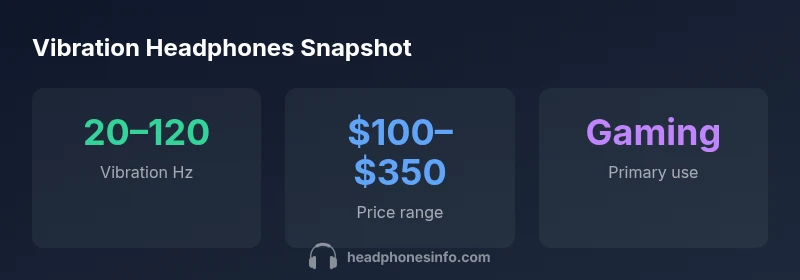
What headphones vibrate? Several headphone types can produce tactile vibration, including gaming headsets with built‑in haptic drivers and consumer vibrating or bass‑transducer designs. They add physical rumble to low frequencies to boost immersion, but are not standard for every listener. When evaluating options, check the vibration mechanism, adjustability, latency, and how well the feature works with your usual music or games.
What makes headphones vibrate
Vibration in headphones is achieved through dedicated tactile hardware—usually a compact motor or transducer—placed near the ear cups. This hardware converts electrical signals into physical movement, producing a sensation that you feel as much as you hear. The effect is most noticeable in the low bass frequencies and is designed to complement, not replace, audio fidelity. For many listeners, the goal is to add a subtle, controllable rumble rather than a distracting thump. As with any specialized feature, the best results come from a well‑engineered integration that preserves overall sound quality while delivering the intended tactile cue.
How vibration works in practice
There are several practical implementations of tactile feedback in headphones:
- Direct-drive vib motors: Small motors attached to the earcup that press against the casing to create a localized vibration.
- Built-in haptic transducers: Dedicated drivers designed to reproduce tactile sensations, often paired with bass signals.
- Surface-transducers and bone-conduction hybrids: Less common, they rely on vibrations transmitted through the housing or skull, offering a lighter touch.
Key considerations when evaluating these approaches are latency (how quickly the vibration responds to audio) and power efficiency (how much battery life the vib hardware consumes). A well‑designed system minimizes phase issues, ensuring the vibration aligns with the rhythm of the audio.
Use cases: gaming, movies, and accessibility
Vibration shines in specific contexts:
- Gaming: Quick, synchronized rumble can heighten impact for explosions, gunfire, and footsteps, especially when latency is low.
- Movies and music: Tactile feedback can emphasize bass lines or cinematic bass drops, but should not muddy the main mix.
- Accessibility: For some listeners with hearing loss in the low-frequency range, haptic cues can improve perceived bass and rhythm without turning up volume excessively.
Personal preference plays a big role here; many users prefer adjustable intensity or the option to disable vibration entirely when listening in quiet environments.
How to choose vibrating headphones: a practical checklist
When shopping for vibrating headphones, use this checklist:
- Vibration mechanism: Understand whether the device uses a motor, transducer, or hybrid system and how it impacts sound quality.
- Latency and synchronization: Look for models that advertise low latency and tight audio‑to‑vibration alignment, especially for gaming.
- Adjustability: Ensure you can control vibration intensity, or completely mute the tactile feedback if desired.
- Comfort and weight: Added vib hardware adds bulk; seek ergonomic padding and a balanced weight distribution.
- Compatibility: Confirm the headset supports your devices (wired vs wireless, USB, Bluetooth) and software EQ or gaming profiles.
- Safety and SPL: Check that vibration does not encourage listening at unsafe levels; reputable designs maintain safe peak output.
Try to test at least two models with different vibration profiles to find the feel that suits your content.
Care and maintenance for vib headphones
Maintenance basics apply as with any headphone, plus a few vib‑specific tips:
- Keep the earcups clean and dry to avoid motor drift or squeaks.
- Do not expose the vib hardware to moisture; use a dry microfiber cloth for cleaning.
- Periodically inspect padding for wear; added weight can stress hinges differently.
- If you notice lag or unusual noise, check for firmware updates or consult the manufacturer’s support resources.
- Use the recommended charging cycle to preserve battery health, especially for wireless models with active vibration.
Myths vs. reality: common misunderstandings
- Myth: Vibrating headphones replace high‑quality audio. Reality: They complement, not replace, good sound quality.
- Myth: All vibration features ruin battery life. Reality: Efficient designs minimize energy use; the impact varies by model.
- Myth: Vibrations harm your ears. Reality: When used at reasonable levels, tactile feedback is designed to be safe; however, listening at very high volumes is always risky.
Next steps to get started
If you’re curious about tactile audio, start with a gaming headset that offers adjustable haptic intensity and clear bypass options to disable vibration. Compare models by testing latency, comfort, and how well the vib feature aligns with your typical content. Remember to read reviews that specifically mention comfort and perceived bass accuracy, not just hype.
Common vibration technologies in headphones
| Aspect | Vibration Type | Notes |
|---|---|---|
| Direct-drive motor | Inline earcup motor | Responsive, higher weight |
| Built-in transducer | Dedicated haptic driver | Balanced bass feel, potential power draw |
| Surface-transducer/bone hybrid | Housing-based vibration | Light touch, less distortion risk |
People Also Ask
Do vibrating headphones affect sound quality?
Yes, the vib hardware can influence overall sound quality if not well‑integrated. Reputable designs isolate the tactile driver to minimize crosstalk with the audio pathway and preserve clarity in mids and highs.
In most well‑built models, the vibration is paired with the sound signal to avoid muddiness. Try models that emphasize clean bass without distorting other frequencies.
Are vibrating headphones only for gaming?
While gaming is a common and noticeable use case, vibrating headphones are also used for immersive movies, music with deep bass, and accessibility gains for some listeners.
They’re not just for games—you can try them with movies or music to see if tactile feedback adds value for you.
How do I adjust vibration intensity?
Most models offer a dedicated control or app to adjust vibration strength. Start at a low setting and increase gradually while listening to content with strong bass.
Begin with a low setting and tune it up until it feels right for your content.
Can vibrating headphones help with accessibility?
For some users with reduced low‑frequency hearing, vib cues can convey rhythm and bass cues that are harder to hear otherwise, improving overall experience.
If bass is important for you, vib headphones can help, but test carefully for comfort and effectiveness.
Do vibration features drain battery quickly?
Vibration uses additional power, so wireless models may see reduced battery life when vib is enabled. Look for energy‑efficient designs and firmware optimizations.
Yes, but many products optimize power use; you can usually disable vib to save battery.
Are there health concerns with vibration?
Vibration at normal listening levels is generally considered safe. If you experience tingling, headaches, or discomfort, adjust intensity or take breaks.
If you feel any discomfort, pause and reduce vibration or volume.
What content works best with vib headphones?
Low‑end heavy content like hip‑hop, EDM, action movies, and gaming soundtracks often benefit most from tactile feedback, but preference varies.
Bass‑heavy tracks and action scenes usually feel best with vibration, but try different genres.
Should I buy wired or wireless vibrating headphones?
Wired models typically offer lower latency, which is preferable for gaming. Wireless options add convenience but may introduce latency or compression.
If you play fast‑paced games, a wired option may be best for minimal delay.
“Vibration in headphones is a powerful enhancement when designed with precise motor control and safe, predictable levels. It should augment, not overpower, the core audio experience.”
What to Remember
- Identify your primary use case for vibration before buying
- Check latency and adjustability to ensure synchronized feel
- Consider comfort and weight implications of vib hardware
- Test with your usual content to gauge real‑world usefulness
- Look for models that allow easy on/off control