Headphones with USB Connection: The 2026 Buying Guide
Data-driven guide to headphones with USB connection in 2026: compare USB-A vs USB-C, DAC features, latency, and value with Headphones Info guidance. Trusted by readers.


Headphones with USB connection are wired audio devices that transfer digital sound directly through a USB port. They commonly include a built‑in DAC and amplifier, delivering clean, direct sound to your computer or console. USB headphones may use USB-A or USB-C connectors; compatibility varies by host device and power delivery, so verify port type and supported sample rates before buying.
What USB connections deliver for headphones
USB-connected headphones translate the digital signal directly from a computer or other host device. This wired pathway reduces the reliance on the device’s analog jacks and external sound cards. In 2026, most USB headphones include a built‑in DAC (digital-to-analog converter) and a compact amplifier, which can improve signal fidelity and keep desk clutter low. When evaluating options, focus on three core areas: compatibility, sound quality, and power handling. For listeners who frequently switch between laptops, desktops, and consoles, USB offers a reliable, plug‑and‑play experience with fewer cables than traditional audio interfaces. By understanding the USB pathway, you can better predict how a headset will perform across different systems and how much amplification the device itself provides.
USB-A vs USB-C: compatibility and performance
The two most common USB connectors for headphones are USB-A and USB-C. USB-A remains widely compatible with older desktops and laptops, often delivering consistent DAC performance when the host supports USB audio class. USB-C, by contrast, is the modern standard: it supports smaller connectors and power delivery, and it pairs well with newer laptops, tablets, and smartphones. The catch is power delivery and host DAC limitations: some USB‑C ports on mobile devices assume headsets only; others expose higher power and better digital conversion. If you choose USB-C, verify that your device’s USB controller supports audio class and that the headset can draw enough power without falling back to battery or a weak signal. In practice, both types can deliver excellent sound when paired with compatible devices.
Key specs that matter when shopping USB headphones
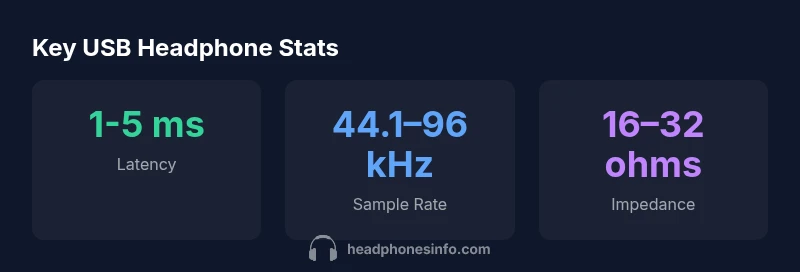
When shopping for headphones with USB connection, pay attention to three performance numbers: sample rate, bit depth, and impedance. A typical pair supports 44.1 kHz or 48 kHz and up to 16‑ or 24‑bit depth, which affects dynamic range and noise floor. Impedance matters for loudness and the required drive from the host; lower impedance headphones are easier to drive from portable USB ports, while higher impedance models may require more robust USB outputs or an external amp. Look for a built‑in DAC and a clean, low‑noise amplification stage, as these features can reduce jitter and improve overall tonal balance, especially in complex mixes or gaming audio.
DACs, impedance, and drive requirements explained
A built‑in DAC converts digital samples into analog audio. In USB headphones, the DAC and the amplifier live in the headset or the USB dongle, which can improve signal integrity by reducing the number of interconnects. Impedance interacts with the source: low‑impedance drives more efficiently from most USB ports; high impedance may require more power. Some USB headphones specify output power or current draw; if your computer’s USB port is weak or shares bandwidth with other devices, you might hear reduced volume or increased noise. As a rule, choose models whose impedance and sensitivity align with your typical listening volume and device type, whether a laptop, desktop, or gaming console.
Use-case scenarios: work, gaming, multimedia
If you use USB headphones for work calls, prioritize a clear microphone along with reliable USB‑audio performance. For gaming, seek low latency and accurate positional cues; a fast DAC with low round‑trip latency helps. For multimedia consumption, a balanced sound signature and good noise isolation can improve listening comfort during long sessions. In each scenario, consider whether you need software EQ, virtual surround, or mic mute controls, and ensure the headset’s USB interface can support these features without extra drivers.
How to connect, set up, and troubleshoot USB headphones
Connecting is usually plug‑and‑play: insert the USB connector, select the device in your operating system’s sound settings, and test with a short audio clip. If you don’t hear sound, check that the headset is selected as the input and output device, and review software applications that may route audio elsewhere. In Windows, you can disable other USB audio devices to free bandwidth; on macOS, ensure the headset is selected for both input and output. If latency is an issue, verify that the USB port is not sharing bandwidth with high‑demand peripherals and consider a USB‑2.0/3.0 port depending on the device’s specs. Firmware updates and driver packages can sometimes improve stability, but many USB headphones operate fully without extra software.
Budget ranges and value across USB headphones
USB headphones come in a wide range of prices, from entry level to pro‑grade. At the lower end, you’ll find dependable everyday models that prioritize comfort and portability; mid‑range options often balance sound quality with build quality and mic clarity; premium models emphasize accurate sound reproduction, low latency gaming, and robust microphones. When evaluating value, consider build materials, warranty length, included accessories (detachable mic, USB dongle, or software), and the presence of a built‑in DAC. The most cost‑effective choices tend to offer solid USB performance without the extra frills that add cost but not value for most listeners.
Maintenance, durability, and reliability considerations
Because USB headphones are often used daily with multiple devices, durability matters. Look for reinforced connectors, robust strain relief, and metal or high‑quality plastic housings. The built‑in DAC and electronics can be sensitive to moisture and temperature, so store headphones in a dry environment and avoid bending the USB cable sharply. Cleaning the earpads regularly improves comfort and hygiene, while cable management helps prevent wear at the connector. If you encounter intermittent audio, check the USB port’s power delivery capabilities and update firmware if available. Regular checks can extend lifespan and maintain consistent performance across devices.
Future-proofing USB headphone standards
USB standards evolve, bringing higher sample rates, lower latency, and more power delivery options. When planning a purchase, look for models that support widely adopted codecs and that can be updated via firmware so you’re not stuck with outdated hardware in a few years. Consider whether the headset includes a detachable microphone or software that can be updated, since such features influence long‑term usefulness. Finally, pay attention to the growth of USB‑C as a universal connector and how host devices are adopting USB Audio Class specifications, which can affect compatibility on future laptops and consoles.
USB connection types at a glance
| Connection Type | Key Pros | Common Use | Notes |
|---|---|---|---|
| USB-A | Broad compatibility; works with most desktops and laptops | Desktops, older laptops | May require adapters for some devices |
| USB-C | Modern, reversible connector; compact form factor | New laptops, tablets with USB-C | Check power delivery and host DAC capabilities |
People Also Ask
Are headphones with USB connection compatible with macOS?
Most USB headphones are plug‑and‑play on macOS. If you encounter trouble, ensure the headset is selected as both input and output in System Preferences and check for any needed firmware updates from the manufacturer.
Most USB headphones work on Macs, but pick the device as both input and output and update firmware if you have issues.
Do USB headphones require drivers?
In many cases, USB headphones do not require separate drivers on modern operating systems. Some models may offer optional software for mic control or equalization, but basic audio functions typically work without extra software.
Usually no extra drivers are needed, though some models come with optional software.
Can USB headphones be used with gaming consoles like PS5 or Xbox?
Many USB headphones are compatible with consoles that support USB audio devices. Compatibility varies by model, so verify supported platforms and any required firmware or adapters before buying.
Check the model’s console compatibility before buying.
Should I choose USB-C or USB-A for my USB headphones?
USB-C offers modern compatibility and higher power delivery for newer devices, while USB-A provides broad compatibility with older hardware. Choose based on your primary devices and future upgrade plans.
Pick based on your devices: USB-C for new gear, USB-A for older setups.
Do USB headphones offer better sound quality than 3.5mm headphones?
USB headphones can offer cleaner digital-to-analog conversion via built‑in DACs, reducing interference. However, real-world sound quality also depends on the driver design, enclosure, and DAC quality, so test before buying.
They can be cleaner digitally, but overall sound depends on many factors.
“USB-connected headphones can simplify setup and often deliver clean, direct sound thanks to built-in DACs, but performance still depends on the host device and power delivery.”
What to Remember
- Prioritize USB-C for future-proof devices.
- Check DAC capabilities and sample rates.
- Know latency requirements for gaming.
- Match port type to your host device.
- Consider built-in amplification for improved desk setup.