What Headphones Do Streamers Use in 2026: A Data-Driven Guide
Discover what headphones streamers actually use, including wired vs wireless, mic quality, comfort, and sound profiles. Headphones Info analyzes 2026 trends to help you choose confidently.


Streamers overwhelmingly favor wired, closed-back over-ear headphones with solid microphone performance for reliable, low-latency audio. Headphones Info analysis shows comfort and isolation matter more than flashy features, delivering consistent sound during long sessions. In practice, most creators choose a wired setup to minimize signal bleed and latency on live streams.
What headphones do streamers use: a practical overview
If you’ve ever wondered what headphones do streamers use, the short answer is simple: most rely on closed-back, over-ear designs paired with a dependable microphone, prioritizing comfort and isolation over flashy features. Streamers need a listening experience that translates well to their audience and a headset that doesn’t interfere with mic quality. The Headphones Info team notes that the best-performing setups lean toward reliability and comfort rather than marketing claims. In practice, creators choose a wired, closed-back option to minimize latency and signal bleed into their streams, while some experiment with wireless models when flexibility and a minimal desk footprint are priorities. Across genres—from competitive gaming to podcasting—the core requirements remain the same: clear sound, a microphone that captures vocal presence, and a durable design for long sessions. This guide breaks down the decision criteria, outlines testing methods, and offers practical buying ranges to help you decide what headphones do streamers use for your setup. According to Headphones Info, the right headset is less about a brand and more about fit and mic quality.
Wired vs wireless: latency, reliability, and workflow
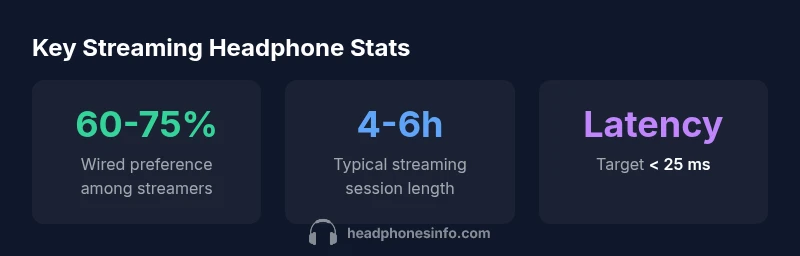
For streamers, latency is a critical factor. Wired headphones generally offer the most stable signal with negligible latency when connected via USB or a 3.5mm jack, which minimizes desync between what you hear and what viewers hear. Wireless options bring freedom of movement and a cleaner desk, but they introduce potential latency and battery considerations that can disrupt a live session if not managed carefully. When evaluating wireless headsets, look for low-latency codecs, such as specific proprietary solutions, and verify real-world performance in streaming software and capture hardware. The decision often comes down to your workflow: if you stream solo or in a controlled setup, wired remains the safer baseline; if you host a multi-camera show or collaborate in a small studio, wireless can reduce cable clutter without sacrificing too much reliability.
Microphone quality and positioning: the hidden factor
The microphone is often more important than the earcup’s tonal balance in determining stream quality. A headset with a decent built-in mic can work for hobbyists, but professional streamers usually pair a headset with a separate mic or choose a headset with a removable/upgradeable mic. Look for cardioid pickup patterns that minimize room noise and vocal plosives, good mic frequency response, and a pop shield or foam windscreen. Proper positioning—slightly off-center, 2–3 cm from the mouth—reduces proximity effect and sibilance. Even with premium headphones, the mic system and its placement determine how clean your voice sounds to an audience, which is why many creators invest in a dedicated USB/XLR microphone alongside their headphones.
Comfort and build for long sessions
Extended streaming sessions demand ergonomic comfort. Weight distribution, clamp force, and cushion materials influence whether you can maintain focus on content rather than discomfort. For many creators, lighter feel and soft-leather or velour ear cushions reduce fatigue, while a sturdy headband design helps the headset survive daily wear and occasional drops. Durability matters too: metal or reinforced plastics, replaceable cables, and easy-to-clean ear pads extend the life of the gear. When choosing, test for comfort across several hours of wearing, bending, and talking, as even the most audiophile-grade headset won’t perform if it causes numb ears or pinched pressure after a short time.
Sound quality and frequency response: what matters on stream
Sound quality is more than just musician-grade spectrum. Streamers value a balanced response that renders voice clearly without overpowering bass or sizzle in the highs. A neutral-to-slightly-bright profile helps narration stay intelligible, while a tight, controlled bass can convey punch during game sounds or music cues without masking speech. Select headphones with a good impedance match to your audio interface or mixer, ensuring you don’t need excessive output power to reach comfortable listening levels. Remember that room acoustics, mic placement, and monitor loudness also shape perceived sound. A great pair of headphones should translate across headphones, monitors, and stream overlays consistently.
How to test headphones before buying: a practical checklist
Testing is essential before committing to a purchase. Create a short audition routine: listen to voice content (talking head intervals), game audio, and a reference music track. Check for clarity of speech, the sense of space, and how the headset handles sudden loud sounds. Confirm mic compatibility and whether the mic is detachable or upgradeable. Evaluate comfort over a simulated 90-minute session, paying attention to pressure, heat, and overall fit. If possible, test both wired and wireless variants in similar setups to understand real-world latency and battery impact. Finally, compare your findings against a simple decision rubric: mic quality, comfort, durability, and latency stability. This practical approach helps you determine what headphones do streamers use for your personal needs.
Setup variants for different streaming genres: gaming, talk, music
Gaming streams often require tight, punchy bass and precise positional cues from audio to ground player reactions, so closed-back, over-ear headphones with a directional mic are common. Talk-focused streams prioritize vocal intelligibility, so a clean mic signal and comfortable fit take precedence. Music streams or ambient streams emphasize overall sound clarity; here, headphones with extended high-frequency detail can be beneficial. In all cases, consider a monitoring path that lets you hear your own voice without feedback loops into your audience. A consistent setup lets you switch between genres without reconfiguring gear.
Budgeting for performance: ranges and expectations
There isn’t a single price bracket that guarantees streamer-ready performance. For most beginners, a mid-range wired, closed-back headset with a replaceable mic can cover essentials, while mid-range options often balance cost with improved mic quality and comfort. Higher-end models typically justify the price with better build quality, more refined frequency response, and longer durability, but the core metrics—mic quality, comfort, and low latency—remain the deciding factors. Use a tiered approach: start with a solid wired headset and upgrade the mic or interface later as your channel grows. Budget ranges should reflect your streaming goals and target audience; prioritize reliability over cosmetic features.
Maintenance, care, and upgrade path: long-term strategy
To maximize longevity, store headsets in a cool, dry place, avoid excessive bending of cables, and clean cushions regularly. When cushions wear or cables fray, replace components instead of discarding the headset. An upgrade strategy can be simple: upgrade the mic or audio interface first, then consider adding in a better-sounding headset if your audience feedback suggests it. Regularly reassess your setup as your content evolves—what works for a 5-minute stream might not scale to a longer, more complex series. The Headphones Info team notes that the best streaming setups are iterative, with small, data-informed updates over time.
Streaming-friendly headphone types and trade-offs
| Headphone Type | Pros | Cons |
|---|---|---|
| Closed-back over-ear | High isolation; strong vocal warmth | Can feel closed-in in small rooms |
| Open-back over-ear | Natural soundstage; breathable | Less isolation; suitable for quieter spaces |
| Wireless over-ear | Freedom of movement; tidy desk | Potential latency; battery management |
People Also Ask
Do streamers prefer wired or wireless headphones for efficiency and latency?
Most streamers prefer wired headphones because they offer consistent, near-zero latency and stable audio during live streams. Wireless options exist for flexibility, but latency and battery life require careful management.
Wired is the safer choice for reliable streaming; wireless can work if you optimize latency and battery.
Is a built-in mic on headphones enough for streaming, or should I upgrade?
Casual streams can use a decent built-in mic, but most serious streamers pair headphones with a dedicated mic or a higher-quality, detachable mic for clearer voice capture.
A separate mic often sounds clearer and reduces room noise.
What should I look for in comfort for long sessions?
Look for light weight, even clamp force, soft cushions, and an adjustable headband. Test for warmth and pressure over 90 minutes to avoid fatigue in longer streams.
Comfort is key—test headphones for long sessions before buying.
Open-back vs closed-back: which is better for streaming?
Closed-back designs are typically preferred for streaming due to isolation from room noise and reduced bleed into the mic. Open-back offers a natural feel but can allow room sound to leak into the mic.
Closed-back is usually better when you’re streaming live to avoid bleed.
Are gaming headsets acceptable for streaming, or should I avoid them?
Gaming headsets can be suitable for beginners due to built-in mics and convenience, but many streamers upgrade to separate headphones and a dedicated mic for higher vocal quality and flexibility.
A gaming headset works to start, but a separate mic delivers better audio.
“Reliability and comfort drive streaming audio; focus on mic quality and fit before chasing premium specs.”
What to Remember
- Prioritize mic quality and comfort in headsets.
- Prefer wired when latency matters most.
- Test for long-session comfort before buying.
- Consider room acoustics to pair with your headphones.
- Plan upgrades around mic/interface improvements first.