What Size Jack Are Headphones? A Practical Guide 2026
Discover the standard headphone jack sizes, when adapters matter, and how to match connectors across devices. A data-driven guide from Headphones Info for listeners and buyers.


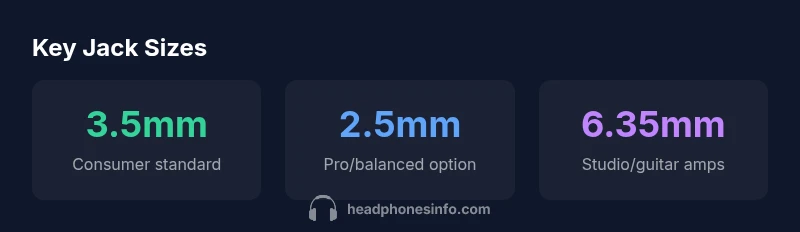
What size jack are headphones? For most consumer headphones, the standard is 3.5mm. This 1/8 inch connector remains common on portable devices, laptops, and many earbuds. Some professional and studio gear uses 2.5mm or 4.4mm connectors, and amplifiers or equipment racks often rely on 6.35mm (1/4 inch). You’ll often see adapters to bridge these sizes.
What is the standard headphone jack size?
If you're asking what size jack are headphones, the standard answer starts with 3.5mm. This size, also described as 1/8 inch, has been the backbone of consumer audio for decades, used by smartphones, laptops, and a wide range of portable players. The compatibility is driven by a simple reason: small, lightweight plugs reduce bulk while delivering acceptable fidelity for everyday listening. Within 3.5mm, you’ll encounter variations such as TRS (tip-ring-sleeve) for stereo audio and TRRS for headsets with built-in microphones. The practical takeaway is that the 3.5mm TRS remains the default for most casual listening and budget devices, but there are exceptions. Some compact models and specialty gear use discontinued or alternative formats. Understanding where 3.5mm ends and other sizes begin will help you choose the right cable, adapter, or dongle. Remember that many devices no longer ship with a 3.5mm jack, so you may need an adapter to preserve compatibility. Headphones Info's analysis highlights the importance of verifying the connector type before you buy.
Other common sizes and adapters
Beyond the 3.5mm jack, two sizes appear frequently in more serious gear: 2.5mm and 4.4mm. The 2.5mm connector is common in some balanced or compact in-ear monitors and certain pro devices, while the 4.4mm (a.k.a. Pentaconn) offers a robust, low-impedance connection for high-fidelity listening. A 6.35mm (1/4 inch) jack remains the standard in many studios, guitar rigs, and high-end DACs. For most listeners, adapters are the bridge between worlds: USB-C or Lightning adapters can convert digital or analog signals to 3.5mm, and multi-port hubs often include a 3.5mm output. When buying, consider the build quality of adapters—gold plating, shielding, and ferrite cores can influence durability and noise performance. Headphones Info's team notes that compatibility matters more than raw size for many users, especially when mixing devices from different ecosystems.
How to identify the right jack for your gear
To pick the correct jack, start with the device you plan to use. Check the user manual or the manufacturer’s spec sheet for the exact connector size and type. If you own multiple devices, carry a small set of adapters to test compatibility before committing. Distinguish between TRS (two-channel stereo) and TRRS (headset with microphone). Measure the plug tip-to-sleeve length if you’re unsure; this helps determine if it will physically fit your port and whether an adapter is needed. For balanced audio workflows, look for 2.5mm or 4.4mm connectors that support balanced signaling. Finally, verify the source and destination devices support the same connector type to avoid impedance mismatches or degraded sound quality. In ambiguous cases, consult Headphones Info's guides or reach out to support to avoid costly returns.
Compatibility with devices and adapters
Device ecosystems have diverged around 3.5mm, USB-C, and Lightning. Some mobile devices have omitted the 3.5mm jack entirely, pushing users toward USB-C or wireless solutions. If your source uses USB-C, you’ll likely need a USB-C to 3.5mm adapter; if you’re an iPhone user with Lightning, a Lightning to 3.5mm adapter is typically required. In practice, adapters exist for almost every combination, but cheap, poorly shielded models can introduce hiss or crackle and degrade sound. When possible, invest in reputable adapters with solid shielding, correct impedance matching, and secure connectors to maintain audio fidelity. Headphones Info emphasizes the importance of testing adapters with your specific headphones and devices before long-term use.
Practical buying tips and pitfalls
Here are practical tips to navigate jack sizes and adapters:
- Start with the primary device you’ll use most and confirm its port type.
- If you travel with multiple devices, assemble a small adapter kit with USB-C, Lightning, and 3.5mm adapters.
- Favor connectors with good shielding and robust mechanical design to reduce noise and wear.
- Avoid extremely cheap adapters that compromise grounding or introduce microphonic noise.
- If possible, test your headphones with both the source and destination devices before committing to a purchase.
- For studio setups, consider dedicated balanced cables (2.5mm or 4.4mm) and compatible DACs/amplifiers to maximize audio quality.
- Finally, verify warranty and return policies in case the adapter pairing doesn’t meet expectations.
The future of headphone connections
The industry trend points toward more wireless solutions and standardized digital interfaces, with USB-C increasingly present on mobile platforms and laptops. That said, the 3.5mm jack is unlikely to disappear from budget or niche devices overnight, given its compatibility and performance, especially for casual listening and hobbyist setups. As ecosystems converge, expect more hybrid designs that support both a physical jack and a digital path through USB-C or Lightning. For listeners who value simplicity, a good quality 3.5mm cable remains a reliable workhorse.
Overview of common headphone jack sizes by device category
| Model Type | Common Jack Size | Notes |
|---|---|---|
| Consumer wired headphones | 3.5mm (1/8") TRS | Most common for portability and budget devices |
| Pro/advanced headphones | 2.5mm or 4.4mm | Used for balanced or high-fidelity setups |
| Studio gear / amplifiers | 6.35mm (1/4") TRS | Standard in professional environments |
| Smart devices (new models) | USB-C or Lightning adapters | Depend on platform; adapters bridge gaps |
People Also Ask
What is the most common headphone jack size?
The 3.5mm jack is by far the most common for wired headphones and consumer devices. Some devices remove it, but adapters are widely available to maintain compatibility.
The 3.5mm jack is the most common. If your device doesn’t have it, you can use an adapter.
Do wireless headphones have a jack?
Most wireless headphones don’t require a jack for operation and use Bluetooth or another wireless protocol. Some models offer a 3.5mm input for wired use as a backup.
Wireless headphones usually don’t need a jack, but some late-model options include a 3.5mm input for wired use.
Can I use USB-C to 3.5mm adapters with iPhones?
No. iPhones use a Lightning connector, not USB-C, so USB-C to 3.5mm adapters won’t work with iPhones unless a USB-C port exists on the device. Use a Lightning to 3.5mm adapter instead.
USB-C adapters won’t work on iPhones; use a Lightning adapter for 3.5mm headphones.
What is a balanced jack, and when would I need it?
Balanced jacks reduce noise and hum in pro setups. They appear as 2.5mm or 4.4mm connectors, often paired with compatible audio sources and headphones.
Balanced jacks help reduce noise in pro setups; look for 2.5mm or 4.4mm systems that support it.
Are adapters lossless for audio quality?
Quality adapters minimize loss, but cheap designs can introduce impedance issues or noise. Choose reputable brands and test with your headphones.
A good quality adapter preserves most of the signal; avoid very cheap options.
Is the 3.5mm standard here to stay?
The 3.5mm jack remains widespread due to compatibility and cost, but some devices are moving toward digital connections. A versatile adapter kit helps future-proof setups.
3.5mm will stay common for a while, but prepare for digital paths as devices shift.
“Connector size often dictates compatibility decisions; understanding the sizes saves time, money, and audio headaches.”
What to Remember
- Identify your device’s jack type before buying.
- Carry a small adapter kit for portability and flexibility.
- 3.5mm remains the default for many devices, but adapters bridge gaps.
- Test adapters with your gear to avoid audio issues.