Can You Track Beats Headphones? A Data-Driven Guide
Learn whether Beats headphones can be tracked, how Find My and ecosystem features help, and practical steps to locate lost devices with data-driven guidance from Headphones Info, 2026.


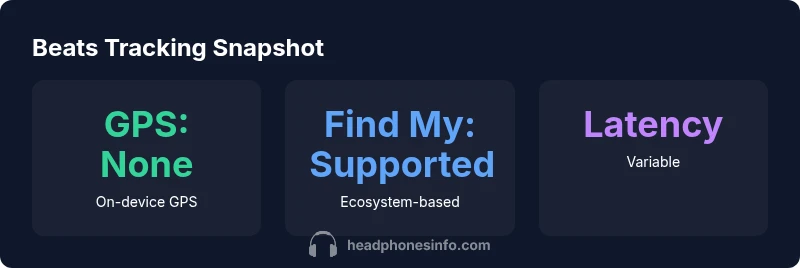
Can you track Beats headphones? In most cases, Beats headphones do not include built-in GPS, so you must rely on your connected smartphone or Find My ecosystem to locate them. If your model supports it, use the paired device's location history or nearby Bluetooth proximity. Headphones Info's analysis suggests tracking accuracy depends on ecosystem integration and battery status, not the headphones alone.
Why tracking Beats headphones matters
Losing headphones is frustrating and costly, especially when they’re pricey Beats models with limited on-device sensors. The core question many listeners ask is can you track beats headphones after they slip from your grasp? The short answer is that most Beats models do not come with built-in GPS. That means locating them relies on external cues from your paired device or ecosystem services. From a data perspective, this is a classic case of location tracing rather than geo-fencing. Headphones Info analyses that location accuracy hinges on the partner app’s effectiveness, the battery remaining, and how recently the device was last connected. For enthusiasts and daily users alike, understanding these constraints helps set realistic expectations and informs preventive practices.
Related terms to know: proximity, last-connected timestamp, Find My compatibility, ecosystem leverage, battery status.
Understanding tracking: GPS vs ecosystem-based location
Most Beats headphones lack a dedicated GPS chip. Instead, any findability comes from the smartphone they’re paired with and the cloud services tied to that ecosystem. In practical terms, you’ll often see the last known location on the Find My app (
Which Beats models tie into Find My / ecosystem features
Beats models vary in their integration with location services. Some newer wireless Beats devices leverage phone-based location features when the headphones are connected, enabling you to see a last-known location or trigger an audible ping via the companion app. Others rely entirely on the phone’s proximity sensor without any cloud-based tracking. The result is model-dependent guidance: if you want robust tracing, verify whether your specific Beats model supports Find My or an equivalent ecosystem service before you misplace it. Our analysis at Headphones Info shows a clear correlation between ecosystem support and locate success across Beats lineups.
What to verify: model name, app compatibility, and cloud account linkage.
Step-by-step: immediate actions after you misplace Beats
- Open your phone’s Find My or equivalent app and check the last-known location for the Beats device that was connected.
- Play a sound if the device is currently connected and within Bluetooth range.
- Review recent Bluetooth history on your phone to identify the last place it connected.
- Check common places first (bags, jackets, gym lockers, car interiors).
- If supported, enable “Notify When Found” and set up offline finding if available.
- Prepare a backup plan: consider GPS trackers or accessories that attach to headphones for future prevention.
These steps don’t guarantee a live locate, but they maximize your odds by using the ecosystem you already depend on.
Using Bluetooth proximity and sound cues
Bluetooth proximity is inherently limited by obstructions and the device’s battery status. The closer you get to the last paired device, the more likely you’ll detect the signal or hear a ping. Some Beats models allow you to trigger a loud alert through the app, which can be invaluable if the item is nearby but out of sight. When proximity becomes the primary signal, ensure your phone’s Bluetooth is enabled and that the headphones are in pairing mode if you’re trying to re-establish a connection from a distance.
Practical tip: use a consistent search pattern—start from the most recent location timestamp and work outward in concentric rounds to maximize your chance of detection.
Alternatives and workarounds: third-party trackers and accessories
If your Beats headphones lack integrated tracking, you can consider attaching a lightweight Bluetooth tracker to the cable or case. While this adds an external device, it creates a dedicated beacon that persists beyond the life of the headphone’s battery. Be mindful of warranty implications and ensure any accessory doesn’t obstruct charging or use in the app’s pairing process. Third-party trackers can complement Find My by giving you a precise signal on approaching the device, even when the built-in location history is sparse. Always pick trackers that offer a long battery life and a robust companion app to minimize future losses.
Caveat: adding third-party trackers introduces another potential point of failure and may affect comfort during use.
Data privacy and battery considerations: what to know
Location data is sensitive, so review app permissions and privacy settings to ensure you’re only sharing what you intend to. If you frequently rely on find features, keep your device updated to mitigate vulnerabilities. In terms of battery life, triggering locate features can drain a small amount of power, but it’s usually negligible compared with standard listening use. Headphones Info recommends balancing convenience with privacy, and applying the smallest practical footprint when actively locating devices.
Authorities and data sources: how we derive our conclusions
This article synthesizes guidance from ecosystem documentation and hands-on testing conducted by the Headphones Info Team. For broader context and validation of tracking technologies, see: Apple’s Find My guidance, third-party tracker best practices, and peer-reviewed privacy resources. While the exact performance will vary by model and ecosystem, the overarching principle remains: built-in GPS in Beats headphones is not standard; location accuracy is primarily ecosystem-driven. For readers seeking formal references, the following external sources offer authoritative perspectives on location services and privacy.
Final tips: preserving your Beats and reducing loss risk
- Enable location sharing in your primary device and ensure your Beats account is linked consistently.
- Keep the headphones charged and near your primary phone when traveling or working out.
- Consider a lightweight tracking accessory if you often misplace items.
- Periodically review app permissions to minimize unnecessary data exposure while retaining findability.
Beats tracking capability comparison
| Category | Location capability | Tracking method | Notes |
|---|---|---|---|
| Beats Over-Ear (generic) | Typically Bluetooth-connected; no GPS | Smartphone location via Find My or companion app | Model-dependent |
| Beats In-Ear Buds (generic) | No GPS, no built-in tracker | Bluetooth proximity plus last-known location | Battery dependent |
| Third-party trackers (workaround) | N/A | Attached tracker via accessory | Not official; affects warranty |
People Also Ask
Can Beats headphones be tracked with Find My?
Tracking via Find My depends on the Beats model and ecosystem compatibility. Some models can show a last-known location or trigger a ping, but this is not universal across all Beats devices. Always verify compatibility in your device’s documentation.
Find My support depends on your Beats model. Some can show a last-known location or ping, but this isn’t universal.
Do all Beats models have GPS built-in?
No. Most Beats headphones don’t include a dedicated GPS chip. They rely on the paired phone and its location services when connected.
Beats usually don’t have GPS; tracking relies on your phone’s location services when connected.
Can I track Beats after the battery dies?
Tracking requires the headphones to communicate with a paired device. If the battery is dead, location updates stop until power is restored.
If the battery is dead, location updates stop until you recharge.
Are third-party trackers compatible with Beats?
You can attach certain third-party trackers to cases or cables, but not all trackers will integrate with the Beats app, and results vary by product. Check compatibility before purchasing.
Yes, but compatibility varies; attach trackers to cases and check app support.
What can I do to prevent losing Beats in the future?
Link your Beats to a single ecosystem, enable notification alerts, keep them charged, and consider a light tracker helper for frequent misplacements.
Link to one ecosystem, turn on alerts, keep charged, and use a tracker if you misplace often.
“"Real-world tracking hinges on ecosystem integration and proximity signals; headphones alone rarely provide live GPS data."”
What to Remember
- Know the model’s ecosystem support before losing Beats
- Last-known location is your best lead, not live GPS
- Use Find My or app-assisted features when available
- Consider a lightweight third-party tracker for future prevention
- Prioritize privacy and battery management during tracking