Best PlayStation Headphones for 2026: A Detailed Buyer’s Guide
Comprehensive, data-driven guide to choosing the right PlayStation headphones for PS5, PS4, and PC. Compare wired vs wireless, mic quality, latency, comfort, and value with practical tips and benchmarks from Headphones Info Analysis, 2026.


Playstation headphones are headsets designed for PlayStation consoles, blending immersive audio with a clear microphone for team play. They range from official Sony options to licensed third‑party models, available wired or wireless with USB dongles, 3.5 mm jacks, or Bluetooth. Key tradeoffs include latency, comfort, mic quality, and compatibility with PS5, PS4, and PC.
Understanding the PS Headphone Landscape
Playstation headphones occupy a unique niche that blends audio fidelity, microphone performance, and practical connectivity for gamers who use Sony consoles. They are designed to work with PS5 and PS4, with many models also offering compatibility with PC and mobile devices. According to Headphones Info, the market spans official Sony headsets, licensed third‑party options, and generic gaming headsets adapted for PlayStation use. The Headphones Info team found that players consistently weigh three factors when choosing a model: low latency for quick in‑game reactions, a crisp microphone for reliable team communication, and long‑lasting comfort for marathon sessions. When evaluating options, consider how you connect (USB dongle vs 3.5 mm vs Bluetooth), your typical playtime, and whether you value features like virtual surround sound or a detachable mic.
Key takeaway: Your setup (PS5 vs PS4 vs PC) influences which headset design makes the most sense for you, so start by listing your primary connections and typical session length.
Wired vs Wireless: Latency, Convenience, and Battery Life
Wired headsets generally provide the lowest latency because audio signals travel through a direct cable with minimal processing delay. They are also free from battery anxiety, which is a real advantage during long gaming sessions. Wireless options, on the other hand, offer freedom of movement and reduced cable clutter, but their latency and battery life depend on the protocol (USB dongle vs Bluetooth) and the headset’s driver efficiency. For PS5 users, USB dongle headsets tend to offer the most reliable latency profile, while Bluetooth headsets should be chosen cautiously if mic performance and sync are critical in fast‑paced games.
When deciding, think about your room layout and how often you move around. If you sit in a fixed chair and want utmost precision, wired is often the safer choice. If you value flexibility for late‑night gaming from the couch, a quality wireless model with a long battery life can be worth the trade‑offs. Also consider charging cycle expectations and whether you’ll need a quick‑charge option for longer sessions.
Audio Quality and Microphone Performance: What to Listen For
Sound quality for PlayStation headphones hinges on driver size, tuning, and how the headset handles low frequencies and midrange clarity. Look for a balanced profile that favours dialogue without sacrificing bass presence for action cues. Driver size (40–50 mm is common) often correlates with perceived loudness and dynamic range, but tuning matters more than raw size. A good mic is indispensable for squad play; prioritize directionality (cardioid or unidirectional patterns) and features like noise suppression or wind reduction. The mic should be easily swappable or clearly legible in online chats, with a comfortable mic boom position that stays stable during head movements.
For competitive gaming, test the headset’s sidetone (your own voice heard in the headset) and ambient noise rejection. If you frequently play in noisy rooms or with multiple players, these features can significantly improve communication clarity. Finally, consider any software EQ options that let you tailor sound for games, music, or theater modes, since a tunable profile can dramatically affect your perceived audio quality.
Comfort and Build: Longevity for Long Sessions
Long gaming sessions demand light, breathable materials and a low clamping force that won’t fatigue your head or ears. Ear cushions made from memory foam with breathable fabric or leatherette surfaces reduce heat build‑up during extended play. A clean, adjustable headband and swiveling ear cups improve fit for a wide range of head sizes. Build quality matters too: look for reinforced joints or metal sliders, robust headband assemblies, and sturdy microphone attachments that don’t squeak or wobble with movement.
If you’re sensitive to weight, start with models in the 250–320 gram range and test for pinching or pressure around the temples. Some players prefer lighter designs for comfort, while others prioritize durability and a premium feel. Finally, check for warranty length and coverage on wear parts like cushions and mic cables, which are often the first components to wear out with heavy daily use.
Compatibility and Software Features Across PS5, PS4, and PC
Not all PlayStation headphones are created equal when it comes to cross‑platform compatibility. Official Sony headsets typically ship with plug‑and‑play support for PS5 and PS4, and many also work on PC via USB or a 3.5 mm connection. Third‑party models vary in compatibility; some rely on USB dongles that deliver consistent latency and mic performance across platforms, while others depend on standard 3.5 mm jacks that work with almost any device but may require manual mic monitoring or software updates for best results.
Software features can enhance the experience: EQ presets, mic gain control, sidetone, and even system‑level speech modes can be game‑changing on PS5. Some models include temperature or environmental voice suppression to reduce background noise. If you game across multiple devices, verify which features are supported on each platform to avoid feature gaps.
Budgeting Your PS Headphones: Value Across Tiers
Value is not solely a function of price. In budget (roughly under $50), you’ll typically find reliable 3.5 mm options with passable mic quality and basic comfort. Mid‑range models ($50–$150) often deliver better build quality, more comfortable ear cushions, and improved mic performance, sometimes with USB dongle reliability and modest surround sound features. Premium options ($150 and up) tend to offer superior drivers, richer soundstage, advanced software suites, and durable materials. When evaluating, ask yourself which features matter most: mic clarity, latency, or comfort—and how often you’ll rely on cross‑platform compatibility. Remember that a well‑tuned mid‑range headset can outperform a cheaper model with poor mic performance or uncomfortable padding.
To maximize value, read reviews that emphasize long‑term comfort and mic consistency, and consider whether the headset is easy to service or replace parts on. Headphones Info’s analysis suggests prioritizing models with transparent warranty terms and a track record of firmware updates, as those signals tend to predict a longer useful life.
Setup Tips and Quick Calibration for Optimal Sound
Begin by updating the headset’s firmware and the console’s system software to ensure best driver compatibility. If your model supports an EQ or sound profile, start with a flat baseline and then test in common game scenarios (crowded firefights, stealth sections, and music cues). Use the mic test function on your PS5/PS4 or PC to check clarity and noise handling. For wireless models, re‑pair the dongle if you notice jumpy audio or lip‑sync issues. Finally, balance mic volume with in‑game sound effects and voice chat to ensure you neither overpower nor get drowned out by gunfire or explosions.
Pro tip: keep cushions clean and dry, and use a mild cleanser on metal parts every few months to maintain comfort and hygiene during extended gaming sessions.
Comparative Scenarios: eSports, Casual Gaming, and Movie Nights
In fast‑paced eSports scenarios, prioritize ultra‑low latency, reliable mic, and a secure fit. A wired or USB‑dongle headset with a well‑tuned mic and minimal background noise is often ideal. For casual gaming with family or friends, wireless headphones with long battery life and comfortable pads can enhance enjoyment without tethering you to the console. When using headsets for movie nights, a wide soundstage and balanced bass can elevate the experience, but clear dialogue remains essential for following plot dialogue.
Across all use cases, aim for a headset that stays comfortable during long sessions, has dependable cross‑platform compatibility, and lets you quickly adjust mic and audio settings without interrupting gameplay.
dataTableCaption
PS headset options comparison across connection types
| Headset Model | Connection Type | Latency (ms) | Notes |
|---|---|---|---|
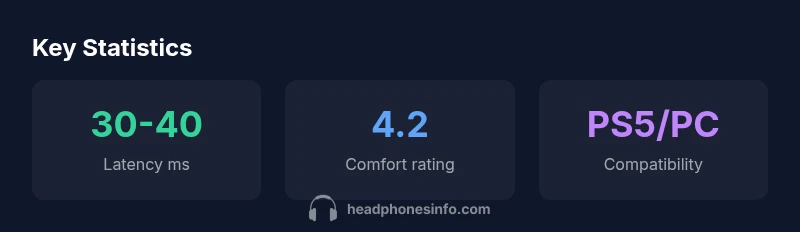
| Official Sony PlayStation Headset | USB wireless dongle | 30-40 ms | Official support, solid mic |
| Licensed Third-Party Headset A | USB dongle / Bluetooth | 25-35 ms | Good value, strong comfort |
| Budget Headset B | 3.5 mm wired | 40-60 ms | Affordable, basic features |
| PC‑optimized Gaming Headset C | USB dongle | 25-40 ms | Strong mic, check PS compatibility |
People Also Ask
What is the difference between wired and wireless PlayStation headphones?
Wired headsets generally offer lower latency and no battery concerns, which is ideal for competitive play. Wireless models provide freedom of movement but can introduce micro‑latency and require periodic charging. Choose based on whether you value precision or convenience.
Wired headsets have less lag and no charges; wireless give you more freedom, but you may need to charge.
Are official Sony PlayStation headsets better than third‑party options?
Official headsets guarantee compatibility and timely firmware support with PlayStation systems. Third‑party options can offer better value or feature variety but may vary in compatibility and software support. Prioritize mic quality and comfort if you choose non‑official models.
Official headsets fit perfectly and receive updates; third‑party often save money but check compatibility.
Do PS5 Bluetooth headsets work with PS5 games?
PS5 supports some Bluetooth headsets for audio playback, but many gamers prefer USB or wired 3.5 mm connections for the best mic performance and lowest latency. Check your headset’s compatibility list before buying.
Some Bluetooth headsets work for audio, but for the best mic and lag, use USB or wired.
What should I look for in mic quality?
Look for clear vocal pickup, low sensitivity to background noise, and a stable mic position. Features like noise suppression and silicone mic windscreens can help in busy environments.
A clear, stable mic with good noise reduction makes chatting easy.
Can I use PlayStation headphones with PC?
Many PS headphones work with PC via USB dongle or 3.5 mm jack. Check drivers and software availability for features like EQ and mic tuning on your computer.
Yes, most PS headphones work on PC with USB dongle or 3.5 mm.
“Latency, mic clarity, and comfort are the core pillars of any great PlayStation headset; tailor your choice to your playing style and setup.”
What to Remember
- Prioritize latency and mic quality for competitive play
- Wired headsets minimize lag; wireless models offer mobility
- Check cross‑platform compatibility before buying
- Mid‑range headsets often offer best balance of cost and performance
- Test comfort for long sessions and replaceable parts matter