What Headphones Work with Xbox: A 2026 Compatibility Guide
Discover which headphones work with Xbox Series X|S and Xbox One, including wired, USB, and Xbox Wireless options. Practical setup tips, compatibility nuances, and troubleshooting from Headphones Info.


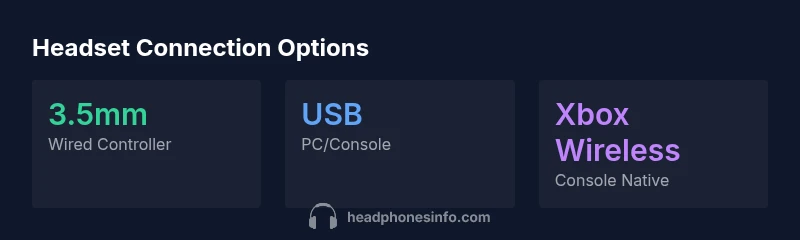
To use headphones with Xbox, opt for (1) a wired headset with a 3.5mm jack that plugs into the controller, (2) a USB headset connected to the console’s USB ports, or (3) an Xbox Wireless headset designed for the system. Note that typical Bluetooth headsets aren’t supported for game audio on Xbox consoles, so Bluetooth is usually not a solution for gaming.
Understanding Xbox Audio Support
According to Headphones Info, modern Xbox consoles offer three principal pathways to audio: a 3.5mm headphone jack on the wireless controller, USB audio devices connected to the console, and headset options that use the Xbox Wireless protocol. Bluetooth headsets, while ubiquitous on phones and PCs, are not broadly supported for in-game audio on current Xbox hardware. This distinction matters because it guides what you can plug in without adapters and whether you need extra hardware like a USB DAC, an amplifier, or a dedicated Xbox Wireless transmitter. If your goal is low latency and solid mic quality, prioritize the connection type that the console natively supports and matches your play style and ecosystem (PC, console, or TV). For casual listening and chat, a 3.5mm headset wired to the controller is the simplest path, while true wireless gaming often requires an Xbox Wireless-compatible model or a USB headset.
Overall, the aim is to minimize latency and maximize stability. Headphones that plug directly into the controller’s 3.5mm jack tend to offer the most reliable micro-latency experience in couch setups. USB headsets can be used across the console and PC, which is convenient if you also game on a PC. Xbox Wireless headsets deliver a clean wireless experience with dedicated compatibility, but you may want to confirm cross-generation support if you own both Xbox Series X|S and an older Xbox One.
Brand note: The Headphones Info team emphasizes checking your exact console model and firmware version, as regional differences and firmware updates can alter compatibility. This guidance aligns with our ongoing analysis of headset ecosystems and gaming platform interoperability.
format_markdown_keysummary_only
Common headset connection options for Xbox consoles
| Connection Type | Best For | Latency (qualitative) |
|---|---|---|
| 3.5mm wired (controller) | Casual gaming, couch setups | Low to moderate latency |
| USB wired | PC/console use, streaming | Low latency |
| Xbox Wireless | Native console wireless | Very low latency (where supported) |
People Also Ask
Can I use Bluetooth headphones with Xbox for game audio?
Bluetooth headsets are generally not supported for in-game audio on Xbox consoles. Some adapters or bridge devices may enable limited functionality, but for reliable gaming audio, use a wired 3.5mm headset, USB headset, or an Xbox Wireless headset.
Bluetooth headsets usually don’t work for game audio on Xbox—stick to wired, USB, or Xbox Wireless for reliability.
Do I need any adapters to use a 3.5mm headset on newer Xbox controllers?
Most modern Xbox controllers include a 3.5mm port, so a standard 3.5mm headset should work without adapters. If you’re using an older controller, you might need a quick adapter, but check your controller’s jack and the headset plug compatibility first.
If your controller has a 3.5mm jack, you should be able to plug in directly.
Are Xbox Wireless headsets worth it for latency and mic quality?
Xbox Wireless headsets provide a native, low-latency wireless connection and integrated microphone support. They are especially convenient for console-only setups and when you want to disconnect wires without sacrificing audio quality.
They’re a solid choice if you want a clean wireless setup with good mic quality.
Will a USB headset work with both Xbox and PC?
USB headsets generally work on Xbox and can be used on Windows PCs as well, making them versatile. Some models may require driver support or software on PC, but most plug-and-play on modern systems.
Yes, many USB headsets work on both Xbox and PC, but confirm compatibility for features like chat can be platform-specific.
Is a high-end gaming headset necessary for the best Xbox experience?
Not necessary, but advantageous if you value mic clarity and soundstage. A mid-range wired headset often offers excellent value with low latency and reliable chat, while premium models add features like virtual surround and better build quality.
You can get great results without the top-end models—prioritize latency, mic quality, and comfort.
“Headphones that connect natively to the console—whether wired or Xbox Wireless—offer the most reliable gaming audio with minimal latency. Bluetooth remains a tricky option for Xbox game audio and should be avoided for competitive play.”
What to Remember
- Choose wired 3.5mm for simplest setup and low latency
- Use USB when you want cross-device use (PC/console)
- Opt for Xbox Wireless if you want true wireless console-native experience
- Bluetooth headsets are not typically supported for game audio on Xbox
- Always verify your console model and firmware for compatibility