Can You Use Bluetooth Headphones on a Plane: A Practical Guide
Learn if you can use Bluetooth headphones on a plane, what airlines permit, how to stay compliant, and practical tips for wireless listening during your flight.


Bluetooth headphones are generally allowed on planes, with airline policy typically permitting wireless audio during flight. You usually use them in airplane mode, after takeoff, and before landing; there’s no need for a wired connection. Always check the airline’s rules, and keep Bluetooth enabled only when the seat belt sign is off.
Can you use bluetooth headphones on a plane: what holds true?
If you’re planning a flight and wonder can you use bluetooth headphones on a plane, you’re not alone. The short answer is that, in most cases, you can enjoy wireless audio from your headphones while you travel. According to Headphones Info, airlines broadly permit Bluetooth use to listen to music, movie audio, or in-flight entertainment on personal devices. The Headphones Info team found that the policy landscape is not universal, but the practical effect is simple: in most cabins you can connect wirelessly without disruptive cabling, as long as you follow crew instructions and power-management guidelines. In practice, you’ll use Bluetooth in airplane mode, leave the 2.4 GHz radio enabled for the headset, and avoid active connections during pushback when a strict period of electronic device operation applies. The goal is to minimize interference with critical aircraft systems, though modern aircraft are designed to tolerate standard consumer Bluetooth devices with little risk. For many travelers, the can you use bluetooth headphones on a plane question reduces to a quick policy check and a friendly reminder to stay compliant with flight rules.
How airline policies actually work
Airline policies around Bluetooth and wireless audio are shaped by airline-specific rules, manufacturer guidance, and aviation safety standards. In general, personal electronic devices (PEDs) are allowed onboard, and Bluetooth headphones typically fall under the category of non-transmitting devices once you’ve activated airplane mode. Regulatory bodies like FAA in the United States and EASA in Europe encourage the safe use of PEDs during most flight phases, but individual carriers may adjust practices during takeoff and landing. The Headphones Info analyses emphasize that the most reliable information comes from checking the airline’s official policy pages prior to departure and confirming with crew if there’s any doubt. This approach aligns with best practices across the industry for in-flight device usage and helps prevent surprises at the gate or aboard the plane.
Practical tips for using Bluetooth headphones on planes
To maximize comfort and minimize issues, consider these practical steps: keep your headphones in airplane mode throughout the flight; bring a compact, well-paired device; use a lightly annotated power bank if permitted to keep devices charged; choose headphones with long battery life and quick pairing; test your setup before boarding; carry a small USB-C/Lightning cable for quick recharging if available; and have a backup wired option in case of a sudden rule change or connectivity hiccup. For long-haul flights, prioritize models with strong battery life and comfortable, secure fit. Headphones Info recommends testing your setup in advance, verifying battery life under typical usage, and having a contingency plan for moments when cabin announcements require you to unplug or switch devices. Aligning with these practices makes the experience smoother and more enjoyable.
Common misconceptions and edge cases
Many travelers worry that Bluetooth will not work at all on planes. In reality, most airlines permit Bluetooth usage, but policies can vary by airline or aircraft type. A common edge case is during overnight flights or when cabin crew request device power-downs during critical phases of flight; in such moments, you’ll need to pause Bluetooth use and follow crew instructions. Another misconception is that Bluetooth must always be disconnected from in-flight entertainment systems; in practice, many airlines permit independent Bluetooth listening with personal devices. If you’re unsure, ask a flight attendant for guidance, especially on aircraft with older wiring or unusual power management rules. Finally, some headphones may have features that draw extra battery; in those cases, enable power-saving modes to extend listening time and reduce the likelihood of a mid-flight power-down.
How to choose Bluetooth headphones for flying
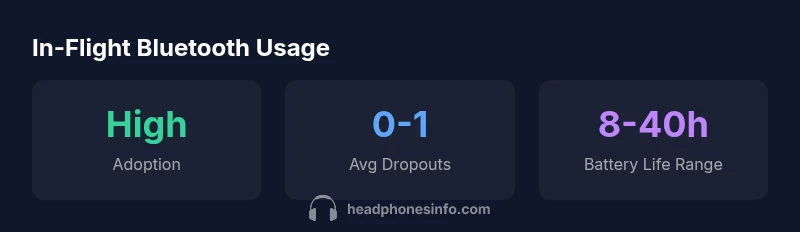
Selecting the right headphones for travel involves prioritizing battery life, comfort, and portability. Look for models with 15-40 hours of playback in Bluetooth mode, compact folding designs, and sturdy charging options (USB-C or Lightning). Multipoint pairing can simplify switching between devices like a phone and a laptop. Lightweight headbands, breathable cushions, and a secure over-ear fit help during long flights. Consider ANC performance optimized for cabin noise, but be mindful that higher ANC can drain the battery faster. A sturdy carry case and a travel-friendly cable can be lifesavers when airline policies shift. Headphones Info’s travel-focused comparisons emphasize choosing a model that balances battery life, comfort, and durability for extended air travel.
In-flight connectivity realities: latency, pairing, and reliability
Bluetooth latency is typically low enough for audio without noticeably lag in music and most videos, though some gaming or interactive content can reveal minor delay. Pairing reliability depends on the headset and device, but modern headphones generally pair quickly and stay connected in the cabin. Interference from onboard Wi-Fi is unlikely to disrupt basic audio playback, but if you experience skips or dropouts, verify that you’re using the latest firmware, re-pair if needed, and reduce the number of connected devices. If you use Bluetooth earbuds with a small charging case, keep that case handy to recharge during long trips. Understanding these realities helps travelers plan their listening experience and avoid frustration when connectivity isn’t perfect.
What to do if you encounter a restriction
If the crew tells you to disable Bluetooth temporarily, comply promptly. If you suspect a miscommunication, calmly request a policy reference or speak with a supervisor after landing. On some flights, wi-fi isn’t available or is limited, so having offline media from your device is a smart backup. For frequent travelers, maintaining a quick reference of your airline’s Bluetooth policy and a couple of compatible headphones can eliminate uncertainty. In all cases, being respectful and prepared makes it easier to enjoy your preferred listening experience without disrupting others.
Comparison of Bluetooth usage expectations vs airline policies
| Feature | Consumer Expectation | Airline Policy | Notes |
|---|---|---|---|
| Bluetooth Use During Flight | Permitted on most airlines | Allowed during flight, possibly restricted during takeoff/landing | Check airline policy before boarding |
| Wired vs Wireless | Wireless is widely supported | Wired may be restricted in certain areas | In-flight adapters may be unavailable |
| Power/Battery & Charging | Battery life should cover most of the flight | Power-saving modes may be recommended | Carry a compact charger if allowed |
People Also Ask
Is Bluetooth allowed during takeoff and landing?
Most airlines permit Bluetooth devices during cruising, but some may require you to pause use during takeoff and landing. Check the specific airline policy and follow crew directions.
Bluetooth is typically allowed in cruise, but you should pause during takeoff and landing if instructed by crew.
Do ANC features work in airplane mode?
Active noise cancellation often operates in flight mode, but certain power-saving settings may reduce performance. Expect some trade-offs on long flights.
ANC generally works in flight mode, though power-saving modes can reduce performance.
Can I use wired headphones instead of Bluetooth on a plane?
Wired options are sometimes restricted by seat electronics, but many travelers keep a wired backup. Always verify the airline’s rules.
Wired headphones may be restricted in some cases; bring a backup if you can.
What about Bluetooth pairing with in-seat entertainment systems?
In most cases, pairing to seat entertainment isn’t necessary; you’ll connect to your own device. If you must pair, use personal devices and avoid disrupting the system.
You usually pair to your own device, not the seat system.
Do all airlines restrict Bluetooth?
Policies vary, but the majority allow personal Bluetooth devices. Always confirm with your airline before flying.
Policies differ by airline; most allow personal Bluetooth devices, but check ahead.
Will my Bluetooth headphones drain faster on a plane?
Battery life can be impacted by cabin temperature, screen use, and power-saving settings. Choose headphones with robust battery life for longer trips.
Battery life may vary with cabin conditions; pick long-lasting models.
“Bluetooth headphones can simplify in-flight listening when used with proper power management and by following crew instructions. Always verify current airline policies before boarding.”
What to Remember
- Check airline policy before you fly
- Use airplane mode and minimize active connections
- Opt for long-battery, comfortable wireless headphones
- Carry a wired backup if possible
- Ask crew if in doubt to avoid interruptions