How to Find Headphones When Lost: A Practical Guide
Learn proven methods to locate lost headphones quickly, with practical steps, tech tips, and prevention strategies for wireless and wired models.


You can locate lost headphones by retracing your steps, checking device history and pairing logs, and using built-in find features when available. Start from your last known location, search pockets, bags, and vehicles, and enlist help if you’re in a shared space. This quick approach sets the stage for a thorough, methodical search.
Why Finding Headphones When Lost Actually Matters
Losing headphones happens to many of us, whether you’re commuting, traveling, or just at home. Knowing how to find headphones when lost can save money, time, and frustration. This guide from the Headphones Info team emphasizes a calm, structured approach that works across wireless and wired models, including in-ear, on-ear, and over-ear headphones. By starting with your last known location and then expanding the search outward, you maximize your chances without wasting effort. The goal is a practical plan you can follow step by step, not a frantic scavenger hunt. According to Headphones Info, a measured search often uncovers the device in places you’d least expect, like between cushions or in a shared bag, long after you thought it was gone. Build a simple checklist, log each area you search, and stay patient as you work through each step.
Quick Reconnaissance: Immediate Steps to Take
Begin with a fast, high-probability scan of the most likely spots: the seat you last used, the pockets of jackets or bags, and nearby furniture. If you were outdoors, check car seats, door pockets, and the ground under tables. Gather all accessories (charging case, adapters) that came with the headphones because locating those can help you confirm if the headphones were moved. Keep a small notepad or notes app handy to log each location you inspect and any clues you find. This initial sweep should take you roughly 5–10 minutes, but expand as needed if you don’t locate the device right away. The Headphones Info team recommends maintaining composure and avoiding distraction while you search.
Using Digital Clues: Apps, Bluetooth, and Device History
Most modern headphones rely on Bluetooth pairing history and companion apps. Check your phone’s Bluetooth list for recently connected devices and try reconnecting to see if the headphones respond. If you use a Find My app (iOS) or Find My Device (Android), open the service and look for the last known location or last ping. Even if the headphones are out of battery, some apps log recent connections that can guide you back to the area where they were last active. If applicable, review purchase receipts or account activity for model details that can help you narrow the search. Headphones Info analysis shows that most successful recoveries leverage this digital trail to corroborate physical locations.
Search Tactics for Different Environments
Indoor environments like homes, offices, and gyms require a tight, systematic approach: check cushions, desks, under furniture, and behind electronics. In cars, inspect seat creases, cup holders, and under floor mats. Outdoors, retrace your walking route, check public seating areas, and alert staff at nearby facilities or transit hubs. In crowded venues, ask staff to make a quick PA announcement if policy allows. For true wireless earbuds, also inspect the charging case and any travel pouches you used. The key is adjusting your search pattern to fit the space without overextending your effort.
Step-by-Step Manual Search Guide
The manual search is where you translate theory into action. Start at Step 1: Identify the last place you had the headphones. Step 2: Sweep the area methodically, moving in logical passes (left to right, top to bottom). Step 3: Check common hiding spots first (cushions, bags, jackets, vehicle compartments). Step 4: Inspect less obvious spots (under chairs, between cushions, in garment pockets). Step 5: Recheck the general area with a fresh mindset, sometimes the first pass overlooks a tiny clue. Step 6: If you find a nearby charging cable or case, validate the reach of the headphones with a quick test. Step 7: If still not found, document the search and move to the next steps like assistance or replacement options.
Preventive Measures and Organization Tips
To reduce future losses, create a dedicated storage spot for your headphones and accessories, use a lightweight pouch, and engage a simple daily routine to check for the items before leaving a location. Consider labeling the charging case or adding a Bluetooth tracker to your headphones or case. Regularly charge and test the devices so you can confirm their status at a glance. This proactive approach saves time and extends the life of your gear. The Headphones Info team suggests pairing your headphones with a habit you perform daily—like dropping the case on a charger when you sit down—to build a reliable routine.
When to Seek Help: Retail, Support, and Warranty Options
If you can’t recover the headphones after a thorough search, contact the retailer or manufacturer’s support for guidance on replacement options, warranties, or discounted programs. Some brands offer loss protection plans or replacement accessories that can significantly reduce costs. If the device is connected to an account, report the loss and review any policy details on coverage or eligibility. Do not attempt to retrieve items in unsafe environments or areas where searching could violate policies. The goal is to recover or replace responsibly while preserving your data and privacy.
Common Myths and What Really Works
Myth: “If a device is lost, it’s unrecoverable.” Reality: A structured search and digital trails often yield results. Myth: “I must search everywhere at once.” Reality: Prioritize high-probability locations and expand gradually. Myth: “Trackers always work.” Reality: Battery life, range, and device compatibility affect effectiveness. The truth is that a thoughtful approach—combining physical search with tech tools—yields the best odds and minimizes wasted effort. Headphones Info emphasizes patience, planning, and a methodical search as the best strategy.
Building a Personal Lost-Headphones Plan
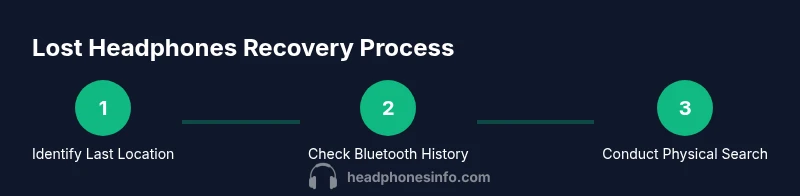
Create a brief, repeatable plan you can use anytime you misplace headphones. Start with the last known location, move to digital clues, then physical inspection. Maintain a checklist, log findings, and set a realistic stop point if you still cannot find the device after a thorough search. Include preventive steps like a dedicated storage spot and tracker attachments. By having a proven plan, you’ll feel more in control and ready to tackle similar situations in the future. The Headphones Info Team stresses that consistency beats frantic, unfocused searching.
Tools & Materials
- Smartphone or tablet with Bluetooth(To view pairing history and use Find My features)
- Pen and notepad(Log locations, times, and clues during the search)
- Flashlight or flashlight app(Inspect dark corners, under furniture, and vehicles)
- Small pouch or case for organizing accessories(Keep chargers, adapters, and spare tips together)
- Charging cable or portable charger(Ensure devices have enough power to use Find My features)
Steps
Estimated time: 60-120 minutes depending on environment and device type
- 1
Identify last known location
Recall where you last used or handled the headphones and note the time. Scan that area first and list adjacent spots to inspect next. This focused start saves time and directs your subsequent searches.
Tip: Write down the last place you remember using them to anchor your search. - 2
Check Bluetooth history
Open your phone’s Bluetooth settings and review recently connected devices. Attempt to reconnect to see if the device responds, which can hint at proximity or current location.
Tip: Note the device name exactly as it appeared in the pairing list. - 3
Run a digital trace
If you enabled a companion app or Find My service, check the last ping location. Even if the headphones are off, recent activity can guide you toward the right area.
Tip: Take screenshots or notes of any location markers for later reference. - 4
Sweep the immediate area
Systematically search the original room, moving from left to right and top to bottom. Check cushions, under furniture, and inside bags or pockets you carried.
Tip: Search in passes; a second pass often reveals hidden items. - 5
Expand to adjacent spaces
Extend the search to places you visited afterward—hallways, lounges, taxis, or gym lockers. Ask staff or attendants to check lost-and-found areas.
Tip: Ask permission before rechecking other people's spaces. - 6
Test and verify
If you find the device, power it on and test basic functions to confirm it’s yours. This ensures you haven’t mistaken another similar item for your headphones.
Tip: Cross-check model names and serials on the device or packaging. - 7
Document next steps
If the search fails, note where you searched and what remains to check. Consider reporting loss to the retailer or manufacturer for replacement options.
Tip: Keep receipts and order numbers handy for warranty or replacement discussions.
People Also Ask
What should I do first when I realize my headphones are lost?
Begin with a quick recall of the last place you used them, then perform a focused physical search of that area. Check nearby bags and pockets, and review any pairing history on your phone. If available, use Find My or Find My Device to narrow down the location.
Start by remembering the last place you used them, search that area, check pockets and bags, and use Find My features to narrow down the location.
Can Bluetooth history help me locate them after they’re lost?
Yes. Bluetooth pairing history can indicate where the headphones were last connected. Reconnect your device to see if the headphones respond, and note the signal strength if possible to estimate distance.
Bluetooth history can show the last connected area; try reconnecting to gauge proximity.
Will warranty cover lost headphones?
Warranty coverage varies by brand and plan. Some manufacturers offer replacement programs or loss protection, but many do not. Check your purchase documents and contact the retailer or manufacturer for options.
Warranties vary; check your documents and contact support for replacement options.
What should I do to prevent losing headphones in the future?
Use a dedicated storage spot, attach a tracker, and establish a routine to drop the headphones in their case when you finish using them. Regular checks before leaving locations help prevent future losses.
Create a fixed spot, add a tracker, and form a routine to store them after use.
What if I still can’t find them after a thorough search?
If not found after a comprehensive search, consider reporting the loss to the retailer or manufacturer for replacement options and check local lost-and-found services. Keep records in case you pursue a claim.
If not found, explore replacement options and check lost-and-found services.
Watch Video
What to Remember
- Start with the last known location and expand logically.
- Use digital clues in tandem with physical search.
- Adapt the search to the environment and headphone type.
- Prevent losses with organization and trackers.
- Know when to seek replacement options if needed.