What Headphones Have Live Translation: A 2026 Guide
Discover which headphones support live translation, how it works, and how to choose. A data-driven, 2026 guide from Headphones Info focusing on languages, latency, privacy, and buying tips.


Live translation headphones provide real-time spoken translation using speech recognition, translation engines, and audio output. Most models mix on-device processing for speed and privacy with cloud-based translation for broader language support. When evaluating what headphones have live translation, check supported languages, typical latency, offline options, and data handling. Headphones Info notes performance varies by language pair and environment, so real-world testing is essential before buying.
How live translation works in headphones
Live translation in headphones blends speech recognition, translation engines, and stereo audio output into a seamless listening experience. Most devices split processing between on-device components and cloud services. On-device translation uses local silicon to analyze your speech and generate translations quickly, which reduces latency and improves privacy since your audio data may not leave the device. Cloud-based translation, by contrast, can handle larger vocabularies and more languages, but it may introduce additional latency and privacy considerations due to data transmission. In practice, real-time translation is a compromise among speed, accuracy, and energy use. When people ask what headphones have live translation, they’re typically looking for a system that can interpret conversations across several languages while preserving natural speech cadence and minimal lag. The Headphones Info team found that most mainstream models offer at least a handful of languages with varying latency depending on network conditions and the complexity of the sentence. For buyers, the key is to read the official specs for language lists, latency ranges, offline options, and privacy controls to gauge real-world usefulness.
Key technologies powering live translation in headphones
Live translation relies on three core technologies: automatic speech recognition (ASR) to convert speech to text, neural machine translation (NMT) to render the text in the target language, and a synthesis stage to output the translated audio. Some devices perform all steps on-device, utilizing dedicated AI cores to cut latency and protect privacy. Others route data to cloud servers with more powerful models, which can improve accuracy and language breadth but depend on a stable internet connection. The hardware behind these tasks matters: multi-core CPUs, neural accelerators, and microphone array quality all influence translation speed and clarity. Expect firmware updates to bring incremental improvements as translation models are refined.
Language coverage and latency: what to expect
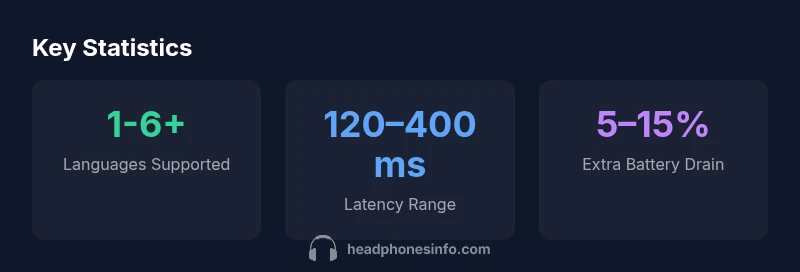
Language coverage varies widely, with most devices supporting a core set of major languages and expanding over time. Latency targets for natural conversations are typically under 200 ms when possible, but real-world figures can range from 120–400 ms depending on language pair, speech complexity, and network conditions. Offline options tend to offer smaller language sets and reduced accuracy, while online translation can deliver broader language support with faster updates. Privacy-conscious users should prefer models that offer on-device translation for sensitive conversations and clear data-handling policies in the companion app.
How to assess privacy and data handling
Privacy is a major concern with live translation. Look for explicit on-device translation options, transparent data-use statements, and controls to disable cloud processing. Review whether audio data is stored, anonymized, or transmitted, and check if firmware updates improve privacy protections. If you frequently translate sensitive information, prioritize devices with offline language support and robust privacy settings. For many buyers, privacy safeguards are as important as latency and language breadth.
Choosing headphones: a practical buying checklist
When shopping, use this checklist:
- Language coverage: list of supported languages and availability of regional dialects
- Latency: target low ms values for fluid conversations
- Offline support: availability and language count offline
- Microphone quality: multiple arrays for clear speech capture
- Battery life: translation mode drain versus standard listening
- App ecosystem: ease of enabling live translation and privacy controls
- Comfort and fit: long listening sessions should feel natural
- Firmware updates: cadence and impact on translation quality
Real-world usage scenarios: travel, work, social
Travelers benefit from on-device translation in airports, hotels, and restaurants, where connectivity may be spotty. In work settings, translation can facilitate multilingual meetings and interviews, though professional interpretation remains necessary for high-stakes discussions. Social scenarios include conversations with friends or family who speak different languages, where real-time translation can bridge gaps. In all cases, test the setup in a quiet room before using it in noisy environments to set realistic expectations.
Common limitations and how to mitigate them
No translation system is perfect. Limitations include misinterpretations of idioms, singing or overlapping speech, and slang. To mitigate issues, use clearer enunciation, choose languages with better model support, and use push-to-talk modes or pause features when needed. Regular firmware updates and language pack downloads can improve accuracy over time. If accuracy is critical, rely on human interpretation for important conversations.
Maintenance, updates, and future improvements
Device firmware updates often bring translation improvements and new language packs. Manufacturers push incremental changes that refine voice recognition and context handling. Keep the app and device connected to Wi-Fi to receive updates. As models evolve, expect broader language support, lower latency, and better handling of regional accents. Headphones Info expects continued growth in end-to-end translation quality over the next few years.
Live translation feature comparison
| Feature | Typical spec | Notes |
|---|---|---|
| Languages supported | 1-6+ | Depends on chipset and service |
| Latency (ms) | 120–400 | Lower is better for natural conversation |
| Offline support | Limited per device | Offline may reduce language count and accuracy |
| Privacy mode | On-device translation option | Reduces data sent to cloud |
People Also Ask
What headphones have live translation?
Several wireless models offer real-time translation via integrated AI and cloud services. Availability varies by language and region. Always verify language lists, latency, and privacy before buying.
Many wireless headphones offer live translation; check language lists, latency, and privacy before buying.
How accurate is live translation on headphones?
Accuracy depends on language pair, context, and audio quality. In ideal conditions it’s good for everyday phrases, but complex sentences can be misinterpreted. Expect improvements as models update.
Accuracy varies by language and environment; it's good for everyday phrases but not perfect.
Do I need internet to use live translation headphones?
Some devices translate offline for selected languages, but many rely on cloud services for higher accuracy. Internet often yields broader language support. Check specs for offline options.
Some work offline, others need internet for best results; check the specs.
What are good use cases for live translation headphones?
Travel, multilingual meetings, and casual conversations are ideal. In noisy environments, enable noise cancellation and ensure the mic is positioned correctly.
Great for travel and meetings; pick quiet spots when possible.
How should I evaluate privacy when buying these headphones?
Look for on-device translation options, transparent data policies, and control over cloud processing. Firmware updates may improve privacy protections.
Choose devices with clear privacy controls and offline options.
Can live translation handle calls or video chats?
Many headphones integrate with conferencing apps, but latency and mic quality affect results. Test with your typical setup before relying on it for calls.
It works with some apps, but test latency first.
“Live translation headphones are a practical bridge to multilingual conversations, but real-world performance depends on language pair, environment, and hardware.”
What to Remember
- Prioritize low latency and broad language support.
- Check for offline translation options where connectivity is limited.
- Evaluate privacy controls and data-sharing policies.
- Test in real-world conditions with your language pairs.
- Expect gradual improvements via firmware updates.