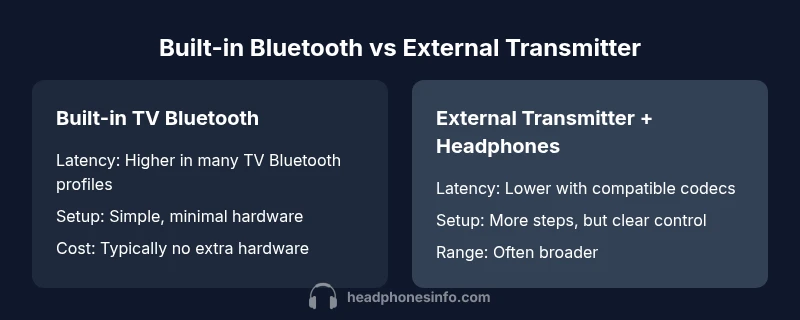
Bluetooth Headphones and TV: A Data-Driven Side-by-Side
An objective, data-driven comparison of built-in TV Bluetooth versus external transmitters with headphones. Learn latency, audio quality, setup steps, and value to choose the best wireless listening setup for TV viewing.


Built-in TV Bluetooth typically works for casual listening, but for lower-latency, more reliable audio while watching movies or gaming, external Bluetooth transmitters paired with compatible headphones generally delivers the best lip-sync and sound quality. This comparison weighs two common setups: built-in TV Bluetooth versus an external transmitter with wireless headphones, focusing on latency, range, ease of setup, and overall value.
Bluetooth headphones and tv: Core considerations
When planning a wireless listening setup for TV viewing, you will quickly encounter a core choice: use the TV’s built-in Bluetooth or attach an external Bluetooth transmitter that works with your headphones. The keyword that anchors this decision is latency. For many viewers, lip-sync accuracy—the alignment of what you hear with what you see on screen—depends on selecting the right codec and hardware chain. According to Headphones Info, the best outcomes arise when you optimize the pairing path from source to receiver, not just the headphones themselves. This is where the two broad approaches diverge: simplicity and integration on one device versus modular, codec-driven optimization with dedicated hardware. In practice, your room size, furniture layout, and typical viewing content (movies, sports, or gaming) will tilt the balance toward one method or the other, especially when considering the phrase bluetooth headphones and tv as a holistic concept for home cinema.
It’s also worth noting that the availability of Bluetooth codecs (like aptX or LC3) varies by TV model and headphones. While many TVs support a handful of codecs, manufacturers often differ in which codecs are enabled when you pair devices directly. The Headphones Info team emphasizes thinking beyond the label “Bluetooth” and looking at codec support and latency targets as the real differentiators. For a balanced setup, you’ll want to consider not only latency but also range, interference with other wireless devices, and how often you’ll switch between different listening environments in your living room.
The quick takeaway here is that the two pathways—built-in Bluetooth on the TV and an external transmitter—bring distinct trade-offs in latency, ease of use, and flexibility. The following sections unpack the technical underpinnings and practical implications to help you decide what to buy and how to configure it for your space.
firstParagraphKeywordDensityAllowedForThisBlock
Comparison
| Feature | Built-in TV Bluetooth | External Bluetooth Transmitter + Headphones |
|---|---|---|
| Latency (lip-sync) | Typically higher with built-in Bluetooth | Low-latency when paired with a transmitter and compatible codecs |
| Audio Quality | Can be adequate for casual listening, depending on TV DAC | Often better control and codec support via transmitter/headphones |
| Compatibility | Limited to the TV’s Bluetooth profile | Broad compatibility with various codecs and headphones |
| Setup & Ease | Plug-and-forget on many TVs | Requires transmitter pairing; more steps but clearer control |
| Range & Reliability | Typically limited to room proximity | Often extended range with a dedicated transmitter |
| Price & Value | No extra hardware if the TV supports Bluetooth | Cost of transmitter plus headphones; potential long-term benefits |
Upsides
- Lower upfront cost if the TV already supports Bluetooth
- Fewer devices to manage and fewer cables
- Simple, plug-and-play setup on many TVs
- No additional power bricks in simple configurations
Disadvantages
- Higher latency on many TVs' built-in Bluetooth
- Limited codec support can affect audio quality
- Potential lip-sync issues with certain streaming apps or content
- Less flexibility for future upgrades without changing the TV
External transmitter + headphones generally wins for latency-sensitive viewing
If lip-sync and audio quality are your top priorities, opt for a dedicated transmitter with compatible headphones. Built-in TV Bluetooth is convenient for casual watching, but it often trades latency for simplicity. The Headphones Info team recommends evaluating your content habits and room layout before buying.
People Also Ask
Does built-in TV Bluetooth always cause lip-sync issues?
Lip-sync problems depend on the TV’s Bluetooth implementation and the content being watched. Some viewers don’t notice delays, while others do, especially when watching fast-paced dialogue or gaming. If lip-sync is a priority, testing with your own headphones is recommended before committing to a single setup.
Lip-sync can vary by device. If you notice delay, a quick test with your own headphones helps decide if you need a transmitter.
Will external transmitters work with any Bluetooth headphones?
External transmitters generally support a broad range of Bluetooth headphones, but compatibility depends on codecs and pairing methods. To maximize success, choose a transmitter and headphones that clearly advertise low-latency codecs and verify the TV supports the transmitter.
Most transmitters pair with many headphones, but always check codec support first.
What codecs should I look for when buying for TV use?
Key codecs to seek are low-latency options such as aptX-LL or LC3, if your devices support them. These codecs reduce audio delay. However, availability varies by TV and headset, so verify both sides support the same codec.
Look for low-latency codecs like aptX-LL or LC3 on both the transmitter and headphones.
Is there a noticeable sound quality difference between built-in Bluetooth and a dedicated transmitter?
Yes, a dedicated transmitter with compatible headphones can deliver more consistent sound quality and better codec support, especially in noisy rooms or with dynamic content. Built-in Bluetooth may be sufficient for casual watching but can vary by TV quality.
Dedicated setups often deliver more consistent sound and better latency control.
How long does setup usually take when using a transmitter?
Initial setup can take 5–15 minutes, including pairing and testing for lip-sync. Once configured, most users enjoy quick, repeatable connections for future uses.
Setting up might take a few minutes, but it becomes quick after the first time.
Are there interference concerns I should know about?
Yes, Bluetooth can be affected by nearby wireless devices, Wi-Fi networks, and even other Bluetooth gear. Position transmitters away from routers and large metal objects to minimize interference.
Keep transmitters away from routers and other strong wireless sources.
What to Remember
- Prioritize latency and codec support when choosing a setup
- External transmitters often deliver lower lip-sync delay
- Built-in Bluetooth is convenient but variable across TVs
- Plan for room layout and range when selecting hardware
- Check codec compatibility before buying headphones