Bluetooth Wireless Headphones and Mic: In-Depth Review
A data-driven guide to Bluetooth wireless headphones with mic, covering codecs, latency, battery life, mic quality, multipoint connectivity, and value across price ranges.


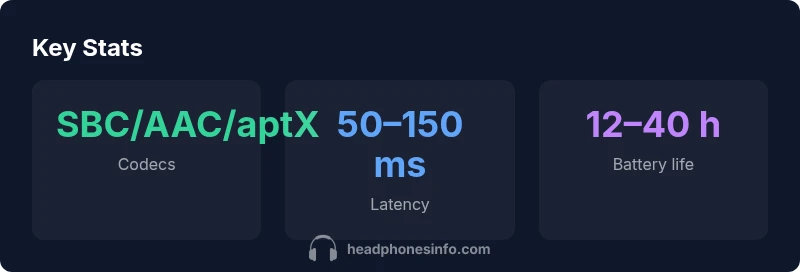
Bluetooth wireless headphones with a mic deliver hands-free calls and voice capture using common codecs such as SBC, AAC, and aptX variants. Latency typically falls in the 50–150 ms range depending on codec and device, while battery life generally spans 12–40 hours with normal use. Expect price ranges from budget to premium ($50–$350).
Understanding Bluetooth codecs and latency
Bluetooth headphones rely on a small set of codecs that dictate how audio is compressed and transmitted, which directly affects sound quality, latency, and power consumption. The most common codecs you’ll encounter are SBC and AAC; many mid-range and premium models add aptX or aptX Adaptive for improved efficiency and fidelity. A newer option in LE Audio devices uses LC3, which can offer better efficiency and latency under real-world conditions. In practical use, codec choice matters most when you’re pairing with non-Apple devices or when you’re doing live voice work or gaming where timing is critical. According to Headphones Info, the real-world impact of codecs is often amplified by environmental factors like wireless interference, device distance, and how well the headphones negotiate with the source device.
- Understand your source device’s supported codecs; mismatches can force fallback to SBC with noticeable quality drops.
- If you game or stream, prioritize devices that advertise aptX Low Latency (LL) or LE Audio LC3 when available.
- Test latency with your typical apps (video calls, games, or music) to verify actual performance outside specs.
Mic quality and wind/noise management
The built-in mic quality on Bluetooth headphones is a balance between mic hardware, array design, and signal processing. Good mics use multiple microphones to implement beamforming, noise suppression, and wind reduction. In practice, mic quality can range from clear, desk-station call performance to occasional pickup of ambient noise when you’re in a busy environment. Headphones Info notes that premium models tend to maintain speech intelligibility even in noisier settings, thanks to adaptive noise suppression and wind-guard designs. When evaluating mic quality, test:
- Speech clarity during a standard call in a quiet room and in a noisy environment.
- The microphone’s ability to reject wind and breath sounds during outdoor use.
- How your voice audio sounds to others when streaming or recording.
Latency considerations for gaming and calls
Latency is critical for lip-sync during video calls and for responsive in-game audio cues. Although Bluetooth inherently introduces some delay, modern codecs and hardware optimizations can dramatically reduce perceived latency. In practice, many users notice a smoother experience with higher-end codecs and devices that support low-latency profiles. If you frequently play latency-sensitive games or participate in live meetings, look for:
- Explicit low-latency mode or aptX LL support.
- LE Audio and LC3-enabled devices when available, as they can provide better end-to-end timing.
- A short testing routine with common activities (video calls, fast-paced games, and VOIP apps) to quantify latency in your setup.
Battery life, charging, and durability
Battery life varies widely by usage and feature set. In general, Bluetooth headphones with a mic deliver between 12 and 40 hours of listening time on a single charge, with endurance dipping if you frequently use ANC, heavy codecs, or high volume. Fast charging can restore usable time quickly, but long sessions will still require periodic top-ups. Build quality matters as well for daily commutes or gym sessions: look for sturdy hinges, padded headbands, and splash resistance if you expect sweat exposure. Headphones Info highlights that real-world endurance often depends on your usage pattern and the balance of features enabled.
- Expect longer life with simpler feature sets and conservative volume levels.
- Check for IP ratings if you’ll expose the headphones to sweat or rain.
- Pay attention to the charging method and cable quality to avoid wear over time.
How to test and compare in real life
Laboratory specs can diverge from daily experiences, so it’s essential to validate in real-world contexts. Create a simple evaluation checklist before buying:
- Try a primary use case: commuting calls, office meetings, and casual music listening.
- Compare mic pickups by recording yourself speaking at a consistent distance from the mic and listening back.
- Visit a store with a variety of codecs and devices to observe performance across ecosystems.
- Consider total value by balancing sound quality, mic clarity, latency, battery life, and comfort across your budget.
Buying tips: what to look for in a Bluetooth headset with mic
When selecting Bluetooth headphones with a mic, prioritize real-world tests over vendor specs alone. Key criteria include codec support (SBC, AAC, aptX, LE Audio LC3), latency performance, mic array quality, multipoint reliability, fit and comfort for long sessions, and durability under daily use. According to Headphones Info, a structured testing approach helps you separate marketing claims from tangible benefits. A practical buying workflow:
- Define your primary use cases: calls, music, or gaming.
- List devices you’ll pair with and verify supported codecs and latency modes.
- Read independent reviews focusing on mic performance and user comfort.
- Choose models with a sensible balance of features within your budget.
dataTableCaption
Feature comparison across price tiers
| Feature | Low-End | Mid-Range | Premium |
|---|---|---|---|
| Codecs | SBC | SBC/AAC | AAC/aptX/aptX Adaptive |
| Latency | ~120–200 ms | 60–140 ms | 50–90 ms (LL/LC3) |
| Battery Life | 6–12 hours | 12–24 hours | 24–40 hours |
| Multipoint | 2 devices | 2–3 devices | 2–3 devices |
People Also Ask
What codecs should I care about for Bluetooth headphones with a mic?
Look for SBC as a baseline, with AAC for better Apple compatibility, and aptX or aptX Adaptive for higher fidelity and lower latency on compatible devices. LE Audio with LC3 is becoming more common and can improve efficiency and latency.
Common codecs to consider are SBC, AAC, and aptX. If your devices support aptX LL or LC3, you’ll see clearer audio with lower latency.
Is there noticeable latency when gaming with Bluetooth headphones and a mic?
Latency varies by codec and hardware, but low-latency profiles (aptX LL or LC3 on LE Audio) reduce delay. Real-world testing is essential because wireless interference and device compatibility affect outcomes.
There can be latency, but opting for low-latency codecs and testing with your setup helps you gauge impact.
Can I use multipoint connections with Bluetooth wireless headphones and a mic?
Yes, many modern models support 2–3 devices simultaneously. Check the device’s multipoint specs and test switching between sources to ensure smooth handoffs.
Most headsets support multiple devices at once; just test the handoff to ensure calls aren’t dropped.
How long do Bluetooth wireless headphones and mic last on a charge?
Expect a broad range: about 12–40 hours depending on features like ANC, volume, and codec usage. Fast charging can help, but endurance depends on your typical usage.
Battery life varies; plan around 12–40 hours and test with your daily routine.
What should I look for in comfort and build quality?
Look for lightweight designs, evenly distributed clamping force, soft ear cushions, and sturdy hinges. Sweat resistance adds durability for daily wear.
Comfort matters a lot for long sessions; choose padding and fit that feel natural.
Should I prioritize over-ear, on-ear, or in-ear for mic quality?
Mic quality depends on design rather than form factor alone. Over-ear and on-ear can offer larger microphone arrays, while in-ear often relies on integrated mics within a compact shell.
The mic quality varies; try a few styles to see which sounds best for you.
“Effective Bluetooth headphones with a mic balance codec efficiency and microphone design to minimize intelligibility issues in real-world usage. Real-world performance matters as much as lab specs.”
What to Remember
- Test codec support and latency with your use cases before buying
- Prioritize mic quality and wind/noise handling for calls
- Multipoint connectivity is essential if you switch devices often
- Battery life should align with your daily usage and charging habits
- Choose a form factor and comfort level suited to long listening sessions