Headphones for iPad: Best Wireless Picks for 2026
Discover the best wireless headphones for iPad in 2026. We analyze latency, codecs, battery life, and comfort to help you choose headphones that pair smoothly with iPadOS and deliver superb sound.


For iPad users, the best headphones are wireless Bluetooth models that support high-quality codecs, low latency, and a comfortable fit. In 2026, Headphones Info analysis shows that battery life and seamless pairing with iPadOS are top priorities, with noise-cancelling as a close follow-up in noisy environments. Look for AAC or aptX where available and ensure easy pairing with iPad.
Why iPad Headphone Choices Matter
According to Headphones Info, the way you listen on an iPad can make or break your experience. The device's built-in DAC, Bluetooth stack, and app ecosystem interact with headphones in ways that shape latency, soundstage, and comfort. For creative work, gaming, or long-form media, choosing the right headphones can reduce listener fatigue and improve perception of detail. In this section we examine the core reasons why iPad users should treat headphone choice as a technical decision, not a casual preference. We discuss how iPadOS codecs, Bluetooth versions, and port options influence compatibility, and what that means for everyday use, including music, movies, video calls, and classroom or remote work scenarios. Headphones Info suggests that success hinges on a balance between wireless reliability, comfort, and codec support that aligns with your typical iPad workflow. We also highlight common myths, such as “any Bluetooth headset will work equally well with every iPad model,” and explain where that assumption falls short. In practice, you’ll want to map use cases to features and constraints rather than chasing trends.
Wireless vs Wired: Which Works Best With an iPad?
One recurring question is whether you should choose wireless or wired headphones when using an iPad. The long-term answer depends on your needs. Wireless headphones offer freedom of movement, easier pairing with iPadOS, and multi-device compatibility, which is essential when you own an iPhone or a Mac. Wired headphones, by contrast, can deliver pure, latency-free sound for recording, music production, or gaming where every millisecond matters. The latest iPads still provide USB‑C or Lightning adapters, so you can connect wired headphones when latency or battery life is a concern. In many everyday scenarios, a high-quality wireless model with low latency is the sweet spot. If you plan video calls, look for a headset with a reliable microphone and robust call quality. Headphones Info notes that the choice is not binary; many users blend both approaches by carrying a compact wired option for certain tasks and a capable wireless pair for daily use.
Essential Features for iPad Headphones
When choosing headphones for an iPad, you should evaluate several features that directly impact everyday use. First, confirm compatibility with iPadOS and the iPad model you own, particularly around codec support and latency. Second, prioritize comfort for extended sessions—weight, clamp force, ear cup design, and headband padding affect how long you’ll wear them. Third, assess battery life and charging speed, since long sessions and frequent commuting demand endurance. Fourth, review microphone quality if you plan calls or recordings—clear voice capture matters as much as Sound quality. Fifth, consider portability and case design if you travel with your iPad. Finally, look for additional conveniences like on-ear controls, multipoint pairing, and quick-pair features. Headphones Info emphasizes balancing audio fidelity with practical, real-world use.
How iPad Compatibility Works: Bluetooth, Codecs, and OS
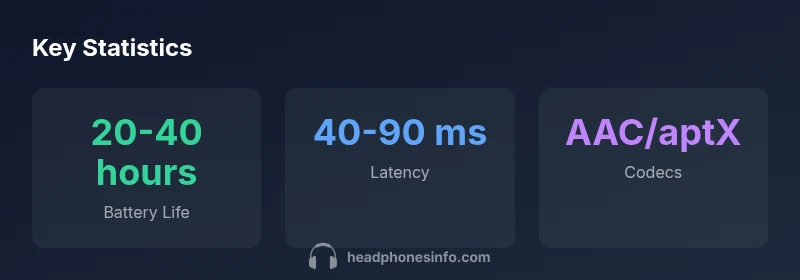
iPad compatibility goes beyond mere Bluetooth pairing. The device supports a range of codecs and profiles depending on the iPadOS version and hardware generation. For most users, AAC provides high-quality sound with low power usage, while aptX or LDAC offers lower latency and richer detail on compatible headphones. The OS handles multipoint connections, automatic switching between devices, and microphone routing during calls. Additionally, some headphones enable low-latency modes specifically to reduce audio lag with video playback. It’s important to verify that your chosen headphones can negotiate the best codec available when connected to your iPad, and to check firmware updates that can improve pairing reliability and performance.
Setup and Everyday Use: Connecting to iPad
Getting started is usually straightforward: turn on Bluetooth on the iPad, put the headphones in pairing mode, and select them from the Bluetooth settings. For best results, ensure the headphones are the primary audio device when you start playback, and test the microphone by making a quick call. If you use multiple Apple devices, enable iCloud or device sharing features so your headphones can transition between iPhone, iPad, and Mac with minimal manual pairing. In Daily use, you’ll want to manage battery life by checking the remaining charge and engaging any power-saving modes offered by the headphones.
Real-World Scenarios: Music, Movies, Calls, and Gaming on iPad
In music playback, you should notice crisp highs, controlled bass, and a broad soundstage without fatigue. For movies and video streaming, a low-latency profile reduces lip-sync issues, especially when using apps that integrate with the iPad’s system audio. In calls, a clear microphone and passive or active noise cancellation enhance intelligibility in noisy environments. For casual gaming, low latency improves responsiveness and reduces echo or distortion during critical moments. When choosing headphones for iPad gaming or multimedia, ensure the product supports stable Bluetooth connections, comfortable wear, and dependable battery life for long sessions. Headphones Info’s testing framework prioritizes practical performance in real-world tasks rather than optimizing for a single metric.
Common Pitfalls and Myths Debunked
Myth: All Bluetooth headphones deliver the same experience with iPad. Reality: codec support, latency, and pairing reliability vary by model and firmware. Myth: Wired headphones always sound better with iPad. Reality: Modern wireless headphones can offer equal or superior quality when paired with the right codecs and drivers. Myth: Any headphone charging method works the same. Reality: The charging speed and battery health depend on the headset’s design and the charger type. Myth: iPad models do not support certain codecs. Reality: Newer iPads often support modern codecs, but check your specific device’s compatibility. Myth: Noise-cancelling automatically improves all listening scenarios. Reality: ANC impact depends on fit, environment, and user sensitivity; sometimes switching to transparency mode is preferable.
Buying Framework: Quick Checklist for iPad Heads
Before you buy, use a simple checklist: confirm iPadOS compatibility, verify codec support (AAC/aptX/LDAC), evaluate battery life, try on for comfort, assess microphone quality, and ensure easy pairing with iPad. Consider whether you want multipoint pairing, on-ear or over-ear styles, and how portable you need the headset to be. Finally, read independent reviews focusing on iPad use and classroom or travel scenarios to gauge real-world performance.
Comparison of headphone types for iPad usage
| Model Type | Connectivity | Battery Life | Weight |
|---|---|---|---|
| Wireless ANC Headphones | Bluetooth 5.2/LDAC | 20-35 hours | 260 g |
| Wired/USB-C Headphones | Wired + USB-C | N/A | 290 g |
| Mini Earbuds | Bluetooth 5.3 | 6-8 hours | 60 g |
People Also Ask
Are wired headphones better than Bluetooth for iPad?
For most uses, Bluetooth is more convenient and flexible with iPadOS. Wired headphones can offer latency-free audio, which matters for critical listening or recording tasks. Your choice should align with whether you value simplicity and portability (Bluetooth) or zero-latency performance (wired with adapters when needed).
Bluetooth is usually more convenient on iPad, while wired can be latency-free for specific tasks.
Does iPad support ANC headphones?
Yes, many ANC headphones work via Bluetooth with iPadOS. Ensure the headset supports your iPad model’s Bluetooth version and update firmware if needed for best performance.
Most ANC wireless headphones work with iPad; check Bluetooth version and firmware.
What about latency for watching videos?
Low-latency codecs help minimize lip-sync issues. Look for headphones that advertise low latency or have a dedicated gaming/aptX LL mode when available.
Choose headphones with low-latency modes for video syncing.
Do I need an adapter for USB-C iPad?
If you want to use wired headphones with a USB-C iPad, you may need a USB-C to 3.5mm adapter or a USB-C wired headset. Wireless options eliminate adapters entirely.
An adapter might be needed for wired use; wireless avoids it.
What is the best headphone type for iPad travel?
For travel, wireless over-ear headphones with long battery life and a compact case typically offer the best balance of comfort and convenience while still delivering strong sound.
Wireless over-ears with good battery life are great for travel.
“When shopping for iPad headphones, prioritize stable wireless performance and comfort; battery life and codec support drive real-world satisfaction.”
What to Remember
- Prioritize iPad compatibility and low latency for seamless playback
- Choose codecs supported by iPadOS (AAC/aptX) when possible
- Aim for long battery life to cover long sessions
- Prefer wireless over-ear designs for comfort during work or travel
- Check weight and fit for all-day use