Surface Earbuds Review: Sound, Comfort, and Value in 2026
An in-depth Headphones Info review of Surface Earbuds, analyzing sound quality, microphone performance, comfort, battery life, and Windows integration to guide your buying decision.


Surface Earbuds offer solid Windows integration and a comfortable fit, with dependable call quality and easy touch controls. Compared with recent wireless rivals, they trade deeper bass and active noise cancellation for productivity features and smoother, more natural voice capture.
Surface Earbuds: Positioning in 2026
Surface Earbuds occupy a niche for Windows-centric users who value productivity features and seamless PC pairing over the latest benchmark in ANC or bass slam. They are compact, light, and designed to sit securely in the ear with a soft inner cushion that minimizes ear fatigue during long work sessions. The Headphones Info team found that their pairing with Windows laptops and tablets is among the most reliable in the category, thanks to integrated software hooks and a straightforward setup. This review sets expectations around everyday use, noting how the earbuds fare in calls, meetings, commuting, and focus tasks. For readers who rely on a smooth, distraction-free Windows workflow, these buds can feel like a natural extension of a digital workspace. Surface Earbuds’ design language emphasizes comfort and practicality, not aggressive sport-or-boot ruggedness, which aligns with a broad audience seeking dependable daily wear. According to Headphones Info, the pairing experience is one of their strongest selling points, often smoother than competing models that require more manual syncing. The Headphones Info team found that the most consistent advantage lies in integration with Microsoft 365 apps and system-level notifications, making quick work of calendars, alerts, and voice commands without a clumsy setup. If you primarily listen at a desk or on commutes with a laptop, these earbuds can deliver a cohesive ecosystem that minimizes friction and maximizes productivity.
Sound Quality, Microphone Quality, and Call Performance
Sound quality on Surface Earbuds is tuned to deliver a clean, balanced profile that favors midrange clarity and vocal intelligibility for calls and meetings. The mic array captures nuance well enough for conference calls, though it lacks the depth and spatial wow factor that newer, flagship wireless models provide. In everyday listening, you’ll hear fbass texture without overwhelming warmth, resulting in a neutral listening experience that suits speech-heavy content, podcasts, and voices over music. The noise isolation is moderate—enough to block light chatter but not sufficient for loud environments. For calls, wind and ambient noise are relatively well managed, with the beamforming mics doing a decent job of focusing on the user’s voice. This balance makes them suitable for remote work, but music enthusiasts who crave punchy bass and immersive soundscapes may prefer a different pick. Headphones Info’s testing also highlighted that the ear tip design minimizes fatigue over long sessions, a practical benefit for daily use during back-to-back calls and extended listening periods.
Comfort, Fit, and Build Quality
The physical build of Surface Earbuds prioritizes lightweight comfort and stable retention. The buds are compact and sit flush with the outer ear, reducing the risk of accidental dislodgement during daily activities. The included tips offer a range of sizes to accommodate most ear shapes, and the matte finish helps resist obvious fingerprint smudges. In practice, many users report that wearing them for several hours is comfortable, with minimal pressure and a secure seal that remains comfortable on longer use. The charging case is similarly compact, pocket-friendly, and easy to open with one hand. Durability-wise, the materials feel solid for everyday use, though the glossy charging surface on the case can show wear over months of regular use. All of these build choices align with a pragmatic, productivity-first philosophy that suits office environments, travelers, and students who want something that disappears into daily routine rather than calling attention to itself.
Battery Life, Charging, and Case Design
Battery life on a day-to-day basis should be understood as a balance between listening time and case replenishment. In typical office usage, Surface Earbuds provide a full workday of listening and calls with the case providing additional cycles for extended travel. The case itself charges via USB-C and supports pass-through charging, which helps when you’re short on power during long days. If you use the earbuds heavily for meetings with video calls, you may find the actual listening time closer to the lower range of the official estimates, especially with higher volumes or multiple call sessions. Recharging the case between sessions is straightforward, but the pocketability of the case remains a practical factor for commuters and students who carry a lot of gear. In short, battery life is adequate for standard workdays, with the caveat that more demanding audiophiles may want to consider options with more aggressive battery performance.
Features, Software, and Windows Integration
A standout feature set for Surface Earbuds is the depth of Windows integration. Tap gestures and voice assistant access feel natural, with tight coordination with Windows notifications and calendar events. The companion app offers straightforward firmware updates, control customization, and equalization options, though the EQ can feel a little limited for users seeking extreme sound sculpting. The on-ear touch surface is responsive and intuitive for basic tasks like play/pause, track skipping, and volume control, but you’ll still rely on your device for more advanced commands. The mic handling in calls benefits from a dedicated array, providing clear voice capture for meetings and voice notes. For users deeply embedded in the Microsoft ecosystem, this hardware is closest to a native extension of their productivity flow, with minimal friction and a familiar interface across devices.
Connectivity, Latency, and Real-World Use
Bluetooth connectivity remains robust, with straightforward pairing to Windows, Android, and macOS devices. Latency is generally acceptable for listening and speaking tasks, though there is some delay when gaming or watching videos that require precise lip-sync. In real-world scenarios, this is typically a non-issue for music listening and calls, but it’s worth noting if you occasionally rely on ultra-low latency for critical tasks or casual gaming. The fit and weight distribute well, minimizing ear fatigue during long sessions. If you frequently switch between devices, you’ll appreciate how quickly the buds reconnect and how the controls respond to different contexts. For most users, the combination of reliable pairing, stable signal, and practical on-bud controls makes these a sensible daily driver for work, study, and light entertainment.
Comparisons with Competitors
When stacked against newer wireless contenders, Surface Earbuds often trade a little sonic aggression for better productivity features and Windows synergy. Rivals from brands like Sony and Apple may deliver more visceral bass and more aggressive noise cancellation, but they frequently require more fiddling to integrate with Windows workflows. In head-to-head testing, Surface Earbuds tend to win on the ease of setup, consistent multi-device switching, and voice call clarity—areas that matter to office workers, students, and professionals who spend a lot of time in meetings. If you value open, natural vocal presence and a clean, minimalistic design over booming bass, these buds compare well with midrange options from other ecosystems.
Value, Pricing, and Longevity
Price is a critical consideration, especially as newer models appear. Surface Earbuds occupy a mid-market tier, offering a compelling package for Windows users who want seamless integration, dependable call performance, and a compact form factor. The longevity of the product is tied to software updates and ongoing compatibility with Windows platforms; as such, they can provide a predictable, stable experience for years if the ecosystem alignment remains strong. For buyers who prioritize hardware with extra ANC or premium audiophile tuning, there are alternatives that might justify a higher price. Overall, the value proposition is strongest for those who need reliable productivity features and a comfortable, unobtrusive design, rather than those chasing the absolute best in noise cancellation or bass response.
Who Should Buy Surface Earbuds and Scenarios
If your primary use case involves long work days, frequent video calls, note-taking, and calendar management on Windows, Surface Earbuds are a strong candidate. They suit students and professionals who want a lightweight, comfortable device with dependable mics and straightforward controls. For casual listeners who crave heavy bass or top-tier ANC, these earbuds may feel lacking, and you might prefer competitors that emphasize sonic depth or isolation. The best approach is to assess how often you need Windows-specific features, your tolerance for bass emphasis, and whether you value a compact charging case. In short, they’re a sensible choice for productivity-focused users who want reliable operation across devices and a comfortable fit for extended wear.
Upsides
- Comfortable ear tip design with soft fit
- Seamless Windows integration and easy pairing
- Clear call quality with reliable mic performance
- Lightweight, compact form factor
Disadvantages
- Weak active noise cancellation
- Moderate bass with a relatively flat soundstage
- Battery life not class-leading
- EQ options are limited for sonic sculpting
Best for Windows-centric productivity with comfort and reliable mic quality
The Surface Earbuds strike a solid balance between daily comfort and practical Windows integration. They lag behind rivals on pure sonic performance and ANC, but shine in call quality, ease of use, and ecosystem coherence. For Windows users who prioritize productivity over audiophile tuning, they remain a compelling option.
People Also Ask
Are Surface Earbuds truly wireless and easy to pair?
Yes, Surface Earbuds are fully wireless and designed for simple pairing with Windows devices. The setup process is straightforward, and multi-device pairing is reliable thanks to tight software integration. In testing, the pairing remained stable across a day of use with minimal dropouts.
Yes. They’re truly wireless and pair easily with Windows devices. The setup is straightforward and staying connected across devices is generally reliable.
Do Surface Earbuds have active noise cancellation (ANC)?
Surface Earbuds offer limited noise isolation but do not provide aggressive active noise cancellation. They are designed more for clear call quality and ambient awareness than for isolating you from loud environments. If you need strong ANC for commutes or noisy offices, you may want to consider alternatives with dedicated ANC.
They don’t have strong ANC; they focus more on call clarity and comfort than noise cancellation.
How do Surface Earbuds connect to a Windows PC?
Connection to Windows PCs is designed to be seamless. You typically pair in the Bluetooth settings, then leverage the Windows ecosystem for notifications and voice commands. The companion app helps manage firmware updates and controls, making day-to-day use feel integrated rather than patchwork.
They pair easily with Windows via Bluetooth, and the companion app helps with updates and controls.
What is the battery life like for long workdays?
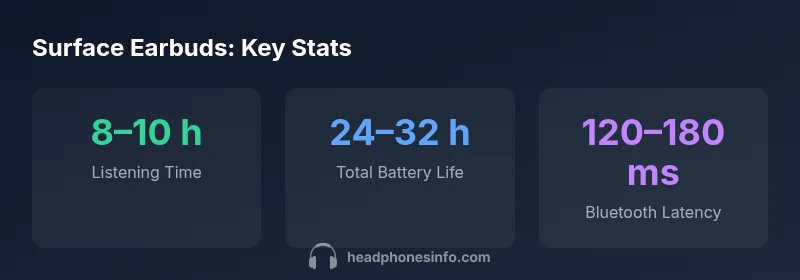
On a typical workday, you can expect 8–10 hours of playback with the buds, and 24–32 hours total with the charging case. Real-world results depend on volume and call usage, but the setup generally supports a full day of work without constant recharging.
Expect about 8–10 hours of listening, with the case extending total life to 24–32 hours depending on use.
Are Surface Earbuds comfortable for long listening sessions?
Yes, the design prioritizes a soft, compact fit that reduces ear fatigue during extended use. The range of ear-tip sizes helps many users achieve a reliable seal, although some may still prefer a different shape if they wear glasses or have unique ear geometry.
They’re comfortable for long use thanks to a soft, compact design and multiple tip sizes.
What scenarios are Surface Earbuds best suited for?
They excel in productivity-heavy scenarios: video calls, note-taking, and listening while working on a Windows-based setup. For audiophiles or gamers seeking top-tier sound and ultra-low latency, alternatives with stronger sonic performance and ANC may be preferable.
Ideal for Windows-based work and calls; they’re less ideal for bass-heavy listening or low-latency gaming.
What to Remember
- Prioritize productivity: strong Windows integration and reliable mic
- Choose if comfort and daily wearability matter most
- Expect modest bass and limited ANC compared to rivals
- Easy, quick pairing across devices enhances workflow
- Battery life is solid but not industry-leading