Are USB-C Headphones Lossless? A Practical Guide
Discover if USB-C headphones can deliver lossless audio, what drives true bit-perfect sound, and how to verify specs and maximize sound quality.


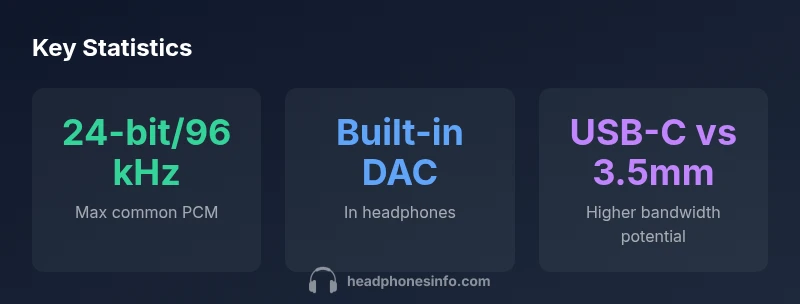
Definition: USB-C headphones transfer digital audio via USB-C. Whether that sound is lossless depends on the DAC in the headphones and the source—not the connector itself. If your source delivers high-resolution PCM (for example, 24-bit at 96 kHz or higher) and the headphones’ DAC can decode it, you can achieve bit-perfect playback. Otherwise, audio may be compressed or downsampled.
Understanding lossless audio and USB-C basics
According to Headphones Info, the term 'lossless' describes audio data that has been transmitted or stored without perceptible compression. In practice, what you hear hinges on the entire chain: the source file, the transport, and the headphone's DAC/amp. USB-C is a digital interface that can carry high-bandwidth PCM, but it does not guarantee lossless sound by itself. The key is whether the source is delivering true PCM and whether the headphone DAC can decode it without introducing distortion. So, are usb c headphones lossless? The short answer is: not automatically—the transport matters less than the DAC and source. With a high-quality DAC and a lossless source, you can achieve bit-perfect playback; with lower-end hardware or compressed streams, you’ll hear the limits of the chain. As you shop, remember that the real gains come from the DAC quality and the fidelity of the original file, not from the USB-C connector alone.
How USB-C transports audio and what it means for fidelity
USB-C carries digital audio data using modern audio-class specifications. In a typical headphone setup, there are two main architectures: the DAC sits in the headphones themselves (self-contained USB-C DAC) or the host device performs data conversion and the headphones receive analog signal after a DAC elsewhere. The important consequence: the connector only defines how data travels; the audible fidelity is determined by the DAC quality, the driver support, and the source. When a USB-C headset claims Hi-Res or 24-bit/192 kHz, you should verify that the device actually supports those specs end-to-end, not just marketing. The USB-IF's USB Audio Class 2.0 spec provides capabilities that can support high sample rates, but real-world performance depends on the implementation.
The meaning of 'lossless' for headphones and DACs
"Lossless" refers to PCM representations that capture the original signal without lossy compression. In practice, lossless playback requires: (a) a source with lossless formats (FLAC, ALAC, WAV); (b) a transport that preserves the data without degrading it; (c) a DAC that accurately converts digital samples to analog without added noise. Headphones themselves are transducers; their benefits rely on the chain’s integrity. With USB-C, the claim of 'lossless' hinges on the combination of high-resolution source, compatible DAC, and proper amplification. Without these, you may experience jitter, distortion, or spectral limitations. It’s essential to check supported sample rates and bit depth, and not rely on broad marketing terms alone.
When USB-C headphones can truly deliver lossless audio
Under optimal conditions, USB-C headphones can deliver bit-perfect playback when the source file is lossless and the headphone DAC can decode it at the requested sample rate. This requires: (1) a source that plays back PCM at 24-bit depth and at least 96 kHz (or higher); (2) headphones either with an integrated DAC or a DAC dongle that supports the same rate; (3) a USB-C connection that preserves the data without introducing jitter or impedance mismatches. In practice, many consumer USB-C headphones advertise Hi-Res credentials, but the actual performance depends on the device's driver support and the quality of the DAC. For streaming services, ensure you’re using a lossless tier (where available) and a player that supports the necessary sample rate. Headphones Info analysis shows that the real-world gains are often subtle unless you’re comparing hi-res PCM to standard 16/44.1 content.
Practical steps to maximize audio quality with USB-C headphones
To get the most from USB-C headphones, start with a high-quality source: choose lossless files or a streaming plan that offers FLAC/ALAC. Prefer players and apps that explicitly support high-resolution PCM, and avoid apps that downsample audio unnecessarily. If your device supports USB Audio Class 2.0, enable any hi-res or high-bit-depth settings in the system preferences. Consider a DAC dongle or high-quality USB-C hub if your built-in DAC is modest. Finally, audition multiple tracks across genres to gauge whether the DAC and drivers reproduce dynamic range and micro-detail without excessive hiss or noise.
Common myths about USB-C, lossless, and streaming
A common misconception is that USB-C itself guarantees better sound than every other connection. In reality, the connector is just a transport channel; you still need a capable DAC, clean power, and a high-quality source. Some USB-C headphones market Hi-Res credentials that depend on external factors such as the host device’s output or the file format being streamed. Another myth is that lossless formats always sound better on all USB-C setups; in practice, the perceived improvement depends on the DAC's accuracy and the mastering of the track. Lastly, it's not true that all streaming services deliver true lossless PCM by default—check your plan and audio tier to ensure you're getting the best possible data stream.
How to verify specs and compare models before buying
Before purchasing USB-C headphones, verify key specs: supported sample rate and bit depth, whether a DAC is built-in, and if the device uses USB Audio Class 2.0. Look for independent reviews that test actual output with a clean signal and hi-res sources. If possible, test both lossless and compressed tracks to hear real-world differences. Cross-check the manufacturer’s stated capabilities with third-party measurements when available. A systematic approach helps ensure your choice aligns with your listening goals.
USB-C headphones and lossless compatibility at a glance
| Aspect | Lossless Potential | Notes |
|---|---|---|
| Source format | PCM up to hi-res | Depends on source content and codec |
| Connection | USB-C | Connector alone doesn't guarantee lossless |
People Also Ask
Is USB-C inherently lossless?
No. USB-C is a transport. Lossless audio depends on the source’s PCM data and the headphone DAC/amp. A hi-res source paired with a capable DAC can be bit-perfect, but the connector alone does not guarantee lossless sound.
No—USB-C by itself doesn’t guarantee lossless sound; it’s the DAC and source that matter.
Do USB-C headphones always sound better than 3.5mm?
Not always. USB-C can offer higher bandwidth for hi-res PCM, but the sonic result depends on the DAC, drivers, and the source file. In many cases, a high-quality 3.5mm setup with a good DAC can rival or exceed a budget USB-C headset.
USB-C can be better, but it isn’t guaranteed; it depends on the DAC and source.
Can USB-C support hi-res audio formats?
Yes, but only if the entire chain supports it: a compatible DAC, the USB Audio Class 2.0 pipeline, and a source that offers hi-res PCM. Some USB-C headphones advertise hi-res support, which should be verified with real tests.
Yes, but you must verify the full chain supports hi-res PCM.
How can I verify the audio specs before buying?
Check official specs for sample rate and bit depth, look for USB Audio Class 2.0 support, and read independent reviews that test the hardware. If possible, compare with lossless content to gauge real-world performance.
Check specs, read reviews, and test with lossless content where possible.
“Audio quality is the result of the entire signal chain, not the connector alone. USB-C can support lossless PCM if the source and DAC are up to the task.”
What to Remember
- Understand lossless means true PCM without lossy compression
- USB-C is a transport; DAC and source decide real quality
- Verify sample rate/bit depth and USB spec when shopping
- Use lossless sources to maximize potential