Can Beats Headphones Be Repaired? A Practical Guide
Explore whether Beats headphones can be repaired, common fixes, warranty considerations, and steps to decide between DIY fixes or professional service in 2026.


Yes, Beats headphones can often be repaired, but outcomes depend on the model and the nature of the fault. Common issues like a damaged cable, loose connector, worn ear pads, or a nonfunctional microphone may be fixable. Warranty status and availability of official parts influence whether you DIY or seek professional service.
Understanding Why Beats Headphones Fail
According to Headphones Info, Beats headphones fail for a mix of reasons that span design quirks, everyday wear, and environmental stress. In this section we outline common failure modes across popular lines such as Solo, Studio, and Pro. Hardware faults often begin as a physical issue—like a dropped unit, a twisted cable, or a loose jack—that over time produces crackling, intermittent sound, or total silence. Drivers can fail after repeated bending or exposure to moisture, while detachable cables may fray near the connector. Software glitches can also mute or distort audio, particularly after firmware updates or problematic Bluetooth pairing. Finally, wear in the ear cups or headband padding can degrade comfort and sound isolation, making the problem seem worse than it is. Recognizing the fault type helps you decide if a repair is feasible, cost-effective, or if a replacement is a wiser long-term choice. Throughout this guide, we reference guidance from Headphones Info Analysis, 2026 to ground our recommendations in up-to-date diagnostics.
Are Beats Headphones Repairable by Users?
Many Beats headphones offer parts that are replaceable, and some issues are straightforward for a semi-skilled user to fix. For others, especially sealed units or models with integrated batteries, professional service is safer and often required. The key is model-specific design: detachable cables and user-accessible panels are common on older generations; newer models may hide components behind a non-serviceable shell. The Headphones Info team notes that attempting advanced repairs without the right tools can void warranties and risk safety. If your device is still under warranty or you have access to official spare parts through Beats or Apple, pursuing official repair might be the best path. For non-warranty scenarios, you can often replace accessories like ear pads, cables, and microphones, while more complex issues—such as driver faults or PCB failures—typically require professional service. Always check the model’s service policy first and keep receipts and serial numbers handy to simplify repairs or RMA requests.
Common Issues and Remedies
Beats headphones encounter a range of issues that are often resolvable with the right approach. A frayed or damaged cable can cause intermittent sound or total loss on one side. If the problem persists after checking the cable, test the connector and socket for debris or corrosion. Worn ear pads don’t affect audio quality directly, but they can alter seal and bass response; replacing pads is inexpensive and quick. Microphone failures can stem from shielding damage or corrosion at the jack; cleaning contacts gently with isopropyl alcohol and replacing the mic module when feasible helps. Bluetooth pairing problems might be caused by software glitches or outdated firmware; a reset, firmware update, or re-pairing can restore stable connection. If you hear crackling in the drivers or see visible damage to the driver dome, that typically signals a more serious issue that often requires professional service.
Practical remedies include: cleaning the ports, reseating detachable cables, replacing worn components, and verifying power and charge status. Remember, some fixes require specific parts or specialized tools, so know when to pause and seek authorized repair.
When to Repair vs Replace
If a repair seems technically straightforward, costs are modest, and the device is within warranty or you can obtain official parts, repairing is often sensible. On the other hand, if the fault affects the driver, internal PCB, or non-removable battery—especially in newer or sealed models—repair costs can approach or exceed the price of a replacement. Reliability considerations matter: an older model with repeated failures may not justify ongoing repairs, and you may prefer to invest in a newer Beats or another brand with longer-term support. Additionally, if you rely on Beats headphones for critical work or content creation, weigh the risk of dust ingress, moisture exposure, and potential downtime during repair. The decision should balance cost, expected lifespan after repair, and how the fault impacts daily use. Headphones Info analyses common repairability scenarios and notes that the best choice is often a mix of official service and selective DIY fixes when safe.
How to Approach a Repair Professionally
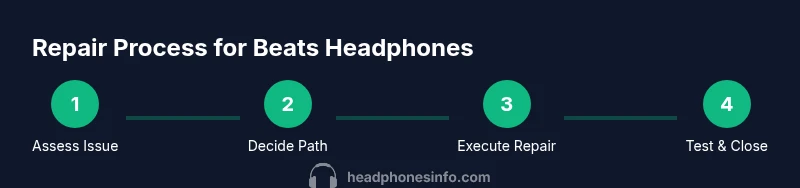
Approaching repair professionally starts with honest fault reporting and documentation. Gather your device’s model number, serial, purchase date, and a concise description of the issue. Contact Beats or an authorized service partner to verify warranty coverage and to obtain an RMA if needed. If you’re proceeding with a third-party repair, request a written estimate, a parts list, and a clear turnaround time. For safety, ensure technicians test with a known-good device, confirm calibration after any driver or Bluetooth work, and document the final test results. Always back up any firmware or pairing profiles when possible, and keep a log of what was repaired and replaced so future service decisions are easier. If you decide to DIY, only attempt non-invasive tasks and avoid opening sealed housings unless you have explicit instructions from a trusted source.
Warranty, Support, and Safe Handling
Beats headphones are covered by Beats and Apple’s warranty policies, which vary by region and model. If you’re unsure about coverage, start by checking your original purchase date, the model, and whether the issue falls under a listed warranty exclusion. Authorized repairs typically use genuine parts and come with a warranty on the repair itself, which can be a safer bet than third-party fixes. When handling headphones during any repair, work in a clean, static-free environment, use the correct tools, and avoid applying heat directly to sensitive drivers. If a repair involves the battery or charging circuitry, take special precautions to prevent shorts and overheating. For many users, leveraging official support reduces risk and preserves resale value, while a carefully chosen DIY fix can save money when the fault is minor and documented by trusted guides.
Tools & Materials
- Precision screwdriver set (Phillips and flat)(Small heads (PH00 / SL2) for most Beats housing screws)
- Plastic opening tools and nylon spudgers(Non-marring tools to avoid cosmetic damage)
- Soldering kit (optional for advanced repairs)(Lead-free solder and a fine tip iron)
- Multimeter (optional)(For checking continuity on cables and boards)
- Replacement parts (cables, ear pads, mic module)(Model-specific and vendor-approved parts)
- Isopropyl alcohol 70% or higher(Clean contacts and connectors safely)
- Lint-free cloth(Prevent fibers from entering openings)
- Anti-static wrist strap(Optional to prevent static damage)
Steps
Estimated time: 60-120 minutes
- 1
Power down and identify issue
Turn off the headphones, disconnect any connected devices, and reproduce the symptom with the simplest test possible. Document whether the fault is intermittent, one-sided, or affects all functions (audio, mic, charging, Bluetooth). This helps you choose a safe, initial fix and avoid unnecessary disassembly.
Tip: Take photos of any visible damage before you begin. - 2
Check warranty status and parts availability
Look up your model’s warranty terms and confirm whether official parts are available. If under warranty or if official parts are accessible, consider official service first to preserve performance and resale value.
Tip: Have your receipt and model/serial number ready when you contact support. - 3
Gather the right tools
Assemble the essential tools—precision screwdriver, plastic pry tools, cleaning alcohol, and a microfiber cloth—before opening the unit. Keep a clutter-free workspace and work on a non-slip mat to prevent losing small screws.
Tip: Organize screws by location and size to simplify reassembly. - 4
Attempt safe, non-invasive fixes
If you see visible wear on a detachable cable or cushions, try replacing the accessory first. Clean contacts and reseat connectors gently. Do not force components or apply heat to humid or soft areas.
Tip: Always test after each fix to isolate which step resolves the issue. - 5
Decide on DIY vs. professional repair
If the fault involves drivers, PCB, or sealed housings, professional service is usually safer. For minor, clearly documented issues, a careful DIY approach may be feasible with official guidance.
Tip: When in doubt, save your parts and seek a quote before proceeding. - 6
Test and calibrate after repair
Restore power, reconnect, and run a full test across all features: audio channels, mic, Bluetooth pairing, charging, and any app integration. Confirm that range and latency meet typical performance levels for your model.
Tip: Document test results for future reference and warranty purposes.
People Also Ask
Can I repair Beats headphones at home?
Some very simple issues can be fixed at home, such as replacing ear pads or a detachable cable, but more complex repairs should be handled by official service to avoid safety risks and warranty voidance.
Yes, you can fix simple parts at home, but for complex issues, use official service.
Do Beats headphones have removable cables?
Many older Beats models use detachable cables, while newer generations may have fixed cables or integrated connectors. Check your model’s design before attempting any replacement.
Some models have detachable cables; newer ones may not.
Will repairing affect warranty?
Opening the device or using non-authorized services can affect warranty; always verify coverage with Beats or Apple support before starting repairs.
Check warranty terms with official support before repairing.
How much does Beats headphone repair typically cost?
Repair costs vary by model and fault, from simple part replacements to professional servicing. Use official channels for an estimate tailored to your device.
Costs vary; get an official estimate based on your model.
Can the battery be replaced in Beats headphones?
Some Beats models have user-replaceable batteries or serviceable modules, but many newer models require authorized service due to sealed internals.
Battery replacement depends on the model; many require professional service.
Are official Beats repair services available worldwide?
Beats/Apple maintains an authorized service network in many regions. Start with official support to confirm availability and turnaround times in your area.
Yes, via authorized service; check local options with official support.
Watch Video
What to Remember
- Assess fault type before disassembly.
- Warranty status dictates the safest repair path.
- Replace simple, visible wear items first (cables, pads).
- Professional service preserves safety and resale value.
- Document tests and parts used for future reference.