Difference Between Headphones and 3D Headphones: A Comprehensive Guide
Explore the key differences between standard headphones and 3D headphones, including sound reproduction, spatial audio tech, setup, and value to help you choose confidently.


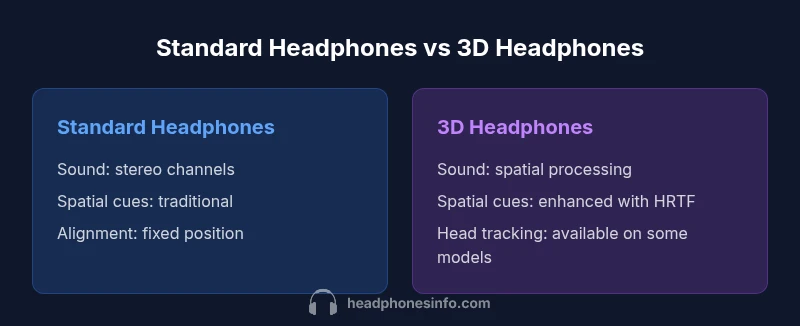
The difference between headphones and 3d headphones centers on how sound is reproduced and spatial cues are created. Standard headphones deliver stereo audio through two channels, providing solid imaging and bass. 3d headphones use processing, head tracking, and sometimes multiple drivers to simulate surround space, which can enhance immersion for compatible content. Real-world results depend on calibration, content, and platform support.
What are 3D headphones, and how they differ from standard headphones?
According to Headphones Info, the difference between headphones and 3d headphones centers on how sound is reproduced and how space is conveyed. Standard headphones deliver stereo audio through two channels, providing left-right imaging with natural bass and detail. 3d headphones, by contrast, rely on processing that simulates surround sound, often using head tracking or multiple drivers to create a sense of distance and position around the listener. The result is a more immersive scene, but it depends on software calibration, content availability, and careful tuning of fit and latency. The Headphones Info team found that user experience varies greatly across models, even within the same price tier. This means your choice should be guided by your primary listening goals and the platforms you use.
The science behind spatial audio: stereo vs 3d processing
Spatial audio relies on how the brain interprets cues from sound arriving at each ear. Standard headphones provide stereo information, which the brain uses to infer location, depth, and distance. 3d headphones augment this with programmed head-related transfer function (HRTF) processing, dynamic filters, and sometimes head-tracking to create a more convincing sense of space. In practice, this can translate to sounds that appear to come from in front, behind, or around you, especially in games and movies. Headphones Info notes that results vary because the effectiveness of spatial cues depends on the quality of the processing engine, the content being played, and how well the device keeps latency low and calibration accurate.
Use cases: gaming, movies, and music
Choosing between standard and 3d headphones often boils down to how you use them. Gamers may benefit from accurate positional cues and responsive head tracking, which can improve situational awareness. Movie enthusiasts and music lovers with immersive formats can enjoy enhanced ambience when content is encoded for spatial audio. However, for casual listening and portable devices, the advantages may be muted by latency, battery life, or reduced detail in certain genres. The Headphones Info team emphasizes testing both types with your favorite content to gauge real-world benefits.
Hardware and build considerations
3d headphones frequently introduce more complex drivers, sensors, and software layers than basic models. This can impact weight, comfort, and battery life. Impedance and sensitivity matter for drive strength and volume consistency across devices. Wireless variants may advertise low latency, but performance depends on the codec and pairing stability. When evaluating hardware, look for adjustable head-tracking options, robust software support, and a design that maintains comfort during long sessions.
Calibration and setup: getting the most from 3d headsets
The full potential of 3d headphones comes from proper calibration. Software ecosystems across brands offer room calibration, personalized HRTF profiles, and game or cinema specific presets. Expect to spend time in a setup wizard to adjust head-tracking sensitivity, EQ, and surround parameters. Headphones Info recommends starting with a neutral profile, then fine-tuning based on your listening environment and preferred genre. A well-calibrated system reduces fatigue and improves spatial accuracy.
Sound quality, imaging, and subjective feel
Sound quality for 3d headphones is a balance between technical accuracy and perceptual immersion. Some listeners report more engaging imaging and a wider soundstage, while others find the effect artificial or fatiguing after long sessions. In practice, the best results come from models with clean drivers, low distortion, and reliable tracking. For standard headphones, the emphasis is often on tonal balance, transparency, and portability, with many models delivering excellent clarity even without spatial processing.
Price, value, and buying guidance
Pricing for 3d headphones spans budget, mid-range, and premium tiers. Because the benefits depend on software, content availability, and calibration, the value is highly content-dependent. For casual listening, standard headphones frequently offer better value and broader compatibility. If you pursue gaming or cinematic experiences regularly and have compatible content, a 3d headphone setup may justify the investment.
Choosing between standard and 3d headphones: decision flow
Start by listing your main uses: gaming, movies, music, or mixed. Check content availability and platform support for spatial audio in your ecosystem. Consider comfort, battery life, and portability. If you value ease of use and broad compatibility, standard headphones are often the safer choice; if you crave immersive space and have compatible content, explore 3d headphones with strong calibration options.
Practical testing tips at home
Test in a controlled room with familiar content. Compare a standard pair against a 3d-capable model using the same source. Listen for how well spatial cues align with your head movements, how latency affects action scenes, and whether the overall tonal balance remains natural. Keep comfort in mind, as extended sessions reveal true differences in fatigue and support.
Comparison
| Feature | Standard headphones | 3D headphones |
|---|---|---|
| Sound reproduction | Stereo channels | Spatial processing with HRTF |
| Spatial imaging | Natural stereo cues | Expanded soundstage with virtual surround |
| Head tracking | Typically none | Often available on compatible models |
| Latency | Low to moderate | Low in wired; variable in wireless |
| Calibration | Basic EQ and fit adjustments | Software calibration and profiles |
| Use cases | Music, casual listening, portability | Gaming, movies, VR/mixed reality |
| Price range | Wide range depending on model | Typically higher for active spatial systems |
Upsides
- Standard headphones offer broad compatibility and often better value
- 3D headphones can enhance immersion for compatible content
- Calibration can unlock better spatial accuracy on both options
- Wider content support than ever in modern streaming and games
Disadvantages
- 3D implementation varies by model and may not always feel natural
- Higher cost and more complex setup for 3D headphones
- Latency concerns with wireless systems can impact perception
3D headphones are worth it for immersive content on compatible platforms; standard headphones remain the safer all-around choice
Choose 3D headphones if your content and devices support spatial audio and you value immersion. Otherwise, standard headphones deliver reliable performance, broader compatibility, and better value.
People Also Ask
What are 3D headphones, and how do they differ from regular headphones?
3D headphones use software processing and sometimes head tracking to simulate surround sound, creating a wider sense of space. Regular headphones provide stereo sound with two channels and rely on brain interpretation for depth. The main difference is spatial presentation and how much the system depends on software and content.
3D headphones simulate space using processing and sometimes head tracking, while regular headphones deliver stereo sound. The result is a wider soundstage with spatial cues, depending on software and content.
Do I need special content or platforms for 3D headphones to work?
Yes, to get the strongest 3D effects you typically need content encoded for spatial audio and a platform that supports the processing. Not all games or movies provide this by default, and some devices require enabling a spatial audio mode. If your library lacks spatial formats, the benefit may be limited.
Most 3D effects require spatial audio content and platform support. If your content isn’t encoded for spatial audio, you may not notice a big difference.
Are 3D headphones worth the extra cost for everyday listening?
For everyday listening, the extra cost may not always translate into perceived improvements. The value depends on how often you engage with spatial audio content and how important immersion is to you. If you mainly stream standard audio, standard headphones are usually the better value.
For daily listening, standard headphones often give you better value unless you frequently use spatial audio content.
Can I convert standard headphones to 3D through software?
Some software can apply virtual surround processing to stereo headphones, but results vary and may introduce latency or color the sound. True 3D effects are typically hardware- and content-dependent. Expect mixed results if you try to retrofit regular headphones.
Some apps can add virtual surround, but results vary and aren’t a perfect substitute for true 3D headphones.
What should I look for when buying 3D headphones?
Prioritize calibration options, head-tracking availability, platform support, and comfort. Check the latency of wireless models and read reviews about actual spatial performance. A good test is to compare a 3D model with a trusted standard pair using the same content.
Look for calibration options, tracking, platform support, and comfort; test with real content before buying.
How does head tracking influence the listening experience?
Head tracking can dramatically improve immersion by adjusting the soundstage as you move. When it works well, it enhances realism; when miscalibrated, it can feel distracting. Its presence is a key differentiator for higher-end 3D headphone setups.
Head tracking makes sound move with your head for realism, but poor calibration can be distracting.
Are there latency concerns with wireless 3D headphones?
Wireless transmission can introduce latency, which may affect timing-critical content like gaming or movies. Look for low-latency codecs and ensure the device supports the required profiles. Wired connections generally minimize latency concerns.
Wireless 3D headphones may have latency; choose low-latency codecs and test with your favorite content.
What to Remember
- Clarify your primary use: gaming/movies vs music
- Test both types with your favorite content
- Prefer calibrated models for best spatial accuracy
- Balance comfort and weight for long sessions