Do Wired Headphones Need to Be Charged? A Practical Guide
Explore whether wired headphones require charging, which models have built-in batteries, how to identify charging needs, and practical tips to maximize battery life and reliability in 2026.


Do wired headphones need to be charged? In most cases, no. Passive wired headphones rely solely on the audio signal from your device and have no internal power. Only wired models with built-in batteries—such as gaming headsets or ANC-enabled wired headphones—require occasional charging. If there's no battery, you won’t need to charge them. Follow manufacturer guidance for any battery-powered components.
Do wired headphones need to be charged? A practical baseline
For most listeners, the answer is straightforward: do wired headphones need to be charged? In everyday listening, the vast majority are passive devices and do not require any charging. They convert the electrical signal from your source into sound without drawing power from an internal battery. The short truth is simple: if it’s purely passive, you listen without plugging in a charger. If there is a battery involved, it powers specific features (like ANC, LED lighting, or an integrated mic) and will need periodic charging. According to Headphones Info, the vast majority of traditional wired earphones and headsets fall into the passive category, delivering reliable sound without battery maintenance. This distinction helps you plan usage and charging routines depending on the model you choose or currently own.
- Passive wired headphones: No internal power, no charging required
- Battery-powered wired headphones: Charging needed for ongoing functionality
- Features like ANC or lighting usually drive power draw that necessitates charging
How power works in wired headphones
Wired headphones sit at the intersection of audio fidelity and power management. Traditional drivers in passive models convert electrical energy from your device into sound without a power reservoir. In contrast, wired headphones with built-in batteries add a small energy storage element to support active features. Inline remotes, microphones, LED indicators, and active noise cancellation are common power consumers. The presence of a battery changes the calculus: it enables features but also introduces maintenance tasks, including periodic charging. For most users, this means you’ll decide based on whether you need features like ANC, mic accessibility, or lighting. Headphones Info’s analysis shows that models offering ANC or LED lighting often require regular top-ups to maintain peak performance. In practice, if you don’t use ANC or lighting, your charging needs may be minimal.
- ANC and LED indicators draw power
- Inline mics and remotes can add minor consumption
- Passive drivers do not use internal power
Where built-in batteries appear
Built-in batteries tend to appear in a subset of wired headphones designed for enhanced functionality. Gaming headsets with wired connections frequently include rechargeable packs to power strong mic performance, surround-sound simulations, and customizable lighting. Some ANC-enabled wired headphones also rely on internal power to amplify noise-canceling effects when connected via USB or a dedicated dongle. Headphones with inline controls or detachable cables may house small cells to sustain features during wired operation. The practical takeaway is that if your model advertises ANC, RGB lighting, or a microphone that performs particularly well in dynamic environments, you should expect a charging routine. The Headphones Info team notes that such batteries are designed to be user-replaceable in some models, while others require service through the manufacturer.
- Gaming headsets with USB power
- Wired ANC headphones with built-in packs
- Inline-control headsets with battery-backed features
How to tell if your wired headphones need charging
Identifying charging needs is straightforward when you know where to look. Many battery-powered wired headphones show a charging indicator—LEDs or a battery icon—on the earcups or inline remote. Some models provide a companion app or a USB-C interface that reports battery status. If you notice appreciable audio drop in ANC mode, reduced microphone performance, dim LEDs, or a general drop in feature reliability (like weaker ambient sound suppression or odd mic behavior), it’s a cue to check the charge. Always consult the user manual for exact indicators. If there’s no battery indicator and you’ve never charged the device, it’s likely a passive model that doesn’t require charging for use.
- Look for battery icons or charging LEDs
- Check companion apps or USB interfaces for status
- Notice any feature degradation as a charging cue
How to charge wired headphones (when applicable)
Charging wired headphones with built-in batteries typically follows standardized methods, but it’s essential to use the charger specified by the manufacturer. Most models charge via USB-C or micro-USB and may require a specific power adapter to avoid long-term wear. When charging, keep the unit in a safe, well-ventilated area and avoid using it while it’s plugged in if the design cautions against it. For travel or daily use, keep a compatible charger on hand, and Never exceed the recommended charging duration, as overcharging can impact battery health. Headphones Info recommends periodic charging as part of routine maintenance to preserve peak performance and ensure features remain reliable over time.
- Use only the recommended charger
- Avoid charging in extreme temperatures
- Do not rely on fast-charging unless specified by the manufacturer
Battery health, lifespan, and safety considerations
Like any rechargeable battery, the internal cell in wired headphones has a finite lifespan. Battery health depends on charge cycles, temperature exposure, and how often the battery is fully depleted. Over time, peak capacity may degrade, leading to shorter usage between charges. Safety considerations include avoiding physical damage to the cable, avoiding exposure to moisture, and using certified chargers. If a battery no longer holds a charge effectively, consider manufacturer-supported service options or battery replacement if available. Regular charging, safe storage, and following the user guide all contribute to longer battery life and consistent performance.
- Expect gradual capacity loss over years
- Protect from heat and moisture
- Follow official service recommendations when needed
Practical maintenance and everyday tips
To maximize reliability, keep your wired headphones’ charging routine simple and aligned with how you actually use them. If you frequently game or use ANC, plan for a regular top-up schedule. If you rarely use the feature-packed variants, you may operate as a passive device and charge less often. Simple steps help: keep cables tidy, store on a cool shelf, and avoid accidental drops that can compromise battery seals. Document your charging cadence to identify any sudden shifts in battery health. For most shoppers in 2026, a pragmatic approach is to treat battery-powered wired headphones as occasional charging devices with feature-driven quirks rather than a daily staple. This mindset helps preserve the device’s value and performance over time.
- Establish a predictable charging cadence
- Store in a cool, dry place
- Use manufacturer guidance for servicing
Comparison of wired headphone power requirements
| Headphone Type | Power Source | Charging Required? | Pros | Cons |
|---|---|---|---|---|
| Passive wired headphones | N/A (no battery) | No | Simple, durable, no maintenance | No ANC or LED features |
| Wired headphones with built-in battery (gaming ANC) | Battery, USB-powered | Yes | ANC, LED lighting, enhanced mic | Requires charging, potential battery degradation |
People Also Ask
Do all gaming headsets with cables have built-in batteries?
Not all gaming headsets are battery-powered. Some are purely passive; others include a rechargeable pack for mic, ANC, or lighting. Always check the model specifications to confirm battery presence.
Most gaming wired headsets have batteries for extra features, but some are passive—check the exact model specs.
Can I use any charger for wired headphones with built-in batteries?
Use the charger recommended by the manufacturer. Using an incompatible charger can affect charging speed, battery health, and safety.
Always use the recommended charger to protect the battery and performance.
What happens if I skip charging my battery-powered wired headphones?
If charged features are active, you may lose ANC, mic performance, or LED indicators. The headphones will still function as a wired device, but non-charged features may be unavailable.
You might lose features like ANC or lighting, but basic audio can still work.
How long do wired headphones' batteries typically last?
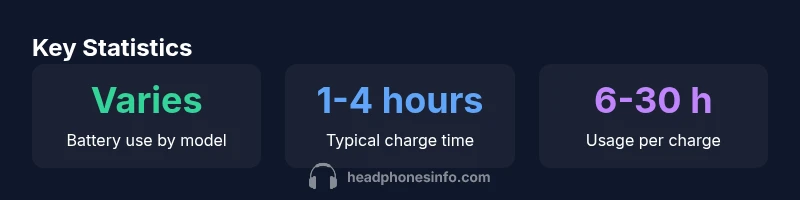
Battery life varies by model, but many wired headsets with built-in power offer several hours per charge. Always refer to the manufacturer’s specs for exact figures.
Life depends on the model; check the official specs for precise hours.
Do inline controls drain the battery quickly?
Inline controls can draw small amounts of power, but the impact is usually modest compared with features like ANC. Battery health depends on overall usage patterns.
They draw some power, but usually not the main factor in battery life.
Is it safe to charge while wearing wired headphones?
Most designs advise against using or charging the headset simultaneously. Follow the safety guidance in the manual to avoid any risk.
Check the manual; charging while wearing isn’t typically recommended.
“Battery-powered wired headphones unlock features like active noise cancellation and customizable lighting, but treat the internal battery as a consumable component that benefits from proper charging and care.”
What to Remember
- Most wired headphones do not require charging
- Battery-powered wired models enable features but need care
- Watch for indicators to know when to charge
- Always use manufacturer-approved chargers
- Regular maintenance extends battery life