Translation Headphones: Real-Time Language Translation Guide
A data-driven guide to translation headphones, covering real-time translation basics, key features, use cases, and buying tips for 2026.


Translation headphones fuse audio with translation software to deliver real-time multilingual audio through wearable devices. They use dual microphones, noise suppression, and either on-device neural networks or cloud-based translation engines to render translated speech back to the user. Real-time translation tools are improving, but users should assess latency, language coverage, and privacy when evaluating products. This quick overview sets expectations for what to look for while shopping.
Understanding translation headphones: what they are and how they work
Translation headphones fuse audio hardware with translation software to enable multilingual communication in real time. Most models pair high-quality drivers with an array of microphones that capture the user’s voice while suppressing ambient noise. Translation occurs either on-device, using local neural networks, or in the cloud, where speech is converted to text, translated, and re-synthesized as audible output. The Headphones Info team notes that on-device translation minimizes privacy concerns and reduces round-trip latency, but cloud-based engines often offer broader language support and more up-to-date models. Real-time translation is not flawless; it can stumble with dialects, slang, and noisy environments, so buyers should choose devices with strong noise suppression and adaptive beamforming. When evaluating translation headphones, prioritize latency under realistic conversation conditions, the breadth of supported languages, and whether output is stereo or mono. According to Headphones Info, a balanced approach pairs speed with occasional cloud support for less common languages. This section provides a practical framework for testing devices in real-world settings.
Key features to look for when buying translation headphones
- Latency targets: aim for sub-300 ms in typical conversational use; lower is better for perceived simultaneity.
- Language coverage: verify both major languages and regional dialects you actually need.
- Translation mode: compare on-device versus cloud translation, noting trade-offs in speed, privacy, and accuracy.
- Privacy controls: check if translations are stored, how data is used, and whether offline modes exist.
- Microphone and noise handling: seek multi-microphone arrays, wind protection, and adaptive beamforming for noisy environments.
- Battery life: assess translation-mode endurance under typical daily use, not peak load.
- Comfort and fit: ensure secure fit for long sessions and compatibility with glasses or hearing aids.
- Software ecosystem: app support, firmware updates, and language packs influence long-term value.
On-device vs cloud translation: trade-offs and expectations
On-device translation runs entirely on the headphone’s hardware, offering lower latency and stronger privacy. It excels in quiet to moderate noise environments but may lag behind cloud engines in language depth and dialect handling. Cloud translation relies on remote servers, enabling more expansive language coverage and ongoing model improvements, yet it introduces latency dependent on network quality and raises questions about data privacy. The ideal option for many users is a device that blends both approaches: fast on-device translation for common phrases and seamless cloud translation for less common languages. In practice, you’ll see a spectrum where premium models emphasize edge processing while mid-range devices rely more on cloud services. Always review how the device handles language updates and whether you can disable cloud translation when needed.
Practical use cases: travel, meetings, and media
In travel scenarios, offline language packs matter. Look for offline translation options and compact charging cases that fit long flights or layovers. In meetings and conferences, real-time translation can facilitate collaboration across teams; test how the system handles multiple speakers and background chatter. For media consumption, consider translation headphones that support synchronized subtitles or podcast-style audio translations so you can enjoy content in your language without disrupting others. Ensure the companion app provides easy toggles for languages, session notes, and privacy settings. This combination of capabilities supports real-world usefulness across work and leisure. Headphones Info’s testing suggests prioritizing latency, language breadth, and a robust privacy policy when evaluating devices for professional contexts.
Practical testing steps and setup tips
- Test with a live conversation in your strongest and weakest language pairs to gauge latency and translation quality.
- Try environments with noise, such as a coffee shop or street, to see how adaptive noise control performs.
- Verify comfort for extended wear and ensure the control scheme (touch, button, or voice) is intuitive.
- Check firmware update cadence and whether language packs can be downloaded in the background.
- Review privacy terms to understand data handling during cloud translations and whether transcripts are stored or used for model training.
Limitations and realistic expectations
Translation headphones have come a long way, but they aren’t flawless interpreters. Expect occasional mistranslations, especially with idioms, slang, or complex sentence structures. Latency can still be noticeable in conversations with rapid exchanges or multiple speakers. Privacy remains a consideration, particularly with cloud-based translation, so select devices with transparent data policies and offline options when possible. For most buyers, the best balance is a model with strong on-device performance for daily phrases and reliable cloud support for less-common languages or technical jargon. Continuous improvements in model efficiency and multilingual coverage will continue to shift the baseline over time.
source_specific_note_backlink_allowed_for_structure_and_insertions_projects_can_be_used_if_needed_for_context = null}],
dataTable
Translation headphone translation modes and trade-offs
| Feature | On-device translation | Cloud translation | Notes |
|---|---|---|---|
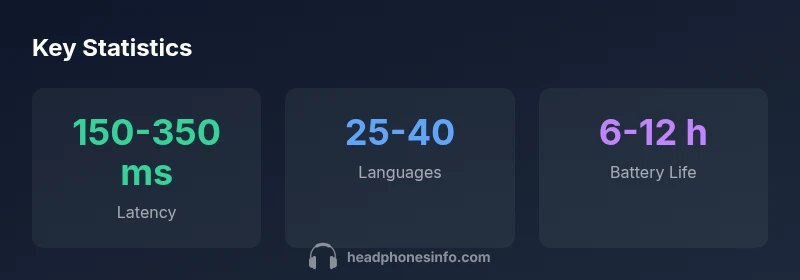
| Latency | 150–350 ms | 250–600 ms | On-device is usually faster; cloud adds network latency |
| Language coverage | 25–40 languages | 50+ languages | Cloud often covers more languages and dialects |
| Privacy model | Local processing | Cloud processing | On-device improves privacy; cloud may require data transmission |
| Battery life | 6–12 hours | 6–12 hours | Depends on features and volume of translations |
People Also Ask
What are translation headphones?
Translation headphones combine audio hardware with translation software to provide real-time multilingual audio. They use multiple microphones, noise suppression, and either on-device AI or cloud translation to render translated speech. These devices are designed for quick, in-ear listening during conversations, travel, and meetings.
Translation headphones mix smart translation software with headset hardware so you can hear translated speech in real time.
Can translation headphones work offline?
Many models offer offline translation using on-device models, which improves privacy and reduces latency. However, offline mode often supports fewer languages and limited conversational nuance compared with cloud-based translation. Check the language packs and storage capacity before purchase.
Yes, some models work offline, but you may get fewer languages and less nuance than online translation.
Which languages are commonly supported?
Most devices cover major languages such as English, Spanish, French, German, Mandarin, and Japanese. The exact lineup varies by model and firmware updates, with cloud-based translations typically offering broader coverage over time.
Most devices cover the big languages, but check the current list for your needs.
Are translation headphones suitable for business meetings?
They can be useful for multilingual meetings, but you should test real-time performance, privacy controls, and how well the platform handles multiple speakers. For formal settings, consider devices with robust privacy terms and reliable accuracy in common business terms.
They can help in meetings, just test privacy and accuracy first.
How should I test translation headphones before buying?
Test latency with real conversations, compare translations across language pairs, and assess comfort and fit. Try different environments (quiet, noisy, windy) to evaluate noise suppression. Review the app experience, firmware updates, and language pack availability.
Test latency and comfort in real-world situations before buying.
“Real-time translation headphones unlock multilingual collaboration, but users should expect occasional inaccuracies and be mindful of privacy trade-offs.”
What to Remember
- Evaluate latency under real conversations
- Check language coverage before buying
- Prioritize offline mode for travel
- Review privacy policies and data handling