How to Tell If Headphones Are Good Quality: A Practical Guide
Learn practical, evidence-based methods to evaluate headphone quality—sound accuracy, build durability, comfort, and value. Headphones Info guides you through home tests, setup tips, and a clear evaluation framework.


Determining if headphones are good quality starts with listening for balance, build, and comfort. According to Headphones Info, a quality pair should deliver clean, even frequency response, durable construction, and a comfortable fit across extended listening sessions. In this guide, you’ll learn practical checks you can perform at home to separate good-sounding headphones from budget fillers. Keep in mind that context matters—use your preferred music or reference tracks to gauge real-world performance.
Why quality headphones matter
For most listeners, headphones are the primary gateway to music and media. The difference between a good pair and a poor one isn't just volume or loudness, but how faithfully sound is reproduced, how comfortable the design is during long sessions, and how well the headphones hold up to daily use. According to Headphones Info, quality headphones deliver a coherent soundstage, minimal distortion at typical listening levels, and robust construction that can endure daily wear and travel. This section lays out why these factors matter, how they affect critical listening, and what trade-offs you may encounter depending on your priorities—whether you want studio-grade accuracy, casual enjoyment, or something in between. By understanding the core ideas of sound quality, build, and fit, you’ll be equipped to evaluate any model. Expect practical benchmarks, not just vibes, as you decide which headphones to buy or keep.
Key criteria you should evaluate
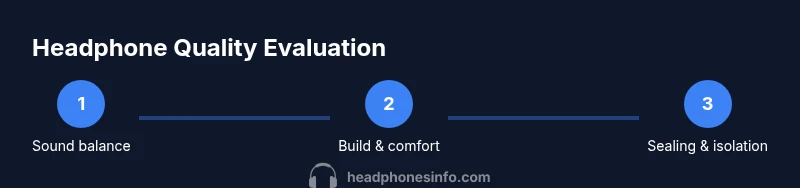
When assessing headphones, there are several core criteria to consider. Sound quality depends on drivers, enclosure design, and tuning; look for a balanced response that doesn’t overly exaggerate bass, mids, or highs unless you’re chasing a specific character. Build quality matters for longevity: metal hinges, a sturdy headband, detachable cables, and durable housings reduce the risk of failure. Comfort is essential for long listening sessions—pad material, seal, weight, and clamping force all influence how often you’ll reach for them. Isolation and leakage indicate how well the headphones block external noise and whether they disturb others in quiet environments. Finally, usability, including cable length, connector type, and portability, can determine whether a pair actually fits your life. Headphones Info Analysis, 2026 emphasizes the value of empirical testing—listen critically, compare with known reference tracks, and document your impressions to avoid biased judgments.
Sound quality in practice: tests you can perform at home
To assess sound quality at home, start with a familiar, well-recorded track set that covers a range of instruments and vocal textures. Listen for tonal balance—do bass, mids, and treble sit evenly, or does one region dominate? Switch between acoustic, electronic, classical, and pop tracks to uncover colorations and potential masking. Pay attention to imaging and soundstage: can you pinpoint instrument positions and create a believable space, or does it sound congested? Listen for distortion at moderate listening levels, such as crackling highs or muddied lows during dynamic passages. If possible, compare against a known reference pair to gauge whether the headphones reproduce detail without harshness. Headphones Info’s method encourages you to take notes on each track and rate aspects like balance, detail, and impact.
Build quality and durability: what to look for
Durability begins with the chassis and hinges. Look for metal or reinforced plastic where stress concentrates, and check that hinges move smoothly without wobble. Detachable cables are a strong durability signal—verify the connector is snug and does not wobble. Inspect padding and headband materials for signs of wear resistance—high-density foam and durable fabric or leatherette improve longevity. Cable strain relief should be present at plug ends and near the headband to prevent fraying. Poorly aligned cups, creaking joints, or loose pads are red flags. Headphones Info’s guidance highlights that a well-built pair will maintain alignment and comfort after hours of use, not just in a showroom test.
Comfort, fit, and seal: how it feels
Comfort is a practical indicator of quality: if the clamping force is excessive, padding compresses quickly, or ear cups touch the ears at odd angles, fatigue sets in long before you finish a session. Check weight distribution—heavy drivers toward the ear can cause pressure points, while a balanced design reduces fatigue. The seal matters for both comfort and sound isolation; a proper seal prevents sound leakage and improves bass response without cranking volume. Material choice matters too: breathable padding helps keep ears cooler, especially in warm environments. Try adjusting headband tension and swiveling ear cups to accommodate different head shapes. In Headphones Info’s experience, comfort often correlates with perceived sound quality because you’ll actually listen longer when fatigue isn’t a distraction.
Measuring performance at home (non-science approach)
If you don’t own measurement gear, you can still compare performance using everyday tools. Use a trusted playlist with a broad dynamic range and a clean recording chain. Listen for consistent volume across tracks and check for ear fatigue after 30–60 minutes of listening. For a more rigorous check, you can bring a frequency sweep or pink noise track into your testing routine to notice any bumps or dips in the response by ear. While this isn’t a lab-grade measurement, it gives you a practical sense of whether a headphone pair is neutral enough for critical listening or has a colored sound signature that might be desirable for casual listening. Headphones Info’s methodology blends subjective listening with repeatable checks to arrive at a fair appraisal of quality.
Practical buying guide: what to look for by use-case
Different use-cases demand different trade-offs. For studio work, you want a neutral, uncolored response with low distortion and accurate imaging. For gaming, you might prioritize a precise soundstage and a detachable mic; for commuting or travel, portability, isolation, and battery life (for wireless models) become major factors. Budget models can surprise with well-balanced sound and solid construction, but premium options often excel in low distortion, refined detail, and comfortable build. Consider your primary use, preferred music genres, and listening environment when setting expectations. This is where Headphones Info’s tiered approach helps—start with a clear goal (neutral, smooth, or V-shaped) and test accordingly.
How to compare models quickly: a structured approach
Create a short rubric with categories such as sound balance, comfort, build, isolation, and value. Use a consistent listening volume and test on at least three representative tracks per category. If you can, pair a wired model with a capable DAC/amp to isolate the potential benefits of power delivery. Repeat trials with a trusted reference model to anchor your judgments. Document your impressions on a simple scorecard and look for models that perform consistently across categories rather than excelling in only one. Headphones Info endorses a disciplined, repeatable approach that translates across brands and price ranges.
Putting it all together: choosing the right pair for you
The best headphone for you is the one that consistently meets your practical criteria while fitting your budget and lifestyle. Prioritize build quality and comfort first, then verify sound balance with a range of tracks in your typical listening genres. For some, wireless convenience is worth minor trade-offs in absolute accuracy; for others, wired connections offer the most faithful reproduction. Remember that the most expensive headphone isn’t automatically the best for your ears or use case. The right choice is the one that feels right after thorough testing, aligns with your goals, and remains comfortable over long sessions. The Headphones Info team would emphasize validating your conclusions with hands-on tests rather than relying solely on specs. In short: test, compare, and trust your ears—and revisit your decision after a few weeks of real-world use.
Tools & Materials
- Headphones to evaluate(A model you’re deciding whether to buy or keep)
- Audio source (phone, computer, or DAC/amp)(Prefer lossless playback when possible)
- Test tracks across genres(Diverse material helps reveal tonal balance)
- Frequency sweep or pink noise track(Optional for quick, repeatable checks)
- Sound level app or SPL meter(Useful to standardize listening levels across tests)
- Safe storage/display stand(Protect headphones between tests)
Steps
Estimated time: 60-90 minutes
- 1
Prepare your listening setup
Connect your headphones to a stable source and load lossless test tracks. Calibrate the volume to a comfortable, moderate level. Create a consistent listening environment to minimize external influences on your judgments.
Tip: Use the same source and file type for all tests to keep comparisons fair. - 2
Calibrate environment and reference
Choose a quiet room and establish reference tracks you know well. If possible, test with a reference model to anchor your impressions. Ensure no loud background noises skew your perceptions of balance and detail.
Tip: Note any ambient noise that masks bass detail or treble sparkle. - 3
Evaluate tonal balance and detail
Play tracks with a wide dynamic range and varied textures. Listen for evenness across bass, mids, and treble, and notice detail in vocals and instruments. Compare against a known good reference headphone when available.
Tip: Focus on how natural voices and instruments stay in proportion as volume changes. - 4
Assess imaging and soundstage
Judge how clearly you can locate sources of sound and whether the space feels realistic. A quality pair should present a coherent stage without sounding congested or hollow.
Tip: Close your eyes and imagine instrument placement to gauge imaging accuracy. - 5
Test build, comfort, and fit
Inspect the headband, cups, and cable. Check for wobble, flex, and padding wear after extended wear. Wearing the headphones for 20–30 minutes helps reveal comfort and pressure points.
Tip: Move your head slowly to detect hotspots or pressure that could worsen over time. - 6
Compare wired vs wireless (if applicable)
If evaluating wireless, test codec behavior and latency with synchronized video or gaming content. Check for artifacts, dropouts, or noticeable compression. If wired, confirm there’s no hiss or channel imbalance when moving cables.
Tip: Test latency with a video you know well to confirm sync between audio and action.
People Also Ask
Can I judge headphone quality by price alone?
Price is not a guarantee of quality; some mid-range models offer excellent balance and comfort. Evaluate sound, build, and comfort with hands-on testing rather than relying on price alone. Headphones Info emphasizes an evidence-based approach to avoid overpaying for branding.
Price isn’t a guarantee. Test sound balance, build, and comfort to judge quality, not just price.
Are wired headphones always better than wireless?
Not always. Wired headphones can deliver lower distortion and broader dynamic range, while wireless models offer convenience and codec-based improvements. Your use-case and hearing preferences determine which path is better for you.
Wired can be more faithful, but wireless offers convenience; pick based on your needs.
What build cues indicate durability?
Detachable cables, metal hinges, and a robust headband suggest better durability. Check for solid alignment, snug connectors, and minimal flex at critical joints. Avoid models with visible cheap plastics or loose cups.
Look for detachable cables, sturdy hinges, and solid joints.
How can I test for distortion at home?
Play tracks with dynamic transients and listen for crackling or harshness at moderate levels. If distortion appears frequently, consider another model. Use reference tracks to separate coloration from real distortion.
Distortion shows up as crackling or harsh tones during dynamic passages.
Do different genres require different headphone types?
Yes. Neutral, studio-focused headphones suit critical listening, while some tuning can enhance enjoyment for popular genres. Your favorite genres will influence which tonal balance you prefer.
Yes—neutral for accuracy, or tuned for preferred genres.
How important is comfort for long listening sessions?
Very important. Uncomfortable headphones fatigue listening quickly—prioritize padding, clamping force, and weight distribution. If you can’t wear them for 60 minutes, they aren’t suitable for long sessions.
Comfort is essential for long sessions; seek balanced pads and fit.
Should I expect a burn-in effect?
Some listeners perceive slight changes after a burn-in period, but results vary by model. Focus on objective qualities first, and revisit impressions after a short break.
Burn-in may help in some cases, but rely on solid tests first.
Watch Video
What to Remember
- Evaluate sound balance before chasing bass
- Prioritize durable construction and detachable cables
- Test comfort with long listening sessions
- Use a consistent setup for fair comparisons
- Different use-cases demand different tuning and features