Is Wireless Headphones the Same as Bluetooth? A Deep Dive
Explore whether wireless headphones are the same as Bluetooth, uncover differences in connectivity, latency, codecs, and use cases. A data-driven guide from Headphones Info.


Is wireless headphones the same as Bluetooth? No. Wireless headphones describe any wireless connection method (Bluetooth, RF dongles, or proprietary links), while Bluetooth is a specific wireless protocol. Most consumer wireless headphones use Bluetooth, which offers broad device compatibility but may incur latency and codec trade-offs. For ultra-low latency, consider RF or dedicated dongles; for casual listening, Bluetooth generally suffices.
What counts as wireless headphones
According to Headphones Info, wireless headphones describe any headset that transmits audio without a physical cable. The term is intentionally broad and does not pin you to a single technology. The most common method today is Bluetooth, which enables devices such as phones, laptops, and tablets to pair quickly. However, some models still rely on non-Bluetooth wireless links—like RF dongles or proprietary wireless transceivers—for computers, gaming consoles, or TVs. When evaluating wireless headphones, focus on the actual connection method and the codec in use, not just the label. This helps clarify differences in sound quality, latency, battery life, and compatibility with your devices.
- Brand reliability matters: a well-documented tech spec and consistent firmware support improve long-term performance.
- Practical tip: always verify the advertised wireless type (Bluetooth vs. RF) and the supported codecs.
- Real-world takeaway: a “wireless” badge is not a guarantee of a single, uniform tech experience across brands.
Headphones Info notes that consumer expectations should balance convenience with performance, especially for gaming, video watching, and calls where latency can affect experience.
Bluetooth vs non-Bluetooth wireless technologies
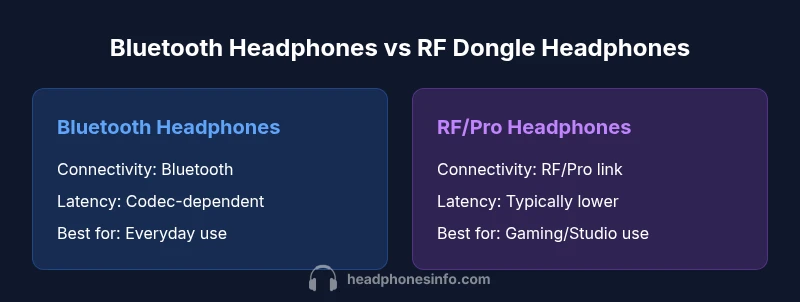
Bluetooth is the dominant wireless standard in consumer headphones today. It is designed for compatibility and ease of use, with widespread support across phones, tablets, and computers. Non-Bluetooth wireless options—like RF dongles or proprietary wireless protocols—are often used for lower latency or specialized setups. RF links can bypass some Bluetooth limitations, delivering quicker response times and a stable connection for PC gaming or studio work. However, RF devices typically require a compatible dongle and may not work as smoothly with mobile devices.
From Headphones Info's perspective, the choice between Bluetooth and RF or other wireless methods boils down to latency, codec support, and ecosystem compatibility. If you value plug-and-play simplicity and universal device support, Bluetooth is usually the better choice. If you need minimum latency in a fixed setup, a dedicated wireless dongle can be advantageous.
Additionally, some high-end Bluetooth headsets implement low-latency codecs (e.g., aptX LL, LDAC) to mitigate delay, though availability varies by device and operating system. Always check codec support and latency specs before buying.
Latency, codecs, and audio quality
Latency is the delay between an audio source and what you hear. Bluetooth latency varies by codec and implementation. Some codecs aim to reduce delay, while others prioritize audio fidelity. LDAC, aptX, and AAC are common Bluetooth codecs with varying performance, and not all devices support every codec. Non-Bluetooth wireless links can offer lower latency because they are designed for stable, dedicated connections. When evaluating sound quality, you should examine both the codec support and the bandwidth of the wireless link. In practice, you may notice subtle timing differences in games or video, particularly with budget or mid-range models. For regular music listening, Bluetooth with a good codec generally provides excellent sound.
Use cases by scenario
Different scenarios demand different wireless setups. For everyday listening, commuting, or working from home, Bluetooth headphones provide broad compatibility and convenient pairing. If you game on PC or console and require rapid audio response, consider wireless options with low-latency dongles or RF-based links. For professional audio work or critical synchronization, some users opt for wired backups or high-performance wireless ecosystems that emphasize ultra-low latency. Understanding your primary use case will guide codec selection, latency expectations, and device compatibility.
Pairing, compatibility, and dongles
Pairing is typically quick with Bluetooth headphones—enable pairing mode on the headset, then select it from your device’s Bluetooth menu. With RF or proprietary wireless headsets, you’ll usually plug a dongle into the source device (PC, gaming console, or TV) and follow on-screen prompts. Dongles can offer stable connections and lower latency but limit compatibility to devices with the appropriate receiver. Always check whether a headset supports multiple devices and how to switch between them. Battery life and charging cadence are also worth considering for long sessions.
How to evaluate wireless headphones
Start with the core questions: what devices will you pair with, what is your tolerance for latency, and how important is audio fidelity? Look for: – Codec support (e.g., aptX LL, LDAC, AAC) – Latency specs in real-world scenarios – Connection type (Bluetooth vs RF or USB dongle) – Battery life and rapid charging – Comfort, weight, and fit – Build quality and durability – Price and value across use cases. Reading user reviews and manufacturer tech notes helps verify practical performance beyond marketing claims.
Common myths and misconceptions
Myth: All wireless headphones use Bluetooth. Fact: Wireless headphones can use Bluetooth, RF, or other proprietary wireless links. Myth: Bluetooth is always high-latency. Fact: Modern codecs and optimizations can minimize latency, though it varies by device. Myth: You must choose one tech for life. Fact: Many models offer both Bluetooth and optional dongles or intermediate modes, enhancing flexibility. The reality is that different contexts favor different technologies, and the best choice aligns with your primary use case.
Practical buying guide
If you’re deciding between Bluetooth and non-Bluetooth wireless headphones, start with your primary use case. For mobile and everyday listening, Bluetooth with a good codec is usually enough. For PC gaming or live streaming, a low-latency RF solution or a headset with a dedicated game mode may be preferable. Verify codec support, latency data, device compatibility, and comfort. Finally, consider software features such as EQ, noise cancellation, and microphone quality, which can enhance overall experience.
Comparison
| Feature | Bluetooth headphones | Non-Bluetooth wireless headphones (RF/USB dongle) |
|---|---|---|
| Connectivity technology | Bluetooth (various codecs) | RF dongle or proprietary wireless link |
| Latency | Moderate to low with optimized Bluetooth codecs | Typically lower with dedicated RF/proprietary links |
| Device compatibility | Broad, works with most Bluetooth-enabled devices | Best with sources that support the dongle or receiver |
| Range | Depends on Bluetooth class and environment | Varies by dongle and setup; often extended in fixed setups |
| Battery life | Battery life varies by model; common across Bluetooth models | Depends on dongle usage and headset efficiency |
| Price range | Wide range; affordable to premium | Can be higher due to dongle and receiver components |
| Best for | Everyday listening, mobile use, broad compatibility | Low-latency gaming, PC/console setups, studio use |
Upsides
- Broad device compatibility with Bluetooth
- Wireless freedom for everyday use
- Wide product selection and price range
- Easy pairing and cross-platform use
Disadvantages
- Potential latency with some Bluetooth codecs
- Latency and interference can vary by environment
- Requires battery management and charging
- RF/dongle setups may require extra hardware and may be less portable
Bluetooth headsets win for versatility; RF/dongle options win for ultra-low latency needs
Choose Bluetooth for broad compatibility and convenience. Choose RF or dedicated dongles for gaming or professional use where latency matters most.
People Also Ask
Is wireless headphones the same as Bluetooth?
Not exactly. Wireless headphones cover Bluetooth, RF, and other wireless methods. Bluetooth is a common standard, but non-Bluetooth options can offer lower latency. The best choice depends on your devices and use case.
Wireless can mean Bluetooth or other wireless tech. Bluetooth is common, but some headsets use RF dongles for lower latency.
Do all wireless headphones use Bluetooth?
No. Some use RF or proprietary wireless links, especially for low-latency or PC-focused headsets. Always check the product specs to confirm the wireless method.
No—some use RF or other wireless links besides Bluetooth.
Which has lower latency: Bluetooth or RF dongles?
RF dongles or dedicated wireless links often provide lower latency than Bluetooth, especially with gaming or real-time audio. Bluetooth latency depends on codec and environment.
RF dongles usually lag less than Bluetooth, but it varies by setup.
Are Bluetooth headphones compatible with all devices?
Most devices with Bluetooth can pair with Bluetooth headphones. Some TVs, consoles, or older devices may require adapters or dongles for compatibility.
Most Bluetooth headphones work with many devices, but some setups need adapters.
Can I use wireless headphones with a TV?
Yes, either via built-in Bluetooth on the TV or a separate dongle/receiver. Check TV specs for Bluetooth versions and supported codecs.
Yes, with Bluetooth on the TV or a dongle. Check codecs.
What should I look for when buying wireless headphones?
Focus on codec support, latency specs, connection type, battery life, and comfort. Read reviews and compare models to ensure the claimed features match real-world use.
Look for codecs, latency, compatibility, and comfort. Compare models.
What to Remember
- Identify your primary use case to guide tech choice
- Check codec support and latency specs before buying
- Bluetooth offers broad compatibility; RF/dongle options offer lower latency
- Don't rely on labels alone—verify actual connection method