g933 Review: Wireless Gaming Headset Analysis
An in-depth, data-driven review of the g933 wireless gaming headset, covering sound, comfort, latency, mic quality, and value for PC and console gaming.


The g933 delivers balanced in-game audio and flexible wireless connectivity, pairing comfort with long battery life for extended sessions. It remains a solid choice for PC gamers who want a versatile headset with USB wireless and a wired option. However, its microphone quality and long-term durability trail some competing wireless headsets.
Overview of g933 in the Gaming Headset Market
The g933 occupies a familiar niche for wireless gaming headsets: versatile connectivity, comfortable fit, and broad compatibility across PC and consoles. It aims to balance convenience with performance, offering a wireless USB dongle for low-latency play and a wired option for devices that prefer a direct connection. In practice, the g933 tends to satisfy gamers who want a single headset for multiple platforms without sacrificing audio quality. According to Headphones Info, this model exemplifies a disciplined feature set that prioritizes flexibility while retaining a competitive sound profile. This positioning matters because the market rewards headsets that deliver consistent performance across different games and genres, from fast-paced shooters to sprawling RPGs.
Acoustic Profile and Soundstage
The g933 delivers a broad, engaging sound with a focus on clarity in the midrange and a punchy, controlled bass that suits action titles and esports titles alike. The virtual surround processing can help with positional cues in shooters, though it may not replace a true multi-speaker setup for audiophiles. Dialogue is generally clear, and the overall tonal balance tends toward neutral-to-warm, which helps in long gaming sessions. While not the most analytical headset on the market, it provides enough detail for most competitive scenarios without becoming fatiguing. For music, the headset remains enjoyable, though listeners seeking studio-grade accuracy may want to explore other options.
Comfort, Fit, and Build Quality
A soft leatherette or fabric cushion on the ear cups combined with a lightly clamped headband yields a comfortable feel for long sessions, even during marathon gaming sessions. The clamping force is moderate, which helps reduce fatigue during extended play. The headset’s weight is distributed to minimize hot spots, though extended use on glass or metal surfaces can cause some warmth around the ears. In terms of build, the plastic frame and metal reinforcement provide a reassuring level of durability for daily use, but frequent folding or rough handling can lead to creaks or looseness over time. Users who frequently travel with gear will appreciate the foldable design and included carrying case in some configurations.
Battery Life, Charging Behavior, and Wireless Stability
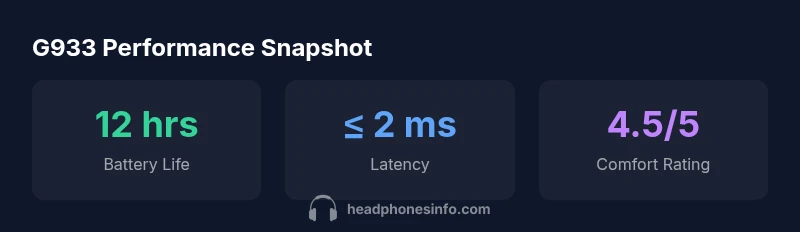
When using the USB wireless dongle, the g933 generally delivers solid battery life suitable for long gaming sessions. The battery life is typically enough for several uninterrupted sessions, and charging via USB or a dedicated docking option helps reduce downtime. In practice, battery longevity can vary with volume levels, RGB lighting (if enabled), and the use of wireless features. Latency is typically low in 2.4 GHz mode, which is crucial for fast-paced titles, though occasional interference can introduce brief hiccups. Bluetooth operation, if supported, may consume power more quickly and is often best reserved for non-gaming use such as casual listening.
Microphone Quality and Voice Pickup
The microphone on the g933 generally delivers clear voice pickup with reasonable noise suppression, suitable for in-game chat and casual streaming. Some users may notice a slightly more nasally or distant voice at longer distances or in noisier environments. The mic boom is reasonably responsive, but mic mute switches or on-device controls can occasionally be finicky when toggling between play and voice chat. For talking to teammates during intense sessions, most players should find it adequate, though professional streamers may prefer a higher-fidelity mic for broadcasts.
Software, Customization, and Firmware
Software options typically include equalizer adjustments, mic gain control, and a basic surround sound tuning interface. The software can unlock additional features like profiles for different games or platforms, though some users report occasional bugs or latency when switching profiles. Firmware updates, when available, can improve stability and audio behavior, but updating should be performed with care to avoid bricking the headset. Overall, software adds value by enabling fine-tuned control over audio behavior and mic transmission.
Connectivity, Connectivity Modes, and Latency
The g933’s strongest selling point is its dual-mode connectivity: a USB wireless dongle for low-latency gaming and a wired mode for devices lacking wireless support. The USB dongle typically provides lower latency than Bluetooth, making it suitable for competitive titles. The wired option ensures compatibility with a wide range of devices, including older consoles and desktops without wireless dongles. Latency is a key consideration for gaming performance, and in practice the g933 performs well in its class when used with the dongle. Some users may experience occasional pairing drops or interference in crowded wireless environments, but these events are not universal.
Durability and Long-Term Use Considerations
Long-term durability depends on how often the headset is transported, stored, and cleaned. The g933 is generally robust enough for regular daily use, but plastic hinges and the headband padding can show wear with heavy abuse. Proper storage—such as using the included case and avoiding over-tightening the headband—helps extend life. Users should also consider routine maintenance like cleaning the mesh of the microphone and keeping the USB dongle in a safe place to prevent damage. Regular inspections for loose screws or creaks can catch issues before they become serious problems.
How g933 Compares to Key Alternatives
Within the wireless gaming headset category, the g933 competes with other models offering similar battery life and sound quality. In practice, some rivals may deliver stronger mic performance, more durable build, or more aggressive sound tuning. However, the g933’s ability to switch between wireless and wired modes offers real convenience for mixed-use environments, and its comfort profile often outlasts more compact offerings. For gamers who value platform flexibility and quick adaptation across PC and console, the g933 remains a compelling option.
Gaming Scenarios: PC, Console, and Mobile Use
For PC gaming, the g933’s low-latency wireless mode and size-friendly design make it a solid all-around choice. When connected to a console using the appropriate dongle, it remains comfortable and easy to use without requiring multiple accessories. Mobile use is possible with wired mode, but the wireless dongle is not typically portable for on-the-go gaming. The headset’s versatility makes it appealing for players who want a single device to cover multiple play styles, though enthusiasts seeking the absolute best mic or the tightest headphones for competition may want to consider alternatives.
Maintenance, Care, and Longevity
Regular cleaning around the ear cushions and microphone grill helps preserve the headset’s sound quality and comfort. Avoid exposing the headset to moisture or harsh solvents, and store it in a protective case when not in use. Periodic checks for loose connectors or wobbly joints can prevent bigger problems down the line. If you use RGB lighting or other power-hungry features, consider turning off lighting during long sessions to extend battery life. Proper care also includes tracking firmware updates and ensuring the dongle remains securely connected.
Summary of Use Cases and Buying Scenarios
The g933 is well-suited for gamers who want a versatile headset that can function across PC and console with both wireless and wired options. It excels for players who value comfort and a balanced sound profile, along with convenient on-device controls. If mic fidelity and ultimate build durability are your top priorities, you may want to weigh alternatives that emphasize those strengths. Overall, the g933 is a solid, flexible choice for multi-platform gaming with a favorable balance of performance and convenience.
Upsides
- Balanced sound with clear midrange for games
- Dual connectivity: USB wireless and wired option
- Good all-day comfort for long sessions
- Decent battery life for PC gaming
Disadvantages
- Mic quality and noise cancellation are not top-tier
- Durability can feel creaky with heavy use
- Software stability can vary by platform
- Not the smallest or lightest option on the market
Best for PC gamers who want reliable wireless versatility
The g933 provides a dependable mix of comfort and flexible connectivity, ideal for multi-platform setups. While its mic and durability aren’t class-leading, the value and convenience make it a strong all-rounder for most gamers.
People Also Ask
What devices is the g933 compatible with?
The g933 supports PC and consoles via USB wireless dongle and wired connections. It also works with devices that provide a compatible 3.5mm input when wired. Check your platform’s USB and jack availability to maximize compatibility.
The g933 works with PC and consoles using the USB dongle and can also connect via a 3.5mm cable on devices that support it. Use the wireless mode for gaming and the wired mode when needed.
How do I update the firmware on the g933?
Firmware updates are typically performed through the manufacturer’s companion software. Ensure the headset is connected, follow on-screen prompts, and keep the dongle plugged in during updates to prevent bricking.
Use the software to check for updates, connect the headset, and follow the prompts. Keep the dongle connected until the update finishes.
Is the mic good for streaming?
The mic is serviceable for in-game chat and casual streaming but may not meet the fidelity needs of serious streamers. For high-end broadcasts, you might prefer an external mic.
The mic is fine for gaming chats, but if you stream regularly, you may want a higher-quality mic for the best voice clarity.
Can I use the g933 for mobile gaming?
Wired mode supports devices with a 3.5mm jack; however, wireless gaming on mobile depends on whether your device supports Bluetooth or a compatible USB adapter. Expect best results in wired mode on mobile devices with a jack.
You can use it wired on devices with a 3.5mm jack, but wireless gaming on phones may require adapters. Wired is usually simplest for mobile use.
Does the g933 feel durable for travel?
The g933 folds for transport and can be reasonably durable with proper case usage. Some users report creaks over time with heavy travel, so handling care matters.
It folds and travels reasonably well, but gentle handling helps prevent wear during trips.
What are common issues to watch for?
Watch for occasional software glitches, dongle pairing hiccups, and wear on hinges over long-term use. Regular updates and careful storage can mitigate many of these concerns.
Be mindful of occasional software or pairing glitches, and store it properly to avoid hinge wear.
Is the g933 worth it for new buyers?
For buyers seeking versatility and comfort in a single headset, the g933 offers strong value. If mic fidelity or rugged durability is paramount, you may want to compare with other options.
If you want a flexible, comfortable headset with good cross-platform support, it’s a solid pick. Compare mic quality and build with rivals if those are priorities.
What to Remember
- Choose g933 for cross-platform flexibility
- Expect solid comfort and balanced audio
- Mic and long-term durability are not top-tier
- Utilize USB wireless for lowest latency