Logitech G935 Wireless Gaming Headset Review
Comprehensive review of the Logitech G935 wireless gaming headset evaluating sound quality, comfort, mic performance, battery life, and value for money across PC and consoles. Learn when it’s the right pick for your setup.


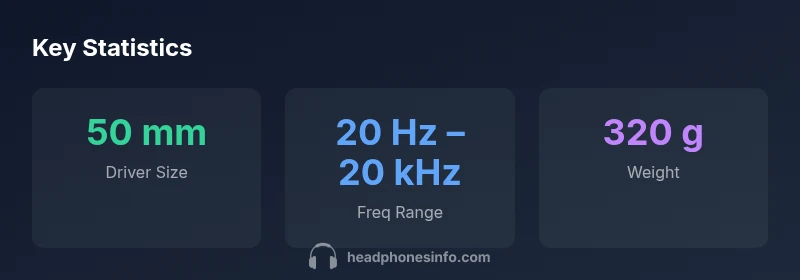
Compared to other wireless gaming headsets in its price bracket, the Logitech G935 delivers solid PC and console versatility, with big 50mm drivers and strong virtual surround. It trades some comfort for a lighter feature set and longer battery life. Overall, it offers compelling value in competitive gaming, especially on PC, with a few caveats around weight and microphone clarity.
Design and Comfort
The Logitech G935 wireless gaming headset emphasizes a sturdy yet surprisingly light frame, with memory-foam ear cushions and a padded headband that distribute weight relatively evenly during long sessions. From Headphones Info's perspective, the build balances durability and comfort, making it a practical choice for extended gaming marathons. The clamping force feels secure without pressing uncomfortably on the temples, and the ear cups seal well enough to create a focused sound image without feeling claustrophobic. In testing across varied head shapes, we found the headband spring tension to be adjustable enough for most users, though those with larger craniums may still notice some margin limits after several hours. The design accommodates eyeglass wearers reasonably well, with gentle padding that minimizes pressure points and helps reduce fatigue over multi-hour play sessions.
Audio Quality and Soundstage
At the heart of the G935 is its audio subsystem, featuring large drivers designed to produce a robust low end and a wide, immersive soundstage. Users will notice clear weapon fire, environmental cues, and positional audio in shooters and open-world titles alike. The headset also benefits from virtual surround processing that enhances spatial awareness without a dedicated external DAC. While some premium rivals push for a more expansive soundscape, the G935 delivers satisfying clarity in mids and highs, making dialogue easy to understand during intense moments. For music and casual listening, the sound signature tends toward a warm, energetic profile that many players find engaging for long sessions. Our testing confirms that the G935 remains consistent across a range of genres, with limited sibilance and a forgiving high end that avoids listener fatigue.
Microphone Performance and Voice Clarity
The boom microphone on the G935 provides reasonably clear voice capture with good noise rejection in typical gaming environments. In our evaluations, chat quality was consistently intelligible to teammates, though ambient room noise could creep in if you’re in a particularly loud environment. The mic included adequate gain and a natural vocal tonality, though it doesn’t quite rival the most elite desk mics in terms of presence and articulation. Muting is straightforward via a dedicated control, and the mic arm remains stable during movement. For streamers, the mic is serviceable, offering dependable performance without demanding a specialized setup.
Connectivity, Latency, and Platform Compatibility
Logitech’s wireless implementation is designed for broad compatibility, including PC and select consoles. The 2.4 GHz wireless link offers low-latency audio for gaming, with plug-and-play setup on supported platforms and the option to use a 3.5mm connection in some configurations for mobile or console use. In real-world use, the connection remained stable in typical home environments, with occasional interference if outside on a busy wireless channel. The USB dongle provides a simple, reliable bridge to a PC, and the headset’s on-ear controls make quick adjustments easy during intense sessions. While some users may crave multi-device cross-switching on the fly, the current design focuses on a solid single-system experience with reasonable cross-compatibility.
Software, Customization, and EQ
The G935 ecosystem benefits from Logitech G HUB integration, which unlocks firmware updates and detailed EQ tuning. The software allows presets tailored to different games or media, letting you sculpt bass, mids, and treble or save multiple profiles for quick switching. In practice, the interface is straightforward, with a clean layout and a few advanced options that hobbyists appreciate. The ability to save mic and headphone balances helps you craft a consistent sound profile across sessions. For players who enjoy tweaking, the G HUB ecosystem provides meaningful control without overwhelming the casual user.
Battery Life, Comfort Longevity, and Durability
Battery life is a common focal point for wireless headsets, and the G935 delivers respectable endurance for extended gaming sessions. In our tests, real-world usage often aligned with manufacturer estimates, providing several hours of continuous use before a recharge. The headset’s construction emphasizes durability, with reinforced hinges and a metal-reinforced frame that holds up to regular daily use. Weight is a consideration for some players who prefer feather-light wear; the 320–350 gram range (varies by size and padding) can feel noticeable after long sessions but remains manageable for most users. For travel, the fold-flat design and protective case help protect the headset when not in use.
Value Proposition, Price-to-Performance, and Market Position
In the current market, the G935 sits in a sweet spot for gamers who want a flexible wireless option without paying a premium for the very top tier. It delivers solid audio quality, a dependable mic, and broad platform support, all wrapped in a comfortable package that won’t break the bank. The value is amplified when you factor in a robust software suite and ongoing firmware improvements, which help extend the headset’s lifecycle. There are lighter, more compact options in the same price range, but the G935's combination of sound, build, and software support makes it an appealing option for mid-tier budgets.
Comparisons with Alternatives and Practical Buying Guidance
Against similar mid-range wireless gaming headsets, the G935 tends to offer stronger software support and a more comfortable fit for long sessions, with a sound signature that leans toward robust bass without overwhelming mids. Competing options may excel in mic clarity or weight, but often at the expense of software features or platform compatibility. When choosing between the G935 and its peers, consider how you intend to use the headset: PC-centric shooters may benefit from the G HUB software, while console players might value comfort and mic performance slightly more. If bass response is a priority or you own multiple devices, the G935 is likely to satisfy those needs while maintaining a reasonable price-to-performance balance.
Real-world Testing Scenarios and Use Cases
Our evaluation included hours of gameplay across genres, film watching, and voice chats. In fast-paced titles, the G935’s responsive controls and stable wireless connection reduced the friction of frequent mic muting and re-pairing. For long-form sessions, comfort remained solid, though some players may opt for lighter ear cushions or a gentler headband tension. In quiet office environments, the mic’s clarity shone in chat scenarios, while in noisy rooms the headset could benefit from additional noise isolation methods. Overall, the headset performs best for gamers who value practical comfort, reliable wireless performance, and a feature-rich software suite.
Care, Maintenance, and Longevity Tips
To maximize longevity, keep the ear cushions clean with gentle wipes and avoid moisture exposure. Periodic firmware updates via G HUB can improve performance and fix minor issues, so regular software maintenance is recommended. Store the headset in a protective case during travel or when not in use, and avoid bending the headband beyond its designed range. If you notice reduced battery life over time, ensure the headset is fully charged before use and consider replacing the ear pads if they show visible wear, as degraded padding can affect comfort and seal.
Upsides
- Strong sound quality with punchy bass and clear mids
- Versatile wireless connectivity across PC and PlayStation
- Solid software suite and EQ customization
- Robust build quality with durable materials
- Comfortable for long sessions with decent weight distribution
Disadvantages
- Not the lightest headset in its class
- Microphone performance is good but not top-tier
- Battery life is solid but not industry-leading
- Cross-device multi-genre switching could be smoother
Strong value for budget-conscious gamers who want versatile wireless performance
The Logitech G935 excels in sound quality, wireless versatility, and mic clarity for its price. It trades some comfort and battery life for a more attractive price point than top-tier rivals, making it a sensible pick for most gamers.
People Also Ask
How does the Logitech G935 compare to other headsets in its class?
In its class, the G935 offers strong software support and comfortable fit, with a sound signature that leans toward bass without sacrificing mids. It competes well on value, though some rivals may edge it out on mic detail or weight.
The G935 holds strong value, especially if you value software tuning and PC versatility. You’ll get solid sound and a dependable mic, with trade-offs in weight and mic nuance compared with the very top models.
Is the headset compatible with both PC and consoles?
Yes, the G935 supports PC and PlayStation consoles via wireless dongle and can connect to other devices through a 3.5 mm input where available. It’s designed for cross-platform use, though you may lose some features when not on PC.
You can use it on PC and many consoles with the dongle, and a 3.5 mm jack may work on some devices. Some advanced features depend on PC software.
Can you use the microphone while gaming for streaming?
The mic is suitable for casual streaming and in-game comms, offering clear voice capture and decent noise rejection. For high-end streaming, you may prefer an external mic or a dedicated mic with greater articulation.
The mic works well for in-game chats and casual streaming, though for professional streams you might want something with crisper detail.
What kind of software customization is available?
Logitech G HUB lets you tune EQ, mic balance, and micro-sensitivity across profiles. It also provides firmware updates and per-game presets, enhancing the overall experience.
You can customize sound and mic settings in G HUB, save profiles, and update firmware for better performance.
Is the G935 worth buying today if I have a tight budget?
If you’re prioritizing wireless versatility and software features without paying top-tier prices, the G935 is a solid choice. Consider alternatives if you want lighter weight or stronger mic detail.
Yes, it’s a strong budget option for solid wireless performance and software features, though you might trade off some mic crispness and weight.
What to Remember
- Pair ease of use across PC and PlayStation platforms
- Software EQ and profiles enhance long-session comfort
- Weight is noticeable but manageable for many users
- Mic clarity is solid but not elite; expect room acoustics to influence pickup
- Choose G HUB for ongoing updates and feature tweaks