What Headphones Work With PS5: A Practical Guide
Discover which headphones work with PS5, from wired USB to 3.5mm and Bluetooth options. Learn compatibility, latency, and setup tips for console gaming.


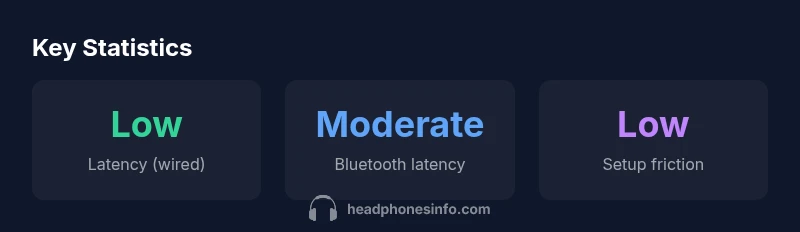
On PS5, most headphones work when connected in wired mode—either via USB or the 3.5mm jack on the DualSense controller. USB headsets tend to be plug-and-play with broad mic compatibility, while 3.5mm headsets offer a simple, low-latency option for game audio. Bluetooth headphones can work in limited cases, but latency and pairing quirks often make wired options the safer choice for competitive play.
Understanding PS5 audio paths
The PlayStation 5 supports multiple ways to route audio to headphones, giving players flexibility depending on their gear and priorities. The most common setups are wired solutions—either a USB headset that plugs directly into the console or a standard 3.5mm jack headset connected to the DualSense controller. Each path has its own pros and cons in terms of latency, mic quality, and ease of use.
USB headsets tend to be straightforward: you plug in the dongle or USB-A/USB-C connector, and the PS5 recognizes the device as an audio peripheral. In many cases, you can manage mic gain, sidetone, and balance through the PS5 settings, sometimes with additional features like surround sound processing or software EQ. For many gamers, this path delivers the most consistent performance with minimal surprises, particularly in online multiplayer where latency and mic clarity are important.
The 3.5mm jack on the DualSense controller allows many standard headsets to work without a separate dongle, which keeps things simple and portable. However, not all mic configurations will be perfectly supported by every headset; some older or more feature-rich mics may require additional adjustments in the console's audio menu. Additionally, some headsets with inline controls or power switches may have variable compatibility depending on the model. Overall, wired options are the most reliable starting point for PS5 gaming.
Wired vs wireless: latency and reliability
Latency is the main reason many players prefer wired headsets for PS5. A wired USB headset can deliver near-instant voice chat and game audio with minimal processing delay, while a 3.5mm headset routed through the controller avoids a separate dongle for most setups. Wireless options introduce traceable latency depending on the protocol, dongle quality, and interference. In practice, the difference may be small in casual play, but in fast-paced shooters and rhythm games, even a few milliseconds matter.
When evaluating wired options, look for a stable USB connection and a mic with a clear pickup pattern. For headsets using the 3.5mm jack, ensure the controller recognizes the mic and that the headset works without the inline mic switch. Also consider that USB headsets sometimes present additional features like virtual surround sound or EQ that can be toggled on the PC or console. If you plan to use the headset across devices, verify compatibility with PC and mobile as well as PS5 to avoid feature lockout.
Wireless options and latency considerations
Wireless PS5 headsets are convenient, but users should evaluate their latency, battery life, and comfort. Many wireless models rely on a USB dongle or a proprietary wireless protocol. If you are playing online games where timing matters, test the pairing in a controlled session and verify if the mic latency aligns with on-screen action. Some wireless headsets provide low-latency modes; others may show jitter under certain conditions.
Another factor is compatibility with PS5's audio features, such as chat mix, mic mute, and volume controls. Some headsets bring software-based EQ or surround-sound processing that works on PC, but not all features translate to PS5. If you travel, consider the weight and battery life; a heavy set can become uncomfortable after extended sessions.
Bluetooth caveats and practical tips
Bluetooth headsets can be used with PS5, but they are not always ideal for competitive gaming. The console's Bluetooth implementation prioritizes stability over ultra-low latency, and many headsets experience higher latency than wired connections. If you must use Bluetooth, choose models known for low-latency codecs and ensure they have a robust mic. Be prepared for occasional dropouts and pairing quirks, especially on informal setups.
Pragmatic tips: disable features that worsen latency, such as advanced DSP or adaptive EQ if possible, and test audio quality by playing a warm-up match before a real session. If you rely on voice chat, a wired mic is often safer.
How to choose: mic quality, latency, and compatibility
Select a headset with a mic you find comfortable and clear; mic pickup patterns can vary from uni-directional to cardioid. For latency, wired connections beat wireless in most scenarios, especially for competitive play. Check compatibility with PS5's audio settings, including input/output devices, volume, mic monitoring, and chat balance. When shopping, look for explicit PS5 compatibility notes and user reviews that mention setup simplicity. Finally, consider comfort: memory foam pads, adjustable headband, and weight distribution affect long sessions.
Setup steps and troubleshooting
Here is a practical setup flow for PS5 headsets. Step 1: plug the headset into the recommended port (USB or 3.5mm). Step 2: Go to PS5 Settings > Sound > Audio Output and Input devices, and choose your headset. Step 3: Set the mic level and test voice chat in a party. Step 4: If you encounter no sound, replug or switch to a different USB port; verify that the headset is selected as the default device. Step 5: For wireless headsets, ensure the dongle is properly paired and within range.
Troubleshooting common issues: no mic input—check mute switch or on-device mic; audio only on chat and not game—adjust app-specific settings; delayed audio—resync or use a wired back-up option.
Quick-start buying guide for PS5 headsets
Before buying, define use-case: casual listening, competitive gaming, movie nights, or mixed use across console and PC. If latency is critical, prioritize wired USB or 3.5mm options; choose models with verified PS5 compatibility or universal compatibility. If you prefer wireless, check battery life and dongle quality, and read reviews about latency on PS5. Finally, compare price ranges and warranty terms to ensure you get long-term value.
PS5 headset compatibility matrix
| Headphone Type | PS5 Compatibility | Notes |
|---|---|---|
| Wired USB Headset | Broad compatibility via USB audio | Plug-and-play with mic control |
| Wired 3.5mm Headset | Direct PS5 controller connection | Mic works through controller |
| Wireless Headset (USB dongle) | Good compatibility | Latency depends on dongle |
| Bluetooth Headset | Limited game audio support | Primarily for chat; test first |
People Also Ask
Can I use any Bluetooth headset with PS5 for game audio?
Bluetooth headsets can work in some setups, but they’re not ideal for fast-paced games due to higher latency. If you must use Bluetooth for PS5, look for models with low-latency codecs and test timing carefully.
Bluetooth headsets can work, but expect higher delay; test a quick match before committing.
Do USB headsets require drivers on PS5?
Most USB headsets are plug-and-play on PS5 and don’t require extra drivers. You may still adjust mic gain and output levels in the PS5 audio settings.
Usually no drivers needed; adjust settings in PS5 if you want different mic or output levels.
Will a 3.5mm headset work on PS5 without a dongle?
Yes, a standard 3.5mm headset can work by plugging into the DualSense controller. Some models may require adjustments for mic behavior or inline controls.
Yes, just plug into the controller and tweak mic settings if needed.
What about PS4 headsets on PS5?
Many PS4 headsets with a 3.5mm jack continue to work on PS5, though some features may vary. Check for PS5 compatibility notes from the manufacturer.
Most 3.5mm PS4 headsets work, but features may differ; verify compatibility.
Which brands are best for PS5 headsets?
There isn’t a single best brand for PS5. Focus on latency, mic quality, and native PS5 compatibility notes. Read reviews to confirm ease of setup on PS5.
No one-brand rule; pick by latency, mic quality, and PS5 compatibility.
Can I use headsets that work with PC on PS5?
Many PC headsets work on PS5 if they use USB or a standard 3.5mm connection. Verify compatibility with PS5 in product notes and user reviews.
PC headsets can work on PS5 if they’re wired or officially supported.
What should I test before a long gaming session?
Test mic clarity, game audio balance, and party chat in a private session. Confirm there is no mute issue and that volume levels feel comfortable.
Test mic and audio in a quick practice session before the big match.
Are there any PS5-specific features I should look for?
Look for explicit PS5 compatibility notes, straightforward mic control, and a stable USB connection or reliable 3.5mm integration. Features like surround sound should be tested for PS5 support.
Check PS5 compatibility notes and mic controls during shopping.
“In practice, wired headsets deliver the most reliable audio on PS5, while wireless options are viable with careful testing.”
What to Remember
- Prioritize wired headsets for lowest latency
- Check mic compatibility with PS5 system settings
- Bluetooth options vary by model; verify official support
- Test both mic and audio in a live session
- Look for explicit PS5 compatibility notes before buying