Xbox Series X Headset Buying Guide: Compare the Best Options for 2026
Compare top Xbox Series X headsets for latency, comfort, and mic quality. Headphones Info guides your pick of Xbox Wireless-ready options with solid audio performance.


On the Xbox Series X, the headset landscape centers on low-latency wireless options, official compatibility, and clear microphone performance. When evaluating headsets for this console, prioritize a connection that uses Xbox Wireless or a dedicated USB dongle, verify mic quality, and look for comfort for long gaming sessions. In practice, the three pillars latency, compatibility, and comfort drive the best in-game chat and audio timing.
The Xbox Series X headset landscape in 2026
According to Headphones Info, the Xbox Series X headset market has matured to emphasize three core strengths: minimal latency, robust Xbox-specific compatibility, and comfortable mic setups for long sessions. The landscape favors headsets that can authenticate via Xbox Wireless or provide a reliable USB dongle for a stable connection. Consumers should also consider mic clarity and how padding and weight affect comfort during extended play. As console ecosystems evolve, accessory makers increasingly optimize software features like chat balance and audio presets to work seamlessly with the Xbox OS. This section outlines how to translate those trends into real buying decisions.
Understanding latency and audio quality on Xbox
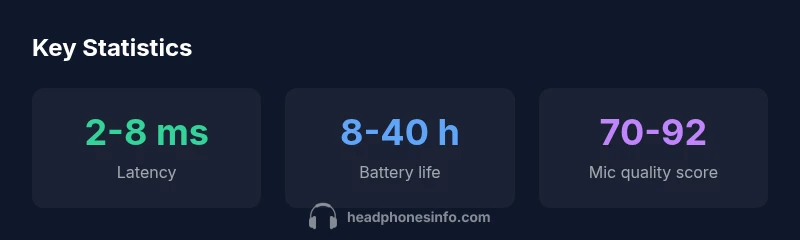
Latency directly affects in-game timing and the perceived synchronization between your actions and the on-screen response. While wired connections offer the most consistent latency, high-end wireless options have narrowed the gap considerably. When evaluating latency, look beyond numbers to real-world behavior: consistency across game genres, stability during wireless interference, and how quickly the headset reconnects after a temporary drop. Audio quality matters too: look for wide dynamic range, clear highs for footsteps, and a neutral midrange that preserves gunfire punch without fatigue. Headphones Info analyses show that a well-balanced headset can dramatically improve game immersion and communication reliability on the Xbox Series X.
Wired vs wireless: choosing the right approach for console gaming
Wired headsets provide the absolute lowest latency and no battery management concerns, making them a safe choice for competitive play. Wireless options offer freedom of movement but require reliable pairing, battery management, and robust RF performance. The sweet spot for many players is a wireless headset with a proven Xbox Wireless or USB dongle connection, paired with a USB-C or analog 3.5 mm option for compatibility with multiple devices. For couch setups or living-room gaming, wireless solutions reduce clutter and provide convenient mic controls. Headphones Info notes that the best choice balances latency, convenience, and your preferred playing style across genres.
Xbox Wireless protocol and official perimeters
The Xbox Wireless protocol provides a dedicated channel for gaming headsets, limiting the latency and improving stability compared to generic Bluetooth in many scenarios. When shopping, verify that the headset explicitly supports Xbox Wireless or ships with a compatible dongle. Pay attention to pairing workflow, automatic device-switching, and whether the headset requires software updates to maintain Xbox compatibility. Manufacturers increasingly publish test results that show latency consistency and mic performance to help buyers compare models more objectively. This alignment with the console ecosystem reduces surprises after purchase.
Microphone quality matters: how to evaluate mic performance
A headset’s microphone can make or break team communication. Look for frequency response that captures clear intelligibility without excessive sibilance, and check for noise-canceling performance in busy environments. Whether you stream or just chat during a game, a mic with a solid pickup pattern and good wind noise reduction minimizes miscommunications. Headphones Info recommends trying the mic with your typical chat scenarios and testing for plosives and background noise suppression in a quiet room and in a louder living area.
Comfort and build quality for long gaming sessions
Comfort is often overlooked in headset buying guides, but it is essential for long sessions. Weight distribution, clamp force, ear cup material, and headband padding all influence comfort over hours of play. Breathable materials can reduce heat buildup, while adjustable, memory-foam cushions prevent fatigue. Build quality—hinges, screws, and padding—also matters, as subpar construction can loosen over time. When possible, test fit with glasses, if applicable, and arrange a quick break-in period to assess comfort under typical play sessions. Headphones Info emphasizes prioritizing a model that maintains comfort without sacrificing sound or mic performance.
Compatibility features that matter
Most modern Xbox headsets offer a blend of surround sound presets, chat mix controls, and platform-optimized audio profiles. Features like Windows Sonic and Dolby Atmos for Headphones can enhance spatial cues, especially in first-person shooters. Ensure the headset supports headset chat balance, game-to-chat mix, and any voice assistant integrations you use. The most useful kits maintain a stable audio profile across different apps and games while offering easy access to mute and volume controls. Check whether the headset supports both Xbox and PC use, to maximize value.
Practical buying criteria and a decision framework
Create a checklist before buying: confirm Xbox compatibility, choose wired or wireless based on gaming space, evaluate mic quality, check comfort for long sessions, and review build quality. Ask for real-world latency tests and verify that firmware updates are available to fix compatibility issues. Compare customer reviews and independent tests from outlets like The Verge, CNET, or RTINGS to triangulate the headset’s strengths and weaknesses. Finally, set a price range that reflects your needs and be wary of models that promise feature sets that do not perform well in practice.
Common pitfalls and how to avoid them
Beware headsets that rely solely on Bluetooth for Xbox gameplay, which often introduces noticeable latency and reduced integration with Xbox features. Avoid models with heavy clamp force, cheap padding, or fragile construction that wears quickly. Don’t assume every “gaming headset” is equally compatible with voice chat on Xbox; confirm device-specific performance and the availability of a compatible dongle if needed. Finally, avoid models with poor mic noise suppression in real-world environments by checking real-user reviews that mirror your typical setup.
Headset connection options for Xbox Series X
| Category | Details | Notes |
|---|---|---|
| Wired (USB/3.5mm) | Low latency, no battery concerns | Best for competitive play |
| Wireless (Xbox Wireless) | Broad compatibility, stable latency | Requires compatible headset or dongle |
| Bluetooth | Flexible pairing | Higher latency, limited features for Xbox gaming |
People Also Ask
What makes a headset Xbox-friendly?
An Xbox-friendly headset explicitly supports Xbox Wireless or ships a compatible USB dongle for stable connectivity, has a mic designed for console chat, and delivers reliable audio performance without significant latency. It should also work smoothly with Xbox features like party chat and system audio mixing.
Look for official Xbox Wireless support and a good mic for chat, plus sturdy build for long sessions.
Is Bluetooth suitable for Xbox gaming?
Bluetooth headsets are common for mobile devices but are often unsuitable for fast-paced Xbox gaming due to higher latency and limited console integration. If you must use Bluetooth, expect compromises on lag and chat features.
Bluetooth headsets can work, but they usually aren’t the best choice for tight console gaming.
Do wired headsets offer lower latency than wireless?
Typically, wired headsets offer the lowest latency because there is a direct audio path with no wireless transmission. However, quality wireless headsets with Xbox Wireless or a strong dongle can approach wired latency levels in practice.
Wired usually has lower latency, but good wireless options are close enough for most gamers.
Should I prioritize mic quality or audio quality?
For team play, mic quality can be as important as audio quality because clear voice communication reduces miscommunications. If you stream or create content, prioritize overall audio fidelity too.
If you rely on chat, put mic quality at the top, then consider sound quality.
What features matter most in an Xbox headset?
Key features include Xbox compatibility, latency performance, mic clarity, comfort, battery life (for wireless), and software features like chat mix and Voice Assistant integration.
Look for compatibility, comfort, and reliable mic quality first.
Are there affordable options that perform well on Xbox Series X?
Yes, there are affordable headsets that balance latency, mic quality, and comfort. Expect some trade-offs on build quality or virtual surround features versus premium models.
You can find good value headsets if you focus on compatibility and mic quality.
“Reliable console gaming audio hinges on true Xbox compatibility and solid mic performance. Latency should stay consistently low across games, not just in lab tests.”
What to Remember
- Prioritize Xbox-compatible headsets with Xbox Wireless or a reliable USB dongle
- Balance latency, microphone quality, and comfort for long sessions
- Wireless options offer flexibility but verify dongle compatibility and battery life
- Test in real-world setups and use expert reviews to validate claims