How to Prevent Headphones from Snapping: A Practical Guide
Learn practical, step-by-step methods to prevent headphones from snapping. Reinforce joints, use protective sleeves, and store cables properly to extend headphone life.


You can dramatically reduce cable snapping by reinforcing strain relief, choosing durable materials, and proper storage. This guide provides a step-by-step approach to protect connectors, use protective sleeves, and practice gentle handling. Start with inspecting your cord, then apply protective measures, and establish a routine to extend headphone life today.
Why preventing the snapping matters for headphone life
Cable snaps are one of the most common failure modes for wired headphones, and they can ruin a commute, studio session, or gaming night in a heartbeat. If you search for how to prevent headphones from snapping, you’ll see a mix of quick fixes and grand claims—most work best when applied consistently. According to Headphones Info, cable stress concentrates right where the cord meets the plug, and repeated flexing at that junction is the primary culprit behind many breakages. The Headphones Info Team found that simple, repeatable reinforcement—like a small sleeve, reinforced strain relief, and mindful storage—can dramatically extend headphone life without replacing the entire headset. In this guide, we’ll cover practical, low-cost methods you can implement at home or on the road, with clear steps, materials, and maintenance routines so you can enjoy music with fewer interruptions.
Common causes of cable snapping
Cables snap for a variety of reasons, but most failures concentrate at the bend near the plug where the internal wires experience the highest stress. Everyday activities—tossing headphones into a bag, yanking the cord out of a device, or pulling on the cable rather than the plug—drastically accelerate wear. Cheap insulation or weak strain relief compounds the problem, while poor storage invites tangles and kinks that turn into cracks over time. Water exposure, heat, and rough handling further degrade the outer jacket. Understanding these factors helps you target prevention where it matters most.
Core strategies to prevent snapping
To maximize longevity, prioritize four core strategies:
- reinforce at the joint with strain-relief and protective sleeves; the goal is to transfer bending stress away from the conductor insulation.
- use heat-shrink or flexible cable sleeves to cover vulnerable sections without adding bulk.
- prefer detachable cables when possible so you can replace a worn cord without buying a new headset.
- practice cable management and smart storage to minimize knots and unnecessary pulling.
Small, repeatable habits beat big repairs: check wear signs monthly, replace worn parts early, and store cords coiled loosely rather than wound tight. These practices dramatically reduce snapping incidents over time.
Materials, tools, and setup
Before you start, gather a few common materials and tools so the job goes smoothly. You don’t need professional equipment; many fixes can be done with items found around the house. Keep your workspace clean and well-lit to spot cracks or exposed conductors. If you’re unsure, start with non-destructive fixes like protective sleeves and proper storage rather than opening the housing. Headphones that use detachable cables simplify maintenance and prolong life because worn cords can be swapped without buying a new headset.
Step-by-step plan (overview)
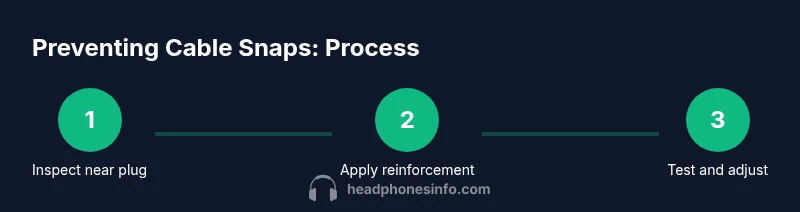
This section provides a high-level overview of the steps you’ll perform when you reinforce a headphone cable. The full, detailed steps are in the dedicated STEP-BY-STEP block, but here’s the gist to help you prepare.
- Inspect the cable near the plug for visible wear and cracks. 2) Decide on a reinforcement method (heat-shrink sleeve or external guard). 3) Cut the reinforcement material to the correct length. 4) Apply the sleeve around the joint and secure edges. 5) Add an external strain-relief at the plug. 6) Manage slack and prevent tight loops with ties. 7) Test the flex by bending at multiple angles and listening for changes. 8) Schedule regular checks to catch wear early. 9) If wear is extensive, consider replacing the cable.
Real-world scenarios and quick fixes
When you’re commuting, long cable runs and tight pockets increase bend stress. A simple quick fix is to slip a short heat-shrink sleeve over the joint and secure it with a couple of small cable ties to prevent movement. In a gaming or desk setup, opt for detachable cords when possible; if the joint shows signs of wear, swapping to a replacement cable can be cheaper than buying a new headset. For travelers, store cables with a loose loop rather than a tight coil, and use a small carry pouch so the plug never bears the load of weight in a bag. These scenarios show how targeted reinforcements and smart storage combine to dramatically reduce snapping risk.
Maintenance routine to keep cables durable
Treat cable longevity as routine maintenance:
- perform a monthly quick check for micro-cracks near the plug;
- replace worn sections or entire cables rather than patching repeatedly;
- store headphones in a soft pouch with the cord wrapped loosely;
- clean connectors to remove dust that could cause crack propagation when flexed;
- avoid gripping the cable to pull headphones from devices; always disconnect at the plug or device end first.
By following a simple routine, you preserve the integrity of the cable jacket, insulation, and connector joints, keeping your headphones working longer between servicing.
Safety considerations and when to replace
Avoid attempting to open sealed headphone housings to fix internal wires unless you’re trained and have the right tools. If you notice exposed copper, charred insulation, or a crack that runs into the conductor strands, stop using the pair and replace the cable or headset. Safety first means protecting your ears and preventing short circuits that could damage devices. If you frequently experience snapping, switch to a more robust model with reinforced strain relief and detachable cables, which offer easier maintenance and longer life.
Final thoughts and long-term care
The key to preventing headphones from snapping lies in proactive reinforcement, mindful handling, and consistent maintenance. Small investments in sleeves, strain-relief guards, and proper storage yield outsized returns in durability. By prioritizing the vulnerable joint near the plug and keeping wear signs under regular surveillance, you’ll extend the life of your favorite headphones and keep your sound consistent over time. The Headphones Info Team believes that durable design plus good habits is the best combination for lasting listening experiences.
Tools & Materials
- Heat-shrink tubing or flexible cable sleeve(Choose diameter to snugly cover the joint near the plug (8–12 cm length typically))
- Cable strain-relief guards(If the headset lacks built-in relief, add aftermarket guards to the plug area)
- Velcro or cable ties(Use sparingly to manage excess length without pulling on the plug)
- Sharp scissors or utility knife(Cuts sleeve cleanly to length without fraying)
- Heat source (hair dryer or heat gun)(Needed only if using heat-shrink sleeves; heat evenly to avoid damage)
- Replacement detachable cable (if available)(Useful for headsets with removable cords; keeps repairs affordable)
- Screwdriver (if accessing internal housing)(Only if you know how to safely open a device)
Steps
Estimated time: 30-60 minutes
- 1
Inspect the cable near the plug
Power off and unplug the device. Visually inspect the entire length near the plug for cracks, discoloration, or hairline splits. Gently bend the cable by hand to feel for stiffness and listen for any crackling sounds that indicate internal damage.
Tip: Lightly tense and rotate the plug area to surface any hidden wear. - 2
Choose reinforcement method
Decide whether a heat-shrink sleeve or a rigid strain-relief guard best suits your headset. Detachable cables tend to be easier to reinforce than fixed cables, but sleeves work well regardless.
Tip: If you’re unsure, start with a heat-shrink sleeve first to evaluate fit. - 3
Cut reinforcement material to length
Measure the area around the joint that needs protection. Cut the sleeve so it extends a little beyond both sides of the joint without covering the connector itself.
Tip: Cut straight edges to avoid snagging during installation. - 4
Slide sleeve over the joint
Gently slide the sleeve to cover the most stressed region. If using heat-shrink, ensure the sleeve is positioned before applying heat.
Tip: Avoid trapping air; position evenly for consistent protection. - 5
Apply heat to shrink sleeve
Use a low, even heat source to shrink the sleeve to the wire. Move the heat source slowly to avoid overheating or damaging insulation.
Tip: Keep a safe distance and continuously rotate the joint for uniform shrinkage. - 6
Add external strain-relief at the plug
Attach or position a strain-relief guard at the plug to distribute bending forces away from the joint. Secure if needed with light adhesive or wrap.
Tip: Do not apply glue that could seep into the connector. - 7
Secure slack and prevent tight loops
Coil excess cable loosely and secure with ties so the cord isn’t repeatedly pulled during use. Ensure the plug end remains accessible.
Tip: Avoid over-tight binding that can create micro-kinks. - 8
Test the bend and function
Reattach to a device and test with moderate bending through common angles. Check for improved flexibility and absence of new wear.
Tip: If any new wear appears, reassess reinforcement placement. - 9
Schedule regular inspections
Set a reminder to check the reinforced joint monthly. Replace the cable if wear returns to pre-reinforcement levels.
Tip: Preventive maintenance saves money and protects your ears.
People Also Ask
What causes headphone cables to snap?
Most snaps occur at the joint near the plug due to repeated bending, tugging, or weak strain relief. Environmental factors and low-quality insulation also contribute.
Cables usually snap where they bend near the plug, so focus on reinforcing that area and avoiding yanking.
Can I repair a snapped cable myself?
Detachable cables can often be replaced. For fixed cables, professional repair or replacing the entire headset is usually safer than attempting internal fixes.
You can swap detachable cables, but avoid opening fixed cables yourself.
What is strain relief and why does it matter?
Strain relief protects the cable at the joint, distributing bending forces away from the insulation and wires, reducing breakage.
Strain relief acts like a shock absorber for the cable’s most stressed area.
Are heat-shrink sleeves safe for headphones?
Yes, when used correctly. Apply heat gradually and avoid overheating the insulation or connector.
Heat-shrink is safe if you heat it evenly and not too close to the plug.
How long should reinforced cables last?
Reinforcement can extend the life of a headphone cable under normal use, but lifespan varies with how carefully you handle and store the cords.
Durability improves with proper care and routine checks.
Watch Video
What to Remember
- Inspect cables regularly for wear.
- Use reinforcement at vulnerable joints.
- Prefer detachable cables where possible.
- Store cables loosely to avoid kinks.