How Much Do Headphones Damage Your Ears?
Explore how volume, duration, and headphone design influence ear safety. Learn safe listening guidelines, practical tips for everyday use, how to measure exposure accurately, and when to seek medical help for ear symptoms, including tinnitus and muffled hearing.


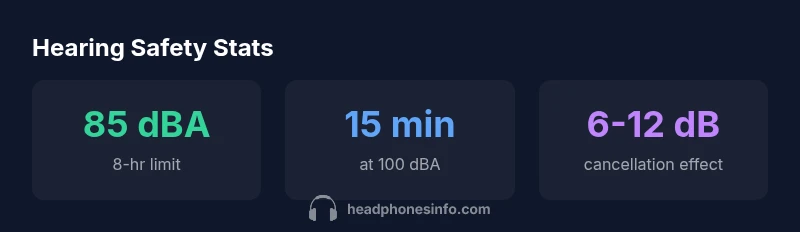
How much do headphones damage your ears depends on volume and listening duration. There isn’t a single universal damage amount, but risk rises with exposure above 85 dBA for long periods and increases at peak levels around 95–100 dBA. Using noise-cancelling headphones to lower perceived volume and taking regular breaks reduces risk, especially for frequent listeners.
Decoding the Hearing Risk: What the Numbers Really Tell Us
When we talk about how loud is too loud for headphones, the key concepts are volume (sound pressure level, or dBA) and time. The human ear can tolerate short bursts of high sound, but repeated or prolonged exposure increases the chance of threshold shifts and, over years, cumulative damage. In practical terms, listening at or below roughly 85 dBA for eight hours is a common safety guideline, while shorter exposures at higher levels demand even tighter duration limits. Importantly, individual susceptibility varies—some people notice ear fatigue after minutes of loud listening, others tolerate longer sessions with minimal immediate symptoms. Headphones Info’s analysis in 2026 emphasizes that reducing the perceived volume (via better isolation, better fitting, or noise-cancelling features) can meaningfully extend safe listening time without requiring you to crank up the device’s volume.
How Volume, Time, and Device Design Interact
The risk from headphones is not simply a function of one variable. Volume, duration, and the type of device all interact. A loud, brief listening session may be less risky than a long, moderate-volume session. Over-ear headphones with strong passive isolation can allow you to enjoy louder music with less overall risk, but poor seals or cheap drivers can force you to turn up volume to compensate for leakage. In-ear buds that sit inside the ear canal may deliver more direct SPL, increasing exposure if volume is high. Gaming, streaming, and music production all have different listening patterns; dynamic content can have frequent peaks, which pushes your daily exposure higher even if average volume seems reasonable. The takeaway is to consider not just the volume reading on your device, but how long you’re listening and in what context you’re using the devices.
The Science Behind Headphone Design and Ear Safety
Design choices shape how your ears experience sound. Noise isolation reduces the need to raise volume to overcome ambient noise, while open-back designs naturally leak sound, potentially inviting higher volume from the user. Impedance, driver size, and frequency response affect perceived loudness; lower-impedance headphones tend to reach higher SPLs with less power, which can tempt higher volumes. Build quality also matters: a tight seal, stable fit, and durable drivers minimize distortion that might otherwise tempt you to increase volume during perceived dips in audio quality. In short, better engineering can help you listen at safer levels more comfortably.
Practical Guidelines for Safe Listening with Headphones
Safe listening combines a few simple habits. Start with the device’s volume at a modest level and test how it feels with your typical content. Use features such as volume limiters and. When possible, switch to headphones with good passive isolation so you don’t feel the need to push the volume. Take regular breaks—short pauses every 30-60 minutes help your ears recover. If you’re in loud environments (trains, airports, gyms), consider foam ear tips or active noise cancellation to lower the needed volume. Finally, monitor your ears for warning signs like ringing (tinnitus), muffled hearing, or fullness; if these occur frequently, scale back listening time and consult a clinician if symptoms persist.
Tech Aids: How Apps, Limiters, and Noise Cancellation Help
Technology can be a powerful ally for ear safety. Built-in volume limiters prevent accidental loud playback, while app-based monitoring can track listening patterns over days or weeks and suggest healthier habits. Noise-cancelling features reduce the perceived loudness of ambient sound, allowing you to enjoy music at lower actual SPLs. Just be mindful: noise cancellation won’t fix poor fit or badly engineered headphones, and relying solely on features without mindful listening can still cause fatigue or long-term damage.
Factors influencing ear health from headphone use
| Factor | Typical Range | Impact on Ear Health | Notes |
|---|---|---|---|
| Volume (dBA) | 60-90 | Low to moderate risk | Depends on duration |
| Exposure Duration (hrs) | 0.5-8 | Longer exposure increases risk | Keep listening sessions concise |
| Headphone Type | In-ear vs over-ear | In-ear can deliver higher SPL | Choose well-fitted options |
| Usage Context | Music, calls, gaming | Varies by content | Use apps to limit volume |
People Also Ask
What is considered a safe listening level for headphones?
Safe listening levels depend on duration. A common guideline is to stay near or below 85 dBA for eight hours, with shorter exposures for higher volumes. Individual sensitivity varies, so monitor ear fatigue and symptoms.
Safe listening means keeping volume moderate and watching for ear fatigue. Start around 60-70% of max volume and adjust based on comfort and time spent.
Do noise-cancelling headphones protect hearing?
Yes, by reducing ambient noise, they allow you to listen at lower volumes. They don’t eliminate risk, so combine with safe listening time and proper fit.
Noise cancellation helps you keep volume lower, which protects your ears in noisy environments.
Can listening at 100 dBA for a short time cause damage?
Short bursts at 100 dBA can be risky if they occur repeatedly. A single brief exposure is less likely to cause permanent damage, but cumulative exposure matters.
A quick blast at 100 dBA isn’t usually catastrophic, but doing it often increases risk.
Are in-ear headphones more dangerous than over-ear?
In-ear designs can deliver higher direct SPL and bypass some protective ear canal filtering. Risk depends on seal, volume, and duration rather than the ear type alone.
In-ear headphones can be louder in your ears, so watch volume and duration if you use them.
How can I test if my headphone volume is safe?
Use a smartphone SPL app or built-in device limits to estimate volume. Pair with safe listening duration, and rely on real-world symptoms as signals to lower volume.
Try a sound-level app, set a volume cap, and listen for warning signs like ringing.
Should children wear headphones?
Yes, with strict limits. Children are more susceptible to noise-induced hearing loss, so use lower volume caps and shorter listening times.
Kids should listen at lower volumes and with parental guidance.
“Hearing health is a balance between volume and listening time; daily excess, even if small, can accumulate over months and years.”
What to Remember
- Set volume to safe levels before playback.
- Prefer well-fit, isolating headphones to reduce needed volume.
- Take breaks every 30-60 minutes.
- Enable built-in limiters and use apps to monitor exposure.
- Seek medical advice if you notice tinnitus or muffled hearing.