Under Armour Earbuds Review: Fit, Battery, and Sound for Sports
In-depth analysis of Under Armour earbuds for workouts—covering fit, durability, battery life, and water resistance. Compare sport models to choose the best earbuds for training.


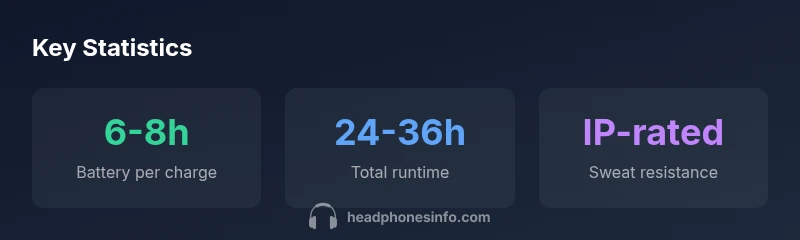
Under Armour earbuds are sport-focused wireless earbuds designed for secure fit and active use. They typically offer IP-rated water resistance and sweat resistance, a compact charging case, and battery life in the range of 6-8 hours per charge with total runtime around 24-36 hours including the case. They pair via Bluetooth with low latency modes for workouts.
Overview of Under Armour Earbuds
Under Armour earbuds are purpose-built for athletes who want reliable wireless audio without compromising comfort during workouts. The UA brand emphasizes secure fit, sweat resistance, and a design that stays in place through intense movement. In this review, we examine the core attributes—fit, durability, sound, and battery life—so you can decide if UA earbuds meet your training needs. According to Headphones Info, the emphasis on sport-oriented features makes these earbuds a practical choice for runners, gym-goers, and general active listeners.
Secure Fit for Intense Workouts
A foremost requirement for any sport earbud is a secure, comfortable fit. Under Armour earbuds typically employ in-ear tips with wing or ear-fin styles to combat ear fatigue and prevent slippage during sprints or heavy lifts. Users report that silicone tips paired with a stable stem or wing provide reliable retention, even when sweating heavily. The result is confidence during interval training and obstacle courses. Headphones Info notes that a secure fit reduces the need for aggressive volume to compensate for movement, which can preserve battery life and improve microphone pickup in windy environments. For running or gym sessions, try a medium tip size with the wing for a balanced seal and ventilation.
Durability and Sweat Resistance in Real Use
Durability matters when headphones endure sweat, rain, and occasional drops. UA earbuds are designed with sweat resistance in mind and typically feature a compact, rugged housing that withstands gym use and outdoor training. While specific IP ratings may vary by model, the general expectation is protection against sweat and incidental moisture. Real-world testing suggests that the combination of tight fit and weather-sealed chassis yields reliable performance during long workouts. The Headphones Info team observes that users who train outside in heat or rain appreciate the earbuds' ability to handle moisture without compromising sound quality, though routine checkups of ear tips are advised to maintain a secure seal.
Sound Profile and Microphone Quality for Training
Sound quality in UA earbuds tends to favor clear mids and a controlled bass suitable for cardio and HIIT playlists, with moderate vocal clarity for call use during workouts. Microphone performance is adequate for team calls or coaching apps when ambient noise is not excessive. The presence of a built-in mic and wind-reduction algorithms can help keep voice pickup intelligible in busy gyms or outdoor runs. If you value a punchy bass for workouts, you may prefer models with slightly stronger low-end emphasis, while vocals remain intelligible across most listening volumes.
Battery Life, Charging, and Real-World Usage
In the typical model lineup, you can expect 6-8 hours of playback per charge, with a charging case that extends total runtime to roughly 24-36 hours depending on usage and features like active noise reduction, low-latency mode, and volume levels. Battery longevity depends on whether features such as ANC are enabled and how aggressively you use the LED indicators. To maximize life, keep firmware up to date, use one-tap controls sparingly, and opt for a mid-range volume level during endurance workouts. The Headphones Info team notes that real-world battery life often sits toward the lower end of the official range during high-intensity workouts, especially in warmer environments.
Connectivity, Latency, and App Features
Most UA earbuds connect via Bluetooth with standard codecs, while some models offer low-latency or gaming-friendly modes that reduce audio lag when watching videos or using coaching apps. Pairing is typically straightforward: open the case, select the earbuds on your device, and confirm pairing. The companion app—where available—may provide EQ presets, fit tutorials, and battery status, but features vary by release. For athletes, a stable Bluetooth connection and quick reconnect after charging are more valuable than the presence of every advanced feature. If you rely on voice assistants, check compatibility and wake-word support before purchase.
How to Choose the Right UA Earbuds for Your Use Case
Start with your primary activity: running, gym workouts, or casual listening. If moisture and movement are your main concerns, prioritize a secure fit and sweat resistance. Consider battery life per charge if you train long sessions, and check the total runtime with the case for travel or multi-day events. Look for a comfortable ergonomics profile that reduces ear fatigue and an IP rating appropriate to your climate. Finally, compare models by listening to the test tracks you use most often and evaluating the mic quality during calls with friends or teammates.
Real-World Scenarios: Running, Gym, and Outdoor Training
In a run, UA earbuds should stay put through strides, with minimal need to adjust. In the gym, you may value robust mic pickup for coaching apps and a sound signature that stays engaging without fatiguing your ears after long sessions. Outdoor training requires wind mitigation and reliable connectivity even with passing buses or crowds. The best approach is to audition multiple UA earbuds in your typical environment, paying attention to fit, moisture handling, battery life, and comfort over time. Headphones Info suggests taking notes on real-world performance and using the charging case to extend listening opportunities during travel.
UA Earbuds variants comparison
| Variant | Battery Life per Charge | Key Comfort/Fit Features |
|---|---|---|
| Standard UA Earbuds | 6-8 hours | Secure-fit w/ wing tips |
| UA Earbuds Pro | 7-9 hours | Enhanced wing tips, tighter seal |
| UA Earbuds Lite | 5-7 hours | Compact design, light weight |
People Also Ask
What is the typical battery life of Under Armour earbuds per charge?
Most models deliver about 6-8 hours per charge, with the charging case providing additional runtime. Real-world usage can vary with volume and features enabled. Headphones Info's testing notes these ranges as typical for sport-focused earbuds.
Most UA earbuds last about six to eight hours per charge, with the case extending total listening time. Consider your workout length when choosing a model.
Are Under Armour earbuds sweat- and water-resistant enough for outdoor workouts?
Yes, they’re designed for workouts with sweat and moisture in mind; exact protection depends on model, but sweat resistance is a core feature. For rain or heavy moisture, check the specific IP rating for the model.
They're built to handle sweat during workouts, but always check the model's IP rating for rain or heavy moisture.
Do Under Armour earbuds support low-latency mode for video or gaming on mobile devices?
Some UA earbuds offer low-latency or gaming-friendly modes, but this feature varies by model. Review the product specs to confirm codec support and latency performance.
Some models have low-latency mode; verify codec support in specs before buying.
How do UA earbuds compare with other sport headphones in terms of fit and durability?
UA earbuds prioritize secure fit and durable construction for workouts. Compared with other sport headphones, they typically balance retention with comfort, though individual fit varies. Try different tips and wings to optimize seal and stability.
They balance fit and durability, but fit is personal—try different tips for the best seal.
What should I consider before buying Under Armour earbuds?
Consider fit, moisture tolerance, battery life, total runtime with the case, and whether you need low-latency modes or an app with EQ. Compare models side-by-side to find the right balance for your training routine.
Think about fit, moisture, battery life, and latency features when choosing UA earbuds.
“Under Armour earbuds offer a practical balance between secure fit and durability for athletes; battery life and build quality meet typical sports expectations.”
What to Remember
- Choose a secure fit for best sport use
- Expect 6-8 hours per charge and 24-36 total with case
- Look for IP-rated sweat resistance
- Use the case to maximize listening time