What Headphones Support LDAC: A Practical Guide for 2026
Explore which wireless headphones support LDAC, how to verify codec compatibility on your devices, and practical steps to optimize high-resolution Bluetooth audio with LDAC in 2026.


LDAC is a high-resolution Bluetooth codec developed by Sony that delivers higher bitrate audio over wireless connections. In headphones, LDAC support is widespread among Sony models and many third-party brands that explicitly list LDAC in their Bluetooth specs. For best results, ensure both your source device (phone, laptop) and the headphones advertise LDAC, and choose the highest available bitrate (up to 990 kbps) when possible. Headphones Info notes that compatibility depends on firmware and BT version.
What LDAC is and why it matters for headphones
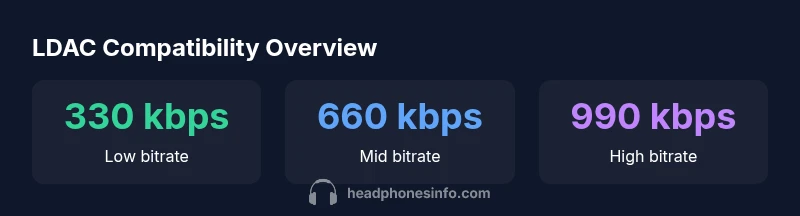
LDAC is a high-resolution Bluetooth codec developed by Sony that aims to deliver more audio data over the air compared to standard SBC. It supports multiple bitrate modes, typically 330 kbps, 660 kbps, and 990 kbps, which translates to noticeably richer detail and wider dynamic range in compatible setups. For listeners who crave clarity in complex musical passages or live recordings, LDAC offers a meaningful improvement, especially when source files are high-quality and the wireless channel remains clean. The real-world benefit depends on the bitrate negotiated during pairing, the quality of the original recording, and how well the downstream headphones reproduce nuance. In practice, Headphones Info finds that the best gains come when both the source device and the headphones support LDAC with the highest bitrate available.
Key takeaway: if you want to maximize LDAC, start with devices that advertise LDAC support on both ends and keep firmware up to date.
Which brands and models officially support LDAC
LDAC has broad adoption in the premium and enthusiast segments of the headphone market, with Sony leading the way and several third-party brands listing LDAC in their Bluetooth specifications. Some models advertise LDAC explicitly in their product pages or manuals, while others offer LDAC as part of a broader “aptX/LDAC” compatibility suite. When evaluating a potential purchase, check the Bluetooth specifications on the box, manual, or the official product page to confirm LDAC support. Note that LDAC is not universal across all product tiers—upper-midrange and flagship headphones are far more likely to advertise LDAC than entry-level models. Firmware updates can also unlock or improve LDAC behavior on devices that already list it.
Practical tip: for best results, pair LDAC-capable headphones with LDAC-enabled sources such as recent Android phones or laptops with LDAC support built into the Bluetooth stack.
How to verify LDAC support on headphones and source devices
Verification starts with reading the official specifications. On headphones, look for LDAC in the Bluetooth codec list or a dedicated LDAC badge on the packaging. On a source device, check the Bluetooth settings or developer options for an LDAC label and confirm the maximum bitrate the connection negotiates. If you’re unsure, you can use a Bluetooth analyzer app or consult the manufacturer’s support resources. Remember that LDAC performance can be impacted by interference, distance, and BT version compatibility. A quick real-world test with a high-resolution track will reveal whether you’re actually receiving LDAC streams.
Checklist: confirm LDAC on both ends, verify firmware versions, and test with a high-quality file to hear the difference.
Practical implications: bitrate, latency, and listening scenarios
Bitrate is the most obvious differentiator for LDAC. At 990 kbps, you’ll notice more detail and a more natural soundstage, particularly with complex instrument sections and wide dynamic ranges. Latency varies with hardware and Bluetooth stack, so for watching video or gaming, latency reduction features or aptX Low Latency alternatives may still be needed if the exact timing matters. In everyday listening, LDAC generally provides a smoother, more open presentation than SBC or older codecs. If you frequently listen in noisy environments, LDAC’s robust transmission can also maintain audio quality at moderate distances, assuming the signal remains stable.
Bottom line: choose LDAC when your device and headphones support it, but don’t assume higher bitrate always equals louder or more impactful sound in every scenario.
Comparisons: LDAC vs aptX HD and AAC for wireless headphones
LDAC often competes with aptX HD and AAC in Bluetooth headphone ecosystems. LDAC’s strength lies in higher potential bitrates and Sony’s codec optimization, which can translate to superior detail when bandwidth allows. AptX HD can offer lower latency in some configurations, and AAC remains reliable across Apple devices with broad compatibility. The practical difference you hear depends on the recording quality, the bitrate negotiated, and how well the headphones reproduce micro-detail and spatial cues. If you’re an Android user with a capable source and LDAC-capable cans, LDAC frequently provides the best overall fidelity in real-world listening.
Takeaway: LDAC isn’t universally ‘better’ in every scenario; its effectiveness hinges on end-to-end support and environmental conditions.
Choosing your LDAC-ready headphones: a buying checklist
- Verify LDAC in the Bluetooth codec list on both headphones and source devices.
- Prefer models with higher bitrate support (330/660/990 kbps) and solid firmware update history.
- Consider headphones with strong, low-latency performance for video and gaming if you need timing precision.
- Check battery life, comfort, and clamping force, since LDAC listening sessions can be longer at higher bitrate settings.
- Read reviews that specifically test LDAC performance with real tracks, not just theoretical specs.
Using this checklist, you can narrow your options to headphones that truly maximize LDAC’s potential while meeting your comfort and budget needs.
LDAC compatibility overview across devices
| Device Type | LDAC Support | Notes |
|---|---|---|
| Smartphones | Common | Most recent devices advertise LDAC in their Bluetooth specs |
| Headphones | Wide | Many premium models include LDAC compatibility |
| Transmitters | Varies | Ensure transmitter supports LDAC for end-to-end fidelity |
People Also Ask
What is LDAC and why should I care about it on headphones?
LDAC is a Bluetooth audio codec designed to transfer more audio data, enabling higher fidelity over wireless connections. If you frequently listen to high-resolution tracks or dynamic recordings, LDAC can offer a meaningful improvement when both ends support the codec.
LDAC is a high-quality Bluetooth option that helps you hear more detail on compatible devices.
Do LDAC headphones work with iPhones?
iPhones do not natively expose LDAC as a selectable codec in their Bluetooth settings. Some LDAC-capable headphones may still work with iPhones, but you may not get LDAC-specific benefits unless the source device provides LDAC support at the OS level or via firmware updates.
iPhones don’t expose LDAC, but some LDAC headphones can still pair and work with other codecs.
Can LDAC be used with non-Sony devices?
Yes, many third-party headphones and source devices support LDAC. Look for the LDAC mark in the device specs, and ensure both ends advertise LDAC for the best results. Vendor firmware and Bluetooth stack compatibility can influence actual performance.
Many non-Sony devices also support LDAC, but check the specs to be sure.
Is there latency with LDAC when watching videos or playing games?
Latency with LDAC depends on the hardware and Bluetooth stack. In some cases, LDAC can introduce noticeable delay for video or gaming if the transmitter or headphones prioritize bitrate over latency. If timing is critical, consider devices that offer low-latency modes or alternative codecs with lower inherent latency.
Latency varies; for timing-critical use, test with your setup.
Does LDAC require special apps?
LDAC does not require a special app. It is a codec negotiated at the Bluetooth level between source and headphones. Some apps may streaming high-res audio, but LDAC itself relies on the devices’ Bluetooth stack.
No special app is needed; ensure your devices support LDAC.
Is LDAC always better than SBC or AAC?
LDAC can provide better fidelity at high bitrates, but results depend on source quality and environment. In some cases, a well-implemented AAC or SBC with good headphones can sound comparable. Use LDAC where possible to maximize potential gains.
LDAC can be better, but it depends on bitrate and setup.
“LDAC unlocks higher audio quality when both source and headphones support the codec, but real-world gains depend on bitrate, file quality, and interference.”
What to Remember
- Check both ends for LDAC support to realize the codec’s benefits
- Use the highest bitrate available for best fidelity
- LDAC performance depends on firmware, BT version, and environment
- Compare LDAC with aptX HD and AAC to gauge real-world gains
- Follow a buying checklist to ensure true LDAC readiness