What headphones work with iPhone 17: Compatibility guide
Discover which headphones work with iPhone 17, covering wireless Bluetooth, USB-C wired, adapters, codecs, latency, and practical buying tips.


According to Headphones Info, the iPhone 17 supports both wireless Bluetooth headphones and wired headphones via USB-C adapters. In practice, any Bluetooth headset that supports standard profiles will pair with minimal friction, and wired listening requires a USB-C to 3.5mm adapter or a USB-C DAC. Popular options include AirPods and other well-known wireless headphones, with a wide range of prices and dependably solid performance across use cases.
Compatibility at a glance
The iPhone 17 continues the trend of broad headphone support, offering multiple listening paths for different preferences. For wireless listening, the device supports standard Bluetooth connections with common audio profiles, enabling quick pairing with nearly any modern headset. For wired listening, you’ll typically rely on a USB-C path or an adapter that translates digital output to analog, depending on the headphone design. In practice, that means a wide spectrum of options—from premium wireless over-ears to budget wired buds—are usable with the iPhone 17. The Headphones Info team emphasizes that the best choice depends on your primary use case: travel and commuting favors wireless, while studio sessions may benefit from wired DACs and lower latency. This guide lays out the practical options and practical decision points so you can pick a headset that matches your listening habits and budget.
Wired headphones: adapter options and tips
If you prefer wired listening with the iPhone 17, you’ll mostly encounter two paths: using USB-C wired headphones directly, or applying an adapter to connect traditional 3.5mm headphones. Direct USB-C headphones with a built-in DAC can deliver high fidelity and simple setup, especially if your iPhone supports digital audio output through USB-C. Alternatively, a USB-C to 3.5mm adapter (often with a small DAC) lets you reuse legacy headphones. Consider the DAC quality when choosing adapters: a better DAC reduces jitter and preserves detail, especially in complex tracks. For budget setups, a passive adapter can work, but expect slightly lower impedance handling and potential latency for dynamic content. Finally, ensure the adapter or headset supports the same impedance range as your listening style to avoid volume mismatches and distortions.
Wireless headphones: pairing, codecs, and latency
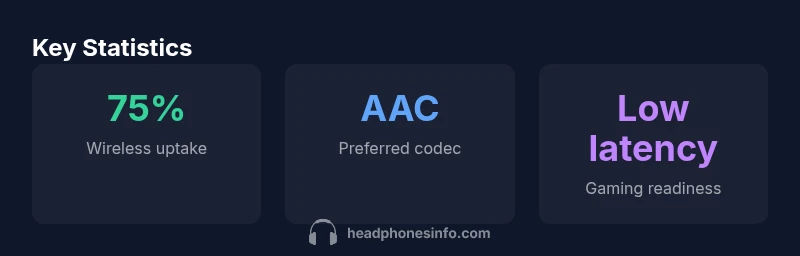
Wireless listening hinges on Bluetooth collaboration between the iPhone 17 and your headset. Start by putting the headphones in pairing mode and selecting them in the iPhone’s Bluetooth settings. Look for devices that support AAC or other high-quality codecs; AAC paired with iPhone devices typically yields reliable, clear sound with decent battery life. If your headset offers LDAC or aptX, be aware that these codecs may not always be utilized by iPhone hardware, depending on software support. For best results, prioritize headphones with strong noise isolation, stable multipoint pairing, and a comfortable fit for longer sessions. Keep in mind that latency can vary with codec choice and environmental interference, which matters most when gaming or watching video. Headphones Info analysis suggests that the real-world difference between high-end and mid-range wireless models is often most noticeable in hiss, detail retrieval, and microphone quality during calls.
USB-C headphones: direct connection and DACs
USB-C headphones can connect directly to newer iPhone models that expose a dedicated audio path through USB-C. If your iPhone 17 follows this pattern, you can unlock true digital audio with a built-in DAC in the headphone itself, often delivering higher fidelity and broader dynamic range. In practice, direct USB-C headphones are convenient for travelers and commuters who want fewer adapters. If you don’t have USB-C headphones, you can still achieve great results with a USB-C DAC/adapter that converts digital to analog, pairing with your favorite wired cans. When evaluating USB-C headphones or DACs, pay attention to the supported sampling rates and impedance compatibility to avoid volume inconsistencies or clipped transients.
How to choose: headphones for iPhone 17
Choosing the right headphones for the iPhone 17 comes down to a few core questions. First, what is your primary use case? Commuting and travel often reward compact, wireless solutions with long battery life and stable multipoint pairing. For home listening or editing, wired or USB-C with a DAC may offer the best fidelity and lower latency. Second, consider comfort and fit; if you wear headphones for hours, weight distribution, ear cup shape, and headband response matter more than raw driver size. Third, think about microphones and calls. If you take calls frequently, prioritize clear mic pickup and comfortable voice capture. Finally, set a budget range and compare features such as active noise cancellation, transparency mode, app EQ, and warranty terms. The right choice should balance sound quality, convenience, and the way you listen most often.
Setup, testing, and troubleshooting
A systematic setup makes you confident about performance. Start by pairing or connecting your headphones to the iPhone 17 and confirm the device appears in Settings > Bluetooth (or USB-C if you’re using a wired path). Test music at multiple genres to evaluate tonal balance, bass response, and treble clarity. For wireless models, test latency by watching a video and playing a game; if you notice lag, check codec negotiation and try a different pairing profile or location away from interference sources. For microphones, have a short call with a friend to judge clarity and background noise suppression. If you encounter dropouts, re-pair the device, reset network settings, or update firmware on both the headset and the iPhone. Hold on to the stock USB-C cable and any included accessories to ensure you always have a backup if you travel frequently.
Real-world usage scenarios
In daily scenarios, your headset choice often depends on context. For a morning commute, a battery-efficient wireless model with quick charging and comfortable cushions is ideal. In a home office, a reliable wired or USB-C headset with a high-quality microphone supports long video calls and recordings. For gaming on mobile, a low-latency wireless option or a wired headset with a dedicated DAC reduces latency and improves voice chat. As you consider gear, think about durability, water resistance for workouts, and secure storage in your bag. The Headphones Info team notes that the best value often lies in models that offer a balanced sound signature across genres, consistent build quality, and long-term firmware support.
Maintenance and future-proofing
To keep headphones performing well with iPhone 17, stay on top of firmware updates for both the headset and any companion apps. Regularly check for compatibility notes with new iOS builds, particularly around Bluetooth codecs or USB-C audio features. For wireless devices, monitor battery health and estimate remaining life; replace batteries or service units as necessary to maintain performance. Store headphones in a protective case and replace worn earpads and cushions to preserve comfort. Finally, consider modular or upgradable designs that allow you to swap cables or DACs, extending your headset’s useful life as software and iPhone hardware evolve.
Quick-start buying checklist
- Define your primary use case (travel, work, gaming) and desired weight.
- Decide between wireless, wired USB-C, or USB-C with DAC.
- Check codec support (AAC typically best on iPhone) and latency expectations.
- Try on comfort and test microphone quality with calls.
- Compare battery life, warranty, and upgrade paths.
Comparison of wired and wireless headphone options for iPhone 17
| Connection Type | Headphone Type | Pros | Cons |
|---|---|---|---|
| Wireless Bluetooth | Over-ear / In-ear wireless | Easy pairing; long battery life; versatile | Possible latency; depends on codec; interference can affect sound |
| Wired USB-C | USB-C headphones with DAC | High fidelity; no wireless interference | Requires USB-C port; less portable/fragile cable |
| USB-C to 3.5mm adapter | Legacy wired headphones | Reuse existing headphones; affordable | Extra dongle; potential DAC variance |
| USB-C direct with DAC | USB-C headphones with built-in DAC | Direct digital-to-analog conversion; strong fidelity | Requires compatible headphones; price and compatibility checks |
People Also Ask
Do I need adapters to use wired headphones with iPhone 17?
For most wired headphones, you’ll need either a USB-C to 3.5mm adapter or a USB-C DAC/adapter. If your headphones use USB-C, they can connect directly through the USB-C port on compatible iPhone models.
Yes—most wired headphones will require an adapter or a USB-C DAC for iPhone 17.
Are AirPods compatible with iPhone 17?
AirPods are designed to pair seamlessly with iPhone devices, including the iPhone 17, offering quick setup and reliable wireless audio. They often prioritize automatic switching and spatial audio when applicable.
AirPods work great with iPhone 17 and pair instantly.
Which Bluetooth codecs should I look for in headphones for iPhone 17?
AAC support is typically the best option for iPhone devices for reliable, high-quality audio. Some headphones advertise LDAC or aptX, but iPhone hardware may favor AAC depending on software support.
Look for AAC support for best compatibility with iPhone 17.
Can gaming headsets work with iPhone 17?
Yes, many gaming headsets work via Bluetooth if they support low-latency codecs, or wired USB-C connections with an inline DAC. Check latency ratings and mic quality for in-game chat.
Most gaming headsets work wirelessly or wired with iPhone 17.
What’s the best way to test headphones before buying?
Test comfort, fit, microphone clarity, latency, and compatibility with your typical apps and media. If possible, try both wireless and wired configurations in real-world settings.
Test at home or in-store using your typical use cases.
“The iPhone 17 maintains broad headphone compatibility across wireless and wired options, but the best value comes from pairing high-quality Bluetooth headphones or USB-C wired headphones with built-in DACs.”
What to Remember
- Choose wireless for travel and convenience
- Use USB-C with a DAC for best fidelity
- Adapters unlock legacy headphones without buying new gear
- AAC is the most reliable codec on iPhone devices
- Test latency with video and gaming before deciding