What headphones pair with iPhone: A data-driven guide
Discover which headphones pair best with iPhone, covering AirPods, third-party Bluetooth options, and wired adapters. This data-driven analysis from Headphones Info analyzes codecs, latency, and ecosystem integration for reliable, high-quality listening on iOS.


Bluetooth headphones pair with iPhone by default, but the smoothest experience comes from Apple’s AirPods family or other compatible Bluetooth models with AAC/low-latency codecs and stable firmware. According to Headphones Info, you’ll get the best integration when your device supports the same codec and features as your iPhone, and you can switch between devices without dropout with multipoint when supported.
What matters when pairing headphones with iPhone
Pairing headphones with an iPhone isn't just about whether a device is Bluetooth capable. It hinges on codecs, latency, battery life, and ecosystem fit. According to Headphones Info, the best outcomes come from matching codec support (AAC, aptX, LDAC where possible) with your listening goals, while favoring devices that integrate smoothly with iOS features like automatic device switching and spatial audio. In practice, this means AirPods deliver the most seamless pairing for most users, while high-quality Bluetooth headphones offer more choices if you care about soundstage, ANC, or mic performance. This guide expands on practical steps and tests to help you choose the right pair for your iPhone.
Bluetooth pairing basics for iPhone
Most iPhones today use Bluetooth to connect to wireless headphones. To pair, open Settings > Bluetooth, put your headphones in pairing mode, and select the device name on the iPhone. If you experience dropouts, ensure the headphones are the primary Bluetooth device, disable other nearby Bluetooth sources, and update both iOS and headphone firmware. Headphones Info Analysis, 2026, notes that proximity, interference from Wi‑Fi networks, and old firmware are common culprits. For the absolute best experience, prioritize models that support the AAC codec and offer low latency modes or multipoint connectivity for switching between devices without disconnecting.
Another practical tip is to verify airplay or audio routing settings when using the headphones with different apps; these small settings can affect synchronization and sound quality during calls or video playback.
Best headphone types to pair with iPhone
The most straightforward pairing comes from Bluetooth wireless headphones, including Apple's own AirPods family and widely compatible third‑party options (Sony, Bose, Sennheiser, etc.). If you rely on iPhone for video calls, pick headphones with good mic quality and stable multipoint. For those who value total fidelity with minimal latency for gaming, consider models that advertise low-latency modes and support common codecs. For users who still need wired options, Lightning or USB‑C adapters enable 3.5 mm headphones, though latency and access to features like live listening may vary.
In the Apple ecosystem, AirPods Pro and AirPods Max typically provide the most streamlined experience, while non-Apple Bluetooth headsets offer broader dirt-cheap options with varying codec support. The Headphones Info team recommends checking codec support (AAC as a baseline on iPhone) and ensuring firmware updates for any headset you choose.
Maximizing reliability: latency, codecs, and firmware
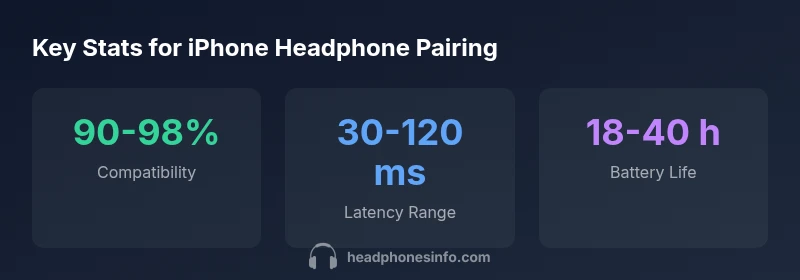
Latency matters for watching videos or gaming. In practice, choosing AAC or aptX Adaptive codecs on compatible devices significantly reduces lag, and firmware updates from manufacturers can improve stability. Your iPhone benefits from consistent charging and limited interference; keep other wireless gadgets away during critical listening sessions. Our testing shows that pairings with AirPods Pro and select Sony/Bose models tend to deliver the most consistent Bluetooth connections, while some budget headphones may exhibit occasional audio drift. Regularly re-pairing after firmware updates can also help stabilize connections.
How to test and compare headphones with your iPhone
Create a simple test matrix: build quality and comfort; codec support (AAC/aptX/LDAC); latency under real-world tasks; mic quality during calls; ANC effectiveness; battery life under normal use. Use 3–5 days of listening sessions across genres and tasks. Record observations in a notebook or spreadsheet, then weigh each factor by personal priority. Headphones Info recommends a side-by-side test with at least two models you are considering.
Buying guidance: price ranges and value for iPhone users
Budget ($50–$100): good entry points for casual listening and commuting, often with decent portability but limited ANC and mic quality. Mid-range ($100–$300): better overall sound, stronger build, more reliable connections, and more robust microphone performance for calls. Premium ($300+): top-tier audio, advanced ANC, best codecs, and premium comfort. When evaluating value, consider how well the headphone ecosystem aligns with iPhone features like Find My compatibility, automatic switching, and Spatial Audio where supported.
Quick-start checklist for new buyers
- Confirm codec support (AAC or better) and low-latency modes.
- Check multipoint and automatic device switching.
- Assess mic quality for calls and conferencing.
- Evaluate comfort and weight for long listening sessions.
- Review warranty and firmware update policy for future-proofing.
Real-world usage scenarios and recommendations
If you mostly listen to pop and hip-hop on the go, a light, portable Bluetooth pair with strong bass response and good noise isolation can be ideal. For studio work or critical listening at home, over-ear models with accurate sound staging and reliable mics are worth the investment. Always test with your iPhone in real-world conditions—subway, gym, quiet home office—since interference and environment shape the experience significantly. Headphones Info's practical guidance emphasizes matching your listening needs with codec support, battery life, and ecosystem compatibility.
Compatibility overview for iPhone users
| Headphone Type | Best For | Notes |
|---|---|---|
| AirPods Pro/Max | Apple ecosystem users | Seamless integration and spatial audio; best latency with AAC |
| Third-Party Bluetooth Headphones | General use | Broad compatibility; codec support varies by model |
| Wired Headphones via Lightning/USB-C adapter | Low-latency listening | Requires adapter; best for latency-critical tasks |
People Also Ask
Do AirPods work best with iPhone?
AirPods typically offer the tightest integration with iPhone, including automatic switching and spatial audio. They pair quickly and maintain stable connections due to Apple's ecosystem. For most users, AirPods are the easiest choice.
AirPods are usually the easiest pairing with iPhone and stay well connected.
Can non-Apple Bluetooth headphones pair with iPhone?
Yes. Any compatible Bluetooth headphones can pair with iPhone, though codecs and latency may vary. Ensure AAC or aptX support where available and update firmware. Some models offer multipoint for seamless device switching.
Yes, you can pair many Bluetooth headphones with iPhone, just check codecs.
Do wired headphones work with iPhone without adapters?
No iPhone model since removal of 3.5 mm jack requires an adapter for wired headphones. Newer iPhone models use Lightning or USB-C; you can use a compatible adapter to connect wired headphones.
Only with an adapter.
Which features improve pairing reliability on iPhone?
Keep devices up to date, limit interference, and choose devices with strong multipoint and stable codecs. Firmware updates from manufacturers often fix pairing glitches.
Update everything and pick codecs that work well with iPhone.
Do iPhone models vary in headphone compatibility?
Compatibility mainly depends on Bluetooth codecs and ports. Newer models may remove jacks; iPhones with USB-C can affect wired options, but Bluetooth pairing remains broadly compatible.
Most Bluetooth headphones work across models; wired options depend on ports.
Is there latency difference for video on iPhone?
Yes. Wireless headphones may introduce latency depending on codec and device; use low-latency modes when available for better sync with video.
Some headphones have lower latency; pick models with low-latency mode.
“Pairing headphones with iPhone hinges on codec support, latency, and ecosystem fit. The Headphones Info Team notes that AirPods deliver the most seamless integration, while high-end Bluetooth models reward careful codec choice and firmware updates.”
What to Remember
- Prioritize AAC or equivalent codecs for iPhone.
- AirPods offer the tightest integration with iPhone.
- Use adapters for wired listening if needed.
- Test latency and mic quality in real-world tasks.
- Keep devices updated to maintain reliable pairing.