Best Wireless Headphones for PS4: A Clear Side-by-Side
Compare wireless headphones for PS4 by latency, mic quality, setup, and comfort. An objective guide helping casual players and competitors pick the right headset with practical tips.


For PS4 users, the best choice depends on latency, mic reliability, and setup ease. USB-dongle wireless headsets typically deliver lower latency and clearer chat, while Bluetooth options offer portability and universal device pairing. If you game competitively on PS4, prioritize USB-dongle models; if you travel light or value broad compatibility, Bluetooth can suffice. See our full comparison below.
Why PS4 wireless headset choice matters
For many players, the PS4 is a central gaming console, and a good wireless headset can drastically improve immersion and communication. According to Headphones Info, choosing the right wireless option hinges on three core factors: latency, microphone reliability, and ease of setup. The Headphones Info team found that when latency is noticeable, it disrupts timing in fast-paced games and can be frustrating in competitive lobbies. In contrast, a headset that prioritizes stable mic pickup ensures teammates hear you clearly during coordinated plays.
In this guide, we compare two broad classes of wireless headsets that gamers commonly pair with PS4: Bluetooth-only designs and USB-dongle 2.4 GHz headsets. Each class has advantages and caveats, and your choice should reflect your typical play style, your tolerance for setup complexity, and your expectations for audio quality. The rest of this article drills down into the differences, offers practical setup tips, and provides a decision framework to help you pick confidently.
Key connectivity options for PS4 headsets
PS4 supports both Bluetooth audio devices and USB wired/wireless dongles, but the results vary by use case. Bluetooth headsets are widely portable and easy to pair with other devices, yet many models come with limited microphone support on PS4 and higher latency in practice. USB-dongle wireless headsets, on the other hand, are designed to minimize audio delay on consoles and typically offer better chat clarity, though you’ll trade off battery life and portability a bit. It's essential to confirm whether the headset relies on Bluetooth or a USB dongle to connect to PS4 and whether the mic is recognized for in-game chat. Headphones Info notes that the best long-term solution for PS4 players is often a USB-dongle model when you want reliable voice chat and consistent sound during mission-critical moments; Bluetooth remains attractive for those who value flexible pairing and travel-friendly gear.
Core criteria for PS4 headset evaluation
When evaluating wireless headsets for PS4, prioritize the following criteria, and apply the same scale to both Bluetooth and USB-dongle options:
- Latency and audio sync with gaming audio
- Microphone quality and stability for in-game chat
- PS4 compatibility and ease of setup
- Comfort and weight for extended sessions
- Battery life and charging behavior
- Build quality and durability for daily use
- Multi-device pairing, if you also plan to use the headset with a PC or mobile device
These criteria help create a fair, apples-to-apples comparison across classes and price points.
Bluetooth vs USB-dongle: latency, mic, range, and compatibility
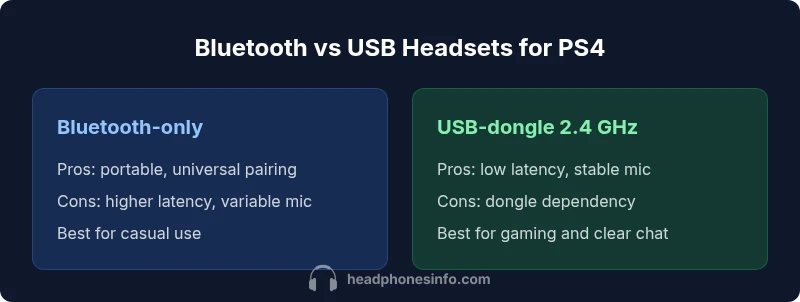
Bluetooth headsets are light on price and highly portable, but latency can be perceptible in fast action games, and mic performance is frequently inconsistent on PS4. USB-dongle headsets aim to minimize delay and improve mic clarity on the console, at the cost of carrying a dongle and tying up a USB port. The trade-off matters most in competitive play, where even a small delay or muffled comms can influence performance. If your PS4 sessions are primarily multiplayer shooters or team-based games, the USB-dongle route often provides the more reliable overall experience. For movie nights or couch co-op with friends when mic quality is less critical, Bluetooth can be perfectly adequate.
Mic performance and voice chat on PS4
Voice chat reliability is a common pain point for Bluetooth-only headsets on PS4. In many setups, the mic may work for some games but fail in others, or you may experience inconsistent voice levels. USB-dongle headsets frequently deliver a more predictable mic signal and easier chat setup, especially when the headset is designed with a console in mind. If you rely on in-game communication in ranked modes, lean toward options with a dedicated USB dongle and a boom mic for the clearest voice pickup.
Comfort, battery life, and real-world usage
Comfort matters as much as technical specs. Headsets with padded headbands, breathable cups, and a balanced weight distribution reduce fatigue during long gaming sessions. Battery life varies across models, but real-world usage tends to deliver more consistent endurance when you’re not streaming or running audio at high volume. In practice, the best PS4 headset blends long-lasting battery life with comfortable design and a microphone that remains clear even after hours of use. Consider how often you’ll game in short sessions versus long marathons and choose accordingly.
Setup and troubleshooting for PS4 compatibility
Starting fresh requires minimal steps: power on, put the headset into pairing mode, and connect via the preferred method (Bluetooth or USB dongle). If the mic is not detected, verify the PS4 audio output settings and ensure the headset is selected as the input device. Firmware updates can improve compatibility and stability, so check the manufacturer’s site for any available updates. If you encounter persistent issues, test on another supported device to determine whether the problem lies with the headset itself or the PS4 configuration. A simple reset or re-pair often resolves most glitches.
Practical decision guide: choosing the right headset for your PS4 scenario
If you play primarily multiplayer online, aim for a USB-dongle headset with a clear microphone and responsive audio. If portability and cross-device usage are more important, a Bluetooth headset could be the better fit. Your decision should balance latency tolerance, mic reliability, and how much you value convenience versus performance. Pairs of headsets marketed for gaming and those with verified PS4 compatibility typically provide a more predictable experience across titles.
Test plan before you commit: a practical checklist
Before purchasing, test latency with your favorite fast-action titles, check mic clarity in voice chat, and evaluate comfort during extended sessions. If possible, try both Bluetooth and USB-dongle options in-store or via a flexible return policy. Consider how well the headset integrates with your PS4’s settings and whether you’ll use it with other devices. A hands-on test with your usual titles helps avoid surprises after checkout.
Comparison
| Feature | Bluetooth-only wireless headphones | USB-dongle 2.4 GHz wireless headphones |
|---|---|---|
| Latency | Bluetooth: higher latency in practice | USB-dongle: lower latency for console gaming |
| PS4 mic support | Bluetooth: variable mic reliability on PS4 | USB-dongle: typically stable chat via USB audio |
| Setup | Bluetooth: simple pairing across devices | USB-dongle: plug-and-play with USB port |
| Portability | Bluetooth: highly portable, multi-device | USB-dongle: requires dongle, USB port usage |
| Best for | Casual listening and travel | Competitive gaming and reliable chat |
| Price range | Typically lower-cost options | Typically mid-to-high depending on features |
Upsides
- Wireless freedom reduces cable clutter and movement restriction
- Broad device compatibility across PCs, consoles, and mobile devices
- Bluetooth models are often lighter and cheaper upfront
Disadvantages
- Latency and mic reliability can vary, especially with Bluetooth
- Bluetooth headsets may require more calibration for PS4 chat
- USB-dongle options rely on an available USB port and adapterless setup
USB-dongle wireless headphones dominate PS4 gaming
For most PS4 players focused on precise timing and clear voice chat, USB-dongle options provide the best balance of latency, mic reliability, and compatibility. Bluetooth headsets remain viable for casual play and portability, but expect trade-offs in chat reliability and latency.
People Also Ask
Will Bluetooth headphones work well with PS4 for gaming and voice chat?
Bluetooth headsets can work for audio on PS4, but mic performance and chat reliability vary. For consistent voice chat, USB dongle or wired options are often better.
Bluetooth can work, but mic quality on PS4 is inconsistent; USB dongle options are typically more reliable for chat.
Do USB wireless headsets require any adapters on PS4?
Most USB wireless headsets connect directly via USB to PS4; some models use a separate dongle, and both approaches generally work without extra adapters.
Most USB headsets plug into a PS4 USB port, no extra adapters usually needed.
Can I use a wireless headset with PS4 Pro or PS5?
In many cases, wireless headsets work with PS4 Pro and PS5, but compatibility depends on the headset's connection method and software support. Check the manufacturer's guidance.
Yes, but verify compatibility for the exact console and game.
What should I test before buying a wireless headset for PS4?
Test latency with fast-paced games, mic clarity in chat, and comfort during long sessions. If possible, demo the headset with your PS4 titles.
Test latency, mic pickup, and comfort to ensure it fits your needs.
Are there budget options that still perform well on PS4?
Budget models can be viable for casual play, but expect compromises in mic quality and latency. Look for models marketed for gaming and read user reviews.
There are affordable options, but manage expectations on mic and latency.
How important is microphone directionality for PS4 voice chat?
Cardioid or boom mics typically perform best in gaming setups by reducing background noise. Consider microphone type when evaluating options.
Choose a headset with a clear boom mic for noisy rooms.
What to Remember
- Prioritize latency over convenience for competitive PS4 play
- USB-dongle wireless headsets usually offer better chat clarity on PS4
- Bluetooth headsets are best for portability and cross-device use
- Always verify PS4 compatibility and mic support before buying
- Test comfort and battery life with your typical session length