How to Make Headphones Louder: Safe Loudness Guide
Learn practical, safe ways to increase headphone volume across devices with practical tweaks, gear options, and listening tips from Headphones Info.


To safely increase headphone loudness, start with your source and playback app—maximize output and disable any aggressive sound limiting. Use a clean EQ to preserve clarity, boost mid/high frequencies instead of bass, and ensure your headphones' impedance matches your player. If needed, add a small headphone amplifier or DAC for more headroom, but monitor distortion.
Why louder isn’t always better for headphones
Pushing volume higher is not a universal fix. Loudness depends on the entire signal chain: the source device, the playback software, the headphones’ impedance, and the amp headroom. Mismatches create distortion, hiss, or a harsh sound that feels louder but is actually less pleasant. The Headphones Info team emphasizes safe listening practices while exploring ways to increase perceived loudness. In practice, you want to maximize headroom (the gap between your peak signal and clipping) rather than simply turning the wheel to max. This means evaluating whether the bottleneck is coming from the source (phone or computer), the headphones themselves, or a lack of amplification. By identifying the bottleneck, you can apply the right fix without risking ear fatigue or driver damage. You’ll often achieve better perceived loudness by preserving dynamics rather than forcing loudness through distortion. This frame sets the ground for practical steps, safety notes, and gear considerations.
Understand your headphones and your source
Headphones are not just “speakers in a can.” They have impedance (ohms), sensitivity (
Quick ways to increase perceived loudness safely
- Maximize source output: ensure the primary device isn’t capping the signal due to software limits or power-saving modes.
- Use a clean EQ: gentle mid/high frequency boosts can increase perceived loudness without adding harsh bass.
- Disable loudness normalization that compresses dynamic range at quiet passages.
- Improve source quality: higher bitrates and lossless files translate to more usable dynamic range.
- Test with a few reference tracks you know well, listening for distortion, harshness, or muffled highs that signal overdrive.
- If your headphones need more headroom, consider a compact DAC/amp or a simple portable amplifier.
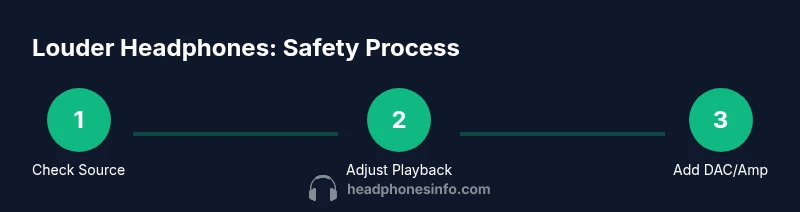
The goal is to improve perceived loudness without sacrificing detail. This means keeping dynamics intact and avoiding sustained distortion. See Diagram A for a visual path from source to ear, highlighting where the most gains typically occur. The Headphones Info team reminds readers that safe listening practices should accompany any loudness enhancement, especially when using headphones in public or around others.
Hardware options: DACs and amplifiers
A dedicated DAC/amp can dramatically improve headroom when paired with appropriate headphones. The idea is to deliver clean power without forcing the signal through a device’s internal limiter. When choosing gear, look for compatibility with your headphones’ impedance and sensitivity, and avoid models that introduce hiss or noise. For portable use, a compact amp/DAC combo is often enough to unlock louder playback while maintaining low distortion. For high-end listening at home, a desktop amplifier can provide substantial headroom and preserve tonal balance. If you’re unsure, start with a modest, reputable entry-level DAC/amp and test with multiple tracks. You should notice clearer highs, more controlled bass, and reduced listener fatigue at higher volumes—without muffling the mids. The key is to avoid increasing noise floor or clipping, which can worsen perceived loudness. A note on safety: keep listening sessions brief when you’re testing new gear to avoid ear fatigue.
Listening safety and human perception
Loudness is not the only element that matters; perception depends on cues like spectral balance and the brain’s adaptation to the sound. Prolonged exposure at high sound pressure levels risks hearing damage. The safe approach is to raise loudness gradually and monitor for any signs of discomfort. Use a timer and plan short testing windows; avoid long, continuous listening at high volumes. When you apply EQ boosts, don’t push the signal beyond the point where it starts to sound harsh. Headphones Info recommends checking for distortion cues—crackling, clipping, or a “shimmer” in high frequencies—and pausing immediately if you hear any of these signs. Everyone’s hearing is different, so personalize your listening levels and take breaks to prevent fatigue.
Troubleshooting distortion and compatibility
If you notice hiss, crackles, or a harsh edge at higher volumes, you likely hit the limit of your current setup. Start by validating cables and connectors for secure fit; a loose jack can introduce noise that exaggerates loudness without improving clarity. If using an external DAC/amp, ensure the gain is set appropriately; too much gain can cause clipping. Revisit your source settings: disable any dynamic range compression and set the device to “maximum undistorted output.” On some computers, you may need to adjust the audio interface’s sample rate or output format to reduce artifacts. When testing, use clean, well-produced tracks and a few genres to ensure the change in loudness is consistent across music types. If distortion persists, it could be caused by incompatible headphones or worn diaphragms; in that case, consider service or replacement.
Advanced setups and when to upgrade headphones
For tricky headphones, impedance matching can make a big difference. Some higher-impedance models will deliver more clean volume when driven by a capable amp, while others respond poorly to additional gain. If you have multiple devices, you may prefer a modular desktop setup with different amps for different headphones. You can also explore higher-end DACs that offer jitter reduction and cleaner digital-to-analog conversion, which often translates into more headroom. But remember, improvements come with diminishing returns; if a pair of headphones are inherently quiet due to driver efficiency, you may be better off testing a different model designed for louder output. Always balance sound quality with loudness preferences, and avoid upgrading gear solely for louder playback if it sacrifices tonal balance or comfort.
Final guidelines: practical steps you can take today
Begin with your current setup and apply a structured test plan. Start by confirming there is no software limit, then adjust EQ and source output, and consider a DAC/amp if a gap remains. Document the results across several tracks and note which combinations yield the cleanest, loudest playback. Remember to keep safety in mind: listening at high volumes should be brief, and the goal is clean perceived loudness, not raw distortion. By following these steps, you can improve your listening experience without compromising ear health or sound fidelity.
Tools & Materials
- Source device (phone, laptop, or desktop)(Ensure capable output without hidden limits; check power-saving modes.)
- Headphones(Prefer models with clear driver response and known impedance.)
- Music/Video app with manual volume and EQ controls(Turn off any auto-normalization or limiting features.)
- External DAC/Headphone amplifier (optional)(Choose one compatible with your headphone impedance and output power.)
- High-quality audio files or streaming source(Lossless or high-bitrate tracks preserve dynamic range.)
Steps
Estimated time: Total time: 25-40 minutes
- 1
Assess current loudness and bottlenecks
Play a familiar track at your typical listening level and note when you hear distortion, strain, or fatigue. Check if the device limits the signal or if the headphones seem less capable. Identify whether the bottleneck appears to be upstream (source or app) or in the headphone driver itself.
Tip: Use a simple sound meter app to estimate relative loudness and watch for clipping cues. - 2
Maximize source output
Disable any power-saving or dynamic-limiter settings in the device and app. Increase the main volume step-by-step while listening for stability. If you hear hiss or distortion, back off slightly and proceed to the next step.
Tip: Avoid rapid, repeated volume jumps; incremental increases help detect distortion early. - 3
Apply smart EQ for perceived loudness
Boost mid/high frequencies conservatively to enhance perceived loudness without overemphasizing bass. Remove any boosts that cause harshness or mud. Consider a reference curve to maintain tonal balance as volume changes.
Tip: Place a reference track with clear vocals to evaluate highs without sibilance. - 4
Add DAC/amp or improve hardware headroom
If your setup supports it, connect a DAC/amp to provide cleaner amplification and more headroom. Check impedance compatibility to avoid under- or over-driving the drivers. Re-test loudness with multiple tracks to verify improvements.
Tip: Start with a modest, reputable entry-level unit and iterate if needed. - 5
Test with varied tracks and monitor distortion
Use tracks across genres to ensure gains are consistent. Listen for clipping, crackling, or muffled mids. If distortion appears, reduce gain or revert a change that introduces it.
Tip: Keep track of the settings that work best for each headphone pair. - 6
Explore alternate headphones or keep your current model
If you consistently reach loudness limits with one pair, try a different model with higher efficiency or lower impedance that matches your gear. This is a practical way to achieve more headroom without sacrificing sound quality.
Tip: Avoid chasing loudness alone; comfort and tonal balance matter for long sessions. - 7
Document results and lock in a profile
Create a simple profile detailing device, app, EQ settings, and gear used. This helps you reproduce results and share a reliable setup with others.
Tip: Label profiles for different listening scenarios (commuting, home, gaming).
People Also Ask
Can turning up the volume permanently damage headphones?
Yes, excessive volume can stress drivers and cause coil damage or early wear. Distortion also harms perceived sound and can mask issues. Always monitor for clipping and back off if you hear harsh tones or crackling.
Yes. Pushing loud volumes can stress the drivers and reduce lifespan. Watch for distortion and back off if you hear harsh tones.
Is a headphone amplifier safe for all headphones?
Amplifiers can help with headroom, but not all headphones benefit equally. Match impedance and sensitivity to the amp’s output, and avoid overdriving. Start with a modest gain and test across tracks.
A good match matters. Start with modest gain and test to avoid overdriving.
Will louder playback improve listening for all music genres?
Not necessarily. Loudness can increase fatigue and mask detail if dynamics are lost. Focus on clean, balanced sound at a comfortable level rather than simply louder output.
Louder isn’t always better. Clean, balanced sound at a comfortable level is usually best.
What’s the difference between software and hardware boosts?
Software boosts often alter dynamic range and can introduce artifacts. Hardware boosts via a DAC/amp typically offer cleaner, more consistent headroom, preserving detail while increasing loudness.
Software boosts can change dynamics; hardware boosts usually preserve detail with cleaner headroom.
How do impedance and sensitivity affect loudness?
Impedance and sensitivity determine how much voltage a headphone needs and how loud it will get from a given source. Higher sensitivity and lower impedance generally translate to higher potential loudness with less power.
Impedance and sensitivity dictate how loud headphones can get from a source; lower impedance and higher sensitivity help.
Should I boost bass to feel louder?
Boosting bass can make tracks feel louder but may mask mids and highs. It’s better to use balanced EQ that enhances perception without muddying the mix.
Bass boosts can feel loud but sometimes muddy the sound; balance is key.
Watch Video
What to Remember
- Identify bottlenecks in source, amp, and headphones
- Use careful EQ to boost perceived loudness without distortion
- Consider a DAC/amp for headroom, then test with multiple tracks
- Prioritize safety and comfort over pure peak volume
- Document your optimal profiles for repeatable results