How to Tell If Headphones Are Loud Before Buying
Learn practical methods to judge headphone loudness before buying, with step-by-step tests, safe listening guidance, and a shopper's checklist. Compare models accurately using SPL measurements and real-world listening.


Before buying, learn to gauge loudness using a sound-level meter or a smartphone app, compare models at the same volume, and check for distortion. According to Headphones Info, practical tests with a representative track and safe listening practices help avoid buyer’s remorse. This quick guide outlines simple, repeatable checks you can perform in minutes.
Why loudness matters when buying headphones
Loudness is a key factor in how enjoyable or tiring a headphone pair feels. When you buy headphones, you don’t just want to know their maximum output; you want to know how loud they feel at everyday listening levels across your favorite genres. A model that sounds loud but lacks control can feel harsh, fatiguing, or cause distortion, especially with complex mixes. Conversely, a headphone that is too reserved might fail to reproduce details or punch, leading to a dull listening experience. For the reader searching for how to tell if headphones are loud before buying, this section explains how perception of loudness works and why real-world testing matters more than raw specs. According to Headphones Info, loudness is a product of the drivers, the seal around your ears, and how the system handles dynamic changes in music. In practice, the goal is not to maximize decibels but to achieve comfortable, clear, and consistent loudness across the music you actually listen to. By understanding the factors that influence loudness, you can compare models more reliably and avoid relying on marketing numbers that poorly reflect everyday use.
Tools & Materials
- SPL meter(Calibrated device preferred; measure at ear level for accurate results)
- Smartphone with SPL app(Choose an app that provides real-time SPL readouts and supports reference tracks)
- Representative test track(Use a well-mixed track spanning genres to test how loudness feels in real listening scenarios)
- Test headphones(The pair you’re considering purchasing, ideally the same model and configuration you’ll use daily)
- Notepad or app for logging results(Document levels, impressions, and which tracks were used)
Steps
Estimated time: 15-25 minutes
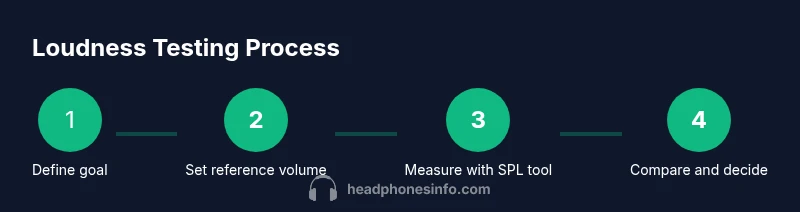
- 1
Define your listening goal
Decide the genres and typical listening situations you care about, such as pop, rock, or podcasts, and choose a comfortable listening level as your baseline. This is your reference point for comparing loudness across models and helps prevent chasing excessive volume. Why: a clear goal keeps your tests focused and repeatable.
Tip: Write down a target listening level in decibels or percent of your max volume as a reference. - 2
Gather tools and create a quiet test space
Set up a quiet room with minimal echoes to ensure SPL readings reflect headphone output rather than environmental noise. Keep the testing area consistent across models. Why: consistency reduces noise in the data and makes comparisons meaningful.
Tip: Close the door, mute other devices, and set a fixed seating distance from the speaker or headphone drivers. - 3
Calibrate your SPL meter
If your meter or app has a calibration option, run it against a known reference tone or calibration file. This step aligns readings between sessions and devices. Why: calibration improves repeatability, so you’re comparing apples to apples rather than different readings.
Tip: Record the calibration result so you can reference it when analyzing data. - 4
Measure loudness at a comfortable level with a representative track
Play your chosen track at your baseline listening level and record the SPL at the ear position. Do this for each headphone model you’re evaluating using the same playback device and source material. Why: real-world listening emphasizes perception, not peak SPL alone.
Tip: Use the same volume control position for every measurement to maintain fairness. - 5
Repeat across tracks and models
Test multiple tracks that cover bass, mids, and highs to see how loudness perception holds across content. Record notes about distortion, percussion clarity, and fatigue potential. Why: different material reveals how each headphone handles dynamic range and headroom.
Tip: Include at least two tracks with contrasting energy profiles. - 6
Evaluate distortion and headroom
While listening, listen for any crackling, hiss, or harshness as levels rise. If distortion becomes noticeable, lower the volume or mark the model as having insufficient headroom for your tastes. Why: distortion is a practical cue that loudness is not the only factor that matters.
Tip: Trust your ears; measurements alone can miss perceptual artifacts. - 7
Make a final decision with a loudness threshold
Based on your measurements and impressions, decide which model offers the most consistent loudness at your baseline and across materials, while remaining comfortable and distortion-free. Why: a well-balanced loudness profile often correlates with longer enjoyment and less listening fatigue.
Tip: Document the final choice and rationale so you can revisit it if specs change with future firmware or batches.
People Also Ask
Why do headphones with similar ratings sound different in loudness?
Loudness differences arise from driver design, acoustic housing, impedance, and how each pair handles dynamic ranges. Ratings are not always standardized across brands, so real-world tests are essential.
Loudness can vary even with similar specs because of design choices and manufacturing tolerances; real-world testing helps you see what you’ll actually hear.
Can I rely on the frequency response graph to tell loudness?
Frequency response graphs show tonal balance across frequencies but do not directly measure loudness perception. You should pair graphs with real listening tests and SPL measurements for a complete picture.
Graphs help with balance, but they don’t tell you how loud something will feel in use.
Is louder always better for headphones?
Loudness quality matters more than sheer volume. Excessive loudness can cause fatigue and distortion, while a well balanced loudness profile preserves detail and comfort.
More volume isn’t always better; comfort and clarity matter more for long sessions.
What is the simplest way to test loudness at home without gear?
Use a smartphone SPL app and a representative track, adjust to a comfortable level, and compare readings across models. This gives a practical sense of loudness without specialized equipment.
A quick at-home test with a SPL app can give you a usable sense of loudness.
Does wireless change loudness compared to wired connections?
Wireless and wired connections can produce subtle differences due to codecs and DACs. Test both if possible to judge which feels consistently loud across content.
If you can, compare both connections to ensure a consistent listening experience.
Should I worry about safety when testing loudness?
Yes. Avoid sustained high volumes, take breaks, and follow safe listening guidelines to protect hearing while testing loudness.
Protect your hearing by not pushing volumes too high and taking regular breaks.
Watch Video
What to Remember
- Define a clear listening goal before testing
- Use SPL measurements at a fixed volume for fair comparisons
- Check for distortion and headroom, not just peak loudness
- Test across multiple tracks to reflect real-world use
- Prioritize safe listening habits over loudness alone