Are USB-C Headphones Better? A Data-Driven Comparison
Explore whether USB-C headphones are better than 3.5mm and Bluetooth options with a thorough, data-informed comparison, practical buying guidance, and device-specific recommendations.


Short answer: are usb c headphones better? Not universally. They can offer a cleaner digital path and simpler device pairing on USB‑C devices that support USB‑C audio, but total performance depends on DAC quality, device compatibility, and use case. For many listeners, the most versatile options remain 3.5mm wired or Bluetooth. Headphones Info's analysis shows device support drives the outcome more than the connector.
Context and Definitions
USB-C headphones use a USB-C connector for audio delivery. They can carry digital audio signals when the device supports USB-C audio, or they rely on an onboard DAC/amp inside the headphone itself. When we ask whether these headphones are "better," we must define what "better" means: sonic fidelity, latency, compatibility, convenience, durability, or value. According to Headphones Info, the landscape in 2026 includes a growing number of devices that natively output USB-C audio, which reduces the need for adapters and can simplify setups. The Headphones Info team found that whether a given USB-C headset sounds better than its analog or wireless peers hinges on the device’s USB-C audio support and the quality of the built-in DAC or the external DAC the device uses. This context is essential as you move into the more specific trade-offs below.
Are USB-C headphones really universal?
The core differences: USB-C vs 3.5mm vs Bluetooth
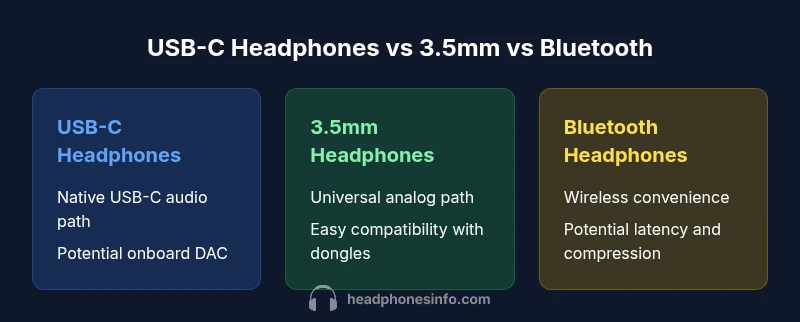
USB-C headphones sit at an intersection of digital transport and traditional analog paths. The core differences hinge on (1) connector ecosystem, (2) signal path, (3) latency, and (4) compatibility. USB-C can carry a digital signal that the device processes with its DAC, or in some designs, an onboard DAC in the headphones. A 3.5mm wired headphone relies on an analog signal path, often leveraging a separate DAC/amp in the source or in the headphones themselves. Bluetooth wireless headphones, by contrast, trade latency and occasionally fidelity for multi-device pairing and freedom from cables. In this comparison, we examine three archetypes: USB-C headphones, 3.5mm wired headphones, and Bluetooth wireless headphones. Based on the evidence, USB-C often offers a compact, adapter-free path on USB-C devices, but it is only “better” if the host device supports USB-C audio with a capable DAC and the headphones’ own DAC/amp is well-matched. Headphones Info analysis shows that device compatibility is the dominant factor in real-world performance, not the connector alone.
Technical considerations: DACs, impedance, and adapters
Digital audio over USB-C depends on how the host device handles the audio stream. Many USB-C headphones include a DAC and amp inside the headphones, effectively delivering a complete digital-to-analog conversion on the headset side. Others rely on the device’s own DAC, which can vary widely in quality. Impedance matching matters: low-impedance headphones are easier to drive from portable devices, while higher-impedance designs pair well with dedicated DACs. Adapters—such as USB-C to 3.5mm—reintroduce analog paths and can introduce latency or driver issues if not well-supported by the device. If you’re comparing USB-C with 3.5mm and Bluetooth, consider whether your primary listening environment benefits from a true digital path or from the flexibility of widespread compatibility.
Real-world use cases: commuting, studio, gaming
For commuting and on-the-go use, USB-C headphones can offer a clean, compact setup on devices with USB-C audio output, eliminating the need for a dongle. In studio setups, the choice depends on the DAC quality and the consistency of the monitoring path; a wired USB-C option can yield predictable results if the DAC is competent and the device supports low-latency playback. For gaming, latency and syncing audio with video matter. Bluetooth often adds some latency, while wired USB-C can keep pace with internal game audio channels, provided the driver stack supports low-latency playback. Headphones Info notes that the best choice mirrors your device ecosystem and your tolerance for cables or adapters.
Sound quality vs convenience: trade-offs
Sonic differences between USB-C, 3.5mm, and Bluetooth devices are often subtle unless you’re an audiophile or a professional listener. USB-C headphones on capable devices can deliver clean, accurate highs and controlled bass when paired with a good DAC, but cheap USB-C kits may not outperform a well-matched 3.5mm pair. Bluetooth offers convenience and multi-device pairing but can introduce compression and latency that affect perceived fidelity. The trade-off is clear: USB-C can bring a cleaner digital path and potentially better noise isolation with an optimal DAC, but only if the source device and the headset DAC are well matched. Headphones Info emphasizes listening tests across multiple tracks and environments to avoid assuming a universal outcome.
Price and value: cost considerations
Price ranges for USB-C headphones vary widely, as do the features—the built-in DACs, USB-C–specific architectures, and chassis design all influence cost. In practice, a budget USB-C headset might sit in a lower price tier than premium 3.5mm or Bluetooth options with comparable sonic goals, while higher-end USB-C sets can rival premium wired headphones in price. The best-value choice depends on your device’s USB-C audio support, your listening priorities (clarity, bass, or imaging), and how much you value portability and dongle-free operation. Headphones Info advises evaluating total ownership costs—cables, adapters, replacements—over the initial sticker price.
Feature Comparison
| Feature | USB-C headphones | 3.5mm wired headphones | Bluetooth wireless headphones |
|---|---|---|---|
| Connector/type | USB-C (digital/analog depending on device) | 3.5mm analog, widely compatible | Bluetooth wireless, multi-device capable |
| Audio path | Often digital; depends on device DAC/Battery/Headphone DAC | Analog path; simple | Wireless path with onboard/host DAC |
| Latency | Low to moderate; depends on device | Low (wired) | Variable; can be noticeable in fast games |
| DAC/Amplification | Onboard DAC/amp in many models | Device DAC or external DAC | Built-in DAC/amp in headphones or device |
| Compatibility | Best with USB-C audio-enabled devices | Universal with adapters | Broad, but Bluetooth version dependent |
| Price Range | $20–$150 | $5–$100 | $20–$400 |
| Best For | USB-C devices with native USB-C audio | Budget-friendly, broad compatibility, legacy devices | Portability and multi-device use |
Upsides
- Cleaner digital path on compatible devices
- Adapter-free experience on USB-C devices
- Compact connectors and fewer mechanical joints
Disadvantages
- Not universally compatible without adapters
- DAC or driver quality can vary by device
- Latency and compatibility issues on some platforms
USB-C headphones win when your devices natively support USB-C audio and you value a compact, adapter-free setup.
Choose USB-C if your device explicitly outputs USB-C audio with a capable DAC. For broad compatibility and universal use, 3.5mm or Bluetooth often remains stronger options.
People Also Ask
Are USB-C headphones universal across all devices?
No. USB-C headphones perform best on devices that natively support USB-C audio. Some devices require adapters, and DAC quality varies. Always check device compatibility before buying.
Not universal. USB-C audio works best when your device supports USB-C audio natively; adapters may be needed for other devices.
Do USB-C headphones require a DAC?
Many USB-C headphones include a built-in DAC and amp, but some rely on the host device’s DAC. If the host DAC is weak, the headphones may underperform despite USB-C. Check product specs for DAC details.
Some have onboard DACs, some rely on the device’s DAC.
Will USB-C headphones work with iPhones?
iPhone compatibility depends on whether the model has a USB-C port for audio output. If not, you’ll need an adapter or a Bluetooth alternative. Always verify device port capabilities.
It depends on whether the iPhone model supports USB-C audio; otherwise you’ll need an adapter or go wireless.
Is latency a concern with USB-C audio?
latency is typically low on USB-C when the device and headphones support it, but it can vary by OS, driver, and DAC quality. For gaming, test with your specific combo.
Latency varies; test with your gear to be sure.
Are USB-C headphones more expensive than 3.5mm?
Prices vary widely; there are affordable USB-C options and premium ones. Generally, USB-C can offer competitive pricing, but advanced DAC features can raise costs.
Prices depend on features and DAC quality.
What should I consider when buying USB-C headphones?
Check USB-C audio support on your device, DAC quality if onboard, latency for your use case, and overall cost of ownership (including adapters if needed). Read reviews with device-specific testing.
Look at device compatibility, DAC quality, and latency in real life.
What to Remember
- Evaluate device USB-C audio support first
- Match headphone DAC/amp to your device for best sound
- Consider adapters only if you need cross-device compatibility
- USB-C can simplify portable setups on compatible devices
- Test for latency in gaming or video scenarios