Headphones Cushion Replacement: A Step-by-Step Guide
Learn how to replace headphone cushions with compatible pads, choose materials, tools, and a clear step-by-step process to improve comfort, hygiene, and sound seal.


This guide teaches you how to replace headphone cushions, from selecting the right cushions to a clear, step-by-step replacement process. You’ll improve comfort, hygiene, and seal, which can restore bass response and isolation. You’ll need basic tools and the correct cushion SKU for your model.
Why cushion replacement matters
Headphones cushion replacement is a practical maintenance task that delivers tangible benefits for comfort, hygiene, and acoustic seal. Worn cushions accumulate oils, sweat, and skin cells, which can irritate the skin and reduce breathability. A fresh pair of cushions restores a comfortable feel and helps maintain a proper seal around the ear, which can sharpen perceived bass response and improve passive noise isolation. For enthusiasts who wear headphones daily, replacing cushions can revive older sets without touching drivers or cables. The Headphones Info team notes that cushion wear often drives perceived padding firmness, warmth, and comfort long before other components fail. Clean, well-fitted cushions also reduce heat buildup and extend the life of your headphones. Regular replacement aligns with responsible gear care and can be a cost-effective upgrade that keeps your listening experience fresh and enjoyable.
Cushion materials and compatibility
Cushions come in several materials and constructions, each offering distinct feels and durability. Velour fabrics are soft and breathable, making them comfortable for long sessions but may wear faster with heavy use. Leatherette or faux leather offers a premium look and often greater durability, but it can become warm in hot environments. Memory-foam cushions provide an excellent seal and sound isolation, though they can be firmer and more expensive. When selecting cushions, prioritize compatibility with your model. Some cushions snap onto the ear cups; others use clips or a glue-on method. Always verify the cushion SKU with your headphone model and check whether the mounting method matches your device. Headphones Info analysis shows that the right material choice can affect long-term comfort, especially for people who wear headphones for several hours daily.
Measuring for the right fit
Before buying replacements, confirm the cushion size and mounting type for your specific model. Look for the cushion’s mounting type (snap-on, clip-in, or glue-on) and check the inner diameter where the cushion attaches to the ear cup. If possible, measure the ear cup opening and compare it to the cushion’s stated compatibility. Note that some brands use universal sizes while others are model-specific. If you’re replacing leather or memory-foam cushions, keep in mind that padding density and thickness influence fit and seal quality. When in doubt, contact the seller for an exact compatibility chart and, if available, model numbers from your headphones.
How to pick the right cushion for your headphones
Material choice drives feel and longevity. Velour is comfortable and breathable but may require more frequent replacement in sweaty conditions; leatherette lasts longer and is easier to clean; memory foam cushions deliver a tight seal with strong isolation but may be pricier. The cushion shape must align with the ear cup profile—some are round, others oval—and the mounting method must match your model. Consider your listening environment and comfort preferences. If you wear glasses or prefer reduced pressure around the ears, a slightly thicker cushion with a plush feel may improve comfort without sacrificing sound quality. The Headphones Info team recommends choosing cushions that balance comfort, breathability, and durability for your usage pattern.
Tools and preparation for cushion replacement
Having the right tools ready makes the replacement smoother. Gather a small plastic opening tool, a precision screwdriver if your cushions use screws or clips, isopropyl alcohol for cleaning mounting surfaces, a microfiber cloth, and the new cushion pads that match your model. Prepare a clean, flat workspace and a small container to hold screws or clips. If your cushions are glued, you may need a gentle adhesive remover and some patience to soften the residue. Keeping parts organized reduces the risk of losing small clips and helps ensure a clean reassembly.
Maintenance and cleaning after replacement
After installing cushions, wipe the exterior of the ear cups and cushions with a damp microfiber cloth to remove any fingerprints or residue. Allow cushions to dry completely before wearing. Regularly clean cushions according to material guidelines: Velour can tolerate light spot cleaning; leatherette should be treated with a leather-safe conditioner periodically; memory-foam cushions benefit from quick surface cleaning and drying to prevent moisture buildup. Storage away from direct sunlight and heat preserves cushion integrity. With proper care, cushions can extend the lifespan of your headphones and maintain comfort.
Troubleshooting common issues after replacement
If cushions don’t sit flush, recheck alignment and reseat around the circumference, pressing gently in small increments. A loose seal can cause sound leaks and reduced bass, so ensure there are no wrinkles or gaps. If cushions are hard to attach, verify that you have the correct mounting type and that you’re using the right side up. For glued cushions, ensure the adhesive has fully cured before use; if you notice peeling or misalignment, consider replacing with a new cushion kit designed for your model. Finally, if discomfort persists, reassess cushion density and material choice to find a better balance between comfort and sound isolation.
Tools & Materials
- New headphone cushion pair(Ensure model-matching SKU (snap-on, clip-in, or glue-on))
- Plastic opening tool(Non-marring, plastic preferred over metal)
- Small Phillips screwdriver(Size #0 or #1 depending on model)
- Isopropyl alcohol (70%)(Used to clean mounting surfaces; use on a cloth, not directly on cushions)
- Microfiber cloth(Lint-free for safe cleaning and drying)
- Scissors or utility knife(Optional for trimming cushions if needed to fit)
- Adhesive remover (optional)(Only if cushions use glue; follow vendor instructions)
Steps
Estimated time: 25-40 minutes
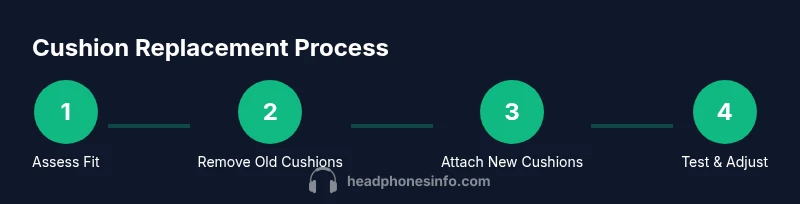
- 1
Prep your workspace
Clear a flat, well-lit area and lay down a microfiber cloth. Gather your replacement cushions and tools before you start to avoid interruptions. This reduces the chance of losing small parts and keeps the process orderly.
Tip: Lay a small tray or towels to catch screws during removal. - 2
Remove the old cushions
Gently pry the cushions away from the ear cups using a plastic tool. Work slowly to avoid tearing clips or plastic housings. If cushions are stubborn, apply a touch of warmth with your hands and test again.
Tip: Take a photo of the cushion orientation before removal to guide reassembly. - 3
Inspect mounting hardware
Check clips, rails, and any mounting hardware for wear or damage. If clips are cracked or bent, replace them or order a cushion kit that includes new mounting hardware. Do not reuse damaged parts.
Tip: If unsure about clip condition, compare with fresh cushion kits from the manufacturer. - 4
Clean mounting surfaces
Wipe the ear-cup interior and mounting rims with isopropyl alcohol on a microfiber cloth. Let the surfaces dry completely to ensure the new cushions seat evenly.
Tip: Avoid soaking cushions or using excess liquid near the driver housing. - 5
Align replacement cushions
Position the new cushions so notches, grooves, or seams align with the ear cup. Check that the cushion is oriented correctly (some models have top/bottom indicators).
Tip: Test-fit without pressing fully to ensure edges line up evenly all around. - 6
Attach the cushions
Gently press the cushions onto the ear cups. Apply even pressure around the circumference to avoid gaps or wrinkles. If your cushions have clips, ensure each clip snaps securely.
Tip: Work in small arcs around the edge to avoid pinching the foam. - 7
Verify fit and seal
Inspect for gaps and confirm the cushion sits flush against the cup. Wiggle gently to confirm it won’t detach during use. A proper seal helps maintain sound isolation and bass response.
Tip: Run a quick visual check and press all around the edge. - 8
Test playback and finalize
Put on the headphones and listen to a familiar track. Ensure comfort and consistency across the entire ear area and confirm there are no rubbing points. If needed, re-seat cushions.
Tip: Take a few minutes to shake out sound with a spectrum test to verify seal integrity.
People Also Ask
Can I replace cushions on any headphone model?
Most cushions are model-specific and require matching mounting types (snap-on, clip-in, or glue-on). Always verify the cushion SKU against your model before purchasing.
Most cushions fit specific models; check compatibility with the seller before buying.
What materials are best for cushion comfort?
Velour, leatherette, and memory foam are common. Your choice depends on comfort, breathability, and longevity.
Velour is soft, leatherette lasts longer, memory foam seals well.
How do I know if the cushions are the right size?
Compare the cushion mounting diameter and thickness to your ear cup opening and refer to the vendor’s size chart for your model.
Size matters—check the manufacturer’s chart for your model.
Do replacement cushions include mounting hardware?
Most replacements include cushions and mounting clips or rings. Adhesives are rarely included, so verify what comes with your kit.
Usually cushions plus clips; check the listing for hardware.
How long do cushions last with regular use?
Lifespan depends on material and usage. With proper care, cushions can last from months to a few years.
Durability varies by material and care.
Can leather cushions be cleaned safely?
Wipe with a damp cloth and mild soap; avoid soaking. Condition leather occasionally if the kit includes guidance.
Wipe gently with soap and water; dry promptly.
Are there glue-on cushions available?
Yes, some models use glue-on cushions. If your cushions are not snapping on, they may require adhesive or a different kit.
Some cushions are glue-on; check your model’s mounting method.
Watch Video
What to Remember
- Choose cushions by material for comfort and longevity.
- Verify model compatibility before purchase.
- Follow step-by-step to ensure proper fit.
- Regular cleaning extends cushion life.