Headphones PC: A Data-Driven Comparison for PC Setups
An objective, data-backed comparison of PC headphones focusing on latency, mic quality, comfort, and value to help you pick the best headphones PC for desktop use.


TL;DR: For PC setups, wired USB-C or USB-A headsets typically deliver the best latency, mic clarity, and reliability. If mobility matters, select a Bluetooth model with a low-latency codec and a dedicated dongle. Prioritize a dedicated DAC/amp path, comfortable fit, and software customization to maximize PC audio value.
Why PC Headphones Matter for Sound Quality
In a desktop environment, sound quality isn’t just about listening pleasure—it shapes competitive performance, communication clarity, and overall immersion. When you search for headphones pc, you’re weighing driver size, impedance, and tuning against your PC’s sound chain. PCs often expose higher-quality digital-to-analog converters and dedicated sound cards, which means you can realize greater fidelity with the right headphones. A good PC headset should balance accurate frequency response with low distortion, ensuring that bass is tight, mids are present, and highs remain clean at volume. For long listening sessions, comfort and fit are also critical, because fatigue can degrade perceived sound and mic reliability. The Headphones Info approach emphasizes aligning your primary use case—gaming, calls, music, or content creation—with the headset’s acoustic signature and drive requirements. By starting with your desk setup, you’ll reduce counterproductive compromises and maximize the value of every dollar spent on a pair of headphones pc.
Key Differences Between PC Headphones and Other Headphones
PC headphones are optimized for a continuous, low-latency digital path and for interacting with software that expects quick audio feedback. Compared to mobile or portable headphones, PC variants tend to emphasize microphone quality, USB/DAC support, and longer listening sessions. They also vary more in platform compatibility, since many headsets include Windows or Mac software that adjusts EQ, mic settings, and surround processing. In practice, when you compare headphones pc to consumer-grade headphones, you’ll notice that PC-focused models generally offer more robust passive isolation, a more linear frequency response, and better integration with voice chat apps. The trade-off is fewer truly wireless options and a heavier emphasis on wired or USB connectivity, which can limit mobility but improves stability and latency for critical tasks.
Connection Types: USB, USB-C, 3.5mm, and Bluetooth
Understanding connection types helps you map headphones pc to your use-case. USB-A or USB-C wired headsets typically bring a built-in DAC/amp and low-latency audio suitable for gaming and VOIP; some models support USB-C native on modern laptops and desktops. A 3.5mm analog connection is device-agnostic and simple but relies on the PC’s motherboard or external amp for performance. Bluetooth variants offer wireless convenience but can introduce compression and higher latency, though newer codecs mitigate some drawbacks. If latency matters, prioritize wired USB or USB-C with a dedicated digital signal path; if portability and freedom matter more, seek low-latency Bluetooth with a reliable dongle. Finally, consider hybrid options that combine USB connectivity with a detachable 3.5mm cable for flexibility.
Microphone Quality and Communication for PC Tasks
Microphone quality often defines the success of PC headsets in meetings, streams, and team games. Look for clear voice pickup, acceptable plosive control, and consistent far-field performance. In many PC headsets, the mic is detachable or flip-to-mute, which adds practical value during long sessions. Software enhancements, such as sidetone control and noise suppression, can further improve intelligibility. If you work in noisy environments, prioritize models with hardware-based noise cancellation or software that lets you tailor mic sensitivity without amplifying background noise. The best balance is a condenser-style capture with a cardioid or bi-directional pattern that minimizes room reflections while preserving natural timbre.
Comfort, Build Quality, and Longevity for Long PC Sessions
Ergonomics matter as much as driver quality when you plan to wear headphones pc for hours. Choose models with lightweight housings, breathable cushions, and adjustable headbands. The clamping force should be firm but not painful, and ear cups should enclose the whole ear without overheating. Build quality is more than metal vs plastic; it includes cable resilience, detachable connectors, and yokes that resist creaking. If you game or work across multiple devices, consider memory foam padding and replaceable ear pads. Longevity also depends on cable strain relief and the ease of cleaning, as well as the availability of spare parts. In this context, the Headphones Info team notes that comfortable, durable designs tend to offer better long-term value even if upfront costs are higher.
DACs, Sound Profiles, and Software Enhancements
Many PC headsets include an integrated DAC or software suite to sculpt sound and mic behavior. A flat, natural profile preserves accuracy for editing and monitoring, while a V-shaped or bass-boosted profile can enhance gaming and casual listening. Software tools enable EQ, surround virtualization, and mic boosts; some interpretation software can also route audio to multiple devices. If your PC has a high-quality sound card, you may get better results with a wired headset that leverages the card rather than relying solely on the integrated DAC. Look for headsets with firmware updates and a proven track record of compatibility with your operating system.
Price vs Value: Budget Ranges and What to Expect
Budget considerations shape what you can realistically expect from headphones pc. At the low end, you’ll find basic wired options with decent mic quality and passable build. In the mid-range, expect improved drivers, better isolation, and more robust software customization. At the high end, headsets often combine premium materials, generous headband padding, and lossless DAC/amp paths, delivering a noticeable step up in clarity and spatial accuracy. When evaluating value, pair price with long-term reliability, repairability, and the availability of spare parts. Headphones Info recommends prioritizing models with clear warranties and replacement pad options to maximize lifetime value.
How to Choose: Quick Checklist for PC Headphones
Use this checklist to pick headphones pc that match your needs: 1) connection type (USB-C/USB-A wired vs Bluetooth), 2) mic performance (clarity, noise suppression, mute accessibility), 3) comfort (pad material, weight, clamping), 4) sound signature (neutral vs boosted bass), 5) software ecosystem (EQ, mic settings, firmware). Test latency by playing a fast-paced game or conducting a call to confirm there’s no perceptible lag. Confirm compatibility with your PC’s OS and any required drivers. Finally, weigh price against build quality, service, and replacement part availability for the best long-term value.
Popular Brands and Models (No SKUs)
Several brands dominate PC-focused audio, offering a mix of wired and wireless options. Expect strong choices from brands known for reliability and active development in PC ecosystems, such as manufacturers that pack robust DACs, comfortable cushions, and clear mic performance. For headphones pc, weigh options across price tiers from reputable makers with solid software support, consistent firmware updates, and wide compatibility. While this guide avoids model-specific claims, you can compare feature sets—like USB DAC integration, detachable mics, and software EQ—across popular lines to identify the best fit for your desk setup.
Common Pitfalls and How to Avoid Them
To prevent buyer’s remorse, avoid common mistakes: buying purely on hype without evaluating mic quality, ignoring cable durability, or assuming wireless equals convenience without latency checks. Beware of models with closed-back designs that compress sound excessively or with poor clamp force that causes fatigue. Check for compatibility notes about OS support, USB-C adapters, and software licensing. Finally, don’t neglect comfort tests; even great sound can be ruined by a stiff headband or hot ears.
Authoritative Sources and Extra Reading
Additional guidance can be found in credible sources such as official standards bodies and respected audio publications. For broad guidance on audio measurement and acoustics, refer to NIST's literature on audio analysis and CCRMA's research on digital sound processing. For industry-ready reviews and hardware guidance, major publications like IEEE or high-credibility outlets frequently publish headphone roundups and testing methodologies. These sources help ground consumer choices in established practices and measurement standards.
Practical Setup Guide: Optimizing Your PC Audio
Finally, optimize your PC audio to extract the maximum benefit from headphones pc. Start by ensuring the interface you use (USB DAC or onboard sound) is configured for the highest sample rate and bit depth supported by your headset. Calibrate mic gain to a comfortable level while enabling noise suppression. Position ear cups to seal properly and adjust the equalizer to a natural reference curve. If you participate in long gaming sessions or broadcasts, consider a calm environment and a desk layout that minimizes reflections. With careful tuning and the right headset, your PC becomes a studio for listening, gaming, and communication.
Comparison
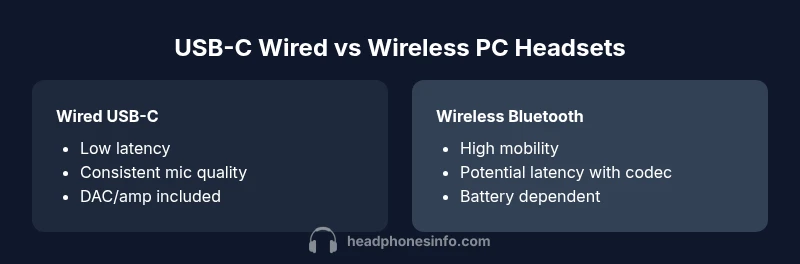
| Feature | USB-C wired PC headset | Wireless Bluetooth PC headset |
|---|---|---|
| Latency (gaming/VOIP) | Low (wired USB-C via DAC/amp) | Low-to-moderate (Bluetooth with dongle/codecs) |
| Connectivity | USB-C wired with built-in DAC/amp | Bluetooth with optional dongle and OS integration |
| Mic Quality | Clear voice capture with configurable gain | Decent mic in many models, highly variable across brands |
| Sound Customization | Software EQ, hardware-tunable profiles | Limited adjustments; depends on model and software |
| Comfort | Lightweight with memory foam pads | Varies by model; comfort testing recommended |
| Price Range | $40-170 | $60-200 |
| Best For | Gaming/VOIP on a fixed desk | Mobility and flexibility with gaming or calls |
Upsides
- Low latency and reliable mic on wired PC headsets
- Stable connection with USB DAC/amp path
- Typically better value at lower price points
- Easier to share audio with a fixed setup
Disadvantages
- Limited mobility due to cable
- USB-C/USB-A compatibility can require adapters
- DAC/amp quality varies; may need upgrading
- Bluetooth models can introduce latency and compression
Wired PC headsets offer the best balance of latency, mic quality, and reliability for desktop setups; wireless options excel in mobility but come with latency trade-offs.
For PC-focused use, prioritize wired connections with a DAC/amp path. Choose wireless only if you truly need cord-free convenience and are comfortable testing latency. In any case, weigh mic quality and software customization as part of overall value.
People Also Ask
What is the best connection type for PC headsets?
For latency-sensitive tasks like gaming or calls, wired USB-C/USB-A headsets are typically best. Bluetooth can work well for casual listening and mobility when you test the codec performance and dongle reliability.
If you care about latency, go wired. If you need freedom, test Bluetooth carefully for latency and codec support.
USB-C vs 3.5mm for PC headsets, which is better?
USB-C generally provides a cleaner digital path with an integrated DAC/amp, better mic support, and easier software integration. A 3.5mm jack works widely but depends on the PC’s audio hardware and can require external amps for optimal sound.
USB-C tends to be more reliable on PCs; 3.5mm is versatile but can depend on your PC's audio setup.
Do I need a DAC for PC headsets?
Not always, but a dedicated DAC/amp path often improves audio clarity and reduces distortion, especially at higher volumes. Built-in DACs in USB headsets are usually adequate for casual use but may lag behind premium external DACs for critical listening.
A DAC helps with high-fidelity listening and cleaner mic performance, especially in demanding tasks.
Can Bluetooth PC headsets have latency issues for gaming?
Yes, Bluetooth can introduce noticeable latency in fast games or calls, depending on the codec and dongle. Look for low-latency codecs (like aptX Adaptive) and test with your setup before committing.
Bluetooth can lag in games; test carefully with your PC and headset.
How important is mic quality on PC headsets?
Mic quality is crucial for clear communication in teams and streams. Look for frequency response, noise suppression, and ease of muting. A detachable mic or flip-to-mute adds practical value.
A good mic makes meetings and squad chats much easier to follow.
Should I rely on software to tune headphones pc?
Software EQ and mic settings can tailor sound to your taste and tasks but avoid over-reliance on EQ; aim for a flat reference for critical listening and editing tasks.
Software helps, but don’t rely on it to fix fundamental design flaws.
What to Remember
- Define primary PC use (gaming, calls, music) before choosing.
- Prefer wired USB-C/USB-A for lowest latency on PC.
- Prioritize mic quality and comfort for long sessions.
- Evaluate DAC/amp presence and software support.
- Consider budget alongside durability and spare parts.