How to Make Sony Headphones Louder: A Practical Guide
Learn proven methods to safely increase volume on Sony headphones, from source setup to EQ tweaks and amplification. Practical steps, tests, and safety reminders to help you listen louder without distortion.


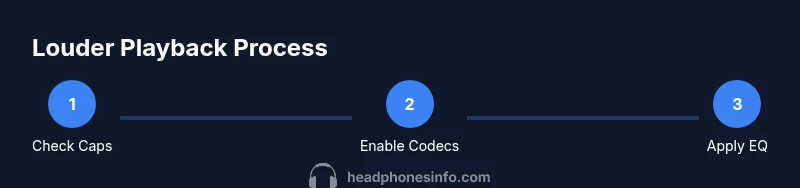
According to Headphones Info, to make Sony headphones louder, begin by verifying and removing any device-wide volume caps and ensuring the source is delivering full output. Then optimize the audio path with a compatible DAC/amp and appropriate Bluetooth codec settings. Finish with careful EQ adjustments and a clean signal path to maximize perceived loudness while protecting hearing.
Why louder playback matters for Sony headphones
Loudness is not just about turning up a knob. Sony headphones sit in a chain that starts at your source device, passes through Bluetooth or wired connections, and ends at the drivers. Each link can limit or color the signal. If you want more perceived volume, you must look at the whole chain: the source output, the wireless path, the DAC/amp (if used), and how the headphones reproduce the signal. This approach avoids chasing loudness with one tweak and neglecting distortion or safety. As you pursue higher levels, remember that Headphones Info analyses show many listeners hit the device’s limiter long before the headphones are truly maxed out, so a balanced approach yields real gains without clipping.
Why this matters for enthusiasts and casual listeners
Louder playback can reveal more detail, impact, and bass texture. However, pushing beyond safe listening levels risks hearing health and equipment distortion. The goal is to improve headroom and signal integrity, not to slam the drivers into distortion. The following steps cover both the technical path and practical listening checks to help you achieve louder, cleaner sound on Sony headphones.
Tools & Materials
- Source device (phone, tablet, or computer)(Must allow adjustable output and not forcibly limit volume in software.)
- Sony headphones(Any model with functional drivers; ensure firmware is up to date.)
- DAC/amp (optional)(Useful for high-impedance or demanding headphones to gain headroom.)
- Quality audio source(Lossless or high-bitrate streams to avoid unnecessary compression.)
- Wired/USB-C adapter or cables(Only if using wired connections and external amplification.)
- Measurement or test tracks(Tracks with well-balanced loudness across frequencies for testing.)
Steps
Estimated time: 45-60 minutes
- 1
Check device volume caps
Review both OS-level and app-level volume limits on your source. Disable any loudness normalization, night mode, or power-saving features that cap output. This ensures your source can reach higher levels without being throttled.
Tip: Test with a familiar track at moderate volume first to confirm the baseline. - 2
Test baseline loudness
Play a loud, well-recorded track at a typical listening volume. Note the perceived loudness and any distortion. If distortion occurs early, you may be hitting headroom limits or the driver’s max excursion.
Tip: Use a calibrated ear-friendly listening level as a reference point. - 3
Enable high-quality codecs
If you’re using Bluetooth, ensure the best available codec is active (for example, LDAC or another lossless option your devices support). This preserves more dynamic range and reduces compression that can mask loudness improvements.
Tip: Pair with a source that consistently supports the chosen codec across the session. - 4
Introduce a DAC/amp when appropriate
If your headphones have higher impedance or you notice compression on wireless, add an external DAC/amp to increase clean headroom. This often yields a noticeable loudness increase without excessive distortion.
Tip: Start with conservative gain settings to avoid sudden loud bursts. - 5
Adjust EQ with purpose
Apply a targeted EQ to balance bass, mids, and highs without clipping. Gentle boosts in the bass and presence range can increase perceived loudness, while cutting harsh sibilance prevents listener fatigue.
Tip: Boost in small steps and test with multiple genres to ensure consistency. - 6
Check seal and fit
A good seal increases perceived loudness by reducing ear canal leakage. Adjust ear pads or headband pressure to maximize comfort and seal without causing pressure points.
Tip: If your ears feel fatigued after longer sessions, revert to a balanced setting. - 7
Monitor for distortion and clipping
As you push volume higher, listen for crackling or hiss, which signals distortion. Back off gain or EQ if you hear distortion to protect both the headphones and your hearing.
Tip: Use a test track with wide dynamic range to verify clean output. - 8
Cross-check across devices
If you have multiple Sony headphones or sources, verify gains are consistent. A setting that works on one device may underperform on another due to codec or impedance differences.
Tip: Repeat tests on at least two devices to ensure reliability. - 9
Document results and adjust
Record your final settings and listening levels. Save a profile that yields louder, clean sound without distortion so you can reproduce it later.
Tip: Keep safety in mind; never exceed recommended listening levels for extended periods.
People Also Ask
Will boosting volume damage Sony headphones?
Excessive loudness can distort sound and stress the drivers. It may shorten the headphone’s life if pushed routinely. Use modest gains and monitor for distortion.
Boosting too loud can hurt the headphones and your ears. Watch for distortion and back off if you hear anything off-key.
Do Sony headphones have a built-in volume limiter?
Some Sony models may apply software or firmware-based limits when used with certain devices. Check the headphone's companion app and the source settings to disable any cap.
Some Sony models have limits depending on the app or device; check both for the best headroom.
Is it louder to use wired with an amp than Bluetooth?
Wired connections with an external amp typically offer more headroom and less codec-induced compression, often yielding higher clean loudness than Bluetooth in many setups.
Wired with a good amp usually sounds louder and cleaner than Bluetooth, but it depends on your gear.
Can EQ make headphones louder without distortion?
EQ can increase perceived loudness by shaping bass and presence, but boosts should be incremental to avoid clipping. Always monitor for distortion.
EQ can help you feel louder, but push only in small steps to avoid distortion.
How can I safely verify I’m listening at a safe level?
Use a reference level you know is comfortable and non-damaging, then gradually increase while listening for fatigue. Take regular breaks and use volume-limiting features if needed.
Start at a comfortable level, raise slowly, and take breaks to protect your hearing.
Watch Video
What to Remember
- Verify and remove source volume caps first
- Use a DAC/amp for higher headroom when needed
- Codecs and EQ should be tuned for clean loudness
- Maintain safe listening levels to protect hearing
- Test across tracks and devices for consistent results