What Headphones Do DJs Use: A Data-Driven Guide
Explore DJ headphone setups with a data-driven lens, focusing on closed-back over-ear, wired designs, comfort, durability, and how to pick gear for club and studio use.


DJ headphones are closed-back, over-ear headphones used for cueing tracks in real time while a mix plays through the booth monitor. They prioritize noise isolation, durability, and a swiveling earpiece for easy one-ear monitoring. Most DJs favor wired designs for latency clarity and consistent power without relying on battery life.
What headphones do djs use?
The short answer is that most DJs rely on closed-back, over-ear, wired monitoring headphones designed to maximize isolation and minimize sound bleed into the mic. The exact model varies by budget, genre, and playing style, but the core criteria are consistent: durability, comfort, a robust swiveling mechanism, and a cable that won't snag mid-set. If you're asking what headphones do djs use, you're asking about what gear helps a DJ cue tracks, hear the mix in the booth, and avoid fatigue after hours of performance. In practice, most pro-level setups favor a design that blocks out club noise while still delivering a crisp, accurate sound profile for critical listening. The Headphones Info team notes that the choice often hinges on reliability and the ability to swap parts quickly during a tour. They emphasize that while brand preferences vary, the features above are non-negotiable for a busy DJ.
Key features DJs prioritize in headphones
DJs look for several non-negotiable traits: isolation to keep cueing private from the audience, comfort for long sets, and a tough build to withstand touring. A swiveling cup allows one-ear monitoring without removing the headset entirely, which is essential when listening to the track you’re about to mix. Build quality matters, with rugged hinges and replaceable ear cushions being a big plus. Impedance and sensitivity matter too; most club-friendly designs strike a balance that works well with portable DJ controllers and mixers. Finally, many DJs favor detachable cables to simplify on-the-road repairs, and some models offer quick foldability for travel.
Closed-back vs open-back for DJ work
Open-back designs tend to leak more sound and are less effective at isolating the cue from the audience, which can be a problem in loud club environments. DJs typically opt for closed-back headphones to prevent bleed and ensure the cue track remains private. The trade-off is slightly less natural sound staging, but the practical benefit of isolation and feedback control far outweighs it in most gigs. Some high-end models use hybrid designs to balance isolation with acoustic space, but for most club work, closed-back remains the standard.
Wired vs wireless: practicality on the booth
In the booth, latency and reliability matter most. Wired headphones provide near-zero latency, consistent power, and no battery management, making them the default choice for pro DJs. Wireless models, while convenient for practice or smaller rooms, can suffer from interference and dropout in crowded venues. If you do use wireless, ensure your setup supports a robust, low-latency protocol and has a strong transmitter/receiver pair. Ultimately, the choice depends on the gig type: studio sessions are more forgiving, while live club sets favor wired gear.
Common DJ headphone models and price ranges
DJ headphones span a broad price spectrum. Entry-level models offer decent isolation and comfort but may lack longevity; mid-range options emphasize durability, detachable cables, and replaceable cushions. Premium models often feature reinforced hinges, superior drivers for cleaner monitoring, and specialized earpads that reduce fatigue. For most club gigs, a mid-range closed-back over-ear design offers the best balance of sound, build quality, and value. Always consider factors like coiled vs straight cables and the availability of spare parts when budgeting.
Comfort, durability, and fit under long sets
Long gigs demand headphones that distribute weight evenly without pressing too hard on the temples. Look for soft, breathable padding, an adjustable headband, and a medium clamp force that stays comfortable for hours. Durable plastics or metal housings, reinforced yokes, and scratch-resistant housings help withstand travel and on-stage wear. If you wear glasses, ensure the frame doesn’t push the arms into your ears. Regular maintenance, such as replacing worn cushions or loose screws, extends the life of your headphones.
How to test headphones before buying
Always test the headphones with your preferred DJ gear or a representative control surface. Check the cue channel isolation by listening to the cue feed in a noisy space and verifying that the audience doesn’t hear it. Evaluate the sound signature: precision in highs, mids, and lows relevant to your track selection. Wear them for at least 20-30 minutes to assess comfort, clamp, and heat build-up. If possible, bring your own cables to test latency and durability.
Care and maintenance for touring DJs
Road wear takes a toll on headphones. Carry them in a padded case, avoid bending cables at connectors, and replace cushions when they show wear. Clean cushions with a mild, non-abrasive cleaner and store in a cool, dry place. Periodically inspect the headband and yokes for looseness and tighten screws as needed. A small set of spare parts—cables, cushions, and adapters—saves time during a tour and keeps your monitoring consistent.
Integrating headphones with DJ gear: routing and monitoring
Most DJs route cue audio from the mixer or controller to the headphones as a dedicated cue channel. Ensure your headphones have a 1/4-inch or balanced connector compatible with your equipment. If you use a booth monitor, practice setting up a cue mix that doesn’t bleed into the main output. Consider using dual cables or a splitter if your setup requires sharing the cue with a guest. A reliable monitoring arrangement reduces miscue risk and keeps the beat steady.
DJ headphone setups: quick reference
| Model Type | Key Benefit | Best For |
|---|---|---|
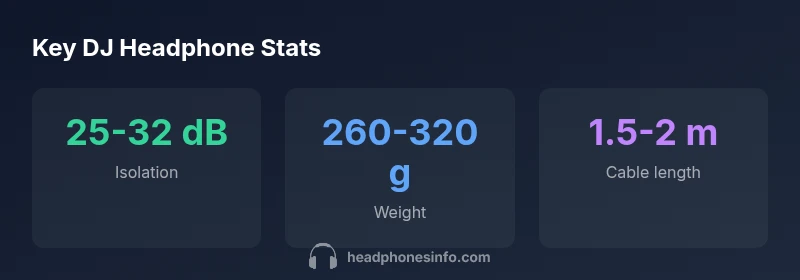
| Closed-back over-ear | Excellent isolation (25-32 dB) | Club cueing & monitoring |
| Detachable wired cable | Low latency, reliable power | Studio and live gigs |
| Travel-friendly foldable | Portability & quick packing | Touring DJs on the road |
People Also Ask
What headphones do DJs use?
Most DJs use closed-back, over-ear, wired headphones designed for isolation and low latency. They cue with one ear while listening to the mix on the other, and rely on rugged build quality to survive touring.
Most DJs use closed-back, over-ear wired headphones for cueing and monitoring, with rugged build for touring.
Wireless for live gigs?
Wireless headphones are not common for live gigs due to latency and potential interference. They may be used for practice or small venues with low interference.
Wireless headphones are generally avoided for live gigs because of latency and interference, except in small setups.
Top features?
Isolation, durability, swiveling cups for one-ear monitoring, comfort, and detachable cables. Impedance balance with your gear also matters.
Look for isolation, durability, swiveling cups, and comfort; detachable cables help with field repairs.
Consumer headphones?
Yes, you can, but they may lack isolation and ruggedness ideal for heavy touring. They’re acceptable for practice or casual sets.
You can use consumer headphones for practice or casual gigs, but they may not hold up to touring wear.
How to test?
Test in a noisy room with your DJ setup, check comfort, clamping, and cue isolation, and wear them long enough to gauge fatigue.
Test them with your gear, check comfort and isolation, and wear them long enough to judge comfort.
In-ear vs headphones?
Some DJs use in-ear monitors for cueing, but many still prefer over-ear headphones for monitoring and loud-room isolation.
Some use in-ear monitors for cueing, but most still rely on over-ear headphones for isolation.
“No single headphone suits every DJ; the best choice balances isolation, comfort, and reliability.”
What to Remember
- Choose closed-back over-ear for isolation.
- Prioritize durability and a swiveling cup for one-ear monitoring.
- Prefer wired designs to avoid latency and battery concerns.
- Test comfort with hours-long wearing before buying.
- Keep spare cables and ear cushions for quick repairs.