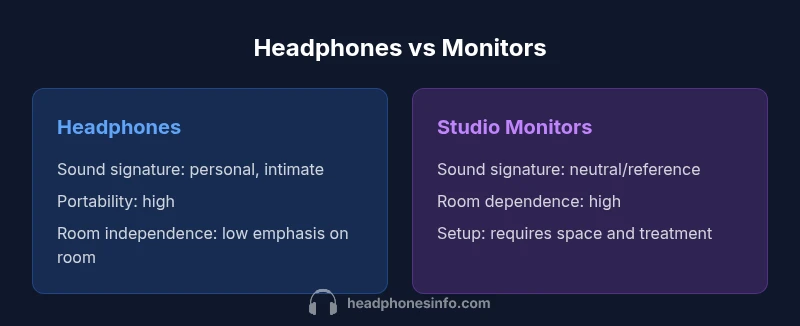
Headphones vs Monitors: Practical Difference Guide
Explore the difference between headphones and monitors with a data-driven, analytical comparison. Learn how design goals, room effects, and use-case needs shape your choice for listening, mixing, and mastering.


Comparing headphones and studio monitors reveals two distinct listening paradigms used in music production and casual listening. Headphones deliver intimate sound with isolation, portability, and a personal listening perspective, while studio monitors aim for a neutral, room-aware reference. For critical listening, monitors in a treated room are generally preferred; for on-the-go work or late-night sessions, quality headphones offer practical alternatives. This guide explains how to choose based on sound goals and environment.
Understanding the difference between headphones and monitors
The phrase difference between headphones and monitors captures two distinct listening paradigms used in music production and casual listening. Headphones deliver intimate sound with isolation, portability, and a personal listening perspective. Studio monitors, by contrast, are designed to reveal the room’s acoustics and to provide a near-field reference that aims to be as neutral as possible when paired with proper treatment. For many creators, this distinction drives decisions about where to mix, listen, and troubleshoot problems. Headphones can help identify problems that are easy to miss on speakers, such as subtle stereo cues when you’re away from the desk. Monitors, meanwhile, encourage you to hear how changes translate in the real, treated room. The Headphones Info team emphasizes that the best choice depends on your environment, your work style, and your willingness to engage with room acoustics. Throughout this article we’ll unpack the practical implications behind this fundamental question.
Core acoustic roles: how each device is designed to render sound
Every playback system makes trade-offs. Headphones are sealed or open back, designed to deliver a consistent listening experience at close range. They bypass room interactions, which means you can hear detail without relying on room reflections. This makes them excellent for late-night sessions, travel, and on-site listening. Studio monitors, in contrast, project sound into the room and depend on the space to shape the final result. A monitor’s value lies in a neutral, faithful translation when the environment is controlled, which is why engineers treat the room as part of the system. In practice, you’re evaluating two intertwined things: the device’s direct sound and how the room responds to it. The goal is to minimize coloration and identify how your mix translates beyond your immediate seat. In short, headphones optimize personal listening, monitors optimize objective accuracy in a controlled space.
Technical distinctions: drivers, frequency response, impedance, and coupling
Headphones and studio monitors differ fundamentally in their transducers and how they interact with the user and room. Headphones rely on close-range drivers that produce sound directly into the ear canal, bypassing most room reflections. The selection often hinges on driver type (dynamic, planar), impedance, and sensitivity, which determine the required driving power and potential tonal emphasis. Studio monitors use larger drivers and cabinets designed to project sound into a room; their performance depends on enclosure design, cabinet resonance, and boundary interactions. Frequency response talk is common, but it’s essential to understand that a flat on-axis response in a headphone does not guarantee the same perceived balance in a room with reflective surfaces. Coupling—how you wear or place the device—also matters: headband pressure and ear seal can color the perceived bass and treble response in headphones, while monitor placement and room treatment shape the translation.
Soundstage and imaging: why monitors feel different in a room
Imaging and soundstage are core areas where headphones and monitors diverge. Headphones create a very intimate stereo image because the sound is delivered directly to each ear, which can produce precise panning cues but can also feel closed and isolated from the room. Monitors, by contrast, rely on the room to shape the spatial cues; the perceived space comes from reflections off walls, ceiling, and floor. When treated properly, monitors can reveal a wider, more natural soundstage with clear left-right localization and consistent imaging across the listening area. Yet imperfect rooms can blur these cues and introduce room coloration. The key takeaway is that imaging quality is as much about the listening room as about the speakers themselves.
Room interactions and listening environment
Room acoustics play a pivotal role in how studio monitors translate sound. Reflections, mode resonances, and flutter echoes can exaggerate or cancel certain frequency ranges, skewing tonal balance and stereo imaging. Acoustic treatment—bass traps, broadband absorbers, and diffusers—helps sculpt the room’s impulse response and reduces problematic modes. Headphones, by contrast, largely sidestep room problems, offering consistent listening regardless of space. However, the trade-off is a more colored personal sound that may not reflect how a mix will translate in real rooms or on consumer systems. For accurate monitoring, many professionals advocate a hybrid approach: use monitors for critical decisions in a treated space, and verify with high-quality headphones for late-night testing and mobile workflows.
Use-case scenarios: when to choose headphones vs monitors
For mobility, travel, or private practice, headphones win. They enable quiet listening, consistent evaluation of micro-dynamics, and quick checks without disturbing others. Studio monitors shine in a soundproofed or treated room when you need to judge balance, tonal accuracy, and translation to real-world playback systems. Production work like mixing and mastering benefits from a controlled environment; editing and rough listening can be effectively done with headphones. In many workflows, using both is ideal: start with headphones to catch obvious issues on the go, then switch to monitors to confirm decisions in the room.
Calibration and testing: how to evaluate them
A rigorous evaluation involves controlled references and repeatable tests. Start with pink noise and a 1/3 octave sweep to assess baseline frequency balance across devices. Use reference tracks with known balance and dynamic range to check translation. Measurements with a calibration microphone and software can reveal room response, while listening tests assess imaging, depth, and micro-dynamics. Always compare at similar listening levels and ensure the monitors are positioned consistently. Document differences you notice and challenge yourself to explain them in terms of room acoustics, device response, and your own preferences. Remember that your goal is reliable translation, not a subjective “fun” listening experience.
Practical tips for studio setups
- Place monitors on isolation stands at ear level and equidistant from your listening position.
- Use a symmetrical listening triangle and align the tweeters with your ears.
- Treat the primary reflection points on walls with absorbers; use bass traps in corners to tame low-frequency buildup.
- For headphones, select a model with a comfortable fit and a neutral-to-leaning bass response if you want closer to a monitor-like translation.
- Always test with material you know well and with reference mixes to benchmark your listening environment.
- Record and compare multiple takes using both systems to verify consistency across devices and room conditions.
Budget and value: cost considerations without guessing exact prices
Budgeting for listening systems means balancing device quality with room readiness. Headphones offer wide price ranges and immediate value at entry levels, and you can upgrade gradually without upgrading your room. Studio monitors typically involve higher upfront costs, not just for the speakers but also for appropriate amplification, speaker stands, and room treatment. The total cost often correlates with the accuracy you can achieve in your room; a modest investment in acoustic treatment can substantially improve translation more than upgrading to a higher-priced monitor in a poorly treated space. If your space has limited treatment options, headphones or nearfield monitors paired with selective treatment can be the most cost-effective path. In all cases, prioritize real testing across both setups to ensure you’re getting faithful representation rather than just a pleasing tone.
Common myths debunked about headphones and studio monitors
- Myth: Expensive headphones automatically replace studio monitors for mixing. Reality: headphones can miss room interactions that monitors reveal, so both tools are necessary for a complete workflow.
- Myth: Flat frequency responses guarantee perfect mixes. Reality: perceived balance depends on listening level, room acoustics, and personal hearing.
- Myth: Any pair of headphones can work for mixing. Reality: many headphones emphasize the bass or treble, which can bias your decisions. Neutral models with flat or near-flat responses are typically preferred for critical tasks.
- Myth: More expensive always means better accuracy. Reality: cost increases can bring more comfort or feature sets, but accuracy depends on the entire chain, including room treatment and calibration.
The testing workflow: steps to compare at home
- Establish a controlled reference setup with both a treated room and a quiet environment.
- Calibrate playback levels to match perceived loudness across devices.
- Use reference tracks that span the frequency spectrum and dynamic content.
- Switch between headphones and monitors to observe how translation changes.
- Make notes on issues such as bass buildup, harsh treble, or imaging inconsistencies.
- Validate decisions with a different material and, if possible, a trusted reference system.
- Document improvements and iterate as your room or equipment evolves.
Authority sources and further reading
- Authority resources provide a framework for understanding loudspeakers and headphones in professional settings. See the Audio Engineering Society (AES) resources for standards on monitoring and room acoustics: https://www.aes.org
- Government or standards bodies can offer acoustic measurement principles that apply to room treatment and calibration: https://www.nist.gov
- General engineering research and peer-reviewed publications discuss speaker design, measurement, and translation practices: https://ieeexplore.ieee.org
Comparison
| Feature | Headphones | Studio Monitors |
|---|---|---|
| Sound goal | Personal listening with isolation, color can occur | Neutral/reference sound aimed to translate in treated rooms |
| Imaging and soundstage | Precise imaging close to ear, room-independent cues | Room-dependent imaging with potential wider spatial cues in-treated rooms |
| Room dependence | Largely independent of room acoustics | Highly influenced by room acoustics and placement |
| Power and amplification | Typically self-contained or low-power amps; impedance varies | Require proper amplification and power matching; room layout matters |
| Portability and setup | Highly portable; plug-and-play | Bulky setup; desk space and acoustics needed |
| Price range | Wide range from affordable to premium | Generally higher upfront costs with room considerations |
Upsides
- High portability enables flexible workflows
- Headphones reveal micro-dynamics without room interference
- Monitors provide objective room-translation for balance
- Opportunity to validate mixes across two listening paradigms
Disadvantages
- Headphones may color the sound and obscure room issues
- Monitors require treated rooms and proper placement to be accurate
- Both setups demand calibration and testing to avoid false judgments
Monitors are preferred for critical mixing in a treated room; headphones excel for mobility and private listening.
Choose monitors when you can maintain a controlled listening environment and want faithful translation. Opt for headphones for on-the-go work or late-night checks, then verify results on monitors to ensure translations hold up in a real-space context.
People Also Ask
What is the fundamental difference between headphones and studio monitors?
Headphones provide intimate, portable listening with built-in room isolation, while studio monitors aim for a neutral, room-aware reference that translates to real-world playback. The choice hinges on whether you need mobility or room-accurate monitoring. In practice, most studios use both to cross-check work.
Headphones give you privacy and detail; monitors give you room-accurate sound. Use both to cover mobility and translation.
Headphones for mixing?
Headphones can be used for rough mixing and late-night checks, especially when room treatment is limited. However, relying solely on headphones can lead to imbalance when translated to speakers in a treated room. Use them as a first-pass tool and confirm with monitors.
They're great for rough mixes or late-night listening, but always verify with monitors.
Are pricey headphones accurate enough for reference?
Some high-end headphones offer flat or near-flat responses and transparent imaging, but no headphone is a perfect stand-in for a treated room. They’re excellent for detailed listening and cross-checking, yet translation to monitors can still reveal room-related differences.
They can be very accurate, but they can't fully replace a treated monitoring environment.
Room treatment essential for monitors?
Yes. Proper room treatment addresses low-frequency buildup, early reflections, and standing waves, which significantly affect accuracy. Without treatment, even the best monitors can mislead your decisions.
Room treatment is key to getting honest results from monitors.
Do headphones require an amp?
Some headphones, particularly high-impedance models, perform better with a dedicated headphone amplifier. Lower-impedance headphones can usually be driven by standard audio interfaces, but an amp can improve control and headroom.
If you have high-impedance cans, a good amp helps. Otherwise, your interface may suffice.
How can I test both at home?
Create a controlled environment with consistent levels, use reference tracks, and compare translations across headphones and monitors. Document differences and adjust room treatment or headphone choice accordingly. Iterate with varied material to ensure reliability.
Test with the same tracks on both setups, keep levels consistent, and note differences.
What to Remember
- Define listening goals before choosing equipment
- Invest in room treatment for monitor accuracy
- Leverage headphones for mobility and private sessions
- Test translations across both systems
- Balance budget between headphones, monitors, and room treatment