Is a Bluetooth Headset Good for Gaming? A Data-Driven Analysis
Explore whether Bluetooth headsets meet gaming needs, focusing on latency, sound quality, codecs, and platform support. Learn when wireless comfort works and when wired or 2.4 GHz options are better, with practical buying guidance.


Yes, Bluetooth headsets can be good for gaming in casual solo or co-op sessions, especially if you value mobility and comfort. However, they usually introduce more latency than wired or 2.4 GHz wireless options, which matters for fast-paced, competitive play. Choosing a model with low-latency codecs (aptX Low Latency, LDAC) and a strong DAC can reduce delay considerably.
Latency realities for gaming
is a bluetooth headset good for gaming? It’s a common question for players seeking wireless freedom without sacrificing responsiveness. In practice, latency matters as much as sound quality, especially in fast-paced shooters, fighting games, or rhythm titles. Bluetooth audio pipelines introduce processing steps: the microphone tap, compression, air transmission, decompression, and digital-to-analog conversion at the speaker. Each step adds a potential delay relative to a wired connection. Even with modern codecs, Bluetooth latency is higher than wired USB or 2.4 GHz wireless links, though practical differences vary by device and environment. The latest devices that support low-latency codecs such as aptX Low Latency or LDAC can reduce perceptible delay, but the gains depend on both the transmitter and the receiver hardware, as well as software support. For many players, the question is: is a bluetooth headset good for gaming in casual settings? The answer is often yes if latency remains acceptable, comfort is strong, and the game doesn’t require split-second timing. For competitive play, a wired or dedicated wireless headset remains the safer choice.
Bluetooth tech basics for gamers
Bluetooth uses a shared wireless channel, so the age-old trade-off applies: convenience versus latency. Most Bluetooth headsets rely on codecs to compress and transmit audio. Common options include SBC (baseline), AAC, and proprietary high-efficiency codecs like aptX, aptX HD, and LDAC. The most relevant for gaming are low-latency variants such as aptX Low Latency (aptX-LL) and, in some ecosystems, LDAC. When a headset and source both support a low-latency codec, the end-to-end delay drops significantly, sometimes into a range that feels close to wired, though still not perfectly equivalent. Additionally, the Bluetooth version and antenna design influence stability and range. For gamers, a headset with solid fit, good microphone quality, and reliable pairing often matters as much as codec support. Always verify compatibility between your PC, console, or mobile device and the headset’s codec list.
Platform differences: PC, consoles, and mobile
Your platform matters as much as the headset. PC setups frequently allow broad codec support via software drivers and Bluetooth stacks, enabling aptX-LL or LDAC on compatible hardware. Consoles vary widely: some support Bluetooth audio but use their own audio pipelines, which can add extra latency or restrict codec choice. Mobile devices often pair with headphones with little configuration, but the overall gaming experience depends on the app’s audio handling and background Bluetooth activity. If you play cross-platform titles, be mindful that latency will be inconsistent across devices. The takeaway: test latency on your primary platform with the titles you care about, and consider platform-specific accessories if latency becomes an issue.
Sound quality and perception in wireless gaming
Audible fidelity matters to many gamers, yet wireless means compression and potential artifacts. Bluetooth audio commonly uses perceptual encoding to reduce bandwidth, which can reduce dynamic range and spatial cues in complex game soundtracks. When a headset supports high-quality codecs (AAC, aptX, LDAC), the perceived improvement in clarity and stereo imaging can be noticeable, even if latency remains a consideration. Gamers who value positional accuracy will want to pay attention to driver size, impedance, and microphone quality in addition to codec support. In short, you can get solid sound from a Bluetooth headset, but expect variation between models and codecs, and be mindful of how compression affects gunfire, footsteps, and environmental cues.
Comfort, fit, and build quality
For long gaming sessions, comfort is essential. Wireless designs often trade additional weight for battery life and ergonomic padding. Look for memory foam earpads, adjustable headbands, and a secure but gentle clamping force. Build quality matters too: rotate joints, swiveling ear cups, and a robust USB-C or micro-USB charging interface help ensure longevity. Battery life is another consideration; larger battery packs add weight, but newer models balance weight and battery efficiency with optimized drivers and efficient DSPs. If you game for hours, try them on for fit and test mic clarity during a mid-session call or chat to confirm they stay comfortable and stable.
Battery life and charging discipline
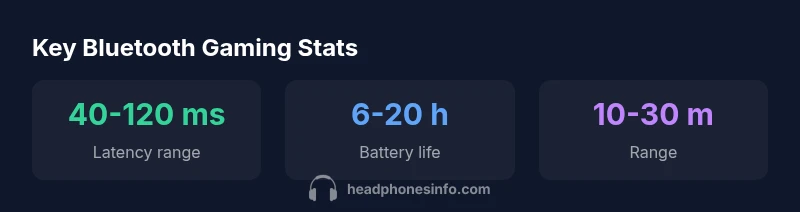
Battery life is a practical constraint in wireless gaming. Expect real-world endurance to vary with volume levels, RGB lighting, and codec activity. Quick top-ups between sessions are convenient, but a headset with a detachable cable or a wired pass-through option can swap the experience from battery-powered freedom to uninterrupted gameplay. Keeping firmware up to date also helps preserve efficiency and bug fixes. If you frequently forget to recharge, consider a model with a larger battery or a USB-PD fast-charge option to minimize downtime between sessions.
Practical buying guide: what to look for
When shopping for a gaming-friendly Bluetooth headset, prioritize latency-reducing codecs (aptX-LL, LDAC where available), a comfortable fit for long sessions, and a robust microphone. Check for multipoint pairing if you want to switch between devices, and verify the headset’s compatibility with your primary platform. Look for a reliable wireless range (at least 10 meters in typical rooms) and a tri-fold or collapsible design for portability. Finally, compare total cost of ownership, including potential accessories, dongles, and replacement parts. A well-chosen model can deliver a satisfying balance between mobility and performance.
Quick home testing techniques for latency
To assess latency at home, use a simple timing test: play an action-heavy game with a consistent input and note any perceived delay between a controller input and the resulting audio and visuals. Use a friend or multiple devices to cross-check: if the delay is inconsistent or significantly higher on one setup, you may be dealing with interference or codec incompatibility. Update firmware, reset pairings, and minimize nearby wireless devices during testing. Conduct a few short trials under typical lighting, background noise, and interference conditions to get a practical read on real-world behavior.
When to choose wired or 2.4 GHz instead
If your goal is ultra-low latency for competitive play, wired headsets remain the gold standard. A wired USB connection or a dedicated 2.4 GHz wireless dongle can substantially reduce lag and jitter, providing more consistent audio cues for timing-sensitive games. If you value freedom of movement or want to reduce cable clutter for living-room setups, a 2.4 GHz wireless headset with a high-quality dongle can be an excellent compromise. In both cases, ensure that the platform supports the chosen connection without introducing additional bottlenecks.
Bluetooth vs wired gaming headset comparison
| Aspect | Bluetooth Headset (Gaming) | Wired Headset (Gaming) | Notes |
|---|---|---|---|
| Latency | 40-120 ms | 5-15 ms | Depends on adapters/codecs |
| Sound Quality | Compression dependent | Higher fidelity, fewer artifacts | Codec choice matters |
| Mobility/Setup | High mobility, pairing required | Cable-free with stable connection | Wired may feel simpler for some setups |
| Ease of Use | Pairing and occasional interference | Plug-and-play, consistent latency | Platform-dependent |
People Also Ask
Does Bluetooth add noticeable input lag in gaming?
Latency is variable. For casual games the delay may be negligible, but in fast-paced titles you might notice it. Consider a model with low-latency codecs and test on your platform.
Latency varies by codec and device. Casual gamers may not notice, but competitive players should verify latency with their setup.
What codecs help reduce latency?
Codecs such as aptX Low Latency and LDAC can reduce end-to-end delay compared with SBC, especially when both ends support the codec.
Look for aptX Low Latency or LDAC support on both the headset and source device.
Can I use Bluetooth headsets with consoles like PS5 or Xbox?
Yes, some consoles support Bluetooth audio, but many games rely on built-in latency-limiting paths or official dongles. Check your console’s specs and any adapters.
Some consoles support Bluetooth audio, but latency can vary; use official adapters where available.
Are wired or 2.4 GHz headsets better for latency?
Typically yes. Wired USB or dedicated 2.4 GHz wireless connections offer lower, more consistent latency than standard Bluetooth.
If latency is crucial, go wired or use a 2.4 GHz wireless headset.
Is there a practical setup to game with Bluetooth without noticeable lag?
Choose a headset with low-latency codecs, update firmware, minimize interference, and ensure device compatibility. Test with your games.
Use a low-latency codec and keep firmware updated to minimize lag.
What are common trade-offs when choosing Bluetooth for gaming?
Trade-offs include latency versus convenience, compression versus sound fidelity, and battery life versus headset weight.
You get mobility and comfort at the cost of potential latency and compression.
“Bluetooth headsets offer unmatched convenience for everyday gaming, but latency and compression can affect fast-paced play. The right low-latency codecs make a noticeable difference.”
What to Remember
- Assess your latency tolerance before buying.
- Prefer low-latency codecs to minimize delay.
- Match the headset to your platform and setup.
- Consider wired or 2.4 GHz for competitive play.