Headphones or Earbuds for Gaming: A Practical Comparison
Discover how headphones and earbuds compare for gaming—sound, mic quality, latency, comfort, and value. A data-driven guide to help you pick the best fit for PC, console, and mobile play.


Headphones generally outperform earbuds for gaming on soundstage, imaging, and mic quality. For competitive play, choose wired headphones to minimize latency; for mobility, premium wireless can work if latency remains low. In most setups, a gaming headset with a built-in mic and solid platform compatibility offers the best balance. According to Headphones Info, the right mix of driver size, seal, and mic design drives performance more than flashy features.
Why audio matters for gaming
Sound is more than just music for gamers; it is a critical tool for navigation, timing, and team communication. The right headphones or earbuds for gaming can reveal subtle cues—footsteps behind you, distant gunfire, or the direction of a grenade throw—that influence your decisions in real time. In fast-paced titles, even a fraction of a second of delay can affect accuracy and outcome. The goal is to balance clarity, warmth, and spatial accuracy without fatiguing your ears after a long session. According to Headphones Info, the most meaningful differences between models stem from driver size, acoustic sealing, and microphone design, which together shape overall performance across genres from competitive shooters to immersive RPGs. When evaluating options, you should also consider platform compatibility, comfort for extended play, and how software features like EQ or virtual surround affect perception. This guide focuses on headphones and earbuds built for gaming contexts, comparing wired versus wireless, open-back versus closed-back designs, and the value you get at different price tiers. Headphones Info's analysis helps you anchor decisions in data rather than hype.
Headphones vs Earbuds for gaming: the central differences
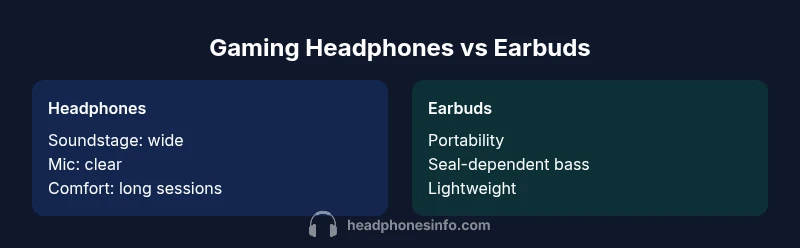
Headphones and earbuds are built around the same goal—deliver clear audio and reliable voice capture—yet they differ in how they achieve it. Headphones typically use larger drivers and a circumaural or over-ear cup that encloses the ear, delivering deeper bass, broader soundstage, and more consistent imaging. Earbuds use smaller drivers and in-ear or hybrid designs that rely heavily on a good seal with the ear canal, which can vary by ear shape and posture. This makes headphones generally more predictable for gaming environments, especially when you need to hear positional cues during a tense firefight. The microphone solutions also diverge: built-in mics on headsets are often closer to your mouth and less susceptible to ambient noise, while earbuds may rely on inline mics that can pick up background chatter. For many players, the decision also hinges on weight and heat: long sessions with heavy cups can be more comfortable than wearing small, less padded devices that press against the ear. The choice should align with how you balance immersion, practicality, and budget.
How to pick based on platform and play style
Whether you game on PC, console, or mobile, your platform and play style guide the right choice. PC players may prefer USB-C dongles or USB sound cards for low-latency, high-fidelity output, while console players sometimes rely on 3.5mm connections that simplify compatibility. If you play fast-paced shooters or battle royale, latency and positional accuracy matter most, making wired headphones a safer baseline. If you travel often or game on a laptop, wireless models with robust codecs can be a strong substitute, provided you test for jitter and reliability. Another factor is your typical session length: if you tend to game for hours, comfort and heat management become major determinants. Finally, consider software ecosystems: some headsets ship with companion apps that enable EQ, surround processing, and game-specific presets; others rely on system-level DSP like Windows Sonic or DTS Headphone:X. The bottom line is to map your needs to a platform-friendly option that minimizes barriers to performance.
Sound quality and imaging: what to look for
Sound quality in gaming hinges on driver size, frequency response, impedance, and the ability to render positional cues. Larger drivers in headphones typically deliver richer bass and a more expansive soundstage, which helps you locate enemy footsteps and gunfire. Imaging—how accurately you can tell where sounds originate—drives competitive edge in FPS and MOBA titles. Look for headphones with a flat or mildly elevated sub-bass region, a smooth midrange for voices, and a top end that preserves detail without harshness. Earbuds can deliver clean mids and clear highs, but their imaging often depends on the seal and driver quality. Consider comfort and heat as well; a balanced driver pairing helps prevent fatigue during long sessions. The presence of a detachable mic or a well-placed built-in mic also affects perceived vocal clarity in team play. Headphones with software EQ and virtual surround options can tailor the sound for different games, but be cautious of artificial coloration that distorts critical cues.
Microphone quality and team communication
In multiplayer gaming, the mic is as important as the speakers. Many gaming headsets feature boom mics designed for close talk and reduced ambient noise, which improves intelligibility in voice chat. Inline mics on earbuds are often adequate for casual play but can suffer from inconsistent pickup and more background noise. If you stream or compete, prioritize a headset with a sturdy, adjustable microphone, good wind rejection, and a mic mute that is easy to access mid-game. Some models offer detachable mics that can be replaced if the mic wears out, which extends the overall lifespan of your kit. Software enhancements like mic EQ or noise suppression can help, but the base mic quality will usually determine early impressions from teammates. Testing mic clarity with friends or in practice sessions is a quick way to gauge suitability before committing.
Wireless vs wired: latency, reliability, and convenience
Wired connections typically provide the lowest latency and the most consistent performance, making them ideal for competitive play. USB or 3.5mm wired headsets lock you into a stable channel with predictable behavior. Wireless models add convenience and freedom of movement but can introduce latency, jitter, or battery concerns if codecs aren’t robust or if the dongle signal is interrupted. When choosing wireless gear for gaming, pay attention to the codec, range, and battery life; Bluetooth is generally not ideal for true competitive play due to higher and variable latency. For console gaming, some wireless headsets use low-latency dongles that minimize delay, while PC gamers may benefit from wired isolation or a dedicated USB sound card. If you often play on the go, a capable wireless option with excellent battery life can be a strong choice, provided delays stay within acceptable bounds for your game style.
Comfort and long gaming sessions
Comfort matters more than you might think, especially during marathon sessions. Over-ear cushions with breathable materials reduce heat buildup and pressure around the ears, enabling longer play without fatigue. Earbud designs should feature a secure, comfortable seal that won’t cause ear fatigue or pain after a few hours. Weight is another factor: heavier headsets distribute more pressure and can cause neck strain if worn too long. Headbands with ample padding and clamps that don’t press hard on the jaw line help. If you wear glasses, look for frames or pads that minimize pressure on the temple area. Finally, test the headset for extended periods, move around, and adjust clamps to find a reliable, comfortable fit. A comfortable device improves focus, reaction times, and overall performance.
Price bands and value: what you get at each tier
Budget options (rough bands like low hundreds) often emphasize portability and basic mic quality, with modest build quality and more limited software support. Midrange gear typically offers better drivers, more durable construction, and richer software ecosystems, including EQ and virtual surround. Premium headphones push absolute fidelity, wider soundstage, extremely clear mics, and elaborate software features, often with heavier frames and higher price tags. When evaluating value, consider not just sticker price but total cost of ownership: repairability, replacement parts, warranty, and how often you’ll upgrade. If you game across multiple devices, a robust, widely compatible headset can reduce future upgrade cycles. In short, the best value comes from a model that consistently nails sound accuracy, mic clarity, and comfort within your budget while offering meaningful software enhancements that improve your experience across games.
Software and feature ecosystems: EQ, surround, and integration
Software ecosystems play a meaningful role in shaping your gaming experience. Some headsets include companion apps with EQ presets, virtual surround sound, mic noise suppression, and game-specific profiles. Others rely on platform DSP such as Windows Sonic, DTS Headphone:X, or Dolby Atmos for Headphones; these options can significantly alter spatial perception and vocal clarity. When evaluating gear, check whether the software is actively updated, whether profiles exist for your favorite titles, and whether there are conflicts with your existing audio setup (like system-wide surround settings). If you use streaming software or capture devices, verify that the headset works well with your software stack. A well-supported ecosystem can be as important as raw driver quality for delivering a consistent gaming experience across different titles and platforms.
Comparison
| Feature | gaming headphones | gaming earbuds |
|---|---|---|
| Sound quality and imaging | Headphones typically deliver deeper bass, wider soundstage, and more precise imaging due to larger drivers and cup design | Earbuds offer clear mids/highs with good clarity but imaging can be more dependent on fit/seal and driver size |
| Latency (wired) | Low latency for both when wired; performance is predictable | Low latency for wired; earbuds can vary with driver and cable quality |
| Microphone quality | Built-in boom mics on headsets usually provide consistent pickup and noise rejection | Inline mics on earbuds are workable but generally less consistent in noisy rooms |
| Platform compatibility | Broad PC/console compatibility via USB, USB-C, or 3.5mm; many models support multiple platforms | Depends on the model; some earbuds are optimized for mobile and may require adapters for PC/console |
| Comfort for long sessions | Over-ear cups with plush padding typically offer better long-session comfort | In-ear designs can fatigue ears if seal pressure is high or lasting many hours |
| Price range | Typically higher upfront cost for quality headphones | Often more affordable options exist, but quality varies across brands |
| Best for | Competitive FPS, immersive gaming, and long sessions with reliable mic quality | Portable gaming, commuting, and less rigid setups |
Upsides
- Clear directional audio improves situational awareness
- Flexible options across wired and wireless formats
- Good platform compatibility and software support
- Durable designs suitable for long gaming sessions
Disadvantages
- Higher upfront cost for high-end headphones
- Wired models limit mobility in some use cases
- Earbuds can be less consistent with mic quality and comfort for long sessions
- Wireless latency can vary with codecs and range
Gaming headphones generally offer the best balance of sound, mic quality, and comfort for most players
The Headphones Info Team finds that headphones excel in imaging, mic reliability, and long-session comfort. Earbuds can work well for portability and lighter use, but they tend to fall short on consistent mic performance and positional accuracy in demanding games. For most players, a wired gaming headset provides the most reliable baseline, with wireless options worth considering if latency remains low in your setup.
People Also Ask
Should I choose gaming headphones or earbuds for a competitive FPS?
For competitive FPS, wired headphones are typically the safer choice due to the lowest and most consistent latency. Sound imaging and mic reliability also favor headsets in noisy environments. If you need portability, a high-quality wireless option can work, but test the latency first.
For competitive FPS, go wired for the lowest latency and best imaging. Wireless is possible but test it first.
Do wired or wireless gear offer lower latency for gaming?
Wired gear generally offers the lowest latency and most stable performance. Wireless gear can be very good with modern codecs, but latency varies by model and environment. If timing is critical, wired is the safer bet.
Wired is usually lower latency; wireless can be great with the right codecs, but test first.
Can I use regular headphones with a separate mic for gaming?
Yes. You can pair ordinary headphones with a standalone microphone or a USB/XLR mic. This can be cost-effective and flexible, but compatibility and setup complexity increase. Check impedance, mic input options, and driver support for your platform.
Yes, you can use regular headphones with a separate mic. Just confirm compatibility and setup.
What should I look for in a gaming headset's microphone?
Prioritize clarity, noise suppression, and distance tolerance. A boom mic that stays close to your mouth and a mute button you can reach easily are practical features. Test in a live chat with teammates to assess intelligibility.
Look for clarity, noise suppression, and easy access to mute. Test with teammates.
Are earbuds ever a good choice for gaming?
Earbuds can be a good portable option if they fit well and provide solid mic quality. They usually lag behind in imaging and bass depth compared with headphones, and comfort can vary by ear shape. For casual or on-the-go gaming, they can be adequate.
Earbuds work for gaming if you value portability and fit, but they often lag behind headphones in sound and mic quality.
What to Remember
- Assess platform and latency before choosing form factor
- Prioritize mic quality for multiplayer focus
- Test comfort for extended sessions and glasses wearers
- Balance price, build quality, and software features
- Consider software ecosystems for sound customization