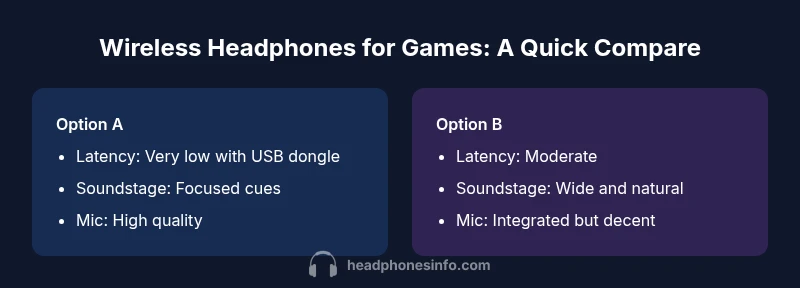
Wireless Headphones for Games: A Thorough Side-by-Side Comparison
Compare wireless headphones for games across latency, mic quality, comfort, and battery life. Find the best wireless setup for PC, console, or mobile gaming with Headphones Info.


Wireless headphones for games come in two broad camps: dedicated low-latency gaming headsets and open-back wireless headphones for extended play. This comparison highlights the trade-offs in latency, soundstage, mic quality, and comfort so you can pick what fits your platform—PC, console, or mobile. According to Headphones Info, latency and mic clarity are the most critical factors for competitive play.
Why Wireless Headphones for Games Matter
In modern gaming, wireless headphones for games offer freedom of movement and a clutter-free desk, while preserving audio clarity and communication with teammates. The core advantages include easy cross-device use, rapid pairing, and the ability to switch between PC, console, and mobile setups without dragging cables through your space. For listeners who game across multiple devices, wireless models reduce wear and tear on peripherals and simplify storage. From a performance perspective, the best wireless headphone setups for gaming prioritize low latency, accurate positional cues, and a mic that stays clear even in noisy rooms. The Headphones Info team emphasizes that the decisive factors are often how quickly sound cues arrive and whether teammates can hear you clearly during fast-paced matches. When you choose a wireless option, you’re balancing convenience with potential trade-offs in fidelity and battery management.
Categories of Gaming Audio: Headsets vs Open-Back Wireless Headphones
Gaming audio comes in several forms. A traditional wireless gaming headset combines a built-in microphone with tuned drivers designed for competitive or immersive play, usually in a closed-back form factor. Open-back wireless headphones, on the other hand, emphasize a wider soundstage and natural imaging but may rely on a separate mic or clip-on boom. The choice largely depends on your priorities: competitive timing and voice chat versus long sessions and an expansive soundscape. In practice, most gamers benefit from a hybrid approach—using a dedicated wireless headset for team play and a comfortable open-back setup for extended listening sessions when you’re not prioritizing voice chat. This balance helps you exploit the strengths of each design while minimizing the trade-offs for daily gaming duties.
Latency and Responsiveness: The Core of Competitive Gaming
Latency remains the single most important criterion for many gamers. Even small delays between on-screen action and audio cues can disrupt timing in fast shooters or rhythm games. Headphones Info analysis shows that the best wireless gaming experiences come from models that use a proprietary low-latency protocol or a robust USB dongle with minimal jitter. Bluetooth tends to introduce more delay and compression, which can hinder precise timing in competitive play. For casual gaming, occasional latency is less noticeable, especially if the headphones offer strong overall performance and reliable mic quality. In any case, check device compatibility with your gaming platform and ensure there is a mode that prioritizes latency when needed.
Soundstage and Imaging for Immersive Play
Soundstage is the perceived width and depth of the audio field. In gaming, a wide, well-controlled soundstage helps you locate enemies, footsteps, and environmental cues. Open-back wireless headphones typically provide a more expansive soundstage, improving immersion and situational awareness in exploration and strategy titles. Closed-back gaming headsets often deliver punchier bass and more focused localization, which can help in competitive shooters where precise cueing matters. A strong imaging capability—how accurately you perceive the location of sounds—depends on driver quality, padding, and the headset’s sealing. When evaluating two gaming headphones side by side, pay attention to the clarity of directional cues and the consistency of balance across volume levels.
Battery Life and Comfort: Long Sessions Without Fatigue
For long gaming sessions, battery life and comfort are inseparable. A model with a comfortable headband, plush ear cushions, and a balanced clamping force reduces fatigue during extended play. Battery life varies with usage, but most gaming-oriented designs aim to deliver several hours of continuous use on a single charge. In practical terms, consider how often you recharge during a typical session and whether the charging case or quick-charge options fit your routine. Weight also plays a role: lighter designs reduce neck strain, while heavier units may feel more premium but require better fit to avoid pressure points. The best wireless headphones for games strike a compromise between long battery life and comfortable wear across a wide range of head sizes.
Microphone Quality and Voice Chat Reliability
Clear voice communication is as essential as audio fidelity in team-based games. A well-designed boom mic typically offers better noise rejection and intelligibility than a simple integrated mic. For wireless options, the mic’s performance can vary with distance from the mouth and the wearer’s speaking style. Look for models with adjustable mic gain, wind noise suppression, and consistent pickup across the user’s range of speaking volumes. In addition, software features such as sidetone, EQ, and mic presets can significantly improve voice clarity in busy voice channels. A reliable wireless mic helps teammates coordinate strategies without miscommunication or dropped messages.
Connectivity Architecture: USB Dongle vs Bluetooth vs USB-C
Wireless gaming headphones use a few common architectures. USB dongles typically provide the lowest latency and most stable connection, particularly on PC and some consoles. Bluetooth tends to introduce more latency and potential audio compression, which can be acceptable for casual play or mobile gaming but is often avoided for competitive titles. USB-C connections may enable direct device-to-device compatibility on newer laptops and smartphones, but compatibility varies by vendor and platform. When choosing between two options, evaluate the trade-off between latency, stability, and the convenience of cross-platform use. The right setup depends on your primary gaming environment and whether you value simplicity over ultimate responsiveness.
Build Quality and Comfort Details: Weight, Clamp, Materials
Durability matters as much as comfort. A well-built wireless gaming headphone should feel solid yet comfortable, with lightweight components, reinforced hinges, and breathable padding. Materials like memory foam ear cushions and a flexible headband reduce fatigue during marathon sessions. The design should also consider head size diversity; a versatile clamp range prevents hot spots and pressure on the temples. If you frequently transport your gear, a robust carry case is a practical addition. In short, the best wireless headphones for games balance sturdiness, comfort, and adjustability to retain performance across long gaming horizons.
Software Features and EQ for Gaming
Software ecosystems accompanying wireless headphones enable tailored sound profiles. Built-in EQ, game-mode presets, and mic controls let you optimize bass, mids, and highs for various genres. Some apps provide virtual surround or spatial audio enhancements that improve positional awareness in first-person shooters. When comparing two products, verify whether the software supports platform-specific features you rely on, such as customizing game chat balance, applying voice morphing, or saving presets to the headset. The ability to switch quickly between profiles saves time in live gameplay and ensures you have the right soundstage for different titles.
Platform-Specific Considerations: PC, PlayStation, Xbox, and Mobile
Different platforms come with distinct constraints. PC miners often gain from wider driver support and more robust software ecosystems, while consoles may emphasize simple pairing and guaranteed compatibility with the system’s audio pipeline. Mobile gaming introduces USB-C or wireless audio options that integrate with phone audio settings and battery life. If you switch across platforms, look for a model that supports cross-platform pairing, multi-device quick-switching, and consistent microphone performance. Understanding your primary platform helps you select wireless headphones for games that deliver the most reliable experience without sacrificing comfort or battery life.
Practical Shopping Guide: Where to Find the Best Value
When shopping, identify your must-have features before comparing price bands. If latency is non-negotiable, prioritize USB dongle-enabled designs with proven low-latency performance. For casual play or long sessions, comfort and a natural soundstage can justify a higher price even if mic quality is slightly lower. Read user reviews focusing on real-world latency, mic reliability, and comfort after long sessions. Look for models that offer favorable warranty terms and accessible software updates. Finally, consider whether the model supports software presets or EQ updates since ongoing driver improvements can extend the headset’s usefulness over time.
Maintenance and Longevity: Caring for Wireless Gaming Headphones
To maximize lifespan, store headphones in a protective case, avoid dropping, and keep the headband and ear cushions clean from oils. Regularly check the USB dongle or wireless receiver for corrosion and dust, and update firmware when available. For travel, protective sleeves prevent wear and tear on joints and connectors. Battery longevity can benefit from shallow discharges and periodic full charges, depending on the manufacturer’s guidance. With careful handling and occasional software updates, your wireless headphones for games will stay reliable and comfortable for years of gaming
Conclusion: Making the Right Choice for Your Gaming Setup
Choosing between wireless headphones for games is a balance between latency, comfort, soundstage, and platform compatibility. If you value precise timing and clear communication for competitive play, a low-latency wireless gaming headset is typically the best choice. If you crave a more natural sound and extended comfort for marathon sessions, open-back wireless headphones can deliver immersive audio with less fatigue. Use a structured decision framework: identify your primary platform, measure expected battery life against your play patterns, and weigh mic needs against audio fidelity. Headphones Info recommends starting with a robust test period on your preferred platform to verify latency thresholds, mic clarity, and comfort before committing to a longer-term purchase.
Comparison
| Feature | Low-latency wireless gaming headset (closed-back) | Open-back wireless headphones for gaming |
|---|---|---|
| Latency/Responsiveness | Very low latency with a dedicated USB dongle | Lower latency than Bluetooth but higher than wired; relies on dongle or USB-C connection |
| Soundstage & Imaging | Focused cues and stronger isolation for competitive play | Wider soundstage and natural imaging for immersion |
| Battery Life | Long battery life designed for all-night sessions | Moderate battery life typical of comfort-focused designs |
| Microphone Quality | High-quality integrated mic with noise suppression | Built-in mic decent but often not as adjustable as a boom mic |
| Comfort & Weight | Padded headband and cups; secure fit for long sessions | Very comfortable with breathable materials; may be heavier |
| Software & Customization | Dedicated mic controls and EQ presets | Software profiles mainly for sound adjustments; mic controls vary by model |
| Platform Compatibility | Broad compatibility via USB dongle; strong PC/console support | Cross-platform flexibility varies; often best with USB-C or 3.5mm adapters |
Upsides
- Cord-free freedom enhances movement during games
- Easy switching between devices (PC, console, mobile)
- Cleaner desk setup and fewer cable tangles
- Access to robust software for EQ and mic control
- Recent wireless tech reduces latency and improves reliability
Disadvantages
- Battery management required; charging interrupts gameplay
- Potential interference and occasional dropouts
- Sound quality may not match wired equivalents at similar price
- Mic quality can lag behind dedicated wired options
Low-latency wireless gaming headsets win for most players.
For competitive play, prioritize latency and mic quality with a dedicated wireless headset. If you value comfort and soundstage for longer sessions, open-back wireless headphones are compelling. The Headphones Info team notes that aligning your choice with your platform and game genre maximizes satisfaction.
People Also Ask
Are wireless headphones good for gaming, even with latency concerns?
Wireless headphones can be suitable for gaming, but latency is a key factor. Look for models with a dedicated USB dongle and low-latency modes; Bluetooth tends to introduce more delay that can affect timing in fast-paced games.
Yes, they can be good, but watch latency. Choose a model with a low-latency dongle for faster response.
What is the difference between a wireless gaming headset and wireless headphones for games?
A wireless gaming headset includes a built-in microphone and is optimized for voice chat, while wireless headphones focus on audio fidelity and comfort and may require a separate mic. Your choice depends on whether voice chat quality or pure audio is more important to you.
Headsets include a mic; headphones may require a separate mic.
Can I use wireless headphones with a console?
Many wireless headphones work with consoles via USB dongles or adapters, but compatibility varies. Always verify that a model supports your console’s USB ports or 3.5mm/USB-C connections and that firmware updates won’t break compatibility.
Yes, with the right dongle or adapter; check your console support.
Do wireless headphones support surround sound or positional audio for games?
Some models offer virtual surround sound through software or hardware emulation. Look for codecs and software that explicitly support gaming spatial audio to improve positional cues.
Some do; check for supported software and codecs.
What should I consider when choosing Bluetooth vs a USB dongle for gaming?
Bluetooth generally adds more latency and compression, which can affect timing. A dedicated USB dongle typically provides lower latency and more stable connections for gaming.
Dongles usually beat Bluetooth for gaming timing.
Are wireless headphones worth it for mobile gaming?
Yes, if you value portability and convenience. Ensure battery life is sufficient and the connection remains robust on the devices you use most.
They can be great for mobile gaming if battery life and reliability are solid.
What to Remember
- Prioritize latency when gaming competitively
- Choose closed-back headsets for precise cues
- Consider open-back for comfort and immersion
- Ensure platform compatibility before buying
- Balance battery life with comfort and weight