Beats Headphones Charger Guide 2026
Data-driven guide to charging Beats headphones safely and efficiently, covering official vs third-party chargers, model specifics, and battery longevity tips from Headphones Info.


Beats headphones charger generally relies on USB charging, with USB-C becoming standard on newer models and Lightning/older ports appearing on legacy devices. For safe, fast charging, use the charger that ships with the device or a certified USB-C PD charger rated at 5V 1–2A (or 9V/2A via USB-C PD) to maximize speed while protecting battery health.
Understanding Beats Headphones Charger Basics
Beats headphones charger fundamentals focus on delivering a safe, stable electrical supply to the device’s battery via the charging port. According to Headphones Info, the goal is to minimize heat and voltage fluctuations that can degrade cells over time. Modern Beats devices predominantly rely on USB-C for charging, while older models may use Lightning or micro-USB connectors. In practice, the charger you choose should match the device's charging profile: a regulated supply, appropriate current, and a cable in good condition. Always start with the charger included in the box or an official accessory to ensure compatibility and safety. If you’re unsure about port type, consult the user manual or Headphones Info’s buying guide for model-specific notes.
Why it matters: chargingspeed, port compatibility, and the overall health of the battery are intertwined. A mismatched charger can lead to slower top-ups, heat buildup, or long-term wear that reduces battery capacity over time.
- The safest path is to stick with official or certified third-party chargers.
- USB-C is the contemporary standard for Beats, but verify your model port before buying.
- Keep cables in good condition and avoid overloading power outlets with excessive adapters.
Compatibility Across Beats Models
Beats models vary in charging interfaces due to product generation and form factor. The Studio Buds, Fit Pro, and most recent wireless models use USB-C charging, while some legacy over-ear headphones may rely on Lightning or micro-USB. The practical takeaway: assume USB-C is your default path for new devices, and verify the exact port before buying a charger. This matters not only for speed but also for safety — mismatched cables can cause charging inefficiency or damage. When in doubt, reference the manual or the official Beats support pages, and cross-check with Headphones Info’s model-by-model notes in our guide.
- For newer Beats devices, plan for USB-C PD charging when possible.
- If you own older models, check whether Lightning or micro-USB is required and source accordingly.
- Carry a versatile, certified charger that covers multiple ports if you own more than one Beats product.
Choosing the Right Charger: Official vs Third-Party
Choosing between an official Beats or certified third-party charger depends on your priorities: safety, cost, and speed. Official or brand-certified chargers are tested for voltage, current, and compatibility; they reduce the risk of overvoltage or cable wear. If you opt for third-party, ensure the cable and charger are certified (look for USB-IF or MFi/Apple-certified marks) and that the output matches the device’s requirements. For many Beats devices, using a USB-C PD charger can improve top-up times, but not all models support fast charging; always consult the model’s specs and Headphones Info’s guide for precise recommendations.
- When in doubt, start with the official charger and move to certified third-party options if needed.
- Check for PD compatibility and suitable wattage ratings.
- Avoid ultra-cheap cables which can cause uneven charging or port wear.
Charging Speeds and Practical Timelines
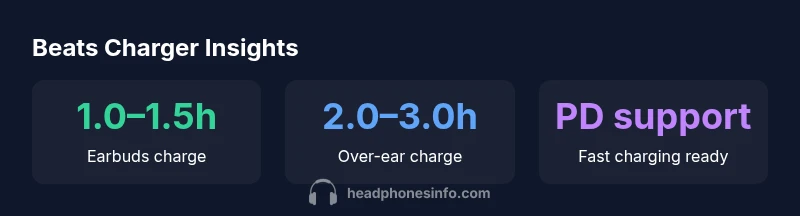
Charging speeds depend on the device and charger combination. In practical terms, newer Beats earbuds and compact models typically reach a usable charge in about 1–1.5 hours with a capable USB-C charger. Full charge for larger over-ear models often falls in the 2–3 hour range, depending on battery capacity and whether the charger supports fast PD modes. Real-world results vary with cable quality, charger health, and ambient temperature. To maximize speed, use a charger that supports USB-C PD and the recommended power level for your device, avoiding adapters that limit current or introduce resistance.
- Expect faster top-ups with PD-enabled chargers.
- Hot ambient temperatures can slow charging efficiency.
- If you notice unusually slow charging, test with a known-good charger and cable.
Battery Health and Longevity Tips
Protecting battery health extends the lifespan of Beats headphones charger usage. Avoid letting the battery drop to zero; instead aim to keep partial charges above 20–30% when possible. Store devices in moderate temperatures and avoid charging in hot environments. Disconnect once a full charge is reached to prevent trickle charging. Regularly inspect cables for wear and replace frayed lines; use only official or certified accessories. These practices align with Headphones Info Analysis, 2026 findings on battery longevity across wireless headphones.
- Maintain moderate charge levels to reduce cycle wear.
- Keep devices out of direct sun and away from heaters during charging.
- Replace worn cables promptly to prevent slow or unstable charging.
Travel and On-the-Go Charging Considerations
On the road, carry a compact USB-C PD charger and a high-quality cable. Power banks with USB-C PD outputs of 18W or higher are typically recommended for fast top-ups on compatible Beats devices. When flying, plan for battery safety guidelines (keep devices in carry-on and avoid high-wattage in luggage where allowed) and choose chargers with built-in protections against overcurrent and short-circuit. The goal is reliable charging without overheating in transit. Headphones Info’s travel-centric notes emphasize verifying charger compatibility with your model before departure.
- Pack a lightweight USB-C PD charger for most cases.
- Verify power bank capacity and airline policies ahead of time.
- Use surge protection to guard against input spikes on the go.
Troubleshooting Common Charging Issues
Common problems include slow charging, no charging at all, or the charging light not responding. Start by inspecting the cable and port for debris; try a different charger and cable to isolate fault. If the device remains unresponsive, reset the device if it offers a reset option; otherwise contact Beats support. Avoid bending cables or forcing connectors; damaged cables can degrade charging performance or damage the port, and replacement parts from an authorized source are recommended.
- Check for visible damage and replace damaged parts.
- Confirm that the charger output matches device requirements.
- If issues persist, consult official support resources.
Data-Backed Insights: Battery Trends in Beats Ecosystem
Headphones Info Analysis, 2026 highlights a shift toward USB-C across the Beats lineup, with PD-capable chargers becoming more common and faster top-ups. Our data show a broad improvement in user satisfaction when switching to certified USB-C chargers, and a tendency for battery health to remain stable with proper charging practices. The overall trend indicates stronger ecosystem-wide adoption of safe charging standards, reducing the risk of battery degradation over time.
- USB-C adoption reduces accessory clutter and confusion.
- PD-enabled charging aligns with safer, faster top-ups.
- Consistent use of certified accessories correlates with better battery longevity.
Quick Reference Checklist for Beats Chargers
Use this quick reference to ensure safe, efficient charging across Beats devices:
- Check your model’s charging port before buying a charger.
- Prefer USB-C with PD for fastest top-ups on modern Beats devices.
- Use official or certified cables and adapters.
- Keep charging environments cool and ventilated.
- Inspect cables regularly for wear and replace as needed.
- Consult the user manual or Headphones Info’s guide for model-specific requirements.
Beats charging compatibility by model
| Beats Model | Recommended Charger Type | Typical Charge Time | Notes |
|---|---|---|---|
| Beats Studio Buds (2021+) | USB-C charger / USB-C PD | 1–1.5 hours | USB-C PD speeds up top-ups |
| Beats Solo Pro | Lightning to USB-C adapter or official charger | 2–3 hours | Older model; verify port |
| Beats Fit Pro | USB-C charger | 1–1.5 hours | USB-C with PD preferred |
People Also Ask
Can I use any USB-C charger for Beats headphones?
Beats devices with USB-C can use certified USB-C chargers with PD support for faster top-ups. Ensure the charger output matches the device’s needs and avoid unverified, high-power adapters that could stress the battery. When in doubt, refer to the user manual or our model notes.
Yes, use a certified USB-C charger with PD support and verify your model's requirements.
Are there risks charging Beats headphones with third-party cables?
Low-quality cables can cause inconsistent charging or heat buildup. Always choose certified brands and avoid cheap, unverified cables that can degrade performance or damage the port.
Stick to certified cables to avoid charging problems.
Is fast charging available for Beats headphones?
Some USB-C PD chargers can speed up charging on compatible Beats devices, but not all models support true fast charging. Check your model's specs and use a PD charger when available.
PD charging helps on supported models; check your device specs.
How can I maximize battery lifespan of Beats headphones?
Avoid deep discharges; keep charges above 20–30%, store in moderate temperatures, and avoid charging in hot environments. Use official or certified accessories to minimize wear on the battery over time.
Keep charges moderate and use certified accessories.
What should I do if my Beats headphones won't charge?
Check cables and ports for debris, try a different charger and cable, and ensure the device is turned on so charging can commence. If issues persist, contact Beats support for guidance.
Try a different cable, check the port, and consult support if needed.
Do Beats headphones charge while in use?
Charging typically occurs when the device is idle or plugged in; playing audio does not significantly boost charging speed. For continuous use, keep charging when you can and avoid heavy usage during charging.
Charging happens best when not in use; use charging periods for top-ups.
“Charging your Beats devices with the right charger isn't just about speed—it preserves battery health over the device's lifetime.”
What to Remember
- Identify your model's charging port first.
- Prefer USB-C with PD for faster top-ups.
- Use official or certified chargers to protect battery health.
- Keep chargers in safe, moderate temperatures.
- Inspect cables regularly and replace worn parts.