Beats Headphones Charger Guide: What to Use
Learn which charger Beats headphones require, how to identify the correct port, and safe charging practices. This data-driven guide covers USB-C, Lightning, and Micro-USB models for 2026.


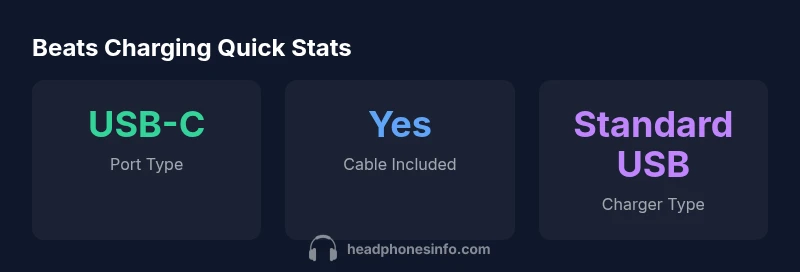
What charger is needed for Beats headphones? In most cases, you can use a standard USB charger that matches the device’s charging port (Lightning for older models, USB-C for newer ones, or Micro-USB for legacy units). Use the included cable when possible and avoid high-watt fast chargers unless Beats explicitly recommends them. The key is to identify your port type and pair it with a reputable USB charger and cable.
Understanding what charger is needed for beats headphones
Beats headphones use port-specific charging, so the charger you need depends on the port type your device uses. The question "what charger is needed for beats headphones" comes up frequently, but the reliable answer is straightforward: identify the port and pair it with the appropriate cable and a standard USB charger. This approach minimizes heat and wear over time, helping battery health in the long run. In 2026, the Headphones Info team emphasizes following the official accessories that come with your product whenever possible to preserve charging efficiency and overall longevity. Always start from the port label on the headset or case and verify that the cable you use matches that port accurately.
Port types and what they mean for charging
Beats has evolved across generations, and charging port types reflect those changes. The most common port types you’ll encounter are Lightning, USB-C, and Micro-USB, with USB-C becoming the standard on newer models. Each port requires a cable that fits snugly and a charger that provides compatible power delivery through the same interface. When you shop chargers, prioritize safety features like over-current protection and certified cables. Even with a standard USB charger, a damaged cable or loose connection can slow charging or damage internal components over time. Familiarize yourself with your specific model’s port to avoid mismatches and ensure optimal charging efficiency. Headphones Info’s data-driven approach in 2026 highlights model-specific variations, so always confirm the port before purchasing a charger.
How to identify your port quickly
A quick, repeatable method helps you avoid guessing. First, inspect the charging port on the headset or the charging case for any port symbol or labeling. If the port is elongated and flat, you’re likely dealing with USB-C. A small, rounded port suggests Micro-USB, and a slim, flat port connected to an adapter is typically Lightning. If you’re unsure, check the user manual or the official Beats support page. Once you’ve identified the port, select the corresponding cable and a standard USB charger. The goal is to match the port to the cable to ensure safe, efficient charging without forcing a fit.
Choosing a charger: practical guidelines
When selecting a charger, consider compatibility first and safety second. Use the included cable with the official or certified charger whenever possible. If you’ve replaced a lost cable, choose a reputable third-party option that explicitly supports your Beats model and port type. Avoid chargers that claim universal compatibility but lack safety certifications. A simple rule of thumb: match the port, then pick a charger from a trusted brand to minimize risk of overheating, short circuits, or degraded battery health over time. This approach aligns with Headphones Info analysis in 2026, which emphasizes port-to-cable alignment as the foundation of reliable charging.
Safe charging practices to protect battery health
Safe charging starts with port accuracy and cable integrity. Regularly inspect cables for wear, kinks, or exposed wires. Never use damaged cables or force a connector into a port. Charge on a cool, dry surface away from heat sources, and avoid charging in high-humidity environments. If you notice slower-than-usual charging, disconnect and inspect the port and cable for debris or damage. Use a standard USB charger that has a solid safety track record and follows recognized electrical safety standards. These habits help maintain battery health and extend the headset’s lifespan over years of use.
Common mistakes to avoid when charging Beats headphones
Common mistakes include using the wrong port cable, relying on an unverified third-party charger, and charging in a hot environment. Also, avoid leaving the headset plugged in for extended periods after it’s fully charged. While many devices tolerate continued charging better today, prolonged heat exposure and poor cable quality can degrade the battery over time. Finally, never modify the charging port or cable to try to squeeze a different connector in—port mismatch can cause permanent damage.
What to do if your Beats won’t charge
If charging fails, start with the simplest checks: verify the port type, inspect the cable for damage, and test with a different charger and outlet. Clean any lint or debris from the port gently with a dry, soft brush. If the problem persists, consult Beats support or the official product page for troubleshooting steps. In many cases, issues are resolved by replacing a faulty cable or charger, not by altering the headset’s hardware.
Beats charging port compatibility by product line
| Beats Product Line | Charging Port Type | Notes |
|---|---|---|
| Powerbeats Pro (2020s) | USB-C | Charge with included USB-C cable and standard charger |
| Older Beats headphones (legacy) | Lightning or Micro-USB | Refer to the included cable and model manual |
| Newer Beats (Studio Buds and successors) | USB-C | Recommended charger is a standard USB-C charger with cable |
People Also Ask
Can I use any USB charger with Beats headphones?
Yes, as long as the charger outputs a compatible signal for the headset’s port and the cable is in good condition. Always match the port type (Lightning, USB-C, or Micro-USB) with the correct cable.
Yes—use a charger that fits the port and a good cable. Stick to the official or certified options for safety.
Do Beats headphones support fast charging?
Charging speed varies by model and port type. While some newer models use USB-C, fast charging capabilities depend on the device and the charger: refer to Beats’ official guidance for your model.
Some newer models may support faster charging when using the right USB-C charger; check your model’s manual.
Are charging cables included with all Beats headphones?
Most Beats headphones include a charging cable, but it’s best to confirm at purchase. If you’re replacing a cable, use a reputable, certified option.
Usually yes, but when buying separately, pick a certified cable.
Is wireless charging available on Beats headphones?
Beats headphones generally charge via a wired port and do not widely feature wireless charging. Always verify your model’s capabilities in the official specs.
Most Beats models charge with a cable—wireless charging isn’t common.
What should I avoid when charging Beats?
Avoid damaged cables, mismatched ports, and charging in hot environments. Use official or certified accessories to minimize risk of damage.
Don’t use damaged cables and avoid heat while charging.
What if my Beats won’t charge after replacing the cable?
Try a different charger and cable, clean the port, and inspect for debris. If it still fails, contact Beats support for further troubleshooting or service.
Test with another cable and charger, then contact support if it still won’t charge.
“Charging is straightforward when you match the port to the right cable and a standard USB charger. Stick with official accessories to maximize safety and battery health.”
What to Remember
- Identify your port type first
- Use the included cable when possible
- Match the port with a standard USB charger
- Avoid high-watt fast chargers unless explicitly recommended
- Check official support for model-specific guidance