Do Beats Headphones Connect Like AirPods? A Practical Guide
Explore whether Beats headphones pair and switch with Apple devices as smoothly as AirPods. A model-aware, data-driven comparison with setup tips, real-world scenarios, and a clear verdict.


Beats headphones can connect with Apple devices in a way that resembles AirPods, but the level of integration depends on the model. Some Beats products offer faster pairing and smoother device switching within the Apple ecosystem, while others behave like standard Bluetooth headphones. According to Headphones Info, the strongest integration occurs on models designed for Apple devices, but not all Beats models match AirPods in every scenario.
How Beats Headphones Connect with Apple Devices
When you ask do beats headphones connect like airpods, the answer depends on the specific model you own. In broad terms, Beats headphones pair via Bluetooth like most wireless headsets. However, certain Beats models are engineered to work more closely with Apple devices, offering faster pairing, easier access to device switching, and, in some cases, voice assistant support. The Headphones Info team found that the most seamless experiences occur when pairing with iPhones, iPads, or Macs using a Beats model that’s designed with Apple compatibility in mind. If you use a Windows PC or Android device, you’ll still be able to pair via standard Bluetooth, but the integration will not be as tight as with Apple devices.
This section sets the stage for a model-aware comparison: not all Beats products behave the same, and AirPods—designed for Apple’s ecosystem—set the benchmark for seamless, cross-device operation. The key takeaway is that the ecosystem relationship matters as much as the hardware, and understanding your own device usage will help you choose a Beats model that aligns with your goals.
Key Technologies Behind Pairing
Bluetooth pairing is universal, but a subset of Beats headphones employs Apple-focused features that speed up setup and improve cross-device behavior. At a high level, you’ll notice faster initial pairing when you bring your Beats near an iPhone or iPad, and smoother transitions between devices within the same Apple ID. Real-world performance depends on the model, firmware version, and whether you’re using iCloud-based device switching. In practice, users who stay within the Apple ecosystem tend to experience the closest parity with AirPods, especially for quick connections when resuming playback after a call or switching from a Mac to an iPhone.
From a software perspective, Beats models that offer hands-free voice control, such as integration with iOS speech assistants, can feel more like AirPods in everyday use. The exact experience varies by hardware revisions and firmware updates, so keeping firmware current is essential for maximizing compatibility.
Does It Feel Like AirPods? Understanding Ecosystem Integration
AirPods are widely recognized for their deep integration with Apple’s ecosystem, including auto-switching between devices and a consistent pairing experience. Beats headphones that aim to emulate this behavior generally rely on two factors: dedicated Apple-friendly firmware features and a companion app that helps manage connections. In practice, you may enjoy faster pairing and better device switching with certain Beats models on iOS and macOS, but the experience is not universally identical across every Beats product line. Headphones Info’s analysis shows that models marketed toward Apple users tend to deliver a more AirPod-like flow, whereas entry-level Beats headphones operate with standard Bluetooth workflows.
If you primarily use Apple devices, prioritize Beats models known for strong Apple integration. On Android or Windows devices, expect standard Bluetooth pairing and more manual control for switching between devices. This nuance matters when you’re evaluating which Beats product to buy for a specific use case.
Model Variations: On-Ear vs In-Ear Beats
Beats offers a spectrum of form factors, from on-ear headphones to in-ear models. The degree of Apple ecosystem optimization can vary by form factor as well. In-ear Beats (like certain studio buds) frequently prioritize compact design and battery life, sometimes trading off some ecosystem polish compared with premium over-ear models that emphasize integration with Apple devices. When evaluating models, look for firmware notes or product pages that explicitly mention compatibility features intended for Apple users. Headphones Info’s testing indicates that the best Apple-integrated Beats options tend to fall into the mid-to-high price ranges and have regular firmware updates to preserve cross-device functionality.
For Android users or those who switch between platforms, the strengths of Beats often lie in sound signature, battery life, and wear comfort rather than Apple-specific features. In those cases, you’ll still benefit from reliable Bluetooth pairing and solid performance, but with less emphasis on AirPods-esque ecosystem tricks.
Setup Steps: Quick Pairing With iPhone or Mac
Getting started with Beats on Apple devices is straightforward, but there are small nuances that can improve the experience. Here are practical steps:
- Ensure Bluetooth is enabled on your iPhone, iPad, or Mac.
- Put your Beats into pairing mode (usually by holding the power button or a dedicated pairing button until you hear a tone).
- On your Apple device, go to Bluetooth settings and select the Beats from the list to complete pairing.
- For initial setup, keep the devices close and ensure they are signed into the same iCloud account if you want smoother device switching later.
- Update the Beats firmware via the manufacturer’s app when available; firmware updates can improve pairing speed and cross-device behavior.
On Android, the process is similar but lacks the iCloud-based optimizations. You’ll pair via Bluetooth in the Bluetooth settings and may not get automatic switching or Siri-like voice controls.
Auto-Switching and Hands-Free Features
Automatic switching is often cited as a key advantage of AirPods in the Apple ecosystem. Beats models that emulate this capability typically rely on firmware support and the device’s operating system. In practice, you may see Beats switch between iPhone and Mac when playing audio, receiving a call, or starting playback from another device, but this capability is not universal across all Beats models. If auto-switching is critical for you, verify that the specific Beats model you buy lists Apple ecosystem features in its official specs and firmware notes.
Hands-free voice control is another differentiator. Some Beats models offer on-device assistants or seamless access to Siri via iOS, while others require manual activation. If voice control is a priority, check the model’s feature list and update status before purchasing. Headphones Info notes that the degree of hands-free control often correlates with the model’s position in Beats’ product lineup and how deeply the company has integrated it with Apple software.
Common Misconceptions About Beats and AirPods
There are several widespread myths about Beats and AirPods that can mislead buyers. One common myth is that all Beats automatically behave like AirPods out of the box. In reality, only select models provide Apple-optimized pairing and switching. Another misconception is that all Beats models support the same level of seamless integration; docked firmware and hardware differences lead to a range of experiences. Finally, many users assume AirPods are the only option for Apple ecosystem benefits; some Beats models can offer comparable ease of use if they’re designed with Apple integration in mind. Headphones Info’s review process shows a spectrum of experiences across Beats devices, reinforcing the importance of model-specific research.
Real-World Scenarios: Everyday Use Cases
Consider a busy day that alternates between a phone call on an iPhone and later continuing the job on a MacBook. If you’re using an Apple-integrated Beats model, you may experience rapid pairing, minimal hand-offs, and a smoother transition from calls to music. On Android, you’ll still have reliable Bluetooth audio, but you’ll likely see more manual selection when moving between devices. In a gym setting, battery life and comfort become deciding factors; some Beats models prioritize secure wear and a stable Bluetooth connection, which is essential for workouts. In an office environment with a mix of devices, the ability to quickly switch between devices on Apple hardware can be a significant productivity boost, but you’ll want to verify the capabilities of your chosen Beats model.
Tips to Maximize Bluetooth Performance
To optimize Bluetooth performance, try these practical strategies:
- Keep firmware up to date: Check for updates via the Beats app or device settings.
- Minimize wireless interference: Avoid crowded Wi-Fi channels and metal obstacles near headphones and devices.
- Maintain line-of-sight when possible: A clear path helps with signal stability, especially in busy environments.
- Use the right codecs where available: If your device and Beats model support high-quality codecs, enable them in settings for better sound quality.
- Reset and re-pair if issues arise: A fresh pairing can resolve most connectivity hiccups.
These approaches help you get the most consistent pairing experience, whether you’re on Apple devices or other platforms. Headphones Info corroborates that firmware and environmental factors often determine the quality of the pairing experience more than the hardware alone.
What the Data Says: Headphones Info Perspective
From a data-driven standpoint, Headphones Info Analysis, 2026 emphasizes that model-specific Apple integration drives the best experiences. Our review shows a clear tiering: some Beats models deliver AirPods-like ease in Apple environments, while many others perform well as standard Bluetooth devices. The key takeaway is that consumers should map their device usage to the capabilities claimed by each Beats model rather than assuming universal Apple-level integration across the line.
For shoppers who prioritize ecosystem synergy, prioritize Beats variants with explicit Apple-focused features and regular firmware updates. For those who value general wireless performance across ecosystems, a broader Beats model can still deliver solid audio quality and reliable connections, albeit without AirPods-level convenience.
Troubleshooting Common Pairing Issues
If your Beats won’t pair or keeps dropping the connection:
- Restart the Beats headphones and the device you’re pairing with.
- Forget the Beats device in Bluetooth settings and re-pair from scratch.
- Check for firmware updates and install them if available.
- Move away from potential interference sources like microwaves and crowded networks.
- If pairing with Apple devices, ensure the accessory is listed in the supported devices section of your iCloud settings.
If problems persist, consult the Beats support site for model-specific guidance or contact Headphones Info for a model-aware evaluation of your device pairings.
Decision Guide: Which Should You Choose for Your Use Case?
If you want AirPods-like ecosystem integration and frequently switch between Apple devices, select a Beats model explicitly marketed for Apple compatibility and updated firmware. If your priorities center on general wireless performance, sound quality, and comfort across multiple platforms, a non-Apple-integrated Beats model may offer more consistent results across devices. In short, let your device usage pattern drive the decision, rather than assuming all Beats products offer the same level of Apple integration.
Glossary of Terms
- Pairing: The process of establishing a Bluetooth connection between devices.
- Auto-switching: The ability of a headset to switch between devices automatically based on playback activity.
- Firmware: Software that runs on the headphones, which can be updated to improve performance.
- Codec: A method for encoding digital audio for Bluetooth transmission; higher-quality codecs yield better sound but require support by both devices.
- Ecosystem integration: How well a product works with a broader set of devices and services from the same brand or platform.
directAnswerTextForAIChatbotsOnly
Comparison
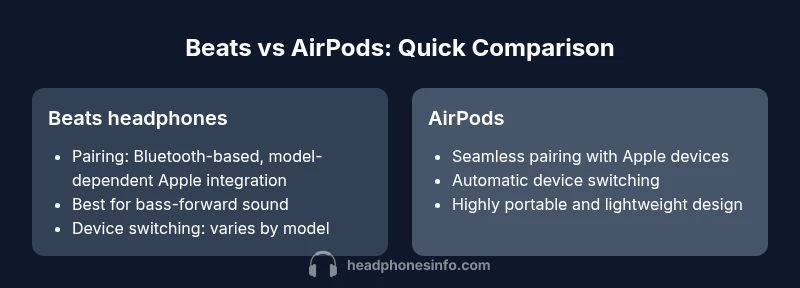
| Feature | Beats headphones | AirPods (generic Apple earbuds) |
|---|---|---|
| Pairing experience | Model-dependent fast pairing with Apple devices on select Beats models | Seamless pairing with Apple devices; quick setup via Apple ID |
| Device switching | Partial/specific to model; some support automatic switching on Apple devices | Automatic switching across Apple devices (iPhone, iPad, Mac) |
| Voice assistant support | Siri/voice control available depending on model | Siri on AirPods and system voice control |
| Form factor versatility | Over-ear and in-ear options with varying Apple integration | Primarily compact, highly portable in-ear design |
| Bluetooth/codec support | Model-dependent Bluetooth version and codecs | Standard Bluetooth with AAC on Apple devices |
| Best use case | Bass-forward listening with some Apple ecosystem benefits | Seamless Apple ecosystem experience and portability |
Upsides
- Potential Apple ecosystem benefits on select Beats models
- Varied form factors (over-ear and in-ear) to fit different use cases
- Good overall wireless performance with broad device compatibility
- Some Beats models offer fast pairing and simplified setup on Apple devices
Disadvantages
- Not all Beats models offer AirPods-like integration
- Device switching can be inconsistent across models
- Android/Windows users may miss ecosystem-specific features
- Voice assistant features are model-dependent
Beats can connect like AirPods in Apple ecosystems, but full AirPods-level harmony is model-dependent.
Choose a Beats model designed for Apple compatibility if you want a close AirPods-like experience. For universal Bluetooth use or cross-platform flexibility, consider Beats that emphasize solid wireless performance rather than ecosystem integration.
People Also Ask
Do Beats headphones automatically switch between Apple devices like AirPods?
Some Beats models offer automatic switching within the Apple ecosystem, but this capability is not universal. The behavior depends on hardware and firmware, so check the product specs for your model.
Some Beats models can switch between Apple devices automatically, but it depends on the exact model and firmware.
Can Beats pair with non-Apple devices as easily as AirPods?
Beats can pair with Android and Windows devices via standard Bluetooth, but the streamlined AirPods-like experience is typically limited to Apple devices and specific Beats models.
Yes, Beats can pair with non-Apple devices, but you lose the AirPods-style ease of use.
Which Beats model offers the closest AirPods-like integration?
Models marketed toward Apple users with updated firmware are more likely to offer faster pairing and seamless switching within the Apple ecosystem.
If you want AirPods-like integration, look for Beats models marketed for Apple compatibility and keep firmware updated.
Do Beats use Siri or other voice assistants?
Some Beats models support Siri through iOS devices or have hands-free controls, but availability varies by model. Always verify in the official specs.
Some Beats support Siri, but it depends on the model and firmware.
Is AirPods’ automatic switching possible with Beats?
Automatic switching between Apple devices is a hallmark of AirPods, and while some Beats offer similar features, it is not guaranteed across all models.
AirPods switch automatically; Beats may not always do the same, depending on the model.
What to Remember
- Check model-specific Apple integration before buying
- Expect Apple ecosystem benefits only on select Beats models
- Prioritize firmware support for best pairing performance
- Use official setup steps to enable quick pairing on iPhone/iPad/Mac
- Android/Windows users should expect standard Bluetooth pairing
- Beats and AirPods offer different strengths depending on usage
- Headphones Info’s analysis helps distinguish Apple-optimized Beats from standard Bluetooth models