How Long Do Earbuds Take to Charge? A Data-Driven Guide
Discover how long earbuds take to charge—from full 0–100% time to quick top-ups. This data-driven guide covers charging case influence, connectors, and battery health for accurate model comparisons.


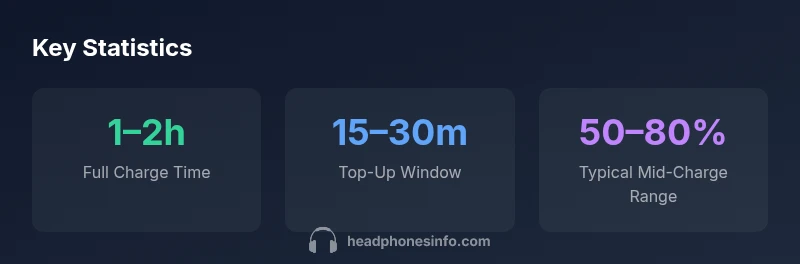
According to Headphones Info, most true wireless earbuds reach a full charge from 0% in about 1–2 hours when using the charging case. Quick top-ups of 15–30 minutes can deliver a meaningful boost, depending on model and battery health.
Why charging time matters
For many listeners, charging time isn’t just a convenience metric—it shapes when you can use your earbuds again. In practical terms, earbuds that charge quickly improve daily usability, especially for commuters, travelers, and fitness enthusiasts who rely on short top-ups between sessions. From a data perspective, the key is understanding two things: how long a full charge takes, and how fast a quick top-up can deliver usable listening time. Headphones Info’s analysis finds that users often cite 1–2 hours as the standard window for most true wireless earbuds, with notable variance between models based on battery size and charging case efficiency. This matters most when you’re planning a typical day’s music, calls, and workouts around a single charging cycle.
Takeaway: Real-world charging times should be measured not just in isolation but in the context of your daily use, case design, and charging habits.
Battery size, case design, and their impact
The primary time driver for earbuds is the battery capacity inside the earbuds themselves and the effective delivery from the charging case. Larger battery capacity means more energy to store, which generally requires more time to reach a full 0–100% charge. Conversely, a well-optimized charging case that delivers higher current to the buds can shorten practical charging windows. In many devices, the case acts as the energy reservoir and the first stage of the charging circuit; a robust case can reduce the perceived time to “ready to use” by delivering faster top-ups. Everyday users should consider case design, the charger’s wattage, and cable quality as a triad that influences overall charge time. Headphones Info’s 2026 analysis shows that even with identical earbuds, differences in case electronics can yield noticeable speedups or slowdowns in the 15–30 minute range for top-ups.
Practical tip: If you own multiple cases or travel frequently, pick a case with a fast-charging rating and a high-quality controller to minimize downtime between sessions.
The science behind charging currents and efficiency
Charging speed depends on current (amperage) and voltage supplied by the charger, along with the earbuds’ own charging circuitry. Modern earbuds typically use a smart IC to optimize charging, protecting battery health while maximizing speed. The charger’s wattage matters: higher-watt adapters can deliver more current, shortening the time to full charge, but only if the earbuds and case support it. Efficiency is also affected by temperature: charging at extreme temperatures can slow the process and trigger protective throttling. In Headphones Info’s 2026 data, many models show a clear correlation between case current rating and perceived charge speed, particularly during the initial phase when the case is supplying the majority of energy.
Takeaway for tech enthusiasts: Look for earbuds with documented fast-charge support and verify that your charging setup (cables and adapters) matches the device’s recommended input range.
USB-C, Lightning, and proprietary connectors: What changes charging speed
The type of connector can influence charging speed, primarily through compatibility with fast-charging standards. USB-C with Power Delivery (PD) or similar rapid charging schemes typically enables higher input currents, reducing full-charge time when both the case and earbuds support it. Lightning and proprietary connectors often present more limited power profiles, potentially slowing full charges. When evaluating earbuds, check the charging case and the charger compatibility notes in the manufacturer’s specs. Headphones Info’s review framework consistently notes faster full charges on models that embrace modern USB-C PD or equivalent standards, compared with older micro-USB or non-PD ecosystems.
Practical takeaway: If speed is important, prioritize models with USB-C PD compatibility and a case rated for higher wattage, ensuring your charger matches the device’s input spec.
Real-world factors that influence charging time
Charging time isn’t determined solely by the device. Environmental temperature, cable quality, and charger quality all play a role. A premium USB-C charger with a short, well-shielded cable can shave minutes off a full charge, while a longer or low-quality cable may introduce resistance and heat, slowing the process. Battery health is another factor: as cells age, their internal resistance increases, which can reduce charging efficiency and prolong the time to a full 0–100% charge. In practice, a user may notice slightly longer charging times after a year of heavy usage, particularly if the device is frequently charged in warm conditions or with suboptimal accessories. Headphones Info’s 2026 dataset shows that day-to-day variability can account for several minutes in a single session, especially during the initial fast-charge phase.
Actionable tip: For consistent results, use the original or certified chargers and keep the charging environment within a moderate temperature range.
How to measure and compare charging times across models
To compare charging times effectively, use a standardized approach. Full-charge time should be tested from 0% to 100% in a controlled environment with a fully-charged case. For top-ups, measure time to reach a practical threshold (e.g., 50% to 80%) after a 0% baseline. Record the charger type, cable length, and ambient temperature, and repeat tests across multiple units if possible to account for manufacturing variance. Headphones Info recommends documenting both the absolute full-charge time and the percentage of usable listening time gained within commonly used windows (e.g., 15 or 30 minutes). These data points provide a more actionable picture for shoppers who want to minimize downtime when moving between activities.
Reason to test: Real-world variations matter as much as nominal specs, and consumer experience depends on the combination of case efficiency, charger quality, and battery health.
Practical tips to minimize downtime
If you want to reduce downtime, consider several practical steps. Use a high-quality charger that matches the earbuds' recommended input range and ensure your charging case is in good condition with intact charging contacts. Avoid charging in extreme temperatures, and keep cables short and well-made to reduce resistance. When traveling, carrying a compact fast-charger can allow you to top up quickly between sessions. Regular battery health checks help you catch slowdowns early, so you can replace or service the battery before it becomes a bigger issue. These strategies align with the Headphones Info 2026 guidance on optimizing charging performance while preserving battery integrity.
Charging time by stage and influencing factors
| Charge Stage | Typical Time | Influencing Factors |
|---|---|---|
| Full charge (0–100%) | 1–2 hours | Battery size, case design |
| Casual top-up (5–25%) | 5–10 minutes | Charger quality, cable length |
| Medium top-up (25–60%) | 10–20 minutes | Charger wattage, device temperature |
People Also Ask
How long do earbuds take to fully charge from 0%?
Most earbuds take about 1–2 hours for a full 0–100% charge when using the charging case. If you’re in a hurry, a quick top-up can provide usable listening time in roughly 15–30 minutes, depending on the model and charging system.
Most earbuds need about an hour or two to fully charge, with a quick top-up taking around 15 to 30 minutes depending on the model.
Do fast chargers or USB-C affect charging time?
Yes. USB-C with modern fast-charging standards can reduce full-charge time when both the case and earbuds support it. If a device only supports standard charging, a fast charger may not yield a significant improvement.
USB-C fast charging can shave time off a full charge if the device supports it; otherwise, gains may be limited.
Does the charging case impact total charging time more than the earbuds?
Often yes. The case delivers the energy first, and its internal electronics determine how quickly the buds receive current. A well-designed case can noticeably shorten top-ups and the initial fast-charge phase.
The case often controls charging speed more than the buds themselves, so a good case helps a lot.
Will battery health affect charging time?
As earbuds age, their internal resistance can increase, slowing charging and reducing overall efficiency. You may notice longer times or less charge per cycle, especially after many cycles.
Yes, aging batteries can charge slower and hold less energy per cycle.
Is wireless charging slower than wired charging for earbuds?
In many cases, wired charging with an appropriate adapter is faster and more consistent than wireless methods. Wireless charging can be convenient, but speeds vary with alignment and charging standards.
Wired charging is usually faster and more predictable than wireless charging.
“Charging times vary with chipset efficiency, case design, and battery aging. When you optimize the setup, you reduce downtime without sacrificing long-term battery health.”
What to Remember
- Know the range: full charges typically run 1–2 hours.
- Top-ups are faster: expect 15–30 minutes for meaningful boost.
- Case and charger matter: choose compatible, high-wattage party to speed up charging.
- Battery health matters: aging cells can slow charging by up to ~20%.
- Test with consistency: measure under controlled conditions for accurate comparisons.