Headphones Charging Time: How Long It Takes
Discover how long it takes for headphones to charge, with data-driven ranges for earbuds, on-ear, and over-ear models. Learn fast-charge realities, battery longevity tips, and how to read charger specs.


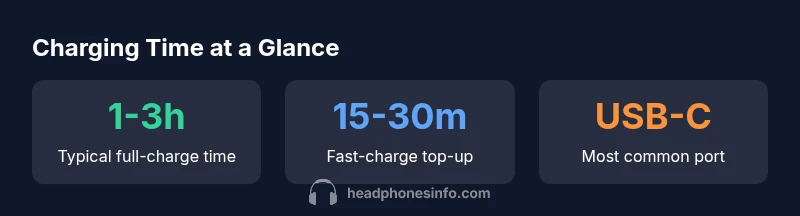
The time to fully charge headphones depends on model and tech, but typical full-charge times range from about 1 to 3 hours. Earbuds with cases can charge faster, while larger over-ear models may approach the 3-hour end. Quick-charge features can provide hours of playback after only a short 15–30 minute top-up. These figures assume ideal conditions and a healthy battery.
Understanding Headphone Charging Basics
Charging headphones is more than plugging in a cable. The time to reach a full charge depends on battery capacity, charging circuitry, cable quality, and the power source. For many listeners, the central question is still: how long does it take for headphones to charge, and how soon can I use them again? According to Headphones Info Analysis, 2026, charging times vary from under an hour for compact earbuds to several hours for larger over-ear models with bigger batteries. While quick top-ups can get you back to listening in minutes, a full recharge typically requires more time. In practice, ideal conditions—stable power, a compatible fast charger, and moderate temperatures—often pull the lower end of the range. The goal for most users is to minimize downtime while preserving battery health over the device’s life. This section lays the groundwork for understanding how charging time translates into real-world usage.
Variation Across Headphone Types
Different headphone form factors pack different batteries and use different charging strategies. Earbuds, especially with compact charging cases, tend to reach usable levels faster on short inputs but may require more frequent top-ups if you listen heavily. On-ear and over-ear headphones usually contain larger batteries, which means longer full charges but potentially longer intervals between charges if you use them extensively. Some premium models balance large-capacity cells with efficient circuitry to deliver better uptime per charge. When comparing models, note not just the charge time, but how long you can realistically listen before needing a top-up. The mix of battery size, charging port, and the efficiency of the circuitry explains much of the variability you’ll see in the field.
Typical Full-Charge Time Ranges
To give you a practical frame of reference, here are typical ranges by type (all figures stated as approximate and under ideal conditions): earbuds generally about 0.5–2 hours, on-ear around 1–3 hours, and over-ear around 2–4 hours. Remember that exact times depend on battery capacity, charger input, and temperature. If you’re buying a new pair, use these ranges to set reasonable expectations and compare models. Real-world performance will vary based on how you use features like active noise cancellation, ANC amplification, and wireless vs. wired charging. Headphones Info Analysis, 2026 shows that many devices now support some form of fast charging, which can dramatically shorten the time needed for a usable partial charge.
Factors That Speed Up or Slow Down Charging
Charging time is a function of several interrelated factors. The charging input matters a lot: higher wattage or voltage can shorten charge time, especially with USB-C PD or proprietary fast-charge protocols. Cable quality and the charging adapter play crucial roles—cheap or damaged cables can bottleneck even a capable charger. Battery temperature is another strong predictor: charging in a cool, ventilated environment tends to be faster and healthier for the battery than charging in heat. Battery health itself is critical: older batteries lose capacity and efficiency, extending charging times and reducing overall playback per charge. Finally, the inclusion of a charging case for earbuds adds a separate time dimension: the case may recharge the buds more quickly or slowly depending on its own circuitry and how often you open/close the lid.
How to Read Charging Specs on Packaging
Charging specifications on the box or in the manual can be cryptic, but they reveal the practical limits of charging speed. Look for terms like inputs (voltage and current), such as 5V/1A or 9V/2A, and any fast-charging labels (PD, QC, or proprietary standards). The advertised charge times are often based on a fully depleted battery and specific ambient conditions, so treat them as a best-case scenario. If you frequently use high-power outputs, choose models that explicitly support fast-charging standards and ensure your charger is compatible. Always verify that the included cable and the power source can safely deliver the stated wattage to avoid slowing charging below expectations.
Practical Scenarios: Earbuds vs Over-Ear
In daily life, earbuds with compact cases often show quick top-ups during a commute, while over-ear head devices, once fully drained, take longer to reach full capacity. If you rely on quick top-ups during the day, a model with fast-charge support and a compatible USB-C charger can be a lifesaver. For long listening sessions, consider models known for efficient power management, which translates to more consistent performance when you can’t plug in right away. The key takeaway is to align charging expectations with your usage patterns and to choose a pair that offers a healthy balance between charging speed and battery longevity.
Troubleshooting: Slow Charging and Fixes
If you notice unusually slow charging, start with the simplest checks: inspect the charging cable for wear, ensure the charger is plugged into a working outlet, and verify the adapter’s wattage matches the device’s needs. Try a different cable or charger that supports the device’s fast-charge standard. Clean any dust from the charging port and remove cases or accessories that might obstruct the connector. If charging remains slow after these steps, consult the manufacturer’s support resources, as some models have known quirks or battery health indicators that can affect charging performance.
Tips for Battery Longevity and Charging Habits
Smart charging habits extend battery life. Avoid letting the battery fully discharge daily; partial discharges and recharges are gentler on most modern lithium-based cells. Keep the device out of extreme heat and cold during charging, and store at a mid-range state of charge if you won’t use it for a while. Use the original charger or an equivalent-certified one to ensure proper voltage and current delivery. Regularly calibrate the battery indicator by letting it run down occasionally and charging to full only when needed, but don’t make this a frequent ritual. Implementing these habits helps maintain-charge efficiency over years of use.
Quick-Charge and Wireless Charging: What to Expect
Many headphones now support quick-charge and wireless charging as convenient options. Quick-charge can dramatically reduce downtime by delivering meaningful playback time with a short input, while wireless charging offers cable-free convenience at the cost of some efficiency. If you’re choosing between wired fast charging and wireless, consider your daily routine: if you often pause charging for short breaks, quick-charge with a compatible cable may be your best bet; if you value clutter-free setups, wireless charging can provide practical benefits, especially when paired with a compatible pad or stand.
Approximate charging times by headphone type under ideal conditions
| Headphone Type | Typical Full-Charge Time | Charging Port | Notes |
|---|---|---|---|
| Earbuds | 0.5-2 hours | USB-C / proprietary case port | Fast top-ups common; battery life generally compact |
| On-Ear | 1-3 hours | USB-C | Moderate battery, balancing size and weight |
| Over-Ear / Studio | 2-4 hours | USB-C | Larger capacity, longer full recharge |
People Also Ask
How long does it take to fully charge earbuds?
Earbuds typically reach a full charge in about 0.5 to 2 hours, depending on the case size and battery capacity. Fast-charging options may shorten top-up times, but actual duration varies by model and power source.
Most earbuds fully charge in half an hour to two hours. If you’re using fast charging, you can get a quick top-up in minutes for longer listening sessions.
Do fast-charge features harm battery longevity?
Fast-charge features are designed to minimize heat and optimize charging curves. When used as intended and with a manufacturer's approved charger, they generally do not harm battery longevity.
Fast charging is usually safe if you use the right charger and avoid consistently charging at high temperatures.
Can charging a headset overnight harm the battery?
Most modern headphones have protection circuits to stop charging once full. Overnight charging is usually safe, but consistently charging at high temperatures or using non-certified gear can impact battery health over time.
Leaving it plugged in overnight is typically fine, but avoid heat and use certified accessories for best longevity.
Why do some headphones charge faster with USB-C than micro-USB?
USB-C with fast-charge protocols can deliver higher power levels than older micro-USB setups, reducing charging time significantly when paired with a compatible charger and device.
USB-C quick charging is usually faster if both the charger and cable support the higher power profile.
Is there a difference between wired and wireless charging times?
Wired charging tends to be faster and more predictable than wireless charging, which can be slower and less consistent but offers convenience. The gap narrows with high-powered wireless pads and compatible devices.
Wired charging is typically quicker, but high-end wireless setups can come close in practical use.
“Charging time is a function of battery health, charging input, and temperature. With proper care, you can minimize downtime without sacrificing longevity.”
What to Remember
- Know your model: charging time varies by battery size and circuitry
- Use the right charger: fast-charging standards accelerate top-ups
- Watch temperature: cool, ventilated charging improves speed and longevity
- Read specs: treat advertised times as best-case scenarios