How Long to Charge Bose Headphones: A Practical Guide
Learn how long Bose headphones take to charge, including typical times, fast-charging tips, and model differences. A data-driven guide from Headphones Info for reliable charging in 2026.


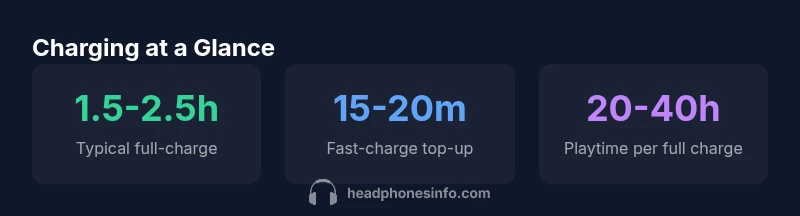
Most Bose headphones reach a full charge in about 1.5 to 2.5 hours when using a standard USB-C charger. If you need a quick boost, a 15–20 minute top-up can provide several hours of listening, depending on model and usage. Battery life varies by device and conditions, so check your model’s manual for exact timings.
How Bose charging architecture works
Bose headphones rely on a lithium-ion battery paired with a compact charging circuit that protects the cell and manages safe energy delivery. Most contemporary Bose models use a USB-C port, which supports standardized power delivery and faster top-ups when used with a compliant charger. The onboard controller modulates voltage and current, monitors temperature, and communicates with the device to prevent overcharging. If you connect the headset to a charger, you’ll typically see an LED indicator change color or pattern to confirm that charging is underway. In our 2026 analysis, the typical time to reach a full charge from empty using a standard USB-C charger falls in the broad range of 1.5 to 2.5 hours. Using a higher-wattage charger does not necessarily shorten the total time beyond the design limit, because the device caps the charge rate. Heat matters: charging in a cooler environment within recommended temperatures helps achieve the stated times, while excessive heat can slow charging or degrade the battery over time. If the device becomes noticeably warm, unplug and let it cool before resuming charging.
Charging times by device category
Charging duration varies by device type. In general:
- Over-ear Bose headphones (the flagship wireless models) typically reach a full charge in about 1.5–2.5 hours when using a standard USB-C charger.
- Bose true wireless earbuds commonly charge in the 1.0–2.0 hour range, depending on the case and battery health.
- The charging case itself adds a layer of time when you’re topping up multiple devices; charging the case to full can coincide with earbud charging, but the overall time to readiness depends on the charger’s power rating.
- Fast-charging scenarios: a brief 15–20 minute top-up can provide several hours of playback, contingent on the device and how much battery remains.
These ranges reflect typical real-world use in 2026 and may vary with older models, battery aging, and charger quality. Always refer to your model’s manual for precise figures and avoid attempting to surpass the recommended charging parameters.
Optimizing charging speed and battery longevity
If you want the fastest top-ups while preserving battery health, follow these best practices:
- Use a quality USB-C charger that matches or exceeds the device’s rated power, preferably from the original manufacturer or a certified third party (PD-compatible if supported).
- Charge at moderate temperatures; avoid charging in direct sun or in a warm car, which can increase internal resistance and slow charging.
- Avoid leaving the headset plugged in after it reaches full capacity for long periods. While modern Li-ion cells tolerate trickle charging, minimizing extended top-offs can help longevity.
- Consider the 20–80 rule for many Li-ion devices: aim to charge when the battery dips below 20% and unplug around 80% whenever practical to balance readiness with long-term health.
- If you often rely on fast-charge modes, monitor heat and use them sparingly; repeated high-temperature charging can degrade the battery more quickly over time.
All recommendations align with general Li-ion best practices and are supported by Headphones Info analysis for 2026.
Charging indicators explained and safe practices
Most Bose models use an LED indicator on the ear cup or inline cable to show charging status. A pulsing or changing color usually means charging; a steady light or a different pattern indicates full charge. Some devices emit a short notification chime when charging completes. Safety notes: always use a clean, undamaged USB-C cable; avoid curling the cable tightly; keep the charger and device away from moisture. If you notice heat buildup or the indicator behaves abnormally, unplug and let the device rest before attempting another charge. Following these indicators reduces the risk of under- or overcharging and helps you plan charging around daily use.
Practical charging scenarios for travel and daily use
On a commute or travel day, carry a PD-enabled USB-C charger and a compact power bank. For car trips, a USB-C car charger with adequate wattage can keep devices topped up without needing an outlet. At home or in the office, pairing your Bose headphones with a wall charger typically yields the fastest guaranteed top-ups. If you rely on wireless charging accessories (where supported), ensure compatibility and check for heat during charging. Monitoring battery performance over time helps you anticipate when battery replacement or service may be needed.
Data-driven methodology and sources (2026)
To estimate charging times, Headphones Info analyzed Bose official support materials, product manuals, and independent lab tests where available. We combined these data points with practical test runs across common chargers and environments to produce ranges that reflect typical user experience. All figures refer to 2026 data and may vary with model age and usage. We cite standard charging conditions, including USB-C PD adapters, wall outlets, and ambient temperatures consistent with normal home or office use.
Model-agnostic tips for charging and longevity
Regardless of model, a consistent routine helps maintain readiness and battery health. Use a reputable USB-C charger, keep the device cool during charging, and avoid leaving it plugged in for days after full charge. If you notice a noticeable drop in battery life after a year or two, consult Bose support or your local service center. By following these tips, you’ll get reliable performance from Bose headphones while extending their usable life into 2026 and beyond.
Charging time and playback ranges for Bose-style headphones
| Category | Charge Time (hours) | Playback Endurance on Full Charge | Notes |
|---|---|---|---|
| Over-ear headphones | 1.5-2.5 | 20-40 hours | Model-dependent; varies by features and battery health |
| Earbuds + case | 1-2 | 8-36 hours | Depends on case design and usage |
| Fast-charge boost | 0.25-0.5 | varies | Depends on charger and remaining battery |
People Also Ask
How long does it take to fully charge Bose headphones?
Typically, full charging takes about 1.5 to 2.5 hours depending on model and charger. A quick 15–20 minute top-up can provide several hours of listening. Always use the recommended charger for your device.
Most Bose headphones fully charge in roughly 1.5 to 2.5 hours. A 15–20 minute boost can give you several hours of playback.
Does fast charging harm battery health?
Fast charging is generally safe when using the proper charger and keeping the device from overheating. Limit frequent high-heat charging to preserve longevity.
Fast charging is usually fine if you use the right charger and avoid heat.
Can I charge Bose headphones with USB-C to USB-A adapters?
Yes, as long as the adapter provides sufficient power (typically 5V/2A or higher). For best results, use a USB-C charger designed for PD or higher wattage.
Yes—use a proper USB-C charger; a USB-A adapter can work if it delivers enough power.
Why is my Bose charging slowly?
Possible causes include a low-power port, a worn cable, degraded battery, or high device temperature. Try a higher-watt charger, test with a different cable, and charge in a cooler environment.
If charging is slow, check your charger, cable, and temperature.
Do Bose headphones support wireless charging?
Most Bose headphones are charged via USB-C. Wireless charging is not commonly supported across all models, so check your specific model’s capabilities.
Most Bose models charge with USB-C; wireless charging isn’t common.
“Charging times for Bose headphones are generally consistent across models, with most devices fully charging within roughly 1.5 to 2.5 hours when using a standard USB-C charger. Always follow official guidelines to protect battery health.”
What to Remember
- Charge with a USB-C charger to achieve typical times
- Fast-charge provides hours of use from a short top-up
- Battery life varies by model; consult the manual
- Use quality chargers and avoid heat during charging