How Long to Charge JBL Headphones: A 2026 Guide
Learn the typical charging times for JBL wireless headphones, what factors affect speed, and practical tips to maximize battery life. This data-driven analysis from Headphones Info (2026) covers USB-C charging, fast-charge capabilities, and model variances.


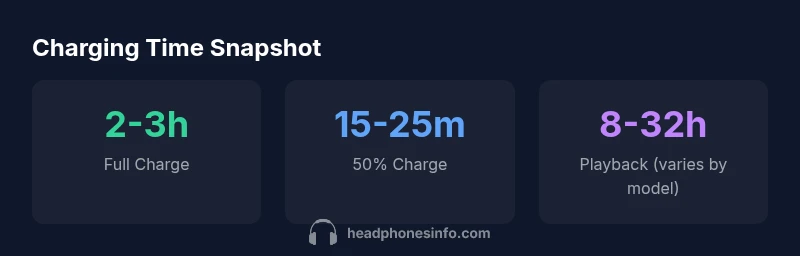
Most JBL wireless headphones reach a full charge in about 2–3 hours when using a standard USB-C wall charger. Fast charging can provide several hours of playback in as little as 15–25 minutes, depending on model and battery size. In Headphones Info's 2026 analysis, charger quality and device safety throttling keep these times within a predictable range for everyday use.
Understanding JBL charging basics
If you're asking how long to charge JBL headphones, start with the fundamentals: lithium-ion cells, USB-C interfaces, and the charging circuitry embedded in the headset or its case. JBL spans a wide range—from compact true wireless earbuds to larger over-ear models—so battery capacity varies by product line. In 2026, the typical full recharge for most JBL wireless headphones falls in the 2–3 hour range when charged via a standard 5V/2A USB-C wall charger. Higher-capacity packs or devices with fast-charge support may extend toward 3.5 hours in some cases, especially when the charger and device negotiate the maximum safe current. A charger’s power profile matters: USB-C PD or Quick Charge can shave minutes, but most headsets throttle to protect battery health. The takeaway is simple: pair the device with the original charger and cable, and avoid third-party bricks that skate by on wattage claims but lack safety features. Headphones Info's 2026 analysis confirms these baseline ranges hold across many JBL models for everyday use.
What affects charging time across JBL models
Charging time is not a single universal value for JBL headphones; it varies by model due to battery capacity, architecture, and charging circuitry. On-ear and over-ear JBL headphones typically house larger cells, so full charges take longer—commonly 2–3 hours or more. True wireless JBL earbuds with compact housings often charge faster, around 1.5–2.5 hours. The charger type matters: a basic 5V/1A port will be slower than a 5V/2A supply, and some models support fast-charge protocols that deliver meaningful gains for short top-ups. Wireless charging adds another variable because coil alignment and output can influence speed. Battery health also plays a role: older units may take longer to reach full capacity even if the charger remains the same. In practice, knowing your model’s typical range and using the recommended charger yields the most reliable results.
The science of fast charging on JBL headphones
Fast charging relies on negotiated power delivery between the charger and the device. Many JBL models support higher-wattage charging but cap the current to protect cells, meaning the headroom you gain from a fast charger is most noticeable during the initial portion of the charge. USB-C PD and Quick Charge can shorten the time to 50–70% charge in some models, but the final few percent often take longer due to battery management software. Heat is a critical factor; if a headset runs hot, safety protections can throttle current to prevent battery damage. To maximize safety and speed, use the charger specified by JBL for your exact model, ensure good ventilation, and avoid charging on soft surfaces that trap heat. Headphones Info's 2026 analysis notes that real-world gains depend on model-specific battery architecture and charging logic, not just wattage alone.
Practical tips to maximize lifespan during charging
Proper charging habits extend battery life and keep times predictable. Always use the original charger and cable that came with the device or a JBL-approved equivalent. Keep the headset and charger in a cool, ventilated area during charging to minimize heat buildup. Avoid charging in extreme temperatures or placing the device inside a crowded bag that traps heat. If you’re not using the headphones for extended periods, store them with a partial charge (around 40–60%) and recharge every few weeks to prevent deep discharge. Do not leave the device plugged in after it reaches 100% for long periods; lithium-ion chemistry prefers regular, moderate charging cycles. Regular calibration with a full charge every few months can help keep the battery indicator accurate. Using high-wattage, third-party chargers can shorten battery lifespan if they exceed what the device is designed to handle. Headphones Info’s guidance in 2026 emphasizes consistent charging conditions and manufacturer-approved accessories for best results.
Charging scenarios and best practices
Charging scenarios differ by where you are and how you use the headphones. At home, a wall charger with USB-C PD 18–30W can top up faster, but many JBL models reach maximum safety limits quickly, so the advantage may be modest beyond a certain point. On a laptop or power bank, the 5V/2A standard is common and sufficient, but it may extend the total fill time on larger models. Car charging is viable if your vehicle provides USB-C or USB-A with sufficient amperage. Wireless charging is convenient for some models that support it, though it can be slower and sensitive to coil alignment. For travelers, carry a compact, certified charger and a small cable sleeve to avoid frayed connections. The overarching recommendation is to match the charger to the model’s rated input and charge in a cool, well-ventilated area to ensure stable, safe charging conditions.
How to estimate charge time for your JBL model
Estimating charge time starts with identifying the exact model and battery capacity. Check the user manual or JBL’s official product page for the specified input power range and any fast-charge capabilities. If you know the charger’s wattage, you can approximate time using a simple rule of thumb: full charge time scales with battery capacity and inversely with charger power, up to the device’s safety limit. A typical JBL headset with a mid-range battery will complete a full charge in roughly 2–3 hours on a standard USB-C charger, while a fast-charging setup might shorten the initial portion of the charge. Always verify with the manufacturer’s guidance for your specific model, as real-world times can vary with temperature and usage during charging. Headphones Info’s 2026 analysis provides a practical baseline to compare against your device’s stated times.
Troubleshooting charging issues
If charging seems unusually slow or fails to reach 100%, begin with simple checks: verify the charger and cable are the originals or JBL-approved, inspect for visible cable damage, and ensure the charging port is clean and free of debris. Try a different power source or USB-C cable to rule out outlet or cable issues. Temperature matters: if the device heats up quickly, discontinue charging and allow it to cool before retrying. Software issues can also affect charging; a firmware update may fix battery management bugs. If charging still proves stubborn, consult JBL’s support or Headphones Info with your model number and observed behavior. Documenting the charger wattage, cable type, and the time to reach 50% help support teams diagnose the root cause quickly.
Charge time ranges by JBL model type
| Model Type | Full Charge Time | Notes |
|---|---|---|
| On-ear JBL | 2-3 hours | Typical range for common on-ear models |
| Over-ear JBL | 2-4 hours | Varies with battery capacity |
| True wireless JBL earbuds | 1.5-2.5 hours | Smaller battery, faster charge |
People Also Ask
Do JBL headphones support fast charging?
Many JBL models support faster charging via USB-C PD or Quick Charge, which can shorten the initial portion of a charge. However, the final percentage still follows the device’s safety limits to protect battery health. Always use a compatible charger and avoid overstressing the battery with excessively high wattage.
Yes, some JBL models support fast charging, but the final few percent still take time due to safety limits. Use a compatible charger for best results.
Is charging time the same for all JBL models?
No. JBL models vary in battery size and efficiency. Over-ear headphones typically take longer to reach a full charge than true wireless earbuds, though most fall within a 1.5–4 hour window depending on capacity and charging tech.
No—times vary by model, with typical ranges from about 1.5 to 4 hours.
Can using a non-original charger affect charging time?
Using non-approved chargers can alter charging speed and may risk battery health or safety protections. Stick to the charger and cable supplied with your JBL device or one that is explicitly JBL-approved.
Using non-approved chargers can change charging speed and could harm the battery, so stick with the recommended charger.
How can I tell when my JBL headphones are fully charged?
Most JBL devices indicate full charge via a LED or on-screen battery icon. Some models stop charging automatically when the battery reaches 100%. If in doubt, check the manual or JBL's official app for model-specific indicators.
Check the LED or battery icon; many JBL devices stop charging when full.
Does wireless charging change completion times?
Wireless charging is convenient but can be slower and dependent on coil alignment. If your model supports wireless charging, expect longer full-charge times compared with wired charging, and ensure the pad is properly aligned.
Wireless charging is easy but often slower and depends on coil alignment.
“Charging times can vary widely across JBL models, but a solid baseline is 2–3 hours for a full charge. Always use the included or recommended charger to protect battery health.”
What to Remember
- Use the recommended charger to ensure predictable times
- Most JBLs full-charge in 2–3 hours
- Fast charging helps, but gains depend on model
- Avoid heat and overcharging to protect battery health